Up to 70% off kits30% off services
A vendor outage radar that tells you when a failed Zap is not your fault
When a Zap fails, the first question is whether something on your side broke or the other app is down. Most teams find out by digging through Zap history and reconnecting apps that were fine. We set up a radar that reads the public status pages of Zapier, Slack, HubSpot and OpenAI, decides which incidents could break Zaps, and emails the team what to do and when to replay.
Screenshots and test runs from our demo Zapier account.
12 of 33
incidents these four vendors posted in 30 days were flagged; the other 21 were noise for Zaps
0 tasks
to log an incident and judge it; only the alert email uses one
2 a day
the most alerts the rules would have sent on any of those 30 days, under the free plan's 5
- Zapier plan
- Free plan apps, two-step Zaps
- Monthly cost
- $0, and 1 task per alert
- Zapier apps
- RSS by Zapier, Zapier Tables, Email by Zapier
The problem
A Zap fails, and someone spends an hour fixing what was never broken.
When Slack, HubSpot or Zapier itself has a bad hour, the Zaps that touch them fail. Without knowing that, someone starts reconnecting apps and editing steps that were fine.
Every vendor posts incidents on a public status page, but nobody on a small team watches four of them. Most incidents do not touch Zaps at all: a ChatGPT login problem says nothing about the OpenAI API.
Once the vendor fixes it, the runs that failed during the incident still need replaying, and they are easy to forget.
What runs
3 two-step Zaps and 2 tables
Every Zap has one trigger and one action, which is all the free plan allows. The logic lives in Zapier Tables, where steps cost no tasks.
Zap 1
Vendor outage radar: status feeds to table
- When
- RSS by Zapier: a new item in any of four status-page feeds (Zapier, Slack, HubSpot, OpenAI)
- Then
- Zapier Tables: create a row in "Vendor incidents" with the title, details, link, date and feed
0 tasks
Zap 2
Vendor outage radar: copy verdict to Alert field
- When
- Zapier Tables: new row in "Vendor incidents"
- Then
- Zapier Tables: copy the "Could break Zaps" formula result into the plain text Alert field on the same row
0 tasks
Zap 3
Vendor outage radar: email alerts
- When
- Zapier Tables: the Alert field is updated on a row in the "Alerts" view, which only shows rows marked Yes
- Then
- Email by Zapier: send the team the vendor, the incident, the stage, what to do and the status page link
1 task per alert
- Table: Vendor incidents. One row per incident from any of the four feeds. Formulas name the vendor and the stage, say what to do and decide whether it could break Zaps.
- Table: Alerts (a view). Only the rows where Alert is "Yes". The email Zap watches this view, so the view does the job a Filter step would.
From the live account
What it looks like in Zapier

The logic
Formulas, not extra steps
Formula fields in Zapier Tables do the checking. They run on every row for free, and anyone on the team can read and change them.
Vendor
Names the vendor from the incident link.
IF(ICONTAINS([Link], "zapier"), "Zapier", IF(ICONTAINS([Link], "slack"), "Slack", IF(ICONTAINS([Link], "hubspot"), "HubSpot", IF(ICONTAINS([Link], "openai"), "OpenAI", "Other"))))Stage
Reads where the incident is from the status text.
IF(ICONTAINS([Details], "resolved"), "Resolved", IF(ICONTAINS([Details], "monitoring"), "Monitoring a fix", IF(ICONTAINS([Details], "identified"), "Cause found", "Investigating")))Could break Zaps
Every Slack and HubSpot incident counts. For Zapier, only integrations, connections, webhooks and triggers; for OpenAI, only the API, not the ChatGPT app.
IF(EQ([Vendor], "Zapier"), IF(REGEXMATCH([Title], ".*([Ii]ntegration|[Zz]ap|[Cc]onnection|[Ww]ebhook|[Tt]rigger).*"), "Yes", "No"), IF(EQ([Vendor], "OpenAI"), IF(REGEXMATCH([Title], ".*API.*"), "Yes", "No"), "Yes"))What to do
Tells the team what to do now, depending on the stage.
IF(EQ([Stage], "Resolved"), CONCAT([Vendor], " says it is fixed. Open Zap history, filter by ", [Vendor], " and replay the runs that errored or were held during the incident. If new runs still fail, reconnect the ", [Vendor], " connection."), CONCAT([Vendor], " is having an incident. Errors on ", [Vendor], " steps are expected until it is fixed: do not edit or turn off those Zaps. Wait for the Resolved update, then replay."))
Free plan
Where the free plan stopped us, and what we did
Free-plan Zaps have two steps, so no Filter step between the feed and the email.
A view in Zapier Tables does the filtering. The email Zap watches the "Alerts" view, which only shows rows marked Yes.
A Tables view cannot filter on a formula field, and its conditions cannot be combined with OR.
A second two-step Zap copies the formula's Yes or No into a plain text field the view can filter on. Tables steps use no tasks, so that extra Zap is free.
RSS by Zapier checks feeds every 15 minutes on the free plan.
Fine for this job: vendor incidents last longer than that, and the radar is there to explain failed Zaps, not to wake someone at 3 am.
The feed setting we use logs each incident once, so later updates (Investigating, then Resolved) do not add rows.
The row and the email link to the live status page, and the email says to replay once it shows Resolved. Switching the trigger to log every update is one setting, at the cost of more emails.
Email by Zapier sends at most 5 emails a day on the free plan.
Only incidents that could break Zaps email. Over the last 30 days the rules would have sent 12 alerts, never more than 2 in a day.
Every team relies on a different set of apps.
The feeds are the status pages of the apps your Zaps use, and the "Could break Zaps" rules match the parts of each app you rely on.
Tested
What happened when we ran it
Real runs, with real incidents from the vendors' status pages.
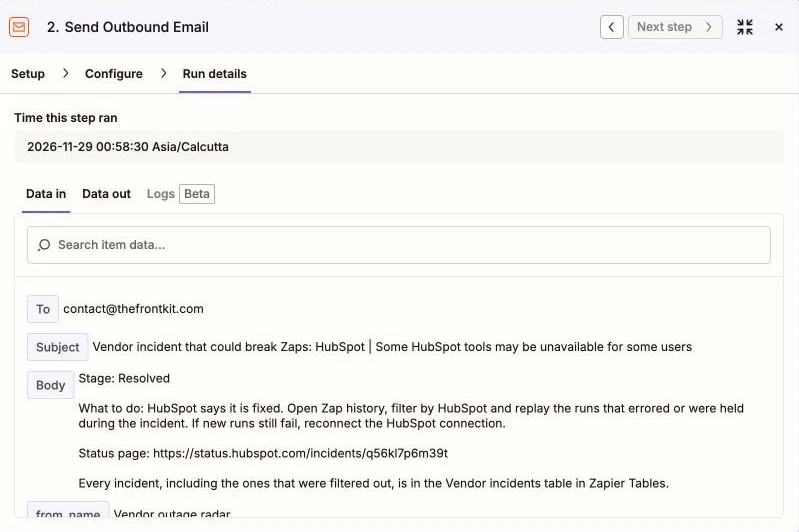
A real HubSpot incident from 10 Nov, "Some HubSpot tools may be unavailable for some users", sent into the table by the feed Zap's step test
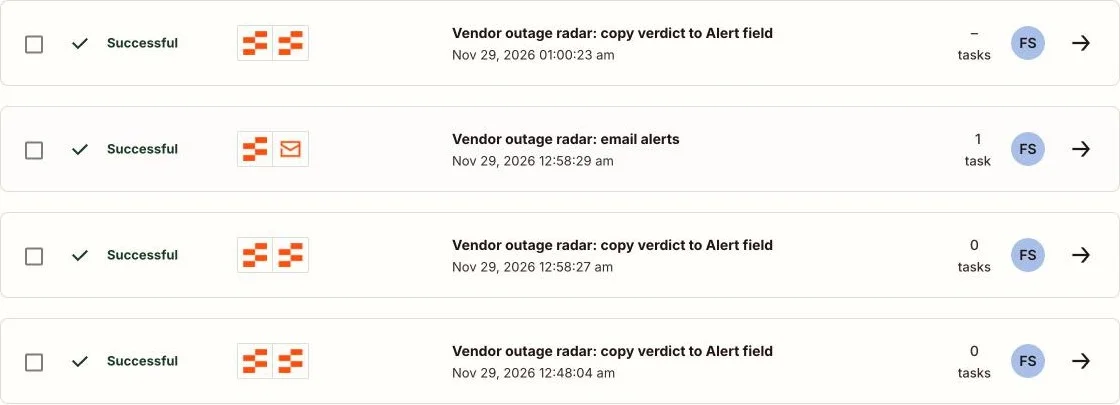
Logged as HubSpot · Resolved · Could break Zaps: Yes. The copy Zap ran at 12:58:27 am and the alert email went out at 12:58:29 am, using 1 task.
A real OpenAI incident from 23 Nov, "Elevated errors with GPT-6 conversations on paid ChatGPT plans", sent in the same way
Logged as OpenAI · Resolved · Could break Zaps: No, because it was the ChatGPT app, not the API. The copy Zap ran at 1:00:23 am and wrote No; the email Zap did not run, so no email and no task.
The "Could break Zaps" rules run over every incident the four vendors posted in 30 days
33 incidents, 12 flagged. Zapier 1 of 5 (the Jira integration outage; the rest were sales chat, sign-in emails and templates). OpenAI 6 of 23. Slack 1 of 1. HubSpot 4 of 4.
What we got wrong first
Our alert Zap did not fire at first
The first version of the email Zap watched the Alerts view for new or updated rows, and never ran, even though the HubSpot rows were sitting in the view. The Alert field was hidden in that view, and a view trigger only notices changes to fields the view shows. Showing the field and switching the trigger to "Updated Record" on Alert fixed it: the next HubSpot incident emailed 2 seconds after its verdict was written.
For your account
What we set up for you
We set this up next to the Zap Watchdog in Zap Fix & Cleanup, and keep it running on Zap Care.
- The status pages of the apps your Zaps depend on, in one table
- "Could break Zaps" rules tuned to the parts of each app you use
- Alerts to the people who own the affected Zaps, with when to replay
- A replay routine for after each incident, so failed runs are not forgotten
Zap Fix & Cleanup: from $2,400, 2 to 4 weeks.
The other builds
Zapier reliability
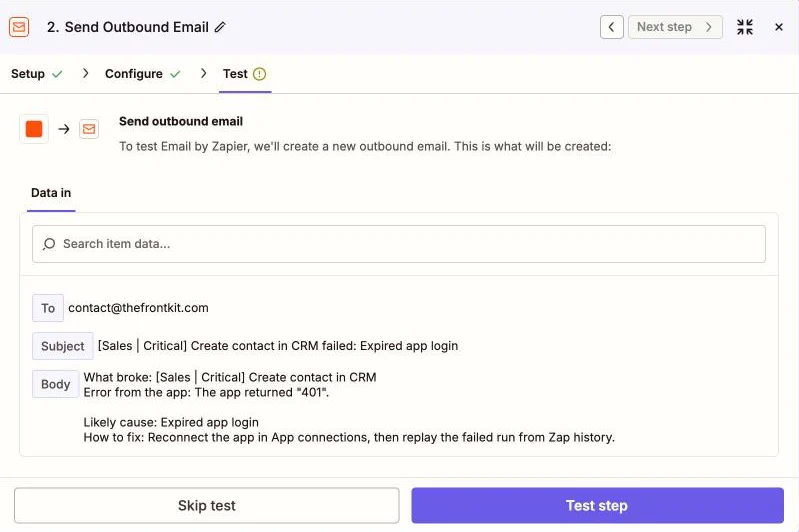
A Zap Watchdog that explains every failure in plain English
Every failed Zap is logged in Zapier Tables with its owner team, how critical it is, the likely cause and the fix. Critical failures email the owner within minutes. Three two-step Zaps on the free plan.
See the build →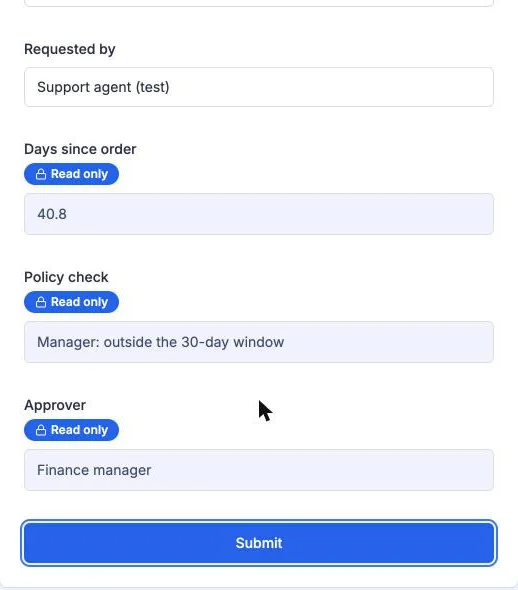
Zapier approvals
A refund desk that checks policy before anyone clicks Approve
Support agents request refunds on a Zapier Form. Table formulas check each request against the order, the 30-day window and a $200 limit while the agent types, route it to the right approver, and one-click buttons record the decision. Three two-step Zaps on the free plan.
See the build →
Want this running in your Zapier account?
Tell us which Zaps keep breaking or which approvals live in a chat thread. We'll show you what the free plan can carry and where a paid plan earns its keep.