Up to 70% off kits30% off services
A Zap Watchdog that explains every failure in plain English
Zapier's own error emails say things like "The app returned 401" and go to whoever owns the account. We set up a watchdog that logs every failure, works out which team owns the Zap, translates the error into a likely cause and a fix, and emails only the failures that matter.
Screenshots and test runs from our demo Zapier account.
9 sec
from a failed Zap to the owner's alert email, in a live run
0 tasks
to log and explain an error; only the alert email uses one
2 of 3
error types caught in testing (401, 503); the 429 gap is written up with the free-plan limits
- Zapier plan
- Free plan apps, two-step Zaps
- Monthly cost
- $0, and 1 task per critical alert
- Zapier apps
- Zapier Manager, Zapier Tables, Email by Zapier
The problem
A Zap fails and the wrong person hears about it, in the wrong words.
When a Zap errors, Zapier emails the account owner. The message names the app and an error code, not the business process, not the team that owns it, and not what to do next.
In the accounts we audit, those emails often go to someone who has left, or to an inbox nobody reads. A lead never reaches the CRM and a customer is the first to notice.
The usual fixes, a Filter, Paths or an AI step in the middle of a Zap, need more than two steps or a premium app, so a paid plan. We wanted to see how far the free plan goes.
What runs
3 two-step Zaps and 2 tables
Every Zap has one trigger and one action, which is all the free plan allows. The logic lives in Zapier Tables, where steps cost no tasks.
Zap 1
Watchdog · Sales · Critical: log errors
- When
- Zapier Manager: New Zap Error, only for Zaps in the "Sales · Critical" folder
- Then
- Zapier Tables: create a row in "Critical Zap errors" with the step that failed, the error, the run link and the owner's alert address
0 tasks
Zap 2
Watchdog · Marketing · Normal: log errors
- When
- Zapier Manager: New Zap Error, only for Zaps in the "Marketing · Normal" folder
- Then
- Zapier Tables: create a row in "Normal Zap errors (weekly review)"
0 tasks
Zap 3
Watchdog · Alert: email the owner of a critical error
- When
- Zapier Tables: new row in "Critical Zap errors"
- Then
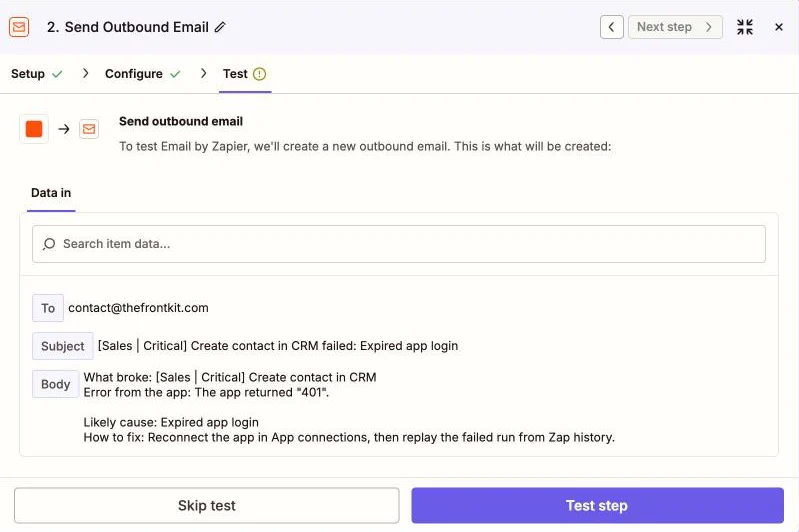
- Email by Zapier: send the owner the subject, likely cause, fix and a link to the failed run
1 task per alert
- Table: Critical Zap errors (alerts). One row per failure in a critical folder. A new row is what sends the email.
- Table: Normal Zap errors (weekly review). Same columns and formulas, no email. Someone reads it on Mondays.
From the live account
What it looks like in Zapier

The logic
Formulas, not extra steps
Formula fields in Zapier Tables do the checking. They run on every row for free, and anyone on the team can read and change them.
Criticality
Reads the label the Watchdog stamps on each row.
IF(ICONTAINS([Zap name], "| critical]"), "Critical", IF(ICONTAINS([Zap name], "| normal]"), "Normal", "Unreviewed"))Owner team
Turns the folder label into a team name.
IF(ICONTAINS([Zap name], "[sales"), "Sales", IF(ICONTAINS([Zap name], "[finance"), "Finance", IF(ICONTAINS([Zap name], "[ops"), "Operations", IF(ICONTAINS([Zap name], "[marketing"), "Marketing", "Unassigned"))))Likely cause
Sorts the raw error into one of five causes a non-developer understands.
IF(REGEXMATCH(LOWER([Error]), ".*(401|unauthori|expired|reconnect|authenticat|token).*"), "Expired app login", IF(REGEXMATCH(LOWER([Error]), ".*(429|rate limit|too many).*"), "App rate limit", IF(REGEXMATCH(LOWER([Error]), ".*(not found|404|does not exist|no record).*"), "Record not found", IF(REGEXMATCH(LOWER([Error]), ".*(invalid|required|missing|400|422|empty|malformed).*"), "Bad or missing data", IF(REGEXMATCH(LOWER([Error]), ".*(500|502|503|timed out|timeout|unavailable).*"), "App outage", "Unknown: open the run")))))How to fix
Gives the first thing to try for each cause.
IF(EQ([Likely cause], "Expired app login"), "Reconnect the app in App connections, then replay the failed run from Zap history.", IF(EQ([Likely cause], "App rate limit"), "Wait an hour and replay. If it repeats, spread the runs out or add a Delay step.", … ))Alert subject
The email subject line.
CONCAT([Zap name], " failed: ", [Likely cause])
Free plan
Where the free plan stopped us, and what we did
Zapier Manager's error data has no Zap name, only its ID and the step that failed.
We route by folder instead. Each team folder gets its own two-step Watchdog that stamps the team, how critical it is and who to email. Putting every Zap in a team folder is part of the cleanup anyway.
AI by Zapier is a premium app.
Formulas in Zapier Tables classify the error. They are predictable, cost nothing per run and anyone on the team can edit them.
Free-plan Zaps have two steps, so no Filter or Paths step.
We split by table instead: critical failures land in the table that sends email, normal ones in a review table that does not.
Email by Zapier sends at most 5 emails a day on the free plan.
Only critical failures email. Everything else waits in the review table.
Without a search step, a Zap cannot check whether the same error was already logged.
Repeat failures each get their own row. Zapier Manager sends a count with each error, which we log as "Times in a row". On a paid plan we add a search step and alert once per incident.
Runs that Zapier holds for an automatic replay, like a 429 rate limit, did not reach the New Zap Error trigger in our test, even after the replay failed.
The Watchdog covers errors Zapier reports straight away. For replayed runs we turn on Zapier's own error notifications for the account owner as a backstop, and check Zap history for "Errored" runs in the Monday review.
Different teams need their alerts in different inboxes.
Each folder's Watchdog stamps its own "Alert to" address, so Sales, Finance and Ops each get only their own alerts. Nothing else changes.
Tested
What happened when we ran it
Real runs, with sample data.
Test Zap "[Sales | Critical] Website lead to CRM" made to fail with an HTTP 401
Row in Critical Zap errors: Critical · Sales · Expired app login · "Reconnect the app in App connections, then replay the failed run from Zap history." Alert email to the Sales address.
Test Zap "[Marketing | Normal] Newsletter signup to email list" made to fail with an HTTP 503
Failed at 9:38:43 pm and logged in the weekly review table 6 seconds later: Normal · Marketing · App outage · "The other app was down. Check its status page and replay once it is back." The alert Zap did not run, so no email and no task.
The same Sales test Zap made to fail with an HTTP 429
Zapier held the run and scheduled its own replay. When the replay failed too, the run ended as an error, but Zapier Manager never reported it, so the Watchdog did not log it. A gap we found by testing; the free-plan limits list how we cover it.
A live run after everything was switched on: the Sales test Zap failed with a 401
Failed at 9:23:28 pm, logged in the table 6 seconds later, alert email sent 3 seconds after that. That email was the Watchdog's only task; logging in Tables uses none. Building and testing both builds used 2 tasks in total, one per live email.
What we got wrong first
Our first error classifier matched nothing
The first version of "Likely cause" sorted a 401 as "Unknown". REGEXMATCH in Zapier Tables only matches when the pattern covers the whole text, so "401" on its own never matched the full error text. Wrapping every pattern in .*( … ).* fixed it. We test every formula against real errors before we hand an account back.
For your account
What we set up for you
We set this up as part of Zap Fix & Cleanup, and keep watching it on Zap Care.
- Every Zap moved into a team folder with an owner and a criticality
- A Watchdog per folder, the two error tables and the alert email
- The cause and fix formulas tuned to the apps you use
- A Monday routine for the review table, written down for your team
Zap Fix & Cleanup: from $2,400, 2 to 4 weeks.
The other builds
Zapier approvals
A refund desk that checks policy before anyone clicks Approve
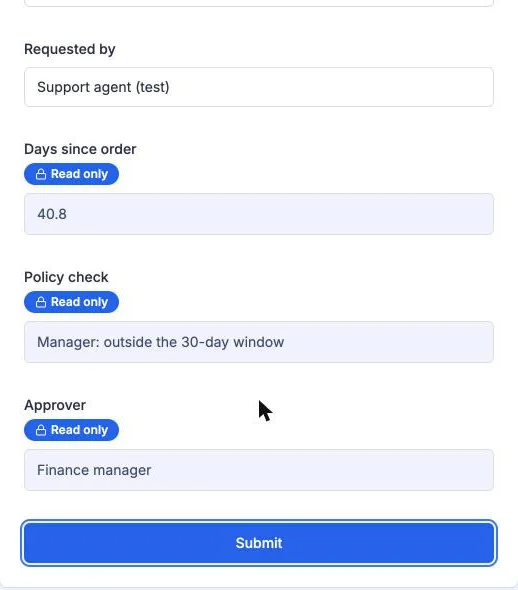
Support agents request refunds on a Zapier Form. Table formulas check each request against the order, the 30-day window and a $200 limit while the agent types, route it to the right approver, and one-click buttons record the decision. Three two-step Zaps on the free plan.
See the build →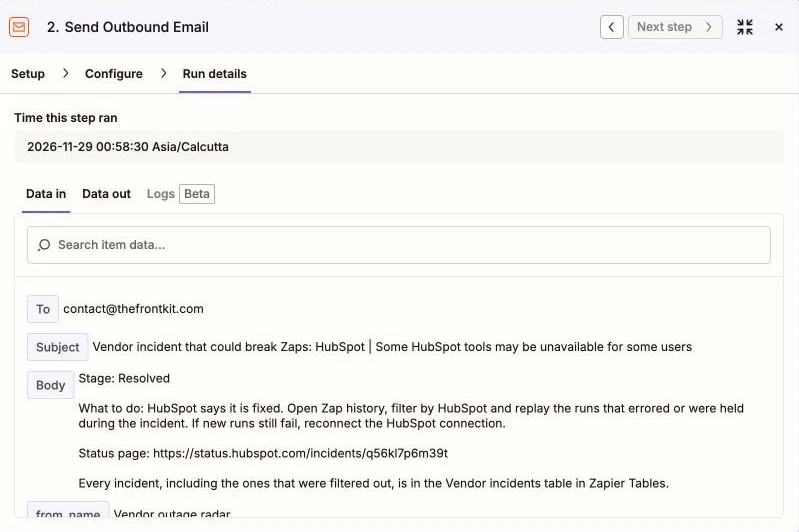
Zapier monitoring
A vendor outage radar that tells you when a failed Zap is not your fault
The public status pages of Zapier, Slack, HubSpot and OpenAI feed a Zapier Table. Formulas name the vendor, the stage and whether the incident could break Zaps, and only those email the team, with what to do and when to replay. Three two-step Zaps on the free plan.
See the build →
Want this running in your Zapier account?
Tell us which Zaps keep breaking or which approvals live in a chat thread. We'll show you what the free plan can carry and where a paid plan earns its keep.