Next.js Booking & Scheduling Template: Calendar Management, Public Booking Flow, Team Availability, and Analytics
Building a booking system from scratch means months of calendar logic, timezone handling, availability rules, and payment flows before your first client can schedule a session. This Next.js booking template gives you 37 screens across 4 sections: a polished public booking flow with slot picking and payment, an admin dashboard with calendar views and booking management, team availability with side-by-side schedules plus round-robin and collective event types, and analytics with revenue tracking. WCAG AA across every screen.
Starting at $79$13140% OFF· 7-day money-back guarantee
Or get this + all 18 kits for $749 with All UI Kits →
Last updated on August 26, 2026


What buyers say
11 reviews. Hover or tap to stop and read.
Just took a look at the live demo.snappy and responsive. For a solo founder, this is basically a cheat code to get an MVP out in days instead of weeks. The pricing looks very fair for the amount of hours this would save me.
 Shekhar DFounder & CEO, IndieStack
Just grabbed a license. Honestly, the code quality is way better than other boilerplates I've bought in the past. The folder structure is intuitive, and the TypeScript is actually strict (no any types everywhere). I managed to get the repo running and swapped out the branding in about 10 minutes. The AI chat implementation is butter smooth. Well worth the investment!
 SuneetFull-Stack Developer, Freelance
This looks super clean. I've used shadcn/ui a lot, but having a fully structured 'app shell' with the sidebar, auth, and settings pre-wired is exactly what I need to skip the setup fatigue. It feels way more production-ready than the usual component dumps I see.
 RishabhFrontend Engineer, Razorpay
Congrats on the launch! I've been looking for a solid Next.js starter that isn't just a landing page template. The fact that you included actual AI UX patterns like streaming responses and citations out of the box is a huge time saver. Definitely checking this out for my next SaaS project.
 Mukesh KProduct Manager, TechVentures
The production-ready architecture is the killer feature here. Most starter kits give you components but not real-world workflows. Seeing complete app screens baked in is refreshing. Love that you prioritized accessibility (WCAG) defaults too, that's often overlooked in these kinds of apps.
 Aquib A, KhanDesign Engineer, DesignOps Studio
The attention to detail here is top-notch. Most starter kits feel a bit generic, but thefrontkit has a really premium aesthetic. The dark mode implementation looks flawless. Awesome work team!
 SurajSenior Frontend Developer, Flipkart
Instant buy for me. As a backend dev who struggles with making things look decent, this app starter is a lifesaver. I was about to hire a freelancer just to design my dashboard, but this costs a fraction of that price and the code is already written. The production-ready components make it a no-brainer. It effectively paid for itself in the first hour.
 SaikatBackend Engineer, Turing
We evaluated building our internal dashboard from scratch vs using this. The accessibility compliance alone saved us weeks of remediation work. Design tokens keep everything consistent across our team of eight, and the dark mode implementation actually works with system preferences out of the box.
 BipulTech Lead, Swiggy
Looks solid. Tired of stitching shadcn. auth + tables every project. The AI flow w/ stop/retry + citations is the bit I never finish.
 Alex CStaff Engineer, Remote Startup
Bought this solely to avoid spending my weekend fighting with CSS and responsiveness. As a backend-heavy engineer, frontend usually kills my momentum. thefrontkit just worked out of the box. I hooked up my API routes, and the UI already looked professional without me touching a single style definition. The component abstraction is super clean. 10/10 recommendation for anyone who just wants to ship.
 Aryan A.Backend Engineer, Zerodha
The AI UX Kit looks incredible. I feel like everyone is building AI wrappers right now but struggling with the frontend interaction parts (like handling chat history and safety notices). This kit seems to solve exactly that. Good luck with the launch!
Saurav GAI Product Engineer, Stealth AI

37 Screens Across Booking, Management & Operations
Building a booking system from scratch means months of calendar logic, timezone handling, availability rules, and payment flows before your first client can schedule a session. This kit gives you every screen you need:

Service landing page, month calendar with availability density, day slot picker with timezone support, attendee details with custom questions and guest invites, payment with coupon and deposit options, confirmation with add-to-calendar, reschedule picker, and cancellation with reason capture.

Bookings dashboard with today's schedule and upcoming cards, calendar week and month views with color-coded events, recurring bookings with pattern builder, booking links management, event types card grid with create/edit dialogs, event type detail with settings tabs and embed code, and individual booking detail with timeline.

Weekly hours with per-day toggles and drag-to-set time ranges, booking policies with cancellation and reschedule rules, contacts directory with detail profiles, team management with invite flow and role badges, and team availability with side-by-side calendar comparison.

Bookings analytics with trends, popular slots, and a conversion funnel, revenue analytics by event type, and team performance. Workflows with a trigger and action editor. Settings for integrations, branding, payments, notifications, organization, roles, and account. Auth pages for login (with Google sign-in), register, and forgot password, plus a 404 page.
All built with TailwindCSS and shadcn/ui. Accessible, token-driven, and developer-friendly.
Booking UI Foundation: Every Screen Your Scheduling Platform Needs
This Next.js booking template covers the complete scheduling experience. From the public booking page to team availability management, every screen is production-ready with accessible components and token-driven design. Here is what you get:

Public booking and calendar management
- 8-screen public booking flow with service selection, slot picking, payment, and confirmation
- Admin dashboard with today's schedule, upcoming bookings, and KPI stat cards
- Calendar week view with color-coded events and clickable booking cards
- Recurring bookings with pattern builder and series management
- Booking links management with create, edit, and share controls

Availability, event types, and team
- Weekly availability editor with per-day toggles and time range controls
- Event types card grid with create/edit dialogs, one-on-one and group settings
- Team management with invite flow, role badges, and availability comparison
- Booking policies with cancellation windows, reschedule limits, and no-show rules
- Contacts directory with detail profiles, booking history, and notes

Analytics, workflows, and settings
- Bookings analytics with trend charts, popular slots, and conversion funnel
- Revenue analytics with trends and breakdown by event type
- Workflow editor with triggers and actions (email, SMS, webhook, wait, tag)
- Full settings suite: integrations, branding, payments, notifications, roles
- Auth screens: login with social auth, register with password strength, forgot password
37 screens covering the complete booking experience, from public scheduling to analytics dashboards. All accessible, all production-ready.
View all screensWhat's Included in This Next.js Booking Template
Included
 React + Tailwind code for all 37 screens and components
- oklch tokens for status badges, availability indicators, event type colors, and booking states across the platform
- Recharts area and bar charts across analytics dashboards
- Public booking flow with multi-step wizard, slot picker, and payment UI
- Team availability view with side-by-side schedules, plus round-robin and collective event types
- 1 year of updates
Not Included
- Backend, database, or API logic
- Calendar sync (Google Calendar, Outlook) integration backend
- Payment processing (Stripe, PayPal) transaction handling
- Email/SMS notification delivery backend
Intent: you get a production-grade booking UI that covers public scheduling, calendar management, team availability, and analytics. You connect your own backend, calendar provider, and payment processor.
Built for Consultants, Service Teams, and SaaS Platforms

Consultants and coaches building branded booking pages to let clients self-schedule sessions

SaaS companies adding appointment scheduling, demos, and onboarding calls to their platform

Agencies delivering branded scheduling solutions with team availability and payment integration
Note: Not for e-commerce storefronts, project management tools, or restaurant table reservations.
Booking UI Components & Patterns
| Feature | Description |
|---|---|
| Public Booking Flow | Multi-step booking wizard with service selection, calendar slot picker, attendee details, payment, and confirmation with add-to-calendar |
| Calendar Week View | Time-based calendar grid with color-coded event types, clickable event cards, and week/month navigation |
| Availability Editor | Per-day toggles with time range controls and a date override calendar, plus buffer settings on each event type |
| Event Type Management | Card grid with create/edit dialogs, duration variants, location options, capacity settings, and shareable booking links |
| Team Scheduling | Side-by-side team availability view, plus round-robin and collective event types for team bookings |
| Analytics Dashboard | Bookings over time charts, popular time slot heatmap, revenue by event type, and conversion funnel visualization |
All components are WCAG AA-compliant and optimized for mobile and desktop.
What the Booking Frontend Runs On




- TailwindCSS across all 37 screens, from public booking flows to admin dashboards to analytics views
- shadcn/ui patterns under the hood, so this drops into existing SaaS scheduling platform builds
- Base UI primitives behind dialogs, dropdowns, tabs, and tooltips for accessible interactions throughout
- Design tokens for consistent spacing, colors, and typography across all sections
- Recharts-powered analytics with area and bar charts across analytics views
- Built for the Next.js App Router
Accessibility Highlights
Every calendar view, booking form, and settings page is inclusive by design. From time slot pickers to team availability grids, built for everyone.
Preview Gallery
Preview the Next.js booking template screens: bookings dashboard, public booking flow, calendar view, event types, team availability, and analytics.
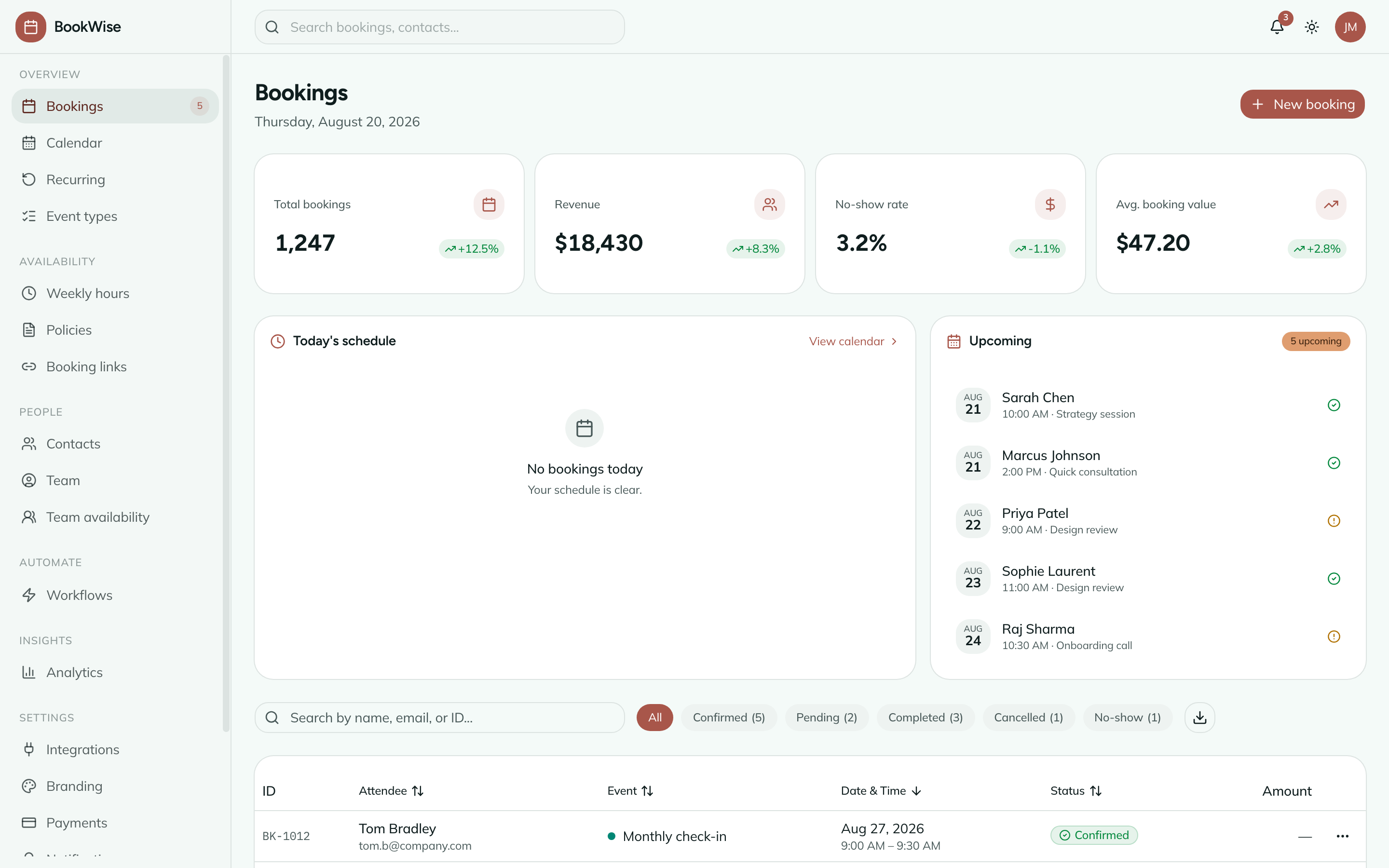
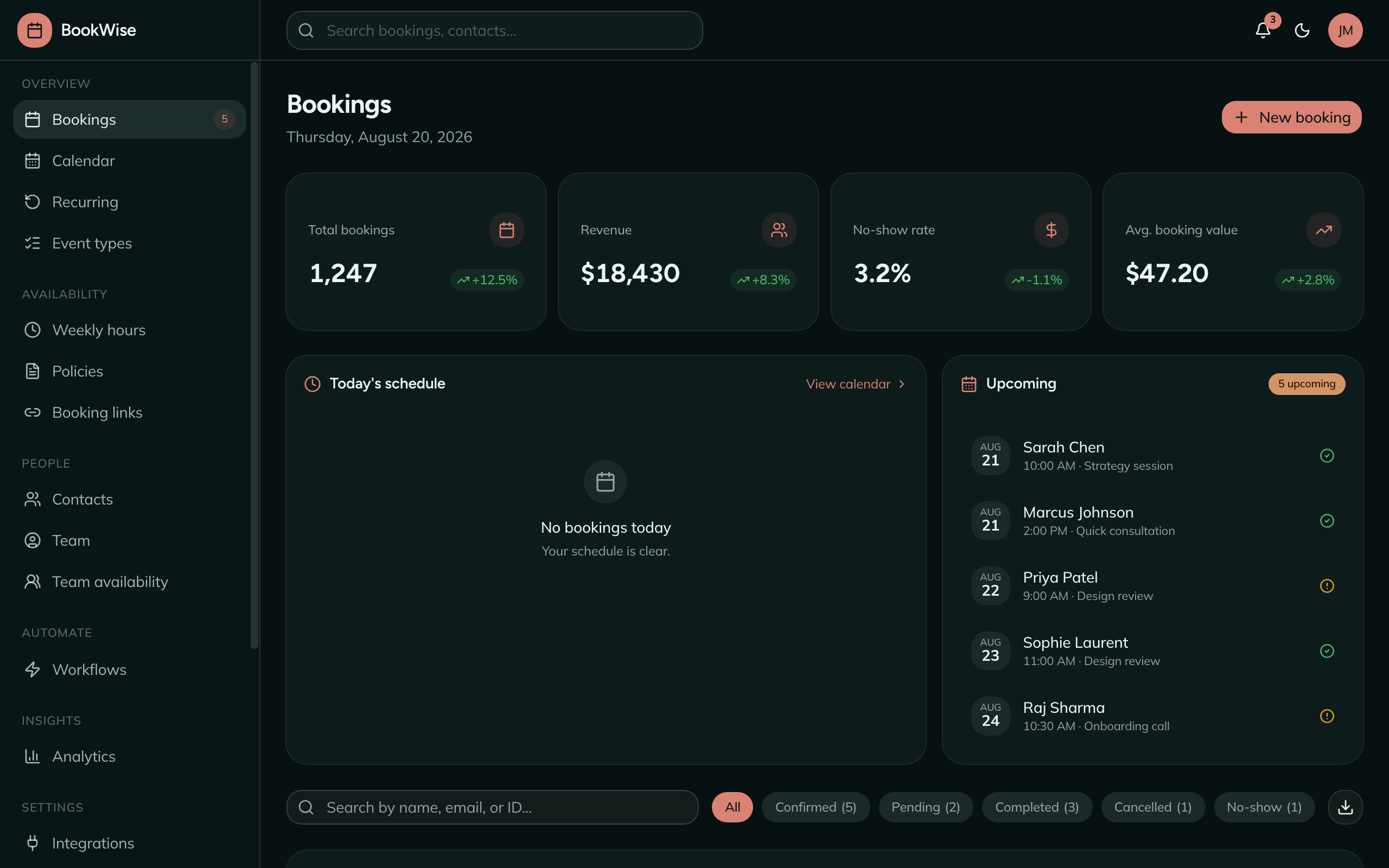
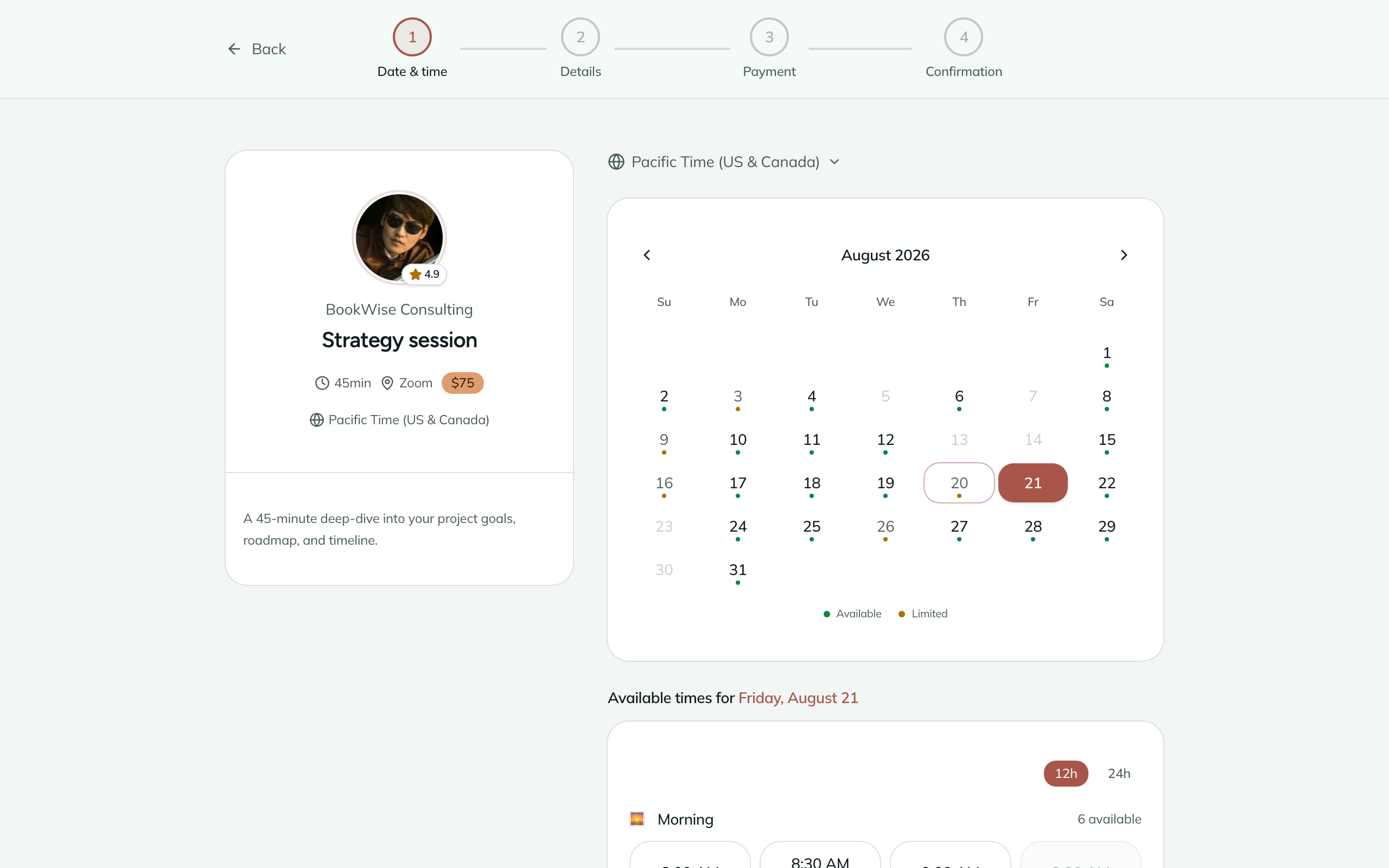
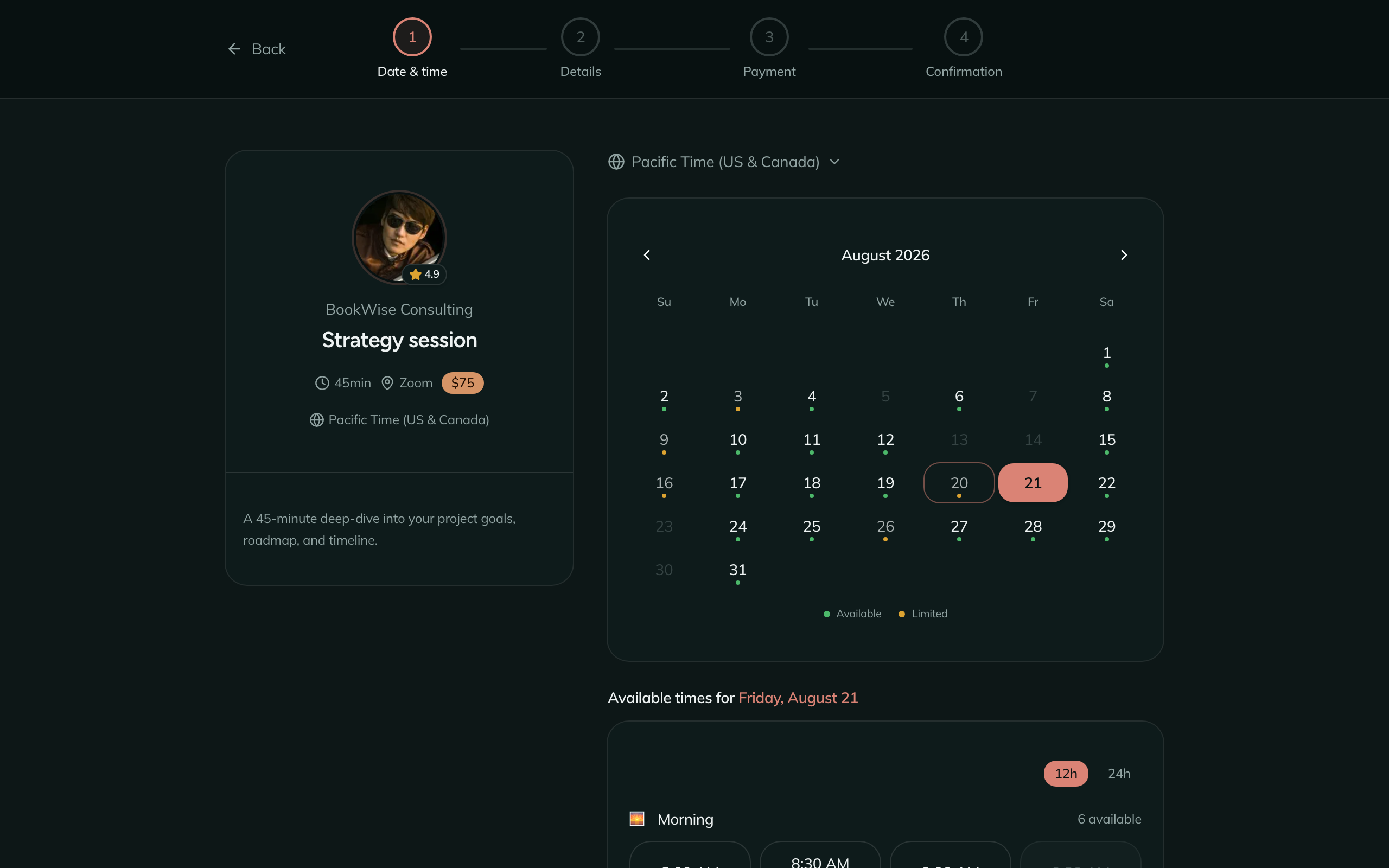
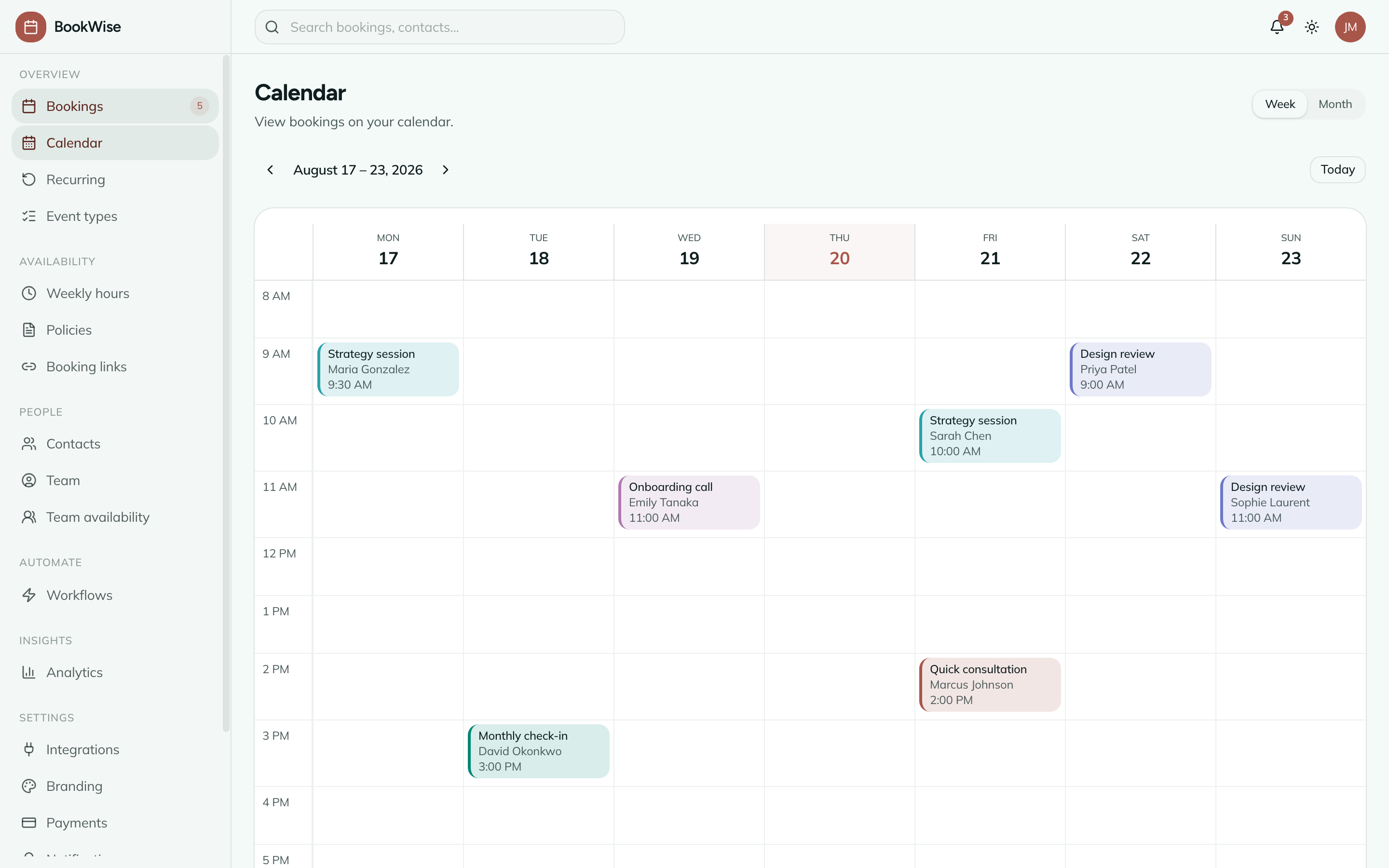
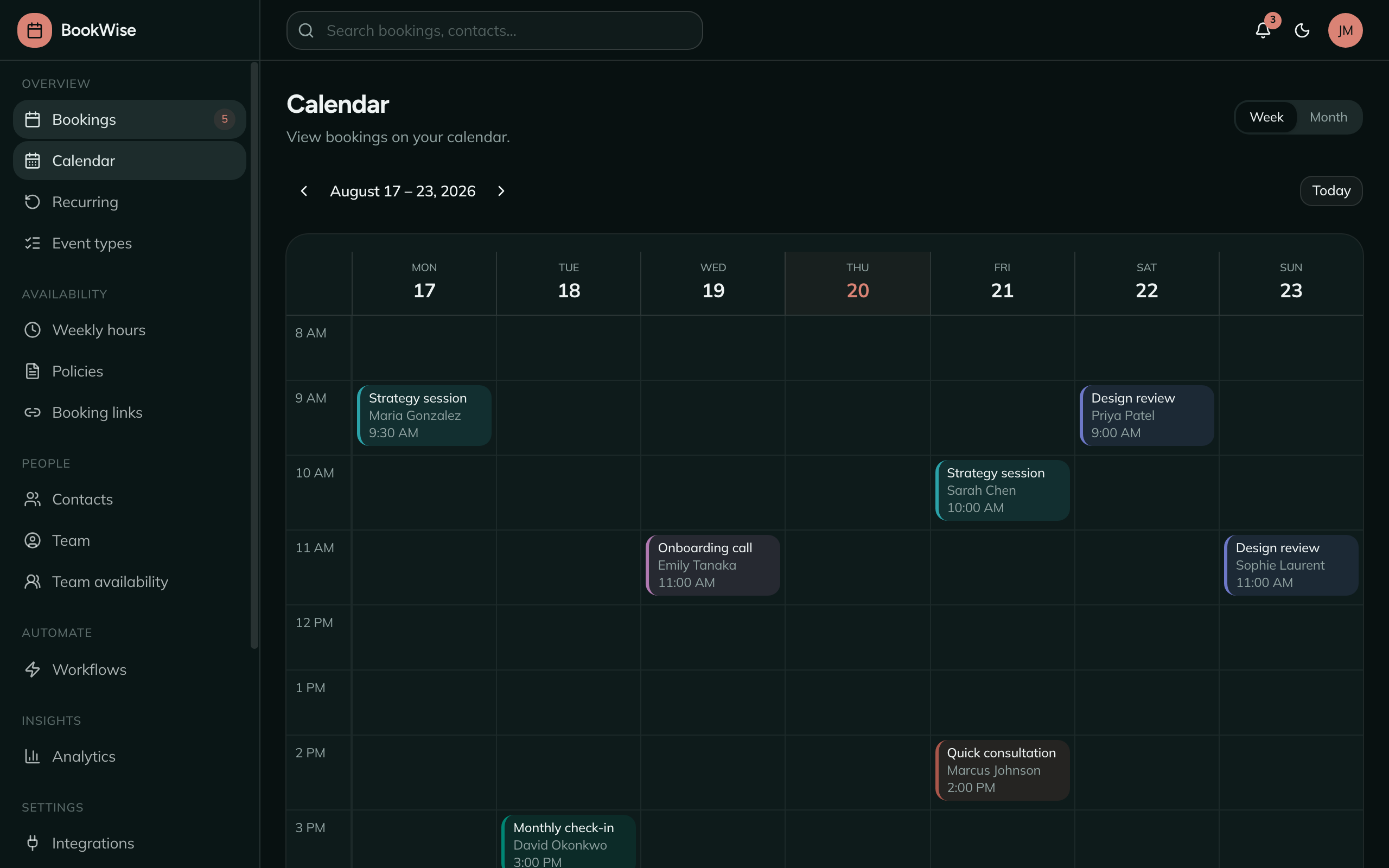
Bookings dashboard with today's schedule, upcoming bookings, and KPI stat cards (light mode)
How Next.js Booking & Scheduling Template Compares
See how Frontkit stacks up against typical alternatives on the features that matter most.
| Feature | Frontkit | Typical Alternatives |
|---|---|---|
| Public Booking Flow | 8-screen flow: landing, date and slot picker, details, payment, confirmation, reschedule, cancel, unavailable | Basic booking form or embed widget |
| Calendar Management | Week and month views with color-coded events, booking detail on click, navigation controls | Simple list view of bookings |
| Event Types | Card grid with create/edit dialogs, one-on-one and group settings, duration variants, embed code | Basic event type list |
| Availability Rules | Weekly hours with per-day time ranges, date overrides, booking policies, round-robin and collective event types | Simple on/off toggles per day |
| Team Management | Team directory with roles, side-by-side availability comparison, invite flow | Basic user list or missing |
| Analytics | Bookings over time, popular slots, revenue by event type, conversion funnel, team performance | Basic booking count or missing |
| WCAG AA Accessibility | Built-in from day one | Usually missing or partial |
| Dark Mode | Token-driven, system-aware | Basic toggle or missing |
Pricing Information
Solo License (1 developer)
Next.js/Tailwind code. 37 screens. Internal projects only.
Team License (Up to 10 developers)
Next.js/Tailwind code. 37 screens. Internal projects only.
Agency License (Unlimited developers, client delivery allowed)
Next.js/Tailwind code. 37 screens. Client delivery allowed.
Pricing Plans

Next.js/Tailwind code. 37 screens. Internal projects only.
- 1 developer license
- 37 screens: dashboard, booking flow, calendar, event types, analytics, settings
- Light & dark mode with design tokens
- Recharts dashboards with area and bar charts
- 6 months of updates
- Internal projects only
Next.js/Tailwind code. 37 screens. Internal projects only.
- Up to 10 developer licenses
- 37 screens: dashboard, booking flow, calendar, event types, analytics, settings
- Light & dark mode with design tokens
- Recharts dashboards with area and bar charts
- 1 year of updates
- Internal projects only
Next.js/Tailwind code. 37 screens. Client delivery allowed.
- Unlimited developer licenses
- All apps + unlimited client projects
- Light & dark mode with design tokens
- Recharts dashboards with area and bar charts
- Priority support
- Client delivery allowed
7-day money-back guarantee. Lifetime updates. Upgrade anytime, we credit 100% of your purchase.
Done-For-You
Skip the setup. We'll launch this app for you.
The team that built Next.js Booking & Scheduling Template deploys it for your business: your branding, your integrations, live in 2-4 weeks. Fixed quote, from $1,999.
See all services →- ✓Kit license included
- ✓Your branding via the design token system
- ✓Wired to your backend, CRM, or payment provider
- ✓Deployed to your own account. You own everything
- ✓2 weeks of post-launch fixes
Ship Your Booking Platform in Days, Not Months
This Next.js booking template gives you 37 production-ready screens for public booking flows, calendar management, event types, team availability, recurring bookings, workflows, and revenue analytics. Skip the scheduling infrastructure boilerplate and start accepting bookings.
Related Articles
View all posts →
Calendly Alternatives: 8 Scheduling Tools for 2026
8 Calendly alternatives compared on pricing, features, and hosting: Cal.com, SavvyCal, TidyCal, Acuity, Zoho Bookings, and building booking into your app.

Best Booking & Scheduling Templates 2026
We compared 7 Next.js and React booking templates on availability rules, calendar sync, payments, and admin depth. Honest picks for 2026.
How to Build a Booking App in Next.js (2026)
A practical walkthrough of building a production booking and scheduling app in Next.js. Calendar, availability rules, customer portal, and admin done right.
You Might Also Like
Explore more production-ready business apps.
Explore Related Templates
Find the right starting point for your project.
Next.js SaaS Template
Production-ready SaaS starter with auth, dashboards & Tailwind
Next.js Dashboard Template
Sidebar navigation, data tables & analytics panels
Next.js Landing Page Templates
10 free and paid landing templates compared
React Admin Dashboard
CRM, HR & analytics admin panels
Pricing
Compare plans: Free, Single App, All UI Kits, Agency
Frequently Asked Questions
Find answers to your key questions about Frontkit. Our FAQ section covers licensing, customization, and technical details, ensuring you have everything you need before getting started.
37 screens total. Public Booking Flow (8): landing page, slot picker, attendee details, payment, confirmation, reschedule, cancel, unavailable. Admin Dashboard (7): bookings with today's schedule, calendar week and month view, recurring bookings, booking links, event types list, event type detail, booking detail. Availability (2): weekly hours, booking policies. People (4): contacts list, contact detail, team management, team availability. Automation (2): workflows list, workflow detail. Analytics (3): bookings analytics, revenue analytics, team analytics. Settings (7): integrations, branding, payments, notifications, organization, roles, account. Auth (3): login, register, forgot password. Utility (1): 404 page.
No. This is a frontend UI kit. All screens use mock seed data. You connect your own backend, API, or data source. The UI layer handles display, interaction, and form structure.
Yes. The frontend is decoupled from any backend. You can wire the calendar, availability, and booking data to Google Calendar, Microsoft Outlook, Cal.com APIs, or your own custom backend. The integrations settings screen provides a visual for managing calendar sync connections.
The payment UI is fully built with a summary card, card input fields, and promo code entry. You connect your own payment provider (Stripe, PayPal, Square) for actual transaction processing.
Yes. All screens use semantic HTML, keyboard navigation, proper ARIA labels, focus management, and WCAG AA contrast ratios in both light and dark modes.
This is a code-first template built with modern React patterns. You own the code, can customize everything, and integrate with any backend. No vendor lock-in, no monthly per-user fees, no limitations on branding or functionality.
Solo and Team licenses are for internal projects. The Agency license allows unlimited developers and client delivery.