VPAT Example: A Filled-In Report, Row by Row
VPAT Example: A Completed Report, Row by Row
Most people who search for a VPAT example have a blank template open in another tab and a buyer waiting. The template tells you which columns to fill in. It doesn't show you what a good answer looks like. This guide does that with a completed report: our sample ACR, a 10-page document written for a fictional company called Acme Data. We'll go through the header, the testing section and real rows for each rating, and put a weak version next to each strong one so you can see the difference.
A quick note on names. The VPAT is the blank template from the Information Technology Industry Council (ITI). Once you fill it in for a product, ITI calls the finished document an Accessibility Conformance Report, or ACR. So a completed VPAT example and a sample ACR are the same thing. If the terms are new to you, start with What Is a VPAT? and come back.
TL;DR
- The example is a WCAG edition report based on VPAT 2.5Rev, covering WCAG 2.0, 2.1 and 2.2 at Level A and AA.
- It has 56 rated rows: 29 Supports, 14 Partially Supports, 1 Does Not Support and 12 Not Applicable.
- Every row below Supports names what fails, where and how often. Each one points to a numbered finding in a separate audit report.
- Supports rows say what was tested. They don't just repeat the criterion.
- The report says what it didn't test. That's a strength, and buyers read it that way.
The Example We're Using
The sample report describes the public website of Acme Data, a made-up B2B data platform. The company name and the data are illustrative, and the report says so in its first note. We wrote it to show the format and depth of the reports Frontkit Studio produces, so every rating has a remark and every number is specific.
It uses the WCAG edition of VPAT 2.5Rev. ITI's VPAT page lists VPAT 2.5Rev as the latest version, released in April 2025, in four editions: 508, EN 301 549, WCAG and INT (which includes all three). The 508 edition uses the same three-column rows, so what you learn here carries over. Section508.gov's own guide says any VPAT 2.x is acceptable for building an ACR.
One thing this example is not: a statement that any product is legally compliant. An ACR describes how a product performs against each criterion on the day it was tested. ITI says plainly that there's no official VPAT or ACR certification, approval or pass/fail rating.
The Header: Product, Scope and Notes
Section508.gov lists seven fields for the top of an ACR: organization name, product name and version, report date, product description, contact information, notes, and evaluation methods. Here's how the sample fills in the ones that matter most to a reviewer.
Name of Product/Version
Acme Data public website (acmedata.example), as published at the time of testing
Product Description
Public marketing and resources website for Acme Data, a B2B data platform. It contains product pages, an FAQ, a resource library with nine articles, an interactive cost calculator, a newsletter sign-up form, a security page and three legal pages.
From that description, a reviewer can already guess which criteria will matter: forms, a slider, long legal text and article images.
Notes is where the scope lives. The sample states that all 17 pages of the public website were tested, and that the logged-in application at app.acmedata.example is out of scope. It also says that the cookie banner and the legal page text come from a third party, and that they're included anyway because every visitor meets them.
A weak header says "Acme Data" for the product, "Cloud data platform" for the description, and leaves the notes blank. A reviewer can't tell which product was tested or what was left out.
A real report also needs a month-and-year date. Ours says "Not dated (sample report)" because it's a sample.
The Evaluation Methods Section
Section508.gov asks for information about how the product was tested (manual, automated or both) and which tools were used. This is the section a careful buyer reads before any rating, because "Supports" means no known defects, and that's only as good as the testing behind it.
The sample lists seven methods. Four of them, shortened:
- Automated testing: axe-core 4.10.2 on all 17 pages in Chromium 153 at a 1366 x 900 viewport, with every flagged item reviewed by hand.
- Keyboard-only testing: full Tab traversal of seven representative pages and every shared component, with no pointer.
- Screen reader testing: NVDA in Firefox on Windows and VoiceOver in Safari on macOS.
- Reflow, zoom and text spacing: pages loaded at 320 CSS pixels wide and at the equivalent of 200% zoom, with the WCAG 1.4.12 text spacing values applied.
The weak version is one line: "The product was tested for accessibility using industry-standard tools." It names no tool, no version, no browser and no assistive technology. A reviewer can't tell whether anyone used a keyboard.
The Ratings at a Glance
The template allows four ratings in the Level A and AA tables. A fifth, Not Evaluated, may only be used in the Level AAA table. The sample skips Table 3 (Level AAA) and says why in the notes: AAA isn't a conformance target and wasn't evaluated. Section508.gov confirms that only Level A and AA are required for US federal procurement.
Here's how the sample's 56 rows break down:
| Rating | Table 1 (Level A) | Table 2 (Level AA) | Total |
|---|---|---|---|
| Supports | 16 | 13 | 29 |
| Partially Supports | 8 | 6 | 14 |
| Does Not Support | 0 | 1 | 1 |
| Not Applicable | 8 | 4 | 12 |
| Rows | 32 | 24 | 56 |
A quarter of the rows are Partially Supports. That's a normal spread for a tested product. A report with 56 clean Supports rows usually tells a reviewer that the testing was thin.
VPAT Example Rows, Rating by Rating
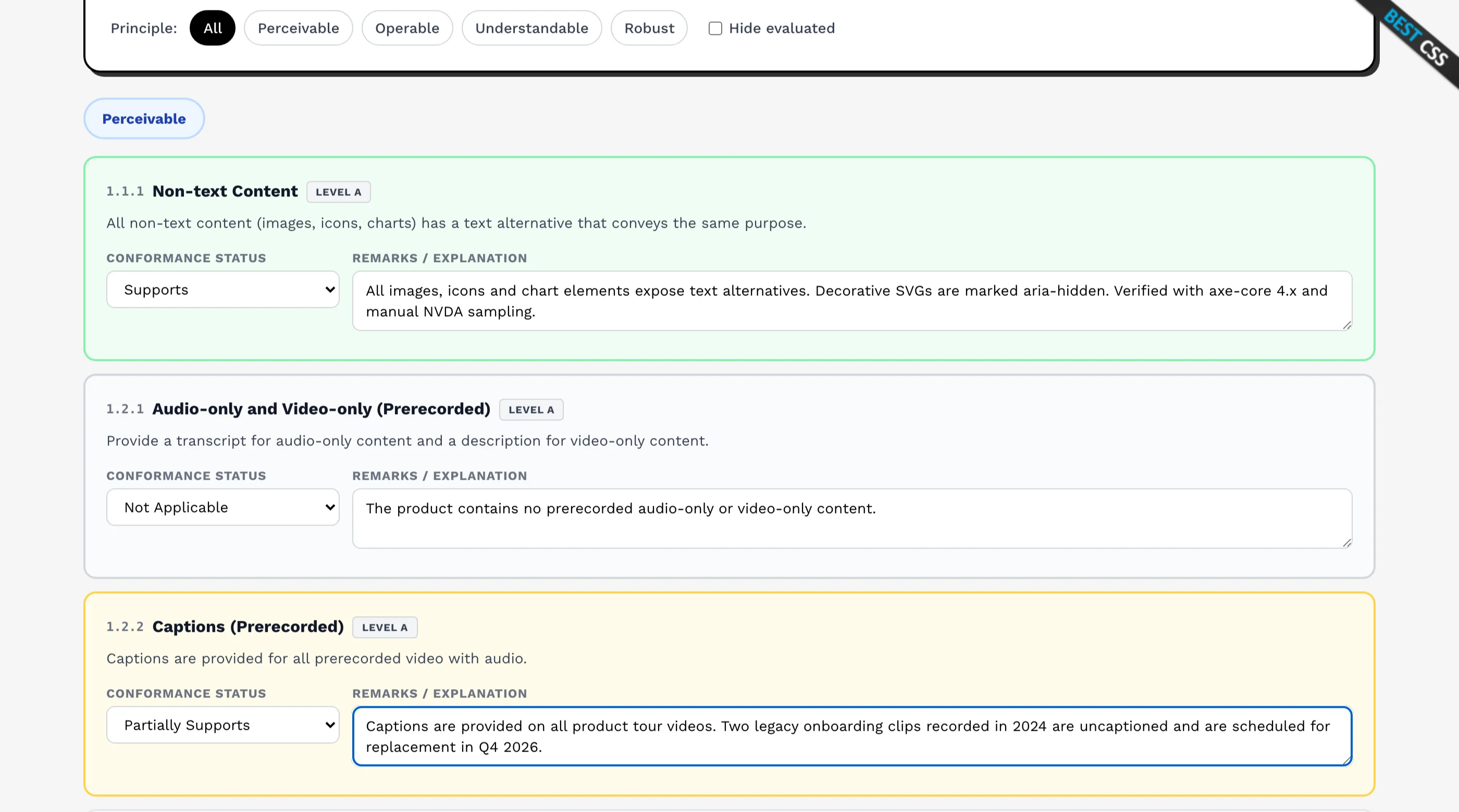
Each row has three columns: the criterion, the conformance level, and remarks and explanations. Section508.gov says remarks are required for Partially Supports and Does Not Support, and encouraged for Supports. The strong rows below are quoted from the sample. The weak rows are ones we wrote for contrast.
Supports
The template defines Supports as: the product has at least one method that meets the criterion without known defects, or meets it with equivalent facilitation.
| Criteria | Conformance Level | Remarks and Explanations |
|---|---|---|
| 2.1.1 Keyboard (Level A) | Supports | Every function was operated with the keyboard alone: header navigation, mobile menu, FAQ accordion, cost calculator slider (arrow keys, Home and End), calculator preset buttons, newsletter form and cookie banner. |
The weak version:
| Criteria | Conformance Level | Remarks and Explanations |
|---|---|---|
| 2.1.1 Keyboard (Level A) | Supports | The product is keyboard accessible. |
The strong remark lists the components that were operated and even the keys used on the slider. A buyer could repeat the test. The weak remark restates the rating.
Partially Supports
The template definition: some functionality of the product does not meet the criterion. This is where most of the writing effort goes.
| Criteria | Conformance Level | Remarks and Explanations |
|---|---|---|
| 2.4.3 Focus Order (Level A) | Partially Supports | Within page content the focus order follows the visual and logical order. Exceptions: at desktop widths, six controls belonging to the closed mobile menu receive focus after the header navigation on every page (F-01). At mobile widths, with the menu open, focus moves on into the page behind the menu after the last menu link (F-04). |
| 1.4.10 Reflow (Level AA 2.1 and 2.2) | Partially Supports | Fifteen of the 17 pages reflow to a width of 320 CSS pixels without horizontal scrolling. Exception: on two articles a long inline code phrase does not wrap, which makes the page up to 373 pixels wide and forces scrolling in two directions (F-07). Code blocks scroll within their own container, which is permitted. |
The weak version:
| Criteria | Conformance Level | Remarks and Explanations |
|---|---|---|
| 2.4.3 Focus Order (Level A) | Partially Supports | Some minor focus issues may exist in certain areas. |
Both strong rows follow the same shape:
- What works. One sentence on the part that meets the criterion.
- The word "Exception" or "Exceptions". It marks the turn clearly.
- What fails, where, and how often. "Six controls", "on every page", "two articles", "373 pixels".
- A finding number. F-01, F-04 and F-07 point to a separate audit report with reproduction steps and recommended fixes.
The weak remark has none of that. "Minor" is the vendor's opinion, "may exist" suggests nobody checked, and "certain areas" could be anywhere.
Does Not Support
The template definition: the majority of product functionality does not meet the criterion. The sample has one such row.
| Criteria | Conformance Level | Remarks and Explanations |
|---|---|---|
| 1.3.5 Identify Input Purpose (Level AA 2.1 and 2.2) | Does Not Support | The newsletter email field is the only field on the site that collects information about the visitor. It appears on 11 pages and has no autocomplete attribute, so its purpose cannot be determined programmatically (F-03). |
This row shows why the rating depends on scope. The site has one field that the criterion applies to, and that field fails. So the majority of relevant functionality doesn't meet the criterion, and the honest rating is Does Not Support, even though the fix is a single attribute.
The weak version of this row is usually the wrong rating: Partially Supports, because Does Not Support looks alarming. A reviewer who tests one form field will catch it, and then doubt every other row.
Not Applicable
The template definition: the criterion is not relevant to the product. Remarks aren't required here, but one sentence saves the reviewer a question.
| Criteria | Conformance Level | Remarks and Explanations |
|---|---|---|
| 3.3.8 Accessible Authentication (Minimum) (Level AA 2.2 only) | Not Applicable | There is no authentication on the pages tested. The application login is out of scope. |
The row ties back to the scope in the notes. The product does have a login, but it sits in the application that wasn't tested, and the row says so. A weak report would leave the remark blank and the buyer wondering whether the login was forgotten.
Be careful with this rating. Not Applicable means the feature doesn't exist in the tested scope. It doesn't mean "we didn't get to it."
A Row That Admits a Limit
The sample's row for 4.1.3 Status Messages is rated Partially Supports. Its remark lists two gaps (F-09) and then ends with: "The success message was not tested." That sentence tells the buyer exactly where the evidence ends. It also matches the evaluation methods section, which says that successful form submission was not tested.
What Strong Remarks Have in Common
Read the sample's rows together and five habits stand out.
- Counts. "All 119 content images", "59 links", "11 pages", "45 links on the legal pages". A number shows someone counted.
- Locations. Page names and component names, so a developer can find the problem and a buyer can check it.
- Measurements where the criterion has a threshold. The 1.4.3 Contrast row gives actual ratios, such as cookie banner buttons at 2.26:1, and states the 4.5:1 minimum they're measured against.
- Finding numbers. Fourteen findings, F-01 to F-14, link the report to an audit document with evidence and fixes.
- Plain statements of what wasn't tested.
Three habits weaken a report: restating the criterion ("Images have alt text"), soft words such as "minor", "may" and "certain areas", and claims like "fully compliant" or "certified", which don't belong in an ACR.
The Legal Disclaimer
The sample ends with a legal disclaimer. It says the report describes the product as observed at the time of testing, within the stated scope, and that it isn't a certification, a legal opinion or a guarantee of conformance. Keep yours short, don't use it to walk back the ratings, and ask your own counsel about wording. This article isn't legal advice.
How to Write Your Own Rows
Once you've seen the pattern, the writing is quick. The testing is what takes time.
- Test first. Run an automated scan, then test by keyboard and with at least one screen reader. Our WCAG AA checklist for web apps covers what to check.
- Log every failure with its page, element and criterion. Give each one a number. You'll cite these in the remarks.
- Rate each row from the log. No failures and you tested it: Supports. Some failures: Partially Supports. Most of the relevant functionality fails: Does Not Support. The feature isn't in scope at all: Not Applicable.
- Write the remark in the same shape every time. What works, then "Exception:", then what fails, where and how often, then the finding number.
- Check the rows against your methods section. If the methods say you tested seven pages, a remark shouldn't claim "all pages" unless the automated run covered them.
- Remove the instruction pages from the front of the template before you send it. Section508.gov asks for this.
- Check the finished file for accessibility. Section508.gov includes this in its final checklist.
If you want a head start on the table itself, our free VPAT template generator walks through the criteria one at a time in your browser. For how buyers read the finished document, see our guide to the accessibility conformance report.
VPAT Example Checklist
Hold your draft against the sample and check each line.
- The product name says which product and which version
- The notes state the scope, the exclusions and any third-party content
- The evaluation methods name tools with versions, browsers and screen readers
- Every Supports remark says what was tested
- Every Partially Supports and Does Not Support remark says what fails, where and how often
- Every Not Applicable row gives a one-sentence reason
- Not Evaluated appears only in the Level AAA table, if at all
- No row says "compliant" or "certified"
- The ITI instruction pages are removed
Frequently Asked Questions
Where can I find a completed VPAT example?
Our sample ACR is a completed WCAG edition report for a fictional company, with a remark on all 56 rows.
What does a good VPAT remark look like?
A good remark says what works, then what fails, where it fails and how often. For example, the sample's Reflow row says fifteen of 17 pages reflow at 320 CSS pixels, then names the two articles that don't and the cause.
Is a VPAT example different for Section 508?
The 508 edition reports against the Revised Section 508 Standards. Section508.gov's guide shows the same three columns and the same four ratings, so the row-writing pattern in this guide applies to a Section 508 VPAT example too.
Can I copy remarks from a VPAT report example?
Copy the structure, never the content. A remark is a statement about your product on the day you tested it. If a buyer finds a copied remark that doesn't match what they see, the whole report loses credibility.
How many Partially Supports rows are too many?
There's no pass or fail score. ITI states there's no official pass/fail rating for a VPAT or ACR. Buyers look at which criteria fail, how serious the gaps are for their users, and whether the remarks show you understand them.
Do I need a legal disclaimer in my VPAT?
It isn't one of the seven header fields Section508.gov lists, so treat it as your choice. Our sample includes one, which states that the report reflects the product at the time of testing and isn't a certification. Have your own counsel review the wording.
Getting Help With Your Report
A VPAT example shows you the shape of a good row. It can't tell you what's true about your product, and that part takes hands-on testing. If a buyer is waiting and you'd like the testing and the report done for you, our VPAT and ACR service produces the same kind of document you've just read: specific remarks, numbered findings and a clear scope. We won't promise you a clean report. We'll give you an accurate one.
Has a buyer asked for your VPAT?30% OFF
We test your product by hand with a keyboard and real screen readers, then write the ACR from what we found: WCAG, Section 508, EU or International edition. VPAT Essentials from $2,030$2,900 with a lighter audit included, or $4,130$5,900 with a full 25-page audit and retest.