What Is a VPAT? A Plain-Language Guide for 2026
What Is a VPAT?
A VPAT (Voluntary Product Accessibility Template) is a standard form you fill in to document how accessible your product is. It walks through each accessibility criterion in a given standard, asks you to state whether your product supports it, and gives you a column to explain anything that is not a clean yes.
It is published by the Information Technology Industry Council (ITI), it is free to use, and you do not need to be an ITI member to use it. The current version is VPAT 2.5, published in November 2023, which aligns with WCAG 2.2.
The word "voluntary" is doing a lot of work in that name. Nobody is legally obliged to publish a VPAT. In practice, enterprise and public-sector buyers ask for one before they sign, so it is voluntary in roughly the way having a website is voluntary.
If someone has just asked you for a VPAT and you have never seen one, the short version is: it is a spreadsheet-shaped document, it takes a day or two to do properly, and the hard part is being honest without being alarming.
You can fill one in free with our VPAT template generator, which runs in your browser and exports HTML or Markdown.
VPAT vs ACR: The Difference That Confuses Everyone
This trips up nearly everyone on their first pass, and the distinction is genuinely simple:
- The VPAT is the blank template.
- The ACR (Accessibility Conformance Report) is what you call it once you have filled it in.
So when a procurement team asks for "your VPAT", they mean your ACR. When a vendor says "we have a VPAT", they mean they have completed one. The terms get used interchangeably in the wild and nobody will correct you, but if you see both in the same email, that is the difference.
VPAT® is a registered trademark of ITI, which is why some vendors and tools carefully say "accessibility conformance report" instead.
Why Anyone Asks You For One
Three groups drive nearly all VPAT requests.
US federal agencies and their contractors. Section 508 of the Rehabilitation Act requires federal agencies to buy accessible technology. Agencies push that obligation onto vendors, and the ACR is how they evidence it during procurement.
Universities and public institutions. Higher education is one of the most consistent sources of VPAT requests, and institutions typically require Level A and AA conformance at minimum.
Enterprise procurement generally. This is the fastest-growing category and has nothing to do with law. Large companies added accessibility to their vendor security and risk questionnaires, and now a VPAT sits alongside your SOC 2 as a checkbox that blocks the deal until it is ticked.
The practical consequence is that a missing VPAT is rarely a compliance problem first. It is a sales problem. Deals stall in procurement while someone scrambles to produce a document nobody planned for.
The Four VPAT 2.5 Editions
VPAT 2.5 ships in four editions. Pick based on who is asking, not on which looks most thorough.
| Edition | Covers | Pick it when |
|---|---|---|
| 508 | Revised Section 508 | Selling to US federal agencies or their contractors |
| WCAG | WCAG 2.0, 2.1 and 2.2 | General commercial use, and the most common choice |
| EU | EN 301 549 | EU public-sector procurement |
| INT | All three of the above | You sell into several markets, or you do not know who will ask next |
The INT edition is the safe default if you are unsure. It is longer to complete, but it means one document answers every request rather than three near-identical documents drifting out of sync.
Most commercial SaaS companies that are not selling to government should start with the WCAG edition against WCAG 2.2 Level AA. That is the bar almost every enterprise buyer actually checks against, and it is the same bar most accessibility law now points at. If you need a refresher on the standard itself, see What Is WCAG 2.1 AA?.
What Is Actually Inside a VPAT
Every edition has the same shape.
Product information. Name, version, the date of the report, your contact details, and a description of what the product does.
Evaluation methods. How you tested. Which browsers, which assistive technologies, whether it was automated tooling, manual review, or both. Buyers read this section to decide how much to trust the rest.
Applicable standards. Which standard and level you are reporting against.
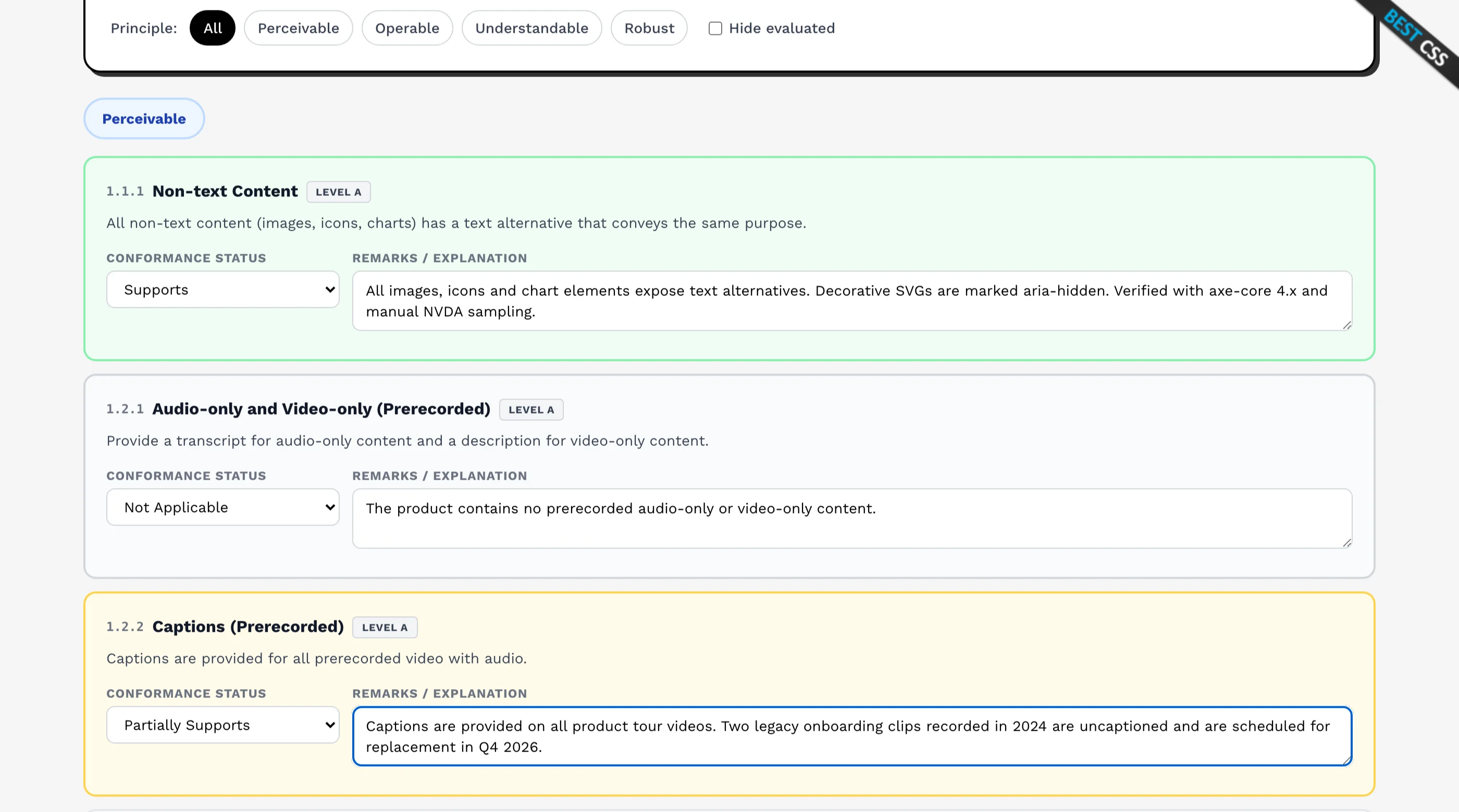
The conformance tables. This is the bulk of the document. Criteria are listed by chapter, and each table has three columns: the criterion, your conformance level, and remarks and explanations.
For the WCAG edition the tables are split by level:
- Table 1: Level A success criteria
- Table 2: Level AA success criteria
- Table 3: Level AAA success criteria
Only Tables 1 and 2 are needed for US federal procurement, and most buyers only read those two. Level AAA is optional and rarely requested.
The Section 508 and EN 301 549 editions add further chapters: Chapter 3 (Functional Performance Criteria), Chapter 4 (Hardware), Chapter 5 (Software) and Chapter 6 (Support Documentation and Services). If your product is a web application, Chapters 4 and 5 will contain a lot of "Not Applicable", which is fine and expected.
The Four Conformance Levels
Each criterion gets exactly one of four ratings:
- Supports. The product fully meets the criterion.
- Partially Supports. Some functionality meets it, some does not.
- Does Not Support. The majority of functionality does not meet it.
- Not Applicable. The criterion does not apply to this product.
The rule that matters: if you write Partially Supports or Does Not Support, you must explain in the Remarks column what fails and where. A rating without an explanation is the single most common reason a reviewer sends an ACR back.
A Worked VPAT Example
Abstract descriptions are less useful than one row done properly. Here is the same criterion filled in three ways.
Criterion: 1.4.3 Contrast (Minimum), Level AA
The lazy version:
| Criterion | Conformance Level | Remarks and Explanations |
|---|---|---|
| 1.4.3 Contrast (Minimum) | Supports | Yes |
This is worthless. It tells the reviewer nothing about how you know, and a sophisticated buyer will discount the whole document on the strength of rows like this.
The honest version:
| Criterion | Conformance Level | Remarks and Explanations |
|---|---|---|
| 1.4.3 Contrast (Minimum) | Partially Supports | All body text, form labels and interactive controls meet 4.5:1. Two exceptions: placeholder text in search inputs measures 3.8:1, and the disabled state on secondary buttons measures 2.9:1. Both are scheduled for the Q4 2026 design token update. Verified with axe-core 4.x and manual sampling across Chrome, Firefox and Safari. |
This is the version that wins deals. It is a worse rating and a better document. The reviewer now knows you tested properly, knows exactly what is broken, knows it is cosmetic rather than blocking, and knows when it will be fixed.
The version that gets you in trouble:
| Criterion | Conformance Level | Remarks and Explanations |
|---|---|---|
| 1.4.3 Contrast (Minimum) | Supports | Fully conformant across all screens. |
If that is not true, you have put a false claim in writing, in a procurement document, that your customer relied on. That is a materially worse position than admitting a 3.8:1 placeholder.
Who Can Write a VPAT?
Anyone. There is no certification, no accreditation body, and no approval process. You can write your own today.
That cuts both ways. Because self-assessment is the norm, sophisticated buyers have learned to read VPATs sceptically. What separates a credible ACR from a dismissed one:
- A detailed evaluation methods section. Naming actual tools, actual assistive technology and actual browser versions signals real testing.
- A realistic spread of ratings. A document where all fifty criteria say "Supports" reads as untested, not as excellent. Nearly every real product partially supports something.
- Specific remarks. "Some images lack alt text on the reporting dashboard" beats "minor issues may exist".
- A recent date. An ACR from three years ago describes a product that no longer exists.
Third-party audits carry more weight, and for high-stakes procurement they are worth the money. Our accessibility audit service ships VPAT-ready conformance documentation on its top tier, if you would rather have someone else produce the evidence.
How Long Does a VPAT Take?
Assuming a reasonably sized web application:
- Testing: one to three days for a genuine WCAG 2.2 AA pass across representative templates and one complete end-to-end flow
- Writing it up: half a day to a day once you know your results
- Review: a few hours, ideally by someone who did not do the testing
The mistake is treating it as a documentation exercise. Nearly all the effort is the evaluation. If you try to write the document first and test afterwards, you will end up guessing, and guessing is how false claims get into procurement documents.
If you have never tested, start with the WCAG AA checklist for web apps and the free WCAG 2.2 checklist tool before you open a VPAT template.
Common Mistakes
Claiming full support everywhere. The fastest way to lose credibility, and the one reviewers look for first.
Leaving remarks blank on failures. A Partially Supports with no explanation will be sent back.
Reporting against the wrong standard. Sending a WCAG-edition ACR to a federal agency that asked for Section 508 means doing it twice.
Never updating it. Your product ships weekly. An ACR is a snapshot, and a stale one misrepresents you even if it was accurate when written.
Testing only the marketing site. Buyers care about the authenticated product they will actually use, not your homepage.
Skipping assistive technology. Automated tools catch perhaps a third of WCAG issues. An ACR built purely on axe output will not survive a reviewer who opens a screen reader.
How to Create a VPAT for Free
You do not need to buy anything. ITI publishes the blank templates as Word documents, and you can fill one in by hand.
If you would rather not wrestle with a Word table for fifty criteria, our free VPAT template generator walks the criteria one at a time, lets you pick your edition, saves progress in your browser, and exports a finished report as HTML or Markdown. Nothing is uploaded and no account is required.
The tool produces the document. It cannot tell you whether your product is accessible, which is the part that takes actual work.
Frequently Asked Questions
What does VPAT stand for?
Voluntary Product Accessibility Template. It is a standard form, published by the Information Technology Industry Council, for documenting how a technology product conforms to accessibility standards. The completed version is called an Accessibility Conformance Report.
Is a VPAT legally required?
No. It is voluntary, as the name says. What makes it feel mandatory is procurement: US federal agencies must buy accessible technology under Section 508, universities and enterprises have adopted the same requirement, and they all ask for an ACR before signing. The obligation is contractual rather than legal for most vendors.
What is the difference between a VPAT and an ACR?
The VPAT is the blank template. The ACR is the completed document. People use both terms for the finished report, and in day-to-day conversation "send us your VPAT" always means "send us your ACR".
What is the current VPAT version?
VPAT 2.5, published in November 2023, aligned with WCAG 2.2. It comes in four editions: 508, WCAG, EU and INT. If you are working from an older 2.4 template, it is worth regenerating against 2.5, because buyers do check the version.
Can I write my own VPAT?
Yes. There is no certification requirement and self-assessment is standard practice across the industry. Buyers know this, so credibility comes from the quality of the document: a detailed evaluation methods section, honest ratings, and specific remarks. A third-party audit carries more weight when the contract is large.
How much does a VPAT cost?
The template is free and self-assessment costs only your time, typically two to four days including testing. A third-party audit is priced by how many pages, templates and end-to-end flows are in scope, and the tier that ships conformance documentation is usually the top one, so check what an audit actually covers before comparing quotes. The expensive part is never the document, it is fixing what the testing finds. We compare published audit and VPAT prices in how much an accessibility audit costs.
The Honest Take
Most teams meet the VPAT the same way: a deal is nearly closed, procurement sends a questionnaire, and there is a line asking for an accessibility conformance report by Friday.
At that point the temptation is to write an optimistic document quickly. Resist it. An ACR full of unearned "Supports" ratings is a written claim your customer relies on, and it is worse than an honest one with a handful of Partially Supports rows and a remediation date.
The document is not the work. Testing your product against WCAG 2.2 AA is the work, and the VPAT is just the shape you pour the results into. Teams that treat it as a writing exercise produce something that falls apart under a reviewer who knows what to look for. Teams that treat it as a testing exercise end up with a document that closes deals, and a better product.
Related Guides
- What Is WCAG 2.1 AA? A Plain-Language Guide for the standard a VPAT reports against
- WCAG AA Checklist for Web Apps for the testing that has to happen first
- Winning RFPs with Accessibility Receipts for what else procurement asks agencies to prove
- ADA Website Compliance Checklist for the wider US legal picture
Want this checked on your own site?
Automated scans verify about 30% of WCAG 2.1 AA. We test the rest by hand: keyboard-only navigation, NVDA and VoiceOver output, focus management, and whether someone can actually complete your key flows. You get a report your developers can work from, mapped to criteria with severity and reproduction steps. Audits from $499.