How to Build a Help Desk in Next.js (2026)
How to Build a Help Desk in Next.js in 2026
Help desk software looks simple from the outside. Customers send emails, agents reply. Behind that simple loop is a real product: ticket assignment rules, SLA tracking, agent workload balancing, canned responses, internal notes, ticket merging, customer satisfaction surveys, knowledge base integration, escalation flows, and reporting. A real Next.js help desk is ten to fourteen weeks of work.
This guide walks through what a help desk has to handle, the data model decisions that matter, and the realistic path from zero to a help desk that does not embarrass your support team.
Or skip the build entirely: get every kit for $749
If you're shipping more than one product, All UI Kits unlocks every Next.js kit on thefrontkit. The full Help Desk Template is in there, plus the SaaS Starter Kit, CRM, HR, Kanban, E-commerce, AI UX, Blog CMS, and 10 more. One-time payment, lifetime access, no subscription.
What a Real Help Desk Has to Do
The features that distinguish a real ticketing system from a shared inbox.
Unified Ticket Inbox
Every customer message becomes a ticket. The inbox shows:
- All open tickets with status, priority, assignee, last update
- Filter by status (new, open, pending, resolved, closed)
- Filter by priority (urgent, high, medium, low)
- Filter by assignee (me, unassigned, anyone)
- Filter by tag (billing, bug, feature request, refund)
- Search across all tickets and message content
- Bulk actions (assign, tag, close, merge)
The inbox is the agent's home screen. It needs to load fast and let them triage 50+ tickets per shift without RSI.
Ticket Detail View
Where the work happens:
- Customer info (name, email, company, lifetime value, past tickets)
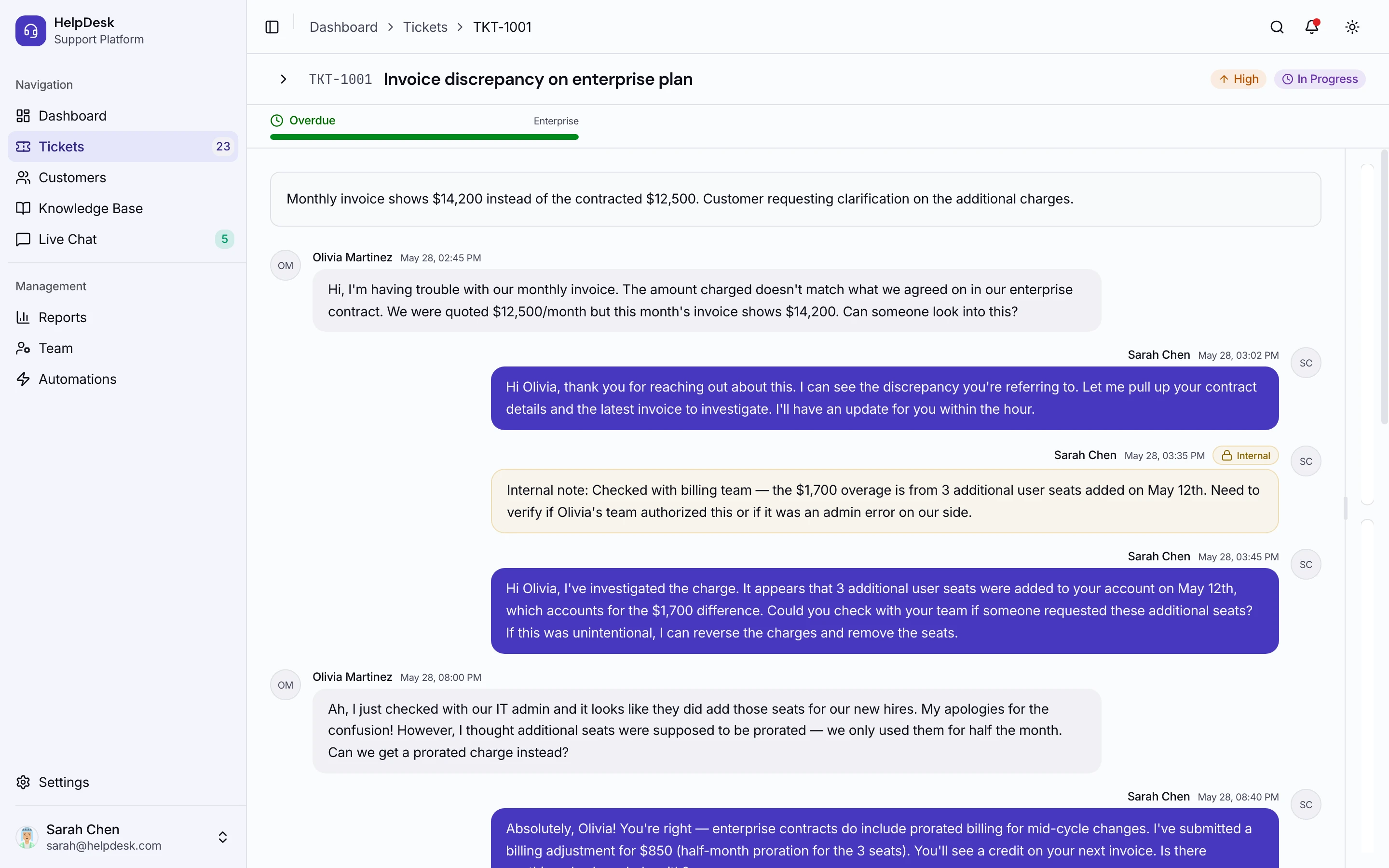
- Conversation thread with customer messages, agent replies, internal notes (visible to agents only)
- Reply box with rich text, canned responses, file attachments
- Side panel with status, priority, assignee, tags, custom fields
- Linked tickets for related issues
- Activity log showing who did what when
- Customer history showing all their previous tickets
The reply box is the most-used UI in the app. Optimize for keyboard shortcuts and inline canned responses.
Email Integration
Most tickets start as email. The flow:
- Inbound email parsing — the customer emails support@yourdomain.com, the system creates a ticket
- Reply parsing — agent replies via the help desk, customer receives the reply by email
- Threading — customer replies to that email and it lands on the existing ticket, not a new one
- Attachment handling — files in inbound email become ticket attachments
- Forwarding rules — emails to specific addresses route to specific queues
Postmark inbound webhooks or Mailgun routes are the standard. Don't try to build SMTP parsing yourself.
Assignment and Routing
Tickets need to land with the right agent:
- Manual assignment — agent picks up tickets from the unassigned queue
- Round-robin assignment — new tickets cycle through agents
- Rule-based routing (tickets tagged "billing" go to the billing team, "bug" to engineering, etc.)
- Skill-based routing — agents have skills, tickets route to matching agents
- Workload balancing — busy agents get fewer new tickets
For a v1, manual + round-robin is enough. Add skill-based in v2.
SLA Tracking
Service-level agreements drive prioritization:
- First response SLA — N minutes/hours to first reply
- Resolution SLA — N hours/days to close
- Different SLAs per priority (urgent: 1 hour; low: 24 hours)
- Different SLAs per customer tier (enterprise: 1 hour; free: 24 hours)
- Visual indicators — color-code tickets approaching SLA breach
- Auto-escalation when SLA is breached
Without SLA tracking, urgent tickets sit in queues for days. Build it from v1.
Knowledge Base
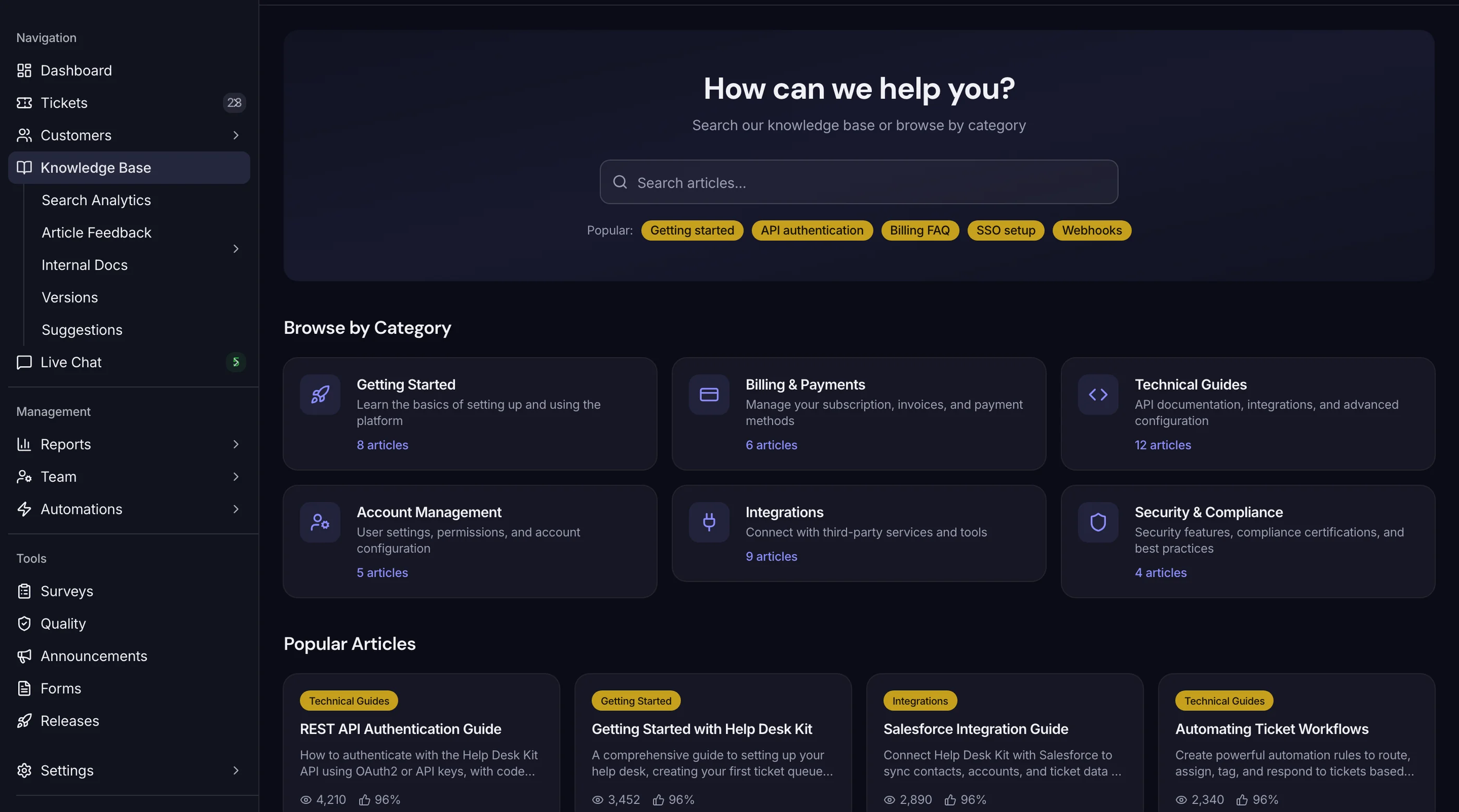
A self-service article system that reduces ticket volume:
- Articles with title, body, category, tags, slug
- Public reader (customers find articles by search or browse)
- Suggested articles in the customer portal and in agent reply boxes
- Article view tracking (which articles get read most)
- Article feedback ("Was this helpful?")
- Inline article suggestions in tickets ("Customer asked about X, suggest article Y")
A good KB cuts ticket volume 20-40%. It pays for itself.
Customer Portal
Customers should be able to:
- Submit a ticket without emailing
- See their open and past tickets
- Reply to tickets without using email
- Search the knowledge base
- See ticket status and ETA
A clean portal reduces "what's the status?" follow-up tickets.
Reporting
What managers look at:
- Ticket volume (new, resolved, backlog) over time
- First response time average and distribution
- Resolution time average and distribution
- Agent performance (tickets handled, average response time, CSAT scores)
- Category breakdown (% of tickets in billing, bugs, features)
- CSAT scores trend
- SLA compliance by tier
Build the 6-7 standard reports. Don't innovate here.
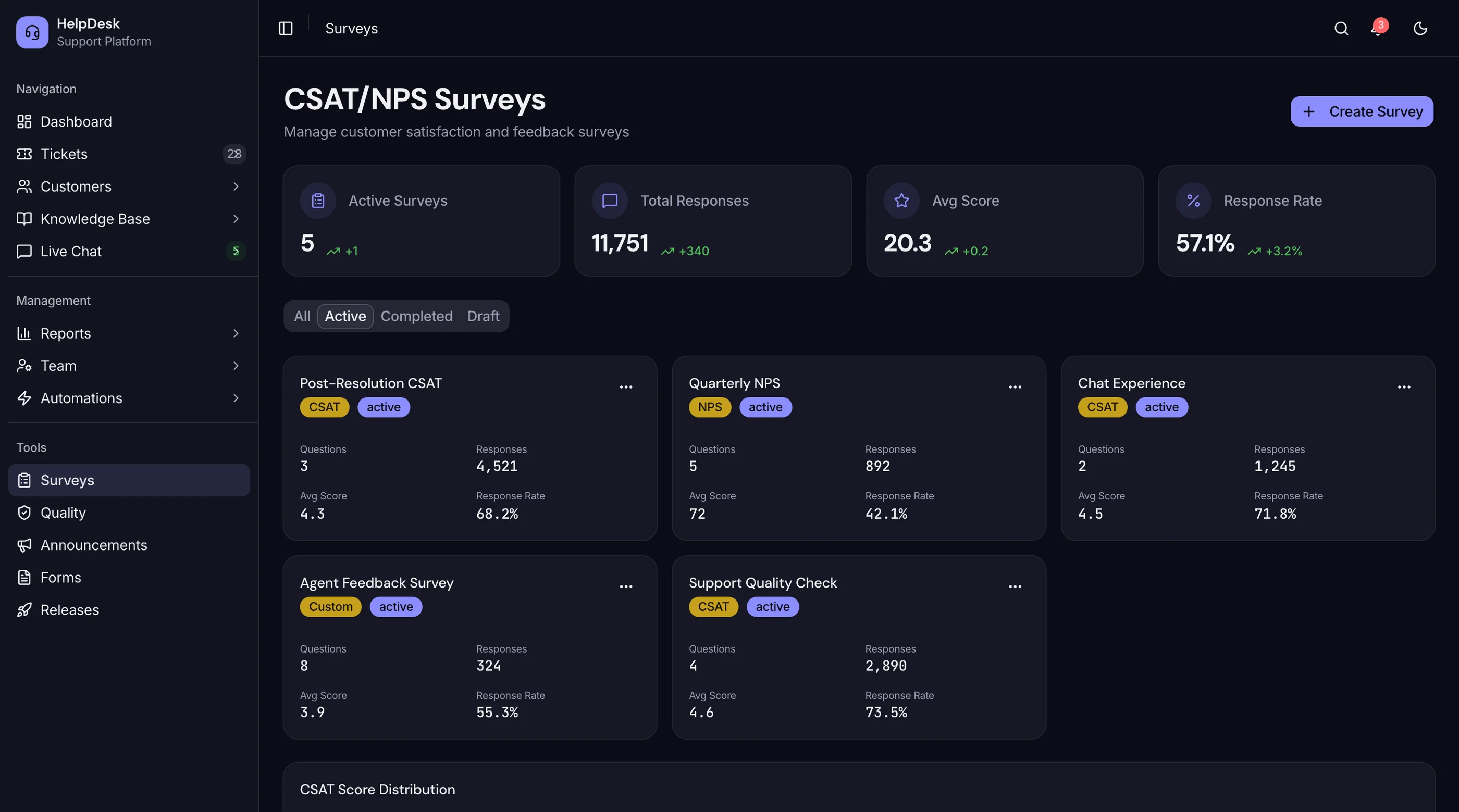
CSAT (Customer Satisfaction)
Post-resolution surveys:
- Email sent after resolution asking for a rating
- 1-5 or thumbs up/down rating
- Optional comment
- Trends per agent for performance reviews
- Low-CSAT alerts for follow-up
CSAT is the only quality metric customers can give you. Collect it from day one.
Tech Stack: Help Desk Specific Decisions
Email parsing: Postmark or Mailgun inbound. Don't roll your own.
Search: Postgres tsvector for v1. Algolia or Typesense at scale (>100k tickets).
Real-time updates: Pusher, Ably, or Liveblocks for live ticket updates in the inbox.
File storage: R2 or Supabase Storage. Tickets accumulate attachments fast.
Background jobs: Inngest for SLA timers, scheduled CSAT emails, escalation triggers.
Charts: Recharts for the reporting dashboard.
Build Path 1: From Scratch (10 to 14 Weeks)
Week 1-2: Foundation. Next.js, auth, database with tickets, messages, agents, customers.
Week 3-4: Ticket inbox and detail view. The agent home screen.
Week 5-6: Email integration. Inbound webhook, threading, outbound replies.
Week 7-8: Assignment, routing, SLA. The workflow engine.
Week 9-10: Knowledge base. Article CRUD, public reader, search.
Week 11-12: Customer portal. Submit, view tickets, reply.
Week 13: Reporting. The 6-7 standard charts.
Week 14: Polish. CSAT surveys, dark mode, accessibility, performance.
For most teams: 14 to 20 weeks. Email integration alone is routinely a 3-week project.
Build Path 2: Using a Help Desk Kit (2 to 3 Weeks)
A production-ready Next.js help desk kit ships:
- Unified ticket inbox with filters, search, bulk actions
- Ticket detail with reply, canned responses, internal notes, attachments
- Email integration (Postmark/Mailgun) with threading
- Assignment (manual, round-robin, rule-based)
- SLA tracking with breach alerts
- Knowledge base with article CRUD and public reader
- Customer portal
- Reporting dashboard with 6+ standard reports
- CSAT survey flow
- 30-40 screens, WCAG AA accessible
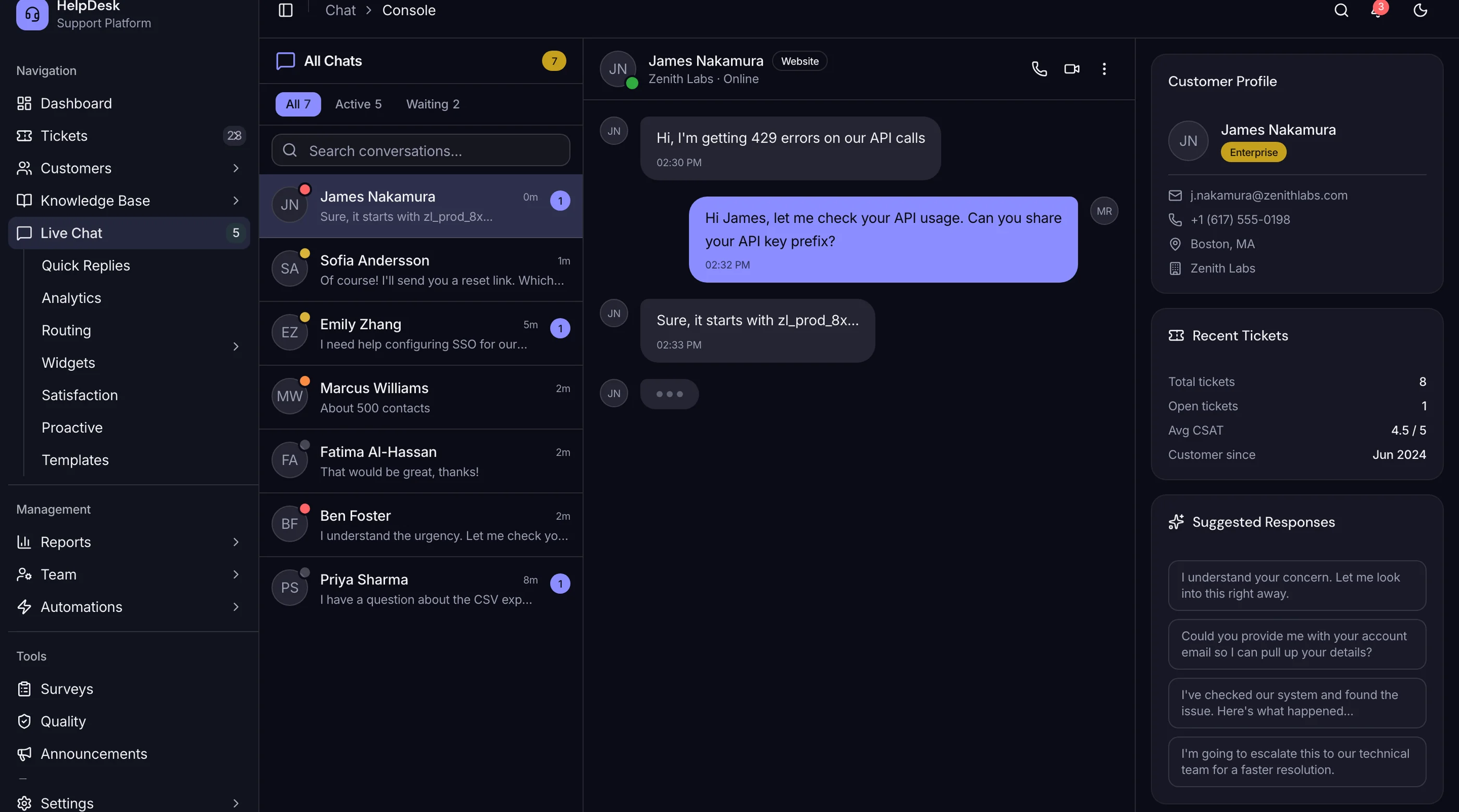
If you would rather not build all of that from scratch, the thefrontkit Help Desk Template ships 110 screens covering this list: threaded tickets with internal notes, a Kanban triage board, live chat with queue management, a knowledge base editor, an SLA dashboard with breach alerts, customer profiles, and agent performance reporting. It is the frontend only, so you still own the backend, the real-time layer, and email delivery. Try the live demo.
Common Pitfalls
Building email parsing yourself. Postmark and Mailgun exist. SMTP parsing is a tar pit.
Forgetting reply threading. Without it, every customer reply creates a new ticket. Agents lose context, customers get annoyed. Build threading on day one.
No internal notes. Agents need to leave notes for other agents that customers can't see. Without this, sensitive discussions leak into customer replies.
Skipping SLA tracking. Urgent tickets get lost without it. The visual breach indicator is what makes agents work the right tickets first.
No canned responses. 60-80% of replies are variants of 10-20 templated answers. Without canned responses, agents type the same things hundreds of times per week.
Underbuilding the knowledge base. A good KB cuts ticket volume 20-40%. Skipping it means support cost grows linearly with users.
Building rich text editor from scratch. Use Tiptap. Custom contenteditable wastes weeks.
Adjacent Reads
- How to Build a SaaS in Next.js — broader build path
- Best Help Desk Templates 2026 — head-to-head comparison
- Connect Supabase to a Next.js Template — pair with database
FAQ
Should I build this or use Zendesk / Intercom / Help Scout?
Hosted help desks ($25-$200/user/month) handle 95% of standard support needs. Build your own when you need deep integration into a larger product (a SaaS where support is part of the experience), you have unusual ticket types (compliance reviews, security incidents), or per-seat pricing doesn't fit. For most companies, hosted is the right answer.
How important is the knowledge base?
Critical. A good KB cuts ticket volume 20-40%. That's the single highest ROI investment in support tooling. Build it before fancy features like AI chatbots.
Do I need AI / LLM-powered features?
In 2026, yes. At minimum: AI-suggested replies based on similar past tickets, AI-tagged ticket categorization, AI-summarized ticket threads. Not required for v1 but increasingly expected within 12 months of launch.
How do I prevent abuse from spam tickets?
Email-based abuse: SPF/DKIM/DMARC checks, sender reputation services like Cloudmark. Portal-based abuse: rate limiting per IP and per email. Don't make customers solve CAPTCHAs to file tickets — it kills legitimate volume.
How many tickets per day can one agent handle?
Depends on the complexity. Simple ticketing (password resets, billing questions): 50-100/day. Complex troubleshooting: 10-20/day. Build the dashboard to track per-agent volume and adjust staffing.
How many screens does a real help desk need?
The minimum is around 22 screens: inbox, ticket detail, customer portal (submit, list, detail), knowledge base (browse, article, search), agent dashboard, reports (6 reports), settings (workspace, agents, routing rules, canned responses, SLA, KB categories), and auth (5 screens). A full-featured product with chatbot integration and multi-channel support lands at 35-45 screens.
Want it shipped without hiring a developer?
The build path above assumes you have engineers. If you don't, the team behind thefrontkit does done-for-you launches: we deploy the kit, apply your branding, and wire it to your stack. Fixed quotes, most builds ship in 2-4 weeks, from $1999.