How to Build an LMS in Next.js (2026)
How to Build an LMS in Next.js in 2026
A learning management system looks straightforward until you actually start. Course structure, lesson types, video hosting, progress tracking per student, quizzes with grading, completion certificates, instructor dashboards, student dashboards, discussion forums, and an admin to manage everything. A real Next.js LMS is twelve to sixteen weeks of work.
This guide walks through what an LMS actually needs to do, the data model decisions that bite you later if you skip them, and the realistic path from zero to a production-ready Next.js course platform.
Or skip the build entirely: get every kit for $749
If you're shipping more than one product, All UI Kits unlocks every Next.js kit on thefrontkit. The full LMS Template is in there, plus the SaaS Starter Kit, CRM, HR, Kanban, E-commerce, AI UX, Blog CMS, and 10 more. One-time payment, lifetime access, no subscription.
What a Real Next.js LMS Has to Do
The features that distinguish a real course platform from a video library.
Course Structure That Survives Real Content
A course is not a flat list of videos. It's:
- Course with title, description, hero image, pricing, instructor, category
- Sections (modules) grouping related lessons
- Lessons with multiple types: video, text, quiz, assignment, downloadable
- Resources attached per lesson (PDFs, code samples, slides)
- Prerequisites per course or per lesson
- Drip schedule (release lessons over N days/weeks instead of all at once)
Most early LMS builds skip the section/module level and regret it the moment they want to organize a 40-lesson course. Build the hierarchy on day one.
Lesson Player With Real Video
Video is the heart of most LMS products. Standards:
- Video hosting via Mux, Cloudflare Stream, or Bunny.net (don't self-host)
- Adaptive bitrate streaming (HLS) so the video adapts to bandwidth
- Playback resume — student watches 15 minutes, leaves, returns and continues at 15:00
- Speed controls (0.75x to 2x)
- Captions/subtitles with proper VTT files (also a WCAG AA requirement)
- Watermarking to discourage piracy
- Download protection so videos can't be ripped easily
- Mobile-friendly player on both iOS and Android
YouTube embeds work for free courses but break monetization and look unprofessional for paid courses.
Progress Tracking Per Student
Every student needs to see where they are:
- Per-lesson completion with auto-detection (video watched to N%, quiz passed)
- Per-course progress bar showing % complete
- Continue where you left off as the default CTA on the course page
- Time-on-platform stats for instructors and admins
- Completion certificates issued automatically when a course is finished
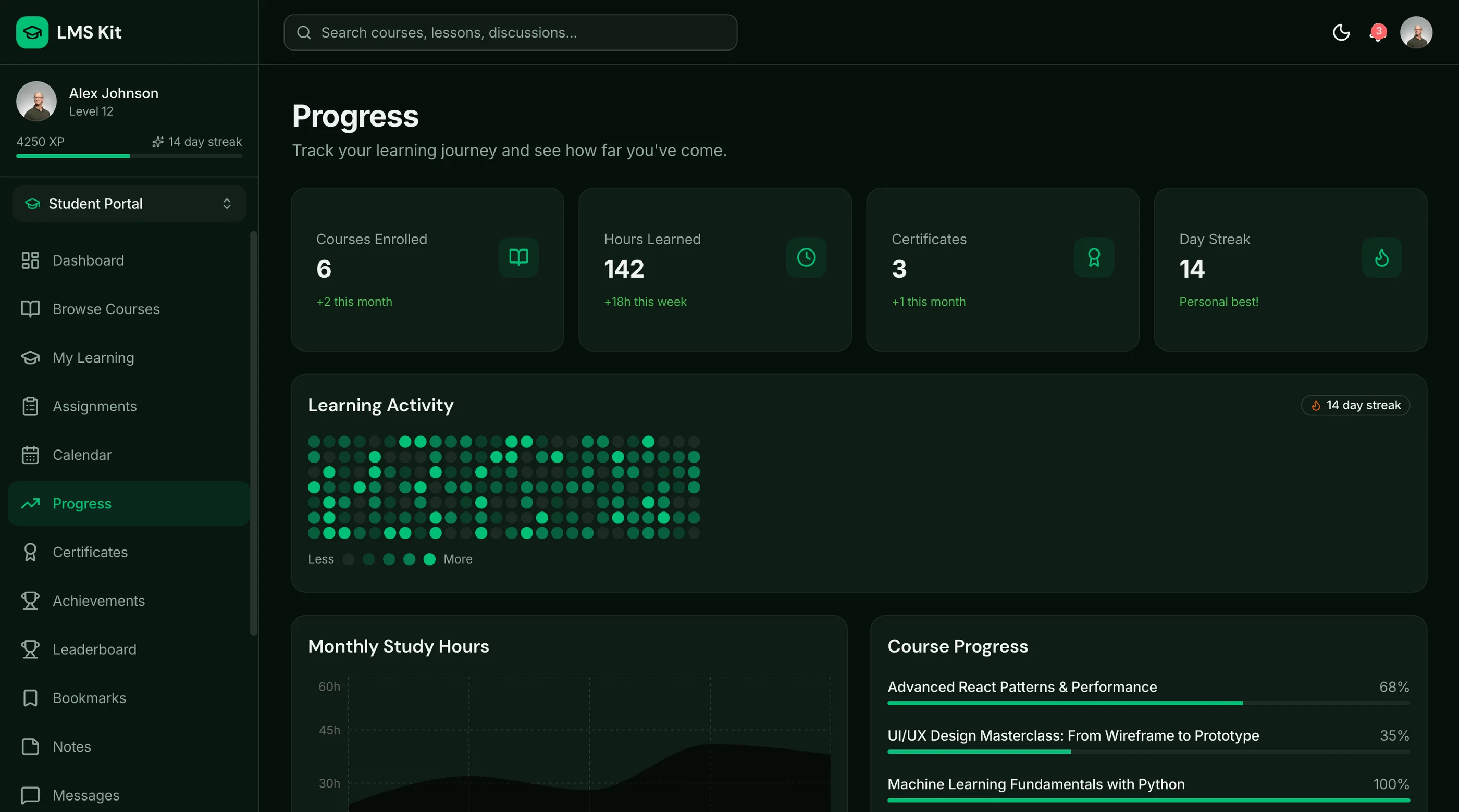
- Streak tracking for engagement gamification
The data model: a lesson_progress table with student_id, lesson_id, completed_at, time_spent_seconds. Index by both student and lesson for fast queries.
Quizzes and Assignments
For courses that test learning:
- Quiz types: multiple choice, multiple select, true/false, short answer, code submission
- Question banks so quizzes can pull random subsets
- Time limits with auto-submit on expiry
- Grading — auto for objective, manual for subjective
- Attempt limits (1 attempt, 3 attempts, unlimited)
- Pass marks with retake logic
- Result review showing which questions were right or wrong
Quizzes are often the second-biggest feature after the video player.
Student Dashboard
The first screen students see after login:
- Enrolled courses with progress per course
- Continue learning prominent CTA pointing to the next uncompleted lesson
- Certificates earned with download links
- Upcoming assignments with due dates
- Recent activity (lessons completed, quiz scores)
Without a clear "what to do next" CTA, students forget about the course.
Instructor Dashboard
Where instructors manage their courses:
- Course creation flow with drag-and-drop section/lesson reordering
- Lesson editor with video upload, transcript, resources, quiz builder
- Student roster per course with progress per student
- Revenue dashboard (if monetized) with sales, refunds, top courses
- Engagement metrics (drop-off per lesson, average completion rate)
- Q&A or discussion management if your platform has it
- Bulk email to enrolled students
The instructor dashboard is half the build. Most early LMS products underbuild it.
Payment and Enrollment
For paid courses:
- One-time purchase per course
- Subscription for all-access platforms (like Masterclass)
- Bundles (multiple courses sold together)
- Coupons and promotional pricing
- Refund policy with self-serve refund within N days
- Affiliate tracking for instructor referrals
Stripe handles all of this. Wire it correctly from day one.
Discussions and Community
Optional but increasingly expected:
- Per-lesson Q&A for student questions
- Course-level discussion for broader conversation
- Instructor responses highlighted
- Direct messages between students and instructors
Skip in v1 unless community is your primary differentiator. Add in v2.
Tech Stack: LMS-Specific Decisions
Video hosting: Mux is the default in 2026 ($0.001 per minute streamed, $0.004 per minute encoded). Cloudflare Stream is comparable. Bunny.net is cheaper for high-volume.
Database: Postgres. Course/section/lesson is a classic hierarchy. Use proper foreign keys with cascade deletes.
Payments: Stripe for global, Razorpay for India.
Email: Resend for transactional (enrollment confirmation, certificate issued). Loops or Customer.io for drip campaigns.
File storage: Cloudflare R2 for downloadable resources (PDFs, code, slides).
Background jobs: Inngest for scheduled releases (drip content), certificate generation, completion emails.
Search: Postgres tsvector for v1. Algolia at scale if course count exceeds 1,000.
Build Path 1: From Scratch (12 to 16 Weeks)
The realistic order:
Week 1-2: Foundation. Next.js, auth, database with course/section/lesson hierarchy.
Week 3-4: Course CRUD and video player. Wire Mux. Test with real video uploads.
Week 5-6: Progress tracking. Per-lesson completion, per-course progress, continue-where-you-left-off logic.
Week 7-8: Quiz builder and player. Question types, grading, retake logic.
Week 9-10: Student dashboard. Enrolled courses, continue learning, certificates.
Week 11-12: Instructor dashboard. Course creation, student roster, engagement metrics.
Week 13-14: Payments and enrollment. Stripe wiring, refund flow, coupon support.
Week 15-16: Polish. Empty states, mobile, dark mode, accessibility, performance.
For most teams: 16 to 22 weeks. The quiz builder alone is routinely a 3-4 week project.
Build Path 2: Using an LMS Kit (2 to 3 Weeks)
A production-ready Next.js LMS kit ships:
- Course/section/lesson hierarchy with drag-and-drop reordering
- Mux-integrated video player with progress and resume
- Quiz builder with 5+ question types and grading
- Progress tracking with completion certificates
- Student dashboard with continue-learning CTA
- Instructor dashboard with engagement metrics
- Stripe payments with one-time, subscription, and bundle support
- 35-45 screens, WCAG AA accessible
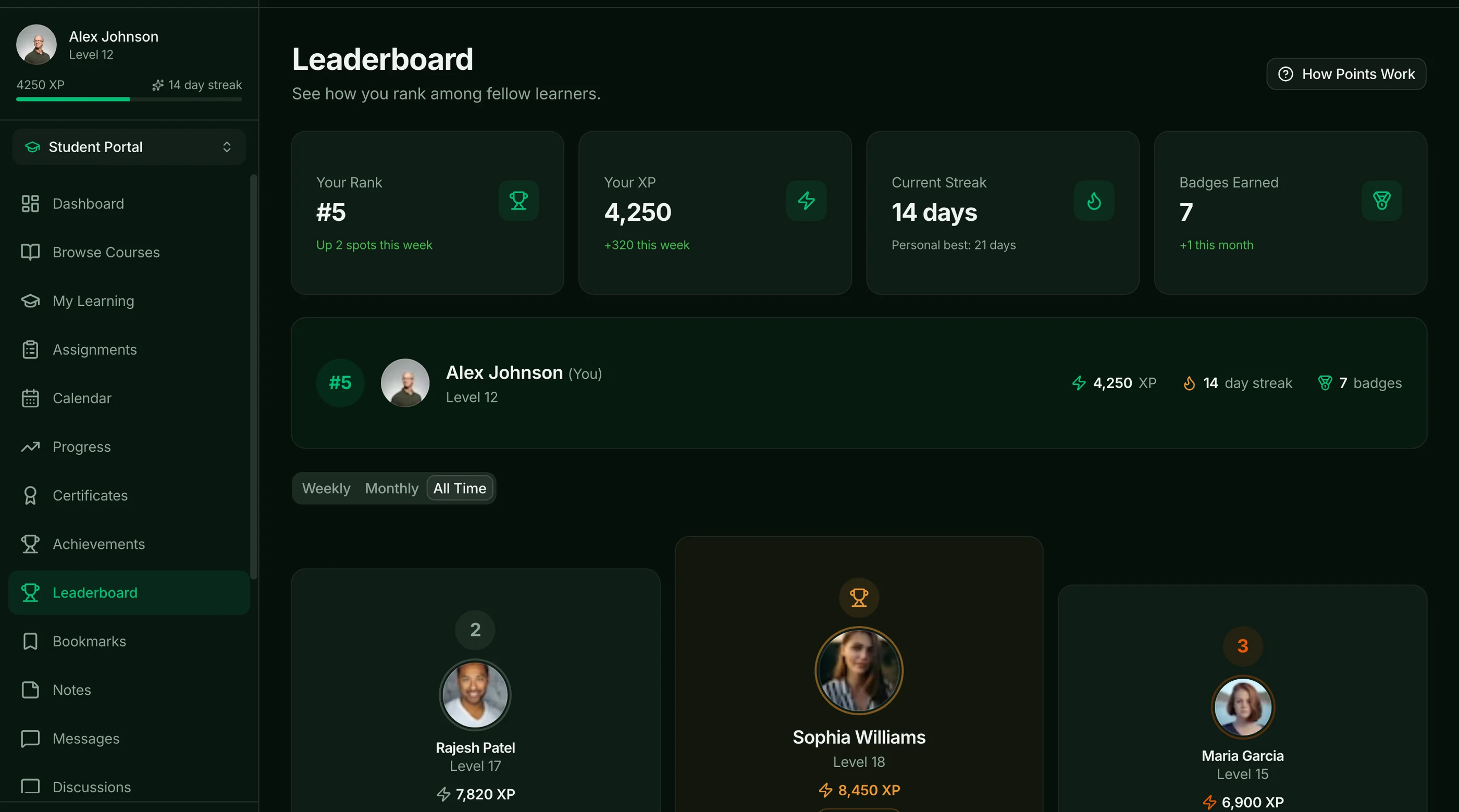
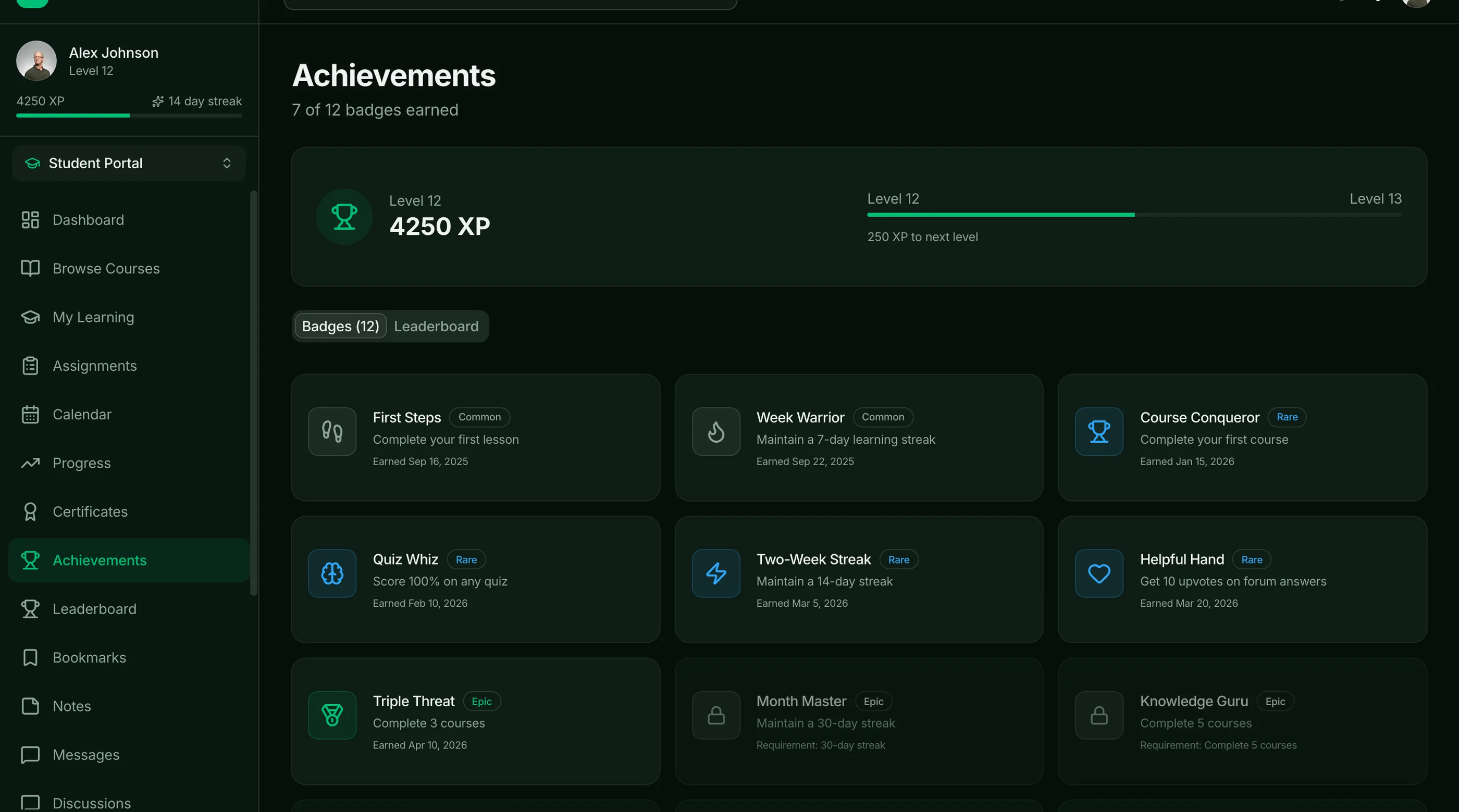
If you would rather not build all of that from scratch, the thefrontkit LMS Template ships 39 screens covering this list: a lesson player with module navigation and bookmarks, a quiz engine with timer and scored results, progress tracking with streaks and badges, threaded discussion forums, a drag-and-drop curriculum editor, and student, instructor, and admin dashboards. It is the frontend only, so video hosting, payments, and your database stay yours. Try the live demo.
Build Path 3: Start From the Full-Stack LMS Kit (Backend Included)
If the database and roles are the part you don't want to build, the Full-Stack LMS Kit ships them wired to Supabase:
- 55 routes across student, instructor and admin portals
- 38 tables with migrations, row-level security, triggers and seed data
- A three-role model (student, instructor, admin) with data scoped by row-level security
- A quiz engine with scoring, time tracking and pass/fail results, plus XP, badges, certificates and a leaderboard
- Discussions, live sessions, study groups and direct messages
- Server Actions for every mutation, across 17 action files
Video hosting and payments are still yours to connect. It starts at $332, with setup covered in the docs. Or have us launch it for you.
Common Pitfalls
Building a flat lesson list. Real courses have sections (modules). Without them, organizing 40 lessons becomes impossible. Build the hierarchy on day one.
Self-hosting video. Don't. Mux, Cloudflare Stream, and Bunny.net handle the edge cases (HLS, adaptive bitrate, mobile codecs, watermarking) that you don't want to build.
Skipping progress tracking until later. Then you launch and students can't tell what they've watched. The data model has to be in place from day one.
No certificate generation. Students expect a certificate when they finish. Without one, completion feels anticlimactic. Generate as PDF on completion.
Underbuilding the instructor dashboard. Instructors are the suppliers of your platform. If the tools are bad, they go elsewhere.
Ignoring mobile. Half of LMS usage is on phones (especially commute time). Test the video player and lesson UI on real mobile devices before launch.
Skipping captions. WCAG AA requires captions on all video. They also help SEO and ESL learners. Generate via Whisper or pay for human captions.
Adjacent Reads
- How to Build a SaaS in Next.js — broader build path
- Best LMS Templates 2026 — head-to-head comparison
- How to Build a Booking App in Next.js — adjacent build pattern
FAQ
How long does it take to build an LMS in Next.js from scratch?
A competent solo engineer at full speed builds a credible LMS in 12 to 16 weeks. Realistic timelines, including the quiz builder, progress tracking edge cases, and instructor dashboard, land closer to 16 to 22 weeks. The quiz builder alone is 3-4 weeks. An LMS kit removes 14 weeks.
Should I build my own LMS or use Teachable / Thinkific?
Hosted platforms (Teachable, Thinkific, Podia) handle 90 percent of standard course-platform needs. Build your own when you need deep customization (custom lesson types, unusual pricing models, marketplace features, integration into a larger product). For solo course creators starting out, hosted is faster. For developer-led businesses or products where the LMS is part of a bigger platform, build. Our custom LMS vs white-label LMS guide runs the three-year numbers for both.
What's the best video host for an LMS in 2026?
Mux for most cases — best DX, fair pricing, good mobile playback. Cloudflare Stream is comparable. Bunny.net is cheaper for high volume. Avoid YouTube embeds for paid courses (you lose monetization control and the experience looks unprofessional).
Do I need a quiz builder for an LMS in v1?
Depends on the course type. Knowledge-transfer courses (Excel, marketing tactics) often skip quizzes. Skill-development courses (coding, certifications) need them. Build it from day one if quizzes are part of your value prop; skip until v2 otherwise.
How do I handle course refunds?
Two policies: time-based (refund within N days of enrollment) and progress-based (refund if less than X% of lessons completed). Stripe handles the refund mechanics; your app enforces the policy. Build self-serve refunds in v1 — manual email refunds don't scale.
How many pages does a real LMS need?
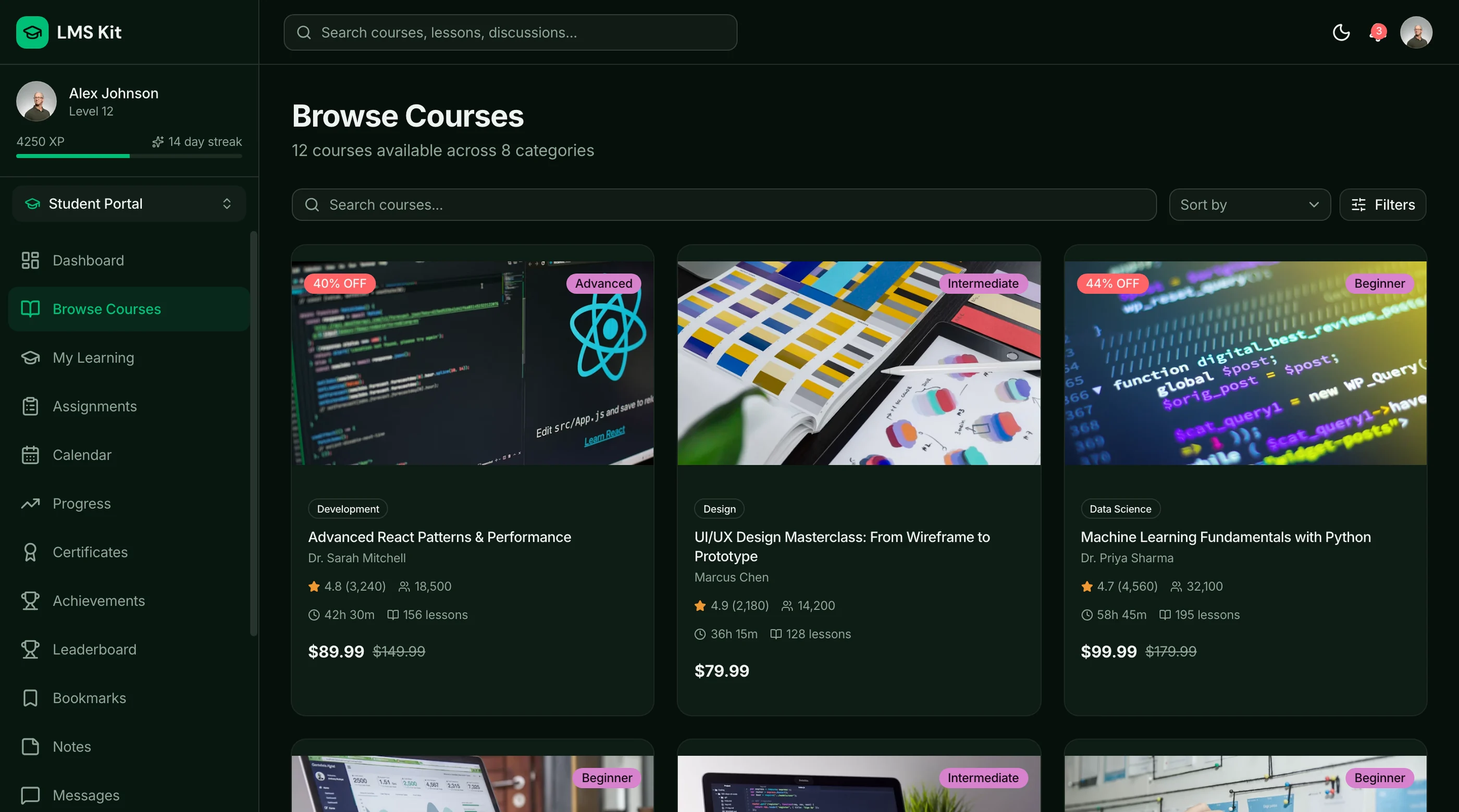
The minimum is around 25 pages: course catalog, course detail, lesson player, quiz player, certificate page, student dashboard, instructor dashboard with course CRUD, lesson editor, quiz builder, student roster, settings, billing, and auth (5 screens). A full-featured LMS with discussions, affiliate dashboards, and marketplace features lands at 40-55 pages.
Is there an LMS kit with the backend already built?
Yes. The Full-Stack LMS Kit wires the student, instructor and admin portals to Supabase: 38 tables with row-level security, Supabase Auth and Server Actions for every mutation. Video hosting and payment processing are still yours to connect.
Want it shipped without hiring a developer?
The build path above assumes you have engineers. If you don't, the team behind thefrontkit does done-for-you launches: we deploy the kit, apply your branding, and wire it to your stack. Fixed quotes, most builds ship in 2-4 weeks, from $1999.