Next.js HR Dashboard Template Guide 2026
How to Build an HR Dashboard with Next.js
HR dashboards have a reputation for being straightforward. "It's just employee data in tables, right?" Then you start building and realize it's one of the most screen-heavy applications you'll encounter.
An employee directory alone needs a list view, a grid view, profile pages with multiple tabs, an add/edit flow that handles dozens of fields, and an org chart that visualizes reporting lines. Add leave management, attendance tracking, performance reviews, onboarding checklists, and recruitment, and you're looking at 30-40 screens.
This guide covers the key patterns you'll encounter when building an HR dashboard with Next.js, and where the complexity actually lives.
The Screen Map: What You Actually Need
Before writing code, map out the screens. HR dashboards have a consistent structure regardless of the company or industry:
Core (must-have):
- Main dashboard with headcount stats and activity feed
- Employee directory (grid + list views)
- Employee profile with tabs (personal, job, documents, activity)
- Employee add/edit forms
- Org chart
- Settings (departments, roles, general)
- Auth (login, register, forgot password)
Leave management:
- Leave overview with balance cards
- Leave request admin with approve/reject
- Leave application form
- Leave policies and holiday calendar
- Team availability calendar
Attendance:
- Attendance dashboard with check-in/out
- Monthly heatmap calendar
- Attendance reports with charts
- Schedule and overtime settings
Performance:
- Performance overview with review status
- Review forms with rating scales
- Goals and OKR tracking
- Review cycle management
Onboarding:
- Onboarding dashboard with active hires
- Task checklists with progress tracking
- Template management
Recruitment:
- Job postings
- Applicant pipeline (kanban)
- Applicant profiles
That's roughly 48 screens for a complete HR dashboard. The thefrontkit HR Dashboard App covers all of these, which is useful as a reference even if you're building custom.
Pattern 1: Employee Directory with Multiple Views
The employee directory is the most visited screen in any HR dashboard. People managers check it daily. New employees use it to learn names and reporting lines. HR admins live in it.
You need two views: a card grid for visual browsing (faces and titles) and a table list for power users who want to sort, filter, and scan quickly. A toggle between them with a shared search and filter bar.
Directory Layout:
[Search Bar] [Department Filter] [Status Filter] [Grid|List Toggle]

Grid View:                    List View:
┌─────┐ ┌─────┐ ┌─────┐     Name | Department | Title | Status
│Photo│ │Photo│ │Photo│     ───────────────────────────────
│Name │ │Name │ │Name │     Jane Doe | Engineering | Sr Dev | Active
│Title│ │Title│ │Title│     John Smith | Design | Lead | Active
└─────┘ └─────┘ └─────┘
The key technical decisions:
Search. Client-side filtering works for companies under 500 employees. Beyond that, debounced server-side search with the API returning paginated results. For the initial build, client-side is simpler and lets you iterate on the UI faster.
Filters. Department, employment status (active, on leave, terminated), location, and job title. These should be URL-driven so filtered views are shareable. Use Next.js searchParams to persist filter state.
Profile pages. Each employee needs a detail view with tabs: personal information, job details (department, manager, start date, compensation tier), documents, and an activity timeline. The profile page is where HR admins spend the most time, so make it fast. Prefetch on hover if using Next.js App Router.
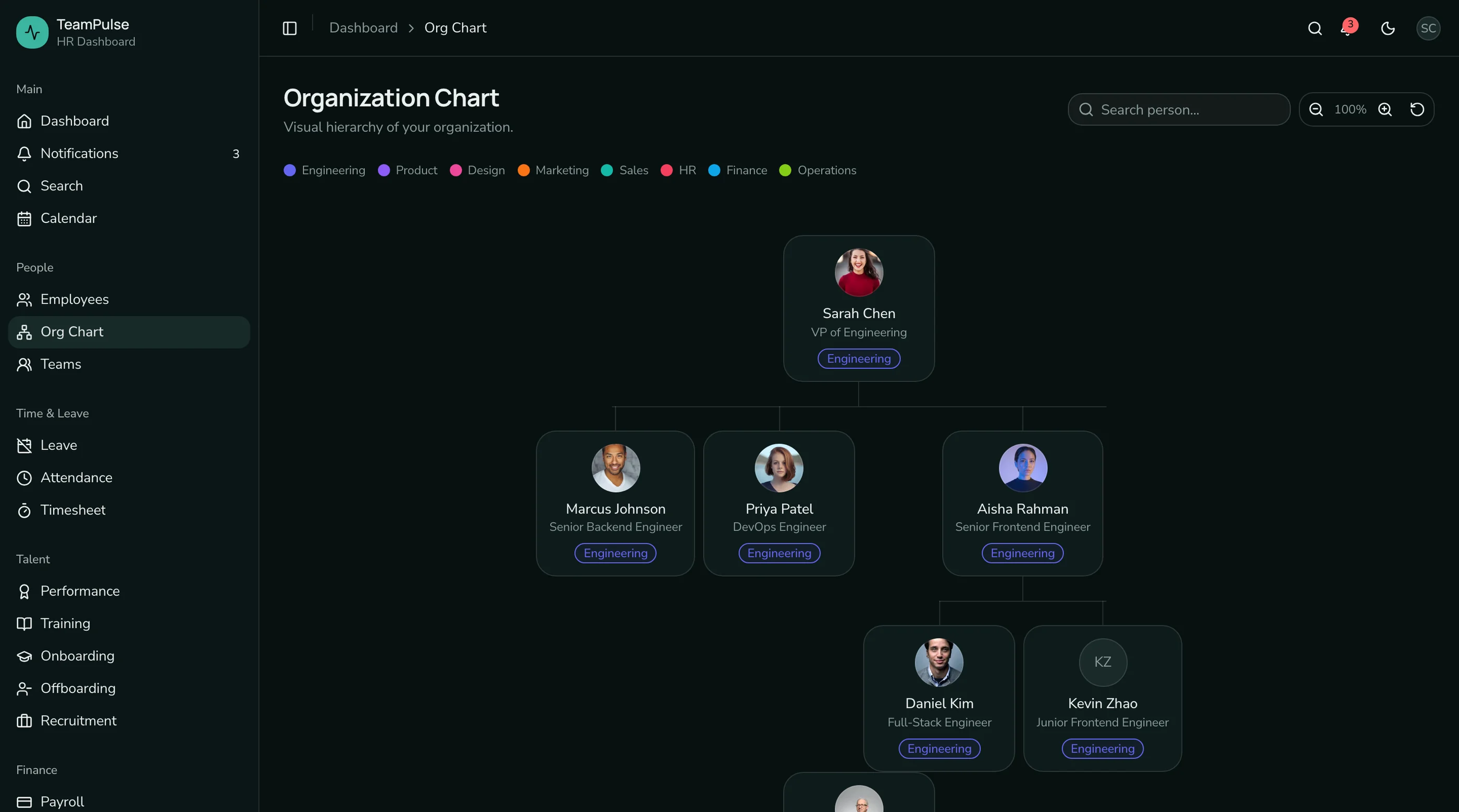
Pattern 2: Interactive Org Chart
The org chart is the feature that separates an HR dashboard from a generic admin template. It's also the trickiest to build well.
The data model is simple: each employee has a managerId field. The rendering is not. You need to:
- Build a tree structure from flat employee data
- Render nodes with connecting lines
- Handle zoom and pan for large organizations
- Support search with path highlighting
- Allow collapsing/expanding branches
- Color-code by department
CSS-based connecting lines work better than SVG for most org charts. Use ::before and ::after pseudo-elements on node containers. This keeps the rendering in the CSS layer and avoids the complexity of SVG path calculations.
Performance. For organizations over 200 people, render only visible nodes plus one level beyond the viewport. Virtualization libraries like react-window can help, but the tree structure makes them harder to apply than with flat lists. A simpler approach: collapse all branches by default and let users expand what they need.
The thefrontkit org chart uses CSS-based connecting lines with search highlighting, zoom controls, and department color coding. If you're building from scratch, study that implementation pattern before committing to an SVG-based approach.
Pattern 3: Leave Management Workflows
Leave management looks simple on the surface. An employee submits a request, a manager approves or rejects it. But the UI complexity comes from the surrounding context:
Balance tracking. Each employee has multiple leave types (annual, sick, personal, parental) with different balances, accrual rules, and carry-over policies. The leave overview needs to show all balances at a glance with visual indicators for low balances.
Team calendar. Before approving a leave request, managers need to see who else is out. A calendar view showing team availability prevents scheduling conflicts. Color-code by leave type and show the requesting employee's entry highlighted.
Approval workflows. The admin view needs bulk approve/reject. When you have 20 pending requests on a Monday morning, approving them one by one is painful. A table with checkboxes and batch actions is essential.
Policy administration. HR admins configure leave types, set balances per employment level, define blackout periods, and manage holiday calendars. This is a settings-heavy section that most templates skip.
Leave Overview Layout:
┌──────────┐ ┌──────────┐ ┌──────────┐ ┌──────────┐
│ Annual   │ │ Sick     │ │ Personal │ │ Parental │
│ 12/20    │ │ 8/10     │ │ 3/5      │ │ 0/90     │
│ ████░░   │ │ ████████ │ │ ████░    │ │ ░░░░░░   │
└──────────┘ └──────────┘ └──────────┘ └──────────┘

[Team Calendar]  [My Requests]  [Apply for Leave]
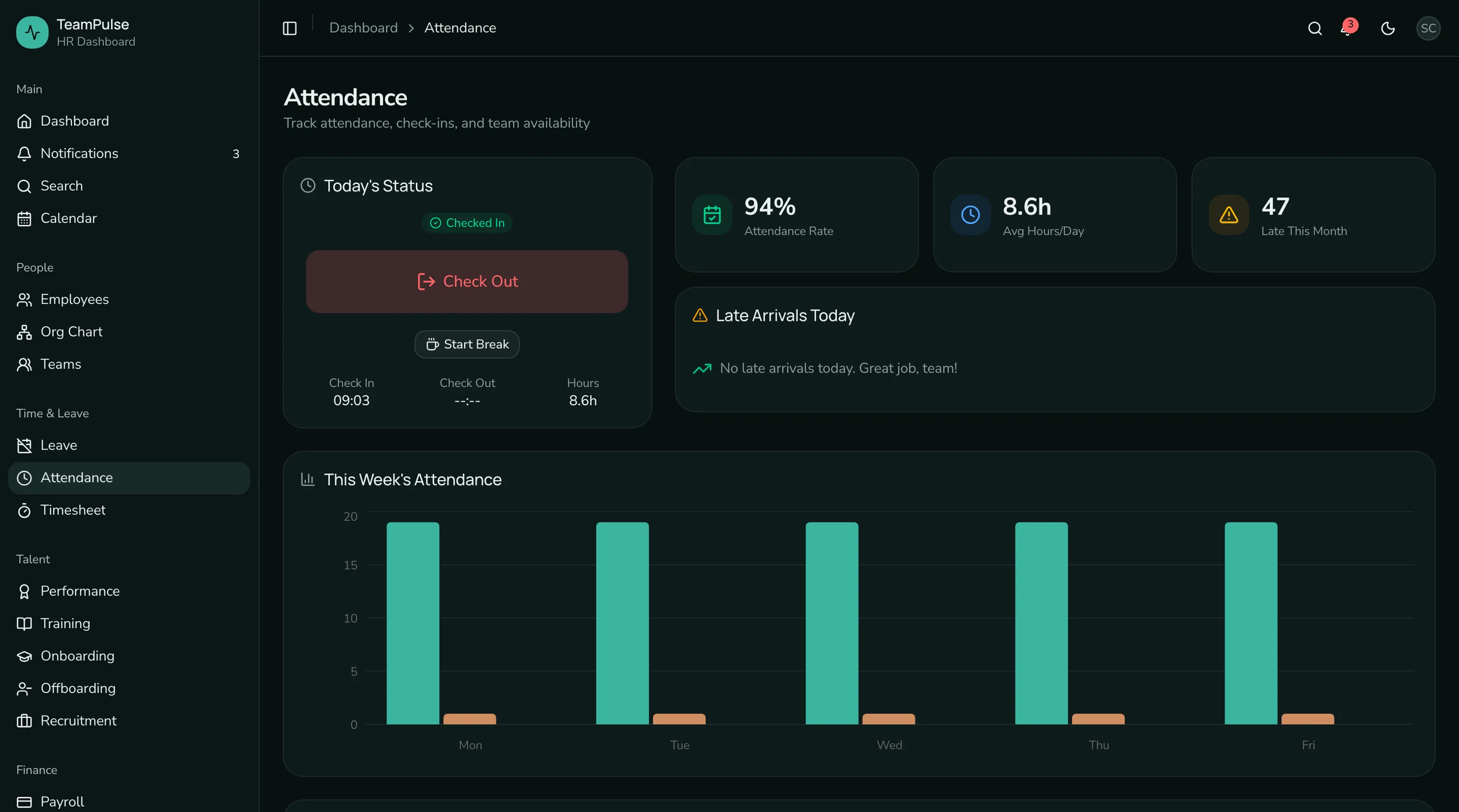
Pattern 4: Attendance Tracking with Heatmaps
Attendance dashboards need to show patterns, not just data points. A simple table of check-in/check-out times is useful for auditing but doesn't help managers spot trends.
Heatmap calendar. A monthly grid where each cell is color-coded by attendance status (present, absent, late, half-day, holiday, weekend). This visual pattern makes it immediately obvious when someone has attendance issues or when a team has low presence.
Check-in/check-out. A prominent button with live status. Show the current day's status (checked in at 9:02 AM, not yet checked out) with a running duration counter. This is the screen employees hit first thing in the morning.
Reports. Department comparison charts showing average attendance rates, late arrival frequency, and overtime patterns. Time-series charts for tracking trends. These reports are what HR presents to leadership.
Build the heatmap with a CSS Grid. 7 columns (days of the week), 5-6 rows (weeks in the month). Each cell gets a background color based on status. Tooltips show the detail. This is simpler than a full calendar library and gives you complete control over the visual treatment.
Pattern 5: Performance Reviews
Performance review UIs are form-heavy and state-heavy. The review cycle has phases (self-assessment, manager review, calibration, delivery), and the UI needs to reflect where each employee is in the process.
Review forms. Multi-section forms with different rating scales (star ratings for competencies, text areas for written feedback, numeric scores for goals). Each section might have different visibility rules (self-assessment sections the manager can't see until submission, calibration notes only visible to HR).
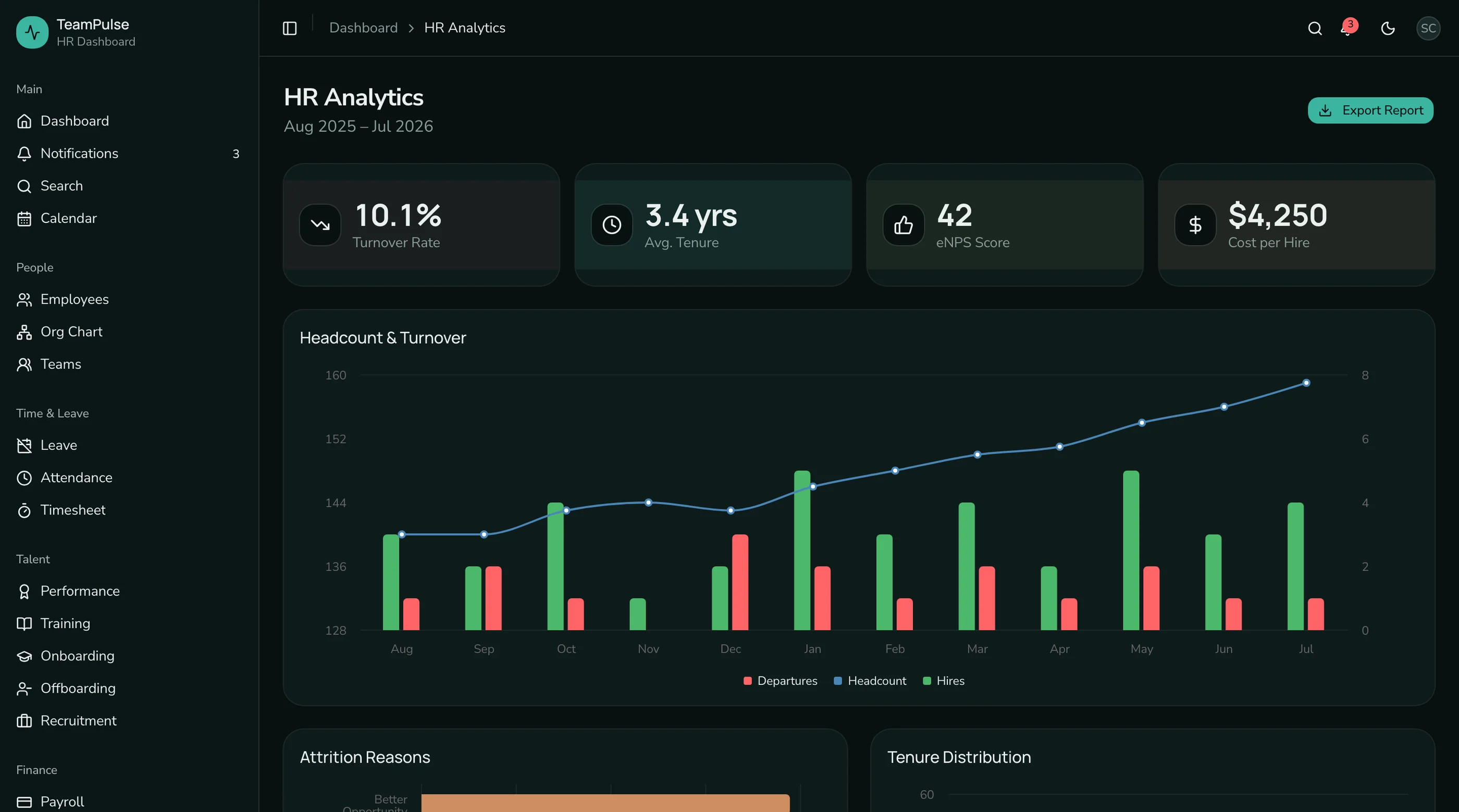
Goals and OKRs. Each employee has goals with key results, progress percentages, and status indicators. The goals view needs to show individual progress alongside team and department aggregates. This is where charts become valuable: bar charts for goal completion rates, radar charts for competency distributions.
Review cycles. An admin view showing all review cycles (annual review, mid-year check-in, probation review) with timeline phases and completion status. HR admins need to see at a glance who hasn't completed their review and send reminders.
This is the section that takes the longest to build from scratch. The data model is complex (reviews, review cycles, goals, key results, ratings, competencies), and the forms have conditional logic that's tedious to implement.
Pattern 6: Recruitment Pipeline
If your HR dashboard includes recruitment, you need a kanban board. Applicants move through stages (applied, screening, interview, offer, hired/rejected), and the visual board is how recruiters manage their pipeline.
The implementation is similar to a CRM deal pipeline. Columns for each stage, cards for each applicant, drag-and-drop between columns. Applicant cards should show name, role applied for, current stage duration, and a quick action menu.
Applicant profiles need an interview timeline (scheduled, completed, feedback submitted), rating scorecards from interviewers, resume/document storage, and communication history. This is a detail view similar to the employee profile but focused on the hiring process.
Job postings need a management view showing active positions, applicant counts per stage, and time-to-fill metrics.
The Build vs Buy Decision
Here's the honest math. Building 37 HR screens from scratch with a 2-person frontend team takes 4-6 months, accounting for design iteration, accessibility testing, and responsive breakpoints. That's before any backend integration.
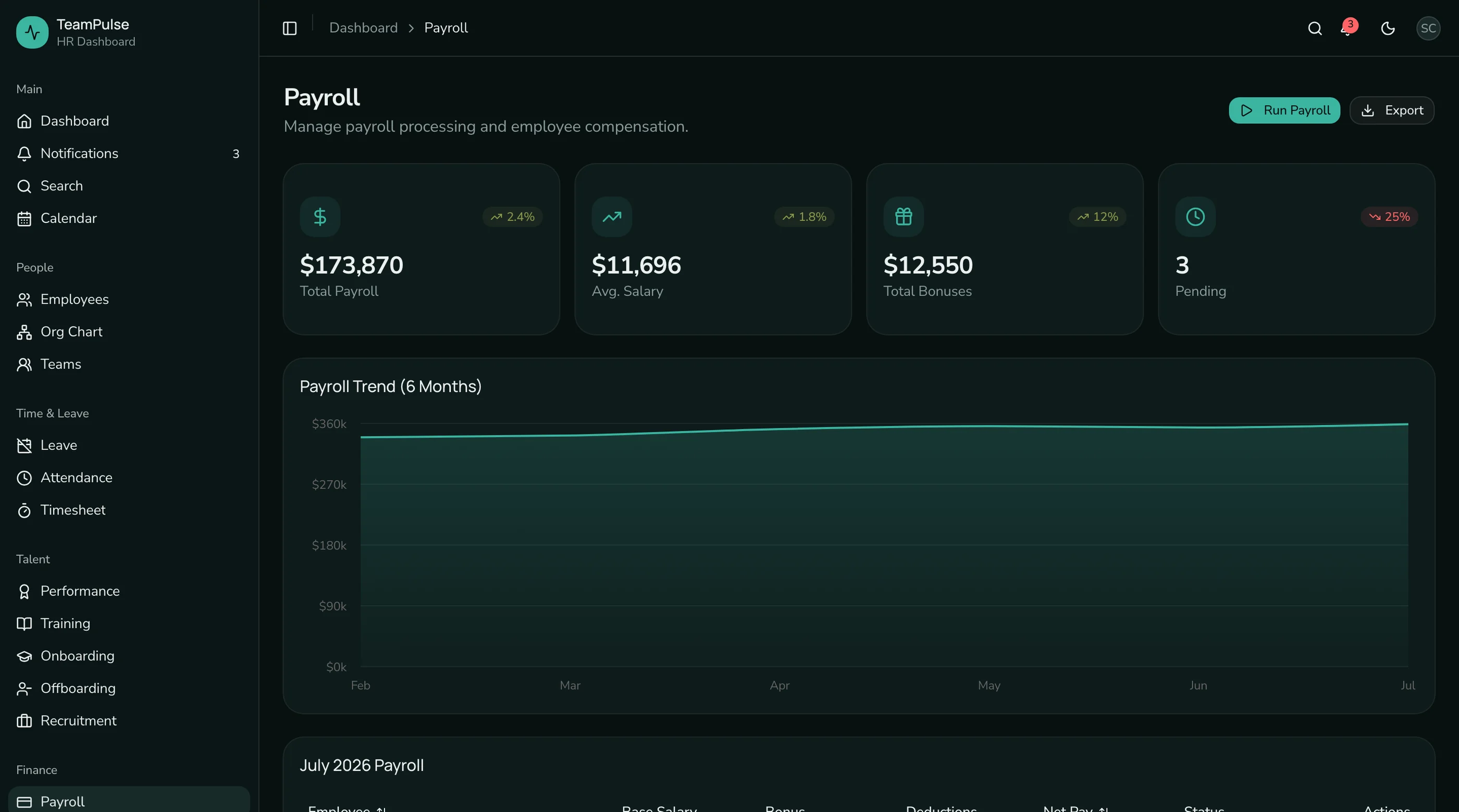
The thefrontkit HR Dashboard App gives you all 48 screens for $131, built on Next.js 16, Tailwind CSS v4, and shadcn/ui. It comes wired to Supabase (auth, Postgres and file storage), so you connect your own Supabase project and focus on the business logic that makes your HR platform unique.
If you're building an HR product, an internal people portal, or a client project with HR features, the template pays for itself in the first week. Try the live demo and see if the screen coverage matches what you need.
Tech Stack Recommendations
Framework: Next.js with App Router. The file-based routing maps naturally to HR dashboard sections. Server components work well for data-heavy views like the employee directory.
Styling: Tailwind CSS with design tokens. HR dashboards need to be rebrandable (white-label for clients, company colors for internal tools). A token-based system with oklch color values makes this a config change, not a redesign.
Components: shadcn/ui gives you accessible primitives for tables, forms, dialogs, and dropdowns. Radix UI underneath handles the accessibility layer. Don't build these from scratch.
Charts: Recharts for headcount trends, department distributions, attendance patterns, and performance analytics. It integrates cleanly with React and supports responsive containers.
Org chart: CSS-based rendering with pseudo-element connectors. Avoid heavy diagramming libraries unless you need features beyond what an HR org chart requires.
The patterns in this guide are the same ones used in the thefrontkit HR Dashboard. Whether you build from scratch or start with the template, these are the screens and interactions your HR dashboard needs to get right.
Want a step-by-step walkthrough? Read How to Build an HR Dashboard in Next.js for the realistic week-by-week build path.