Best AI Ops Dashboard Templates in 2026
Best AI Ops Dashboard Templates in 2026
Running AI in production is not the same as running AI in a notebook. The moment you deploy a model behind an API, you need to track which models are live, what versions are running, how many tokens each request consumes, what those tokens cost, whether prompts are performing well or drifting, what errors are hitting users, and how your team is collaborating on all of it. That is a model registry, prompt management library, token usage and cost analytics, request and response logging, error tracking with resolution workflows, a playground for testing, and team management with settings. Count the screens and you land somewhere between 10 and 15 for a real AI operations tool.
Building that frontend from scratch means months of work before you write a single line of inference logic. An AI ops dashboard template gives you the UI layer so you can focus on model orchestration, provider integrations, and the operational logic that actually differentiates your platform from the existing observability tools.
We compared 7 AI ops dashboard templates on what matters: model management depth, prompt engineering features, usage and cost monitoring, request logging, error tracking, accessibility, and whether the template has enough screens to support a real AI operations workflow or just a metrics page with a chart. For a deeper rubric on what to evaluate, see our How to Choose an AI Ops Dashboard Template guide.
Or skip the choice: get every kit for $749
If you're shipping more than one product, All UI Kits unlocks every Next.js kit on thefrontkit. The NeuralDesk AI Ops Dashboard, AI UX Kit, and AI Feedback Assistant, plus the SaaS Starter Kit, CRM Dashboard, HR Dashboard, Kanban PM, and 12 more. Plus every future kit. One-time payment, lifetime access, no subscription.
What Makes a Good AI Ops Dashboard Template?
Model management. A model registry is the foundation of any AI ops dashboard. You need deployment status indicators showing which models are live, staging, or deprecated. Version history with rollback context. Performance metrics including latency distributions, throughput, and error rates per model. If the template just lists model names in a table, it is a placeholder, not a registry.
Prompt engineering. Prompt management is where most AI teams spend their time in 2026. You need a prompt library with categorized templates, version control so you can track iterations, and A/B test result tracking so you know which prompt variant performs better. This is not a text editor. It is a workflow tool for iterating on the instructions that drive your models.
Usage and cost monitoring. Token usage without cost context is useless. You need cost breakdown by model and provider, trend charts for budget forecasting, model-to-model cost comparison, and the ability to spot anomalies before your monthly bill surprises the finance team. A good template shows usage and cost side by side, not in separate dashboards.
Request logging. Every API call to an LLM should be logged and searchable. You need request and response payloads, latency measurements, token counts per request, HTTP status codes, and advanced filtering by model, status, date range, and user. This is the audit trail for your AI system. If the template does not have a structured log viewer, you will build one yourself within the first week.
Error tracking. AI systems fail differently than traditional software. You get rate limit errors, context window overflows, content policy violations, timeout errors, and malformed response parsing failures. A good template categorizes these error types, tracks frequency over time, shows resolution status, and lets you drill down into individual error details with context.
Accessibility. AI ops dashboards are used by engineering teams who spend full workdays in the interface. Keyboard navigation for data tables, log viewers, and prompt editors is essential. Screen reader support for charts and metrics ensures the dashboard works for everyone on the team. WCAG AA color contrast in both light and dark modes is a production requirement, not a nice-to-have.
The 7 Best AI Ops Dashboard Templates
1. thefrontkit NeuralDesk
Best overall AI ops dashboard template for production applications.
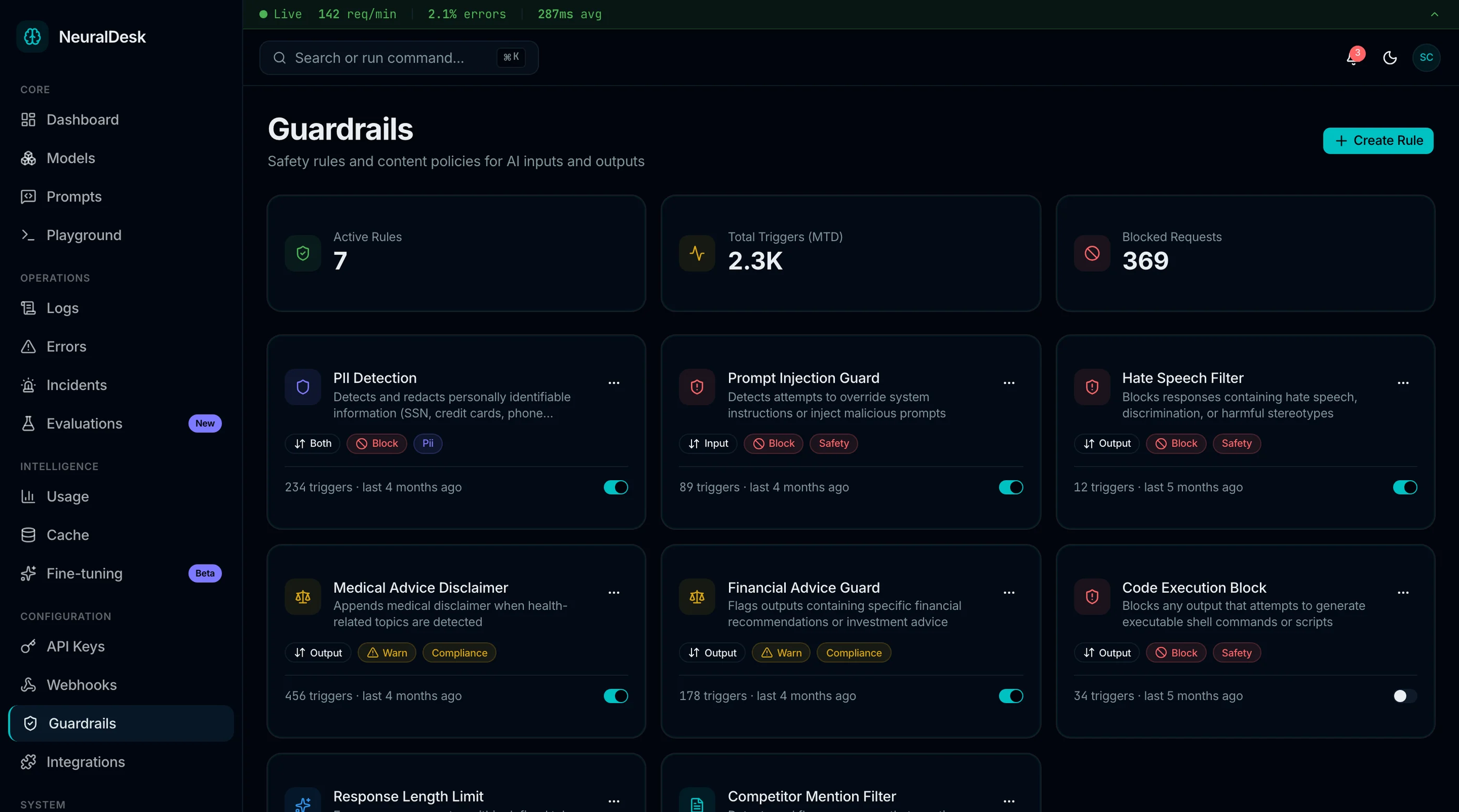
The NeuralDesk AI Operations Dashboard from thefrontkit is the most complete AI ops-specific template available. 21 screens covering the full operations workflow from model management to error resolution.
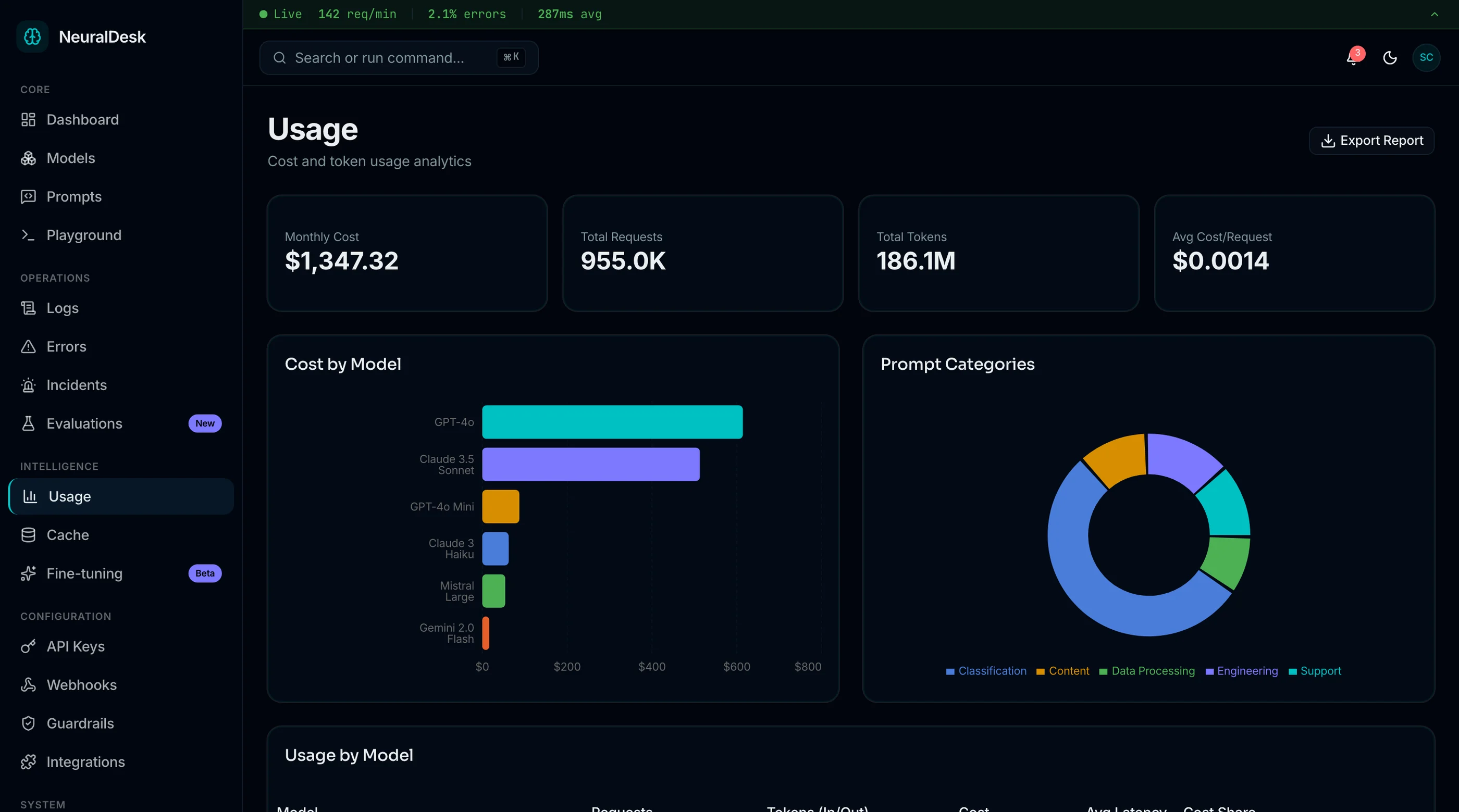
The model registry includes deployment status indicators, version history timelines, and performance metrics with latency and throughput views. The prompt library organizes templates by category with version control and A/B test result tracking so teams can compare prompt variants side by side. Token usage analytics break down cost by model and provider with trend charts for budget forecasting and model-to-model cost comparison.
The request logging screen is where NeuralDesk separates from generic dashboards. A structured log viewer shows request and response payloads, latency measurements, token counts, and HTTP status codes with advanced filtering by model, status, and date range. Error tracking categorizes error types, charts frequency over time, and tracks resolution status with drill-down to individual errors. The LLM playground provides UI for selecting models, configuring parameters like temperature and max tokens, writing prompts, and viewing responses.
Every screen is WCAG AA accessible. Data tables and log viewers support full keyboard navigation. Charts include screen reader annotations. Reduced motion mode tones down animations for users who need it. The oklch color token system means rebranding the entire dashboard takes a single hue change in globals.css.
Built on Next.js 16, Tailwind CSS v4, shadcn/ui, and Recharts. If you have used any other thefrontkit template, the component patterns and project structure are familiar. Try the live demo.
- Screens: 13
- Models: Registry with deployment status, versioning, performance metrics
- Prompts: Library with templates, versioning, A/B test results
- Usage: Token analytics with cost breakdown and model comparison
- Logs: Structured log viewer with latency, tokens, filtering
- Errors: Error types, frequency charts, resolution status
- Playground: LLM testing with parameter configuration
- Stack: Next.js 16, Tailwind CSS v4, shadcn/ui, Recharts
- Accessibility: WCAG AA
- Price: From $131
2. Langfuse
Best open-source LLM observability platform with a built-in UI.
Langfuse is an open-source LLM engineering platform that includes tracing, prompt management, and evaluation features. The dashboard provides trace views, cost tracking, and latency analytics. The prompt management system supports versioning and linked traces so you can see which prompt version generated which outputs.
The strength is in observability depth. Langfuse captures detailed traces of LLM chains, tool calls, and retrieval steps. The weakness as a "template" is that it is a full platform, not a UI kit. You deploy their infrastructure, use their data model, and build on top of their system. If you want a custom AI ops dashboard with your own design and architecture, you are extending their platform rather than owning the frontend.
- Screens: Platform UI (not a standalone template)
- Models: Trace-based model tracking
- Prompts: Versioned prompt management
- Usage: Cost and token analytics
- Logs: Detailed trace viewer
- Errors: Error traces within spans
- Stack: TypeScript, Next.js (self-hosted or cloud)
- Accessibility: Basic
- Price: Free (open source), cloud plans available
3. Shadboard
Best free admin dashboard adaptable to AI ops use cases.
Shadboard is a free Next.js admin dashboard template built on shadcn/ui. It includes analytics variants, data tables, chart components, and form layouts. None of these are AI-specific, but the component library is solid enough to serve as a starting point for building an AI ops dashboard.
You would use the data table components for a model registry, the chart components for usage analytics, and the form layouts for a prompt editor. The layout structure, sidebar navigation, and theme system are ready to go. The AI-specific screens, model management logic, prompt versioning, and log viewer, you build yourself.
- Screens: 5-8 (adaptable to AI ops)
- Models: Not included (data tables available)
- Prompts: Not included (form components available)
- Usage: Basic chart components
- Logs: Not included
- Errors: Not included
- Stack: Next.js, shadcn/ui, Tailwind CSS
- Accessibility: Basic
- Price: Free
4. Helicone UI
Best open-source option focused on LLM request logging.
Helicone is an open-source LLM observability tool that excels at request logging. The UI provides a detailed request viewer with latency, token counts, cost per request, and user attribution. The dashboard shows aggregate metrics for requests, tokens, and costs over time.
Where Helicone falls short as a template is scope. It covers logging and cost tracking well but does not include model management, prompt engineering, error tracking workflows, or a playground. Like Langfuse, it is also a platform rather than a UI kit. You adopt their architecture and data pipeline to use the UI. For teams who primarily need logging and cost visibility, Helicone is strong. For a full AI ops dashboard, you will need to build the remaining screens yourself.
- Screens: Platform UI (logging-focused)
- Models: Basic model filtering
- Prompts: Prompt tracking within requests
- Usage: Strong cost and token analytics
- Logs: Detailed request/response viewer (core strength)
- Errors: Basic error filtering
- Stack: TypeScript, Next.js
- Accessibility: Basic
- Price: Free (open source), cloud plans available
5. TailAdmin
Best free Tailwind dashboard with components you can repurpose for AI ops.
TailAdmin is a free Tailwind CSS admin dashboard with 40+ components, multiple dashboard variants, and a large selection of UI elements. The analytics dashboard includes charts, metric cards, and data tables that could serve as a foundation for AI ops metrics.
The gap is the same as Shadboard but wider. TailAdmin is a general-purpose admin template. You get chart components, tables, and layout patterns. You do not get anything AI-specific. Building a model registry, prompt library, log viewer, error tracker, and playground from TailAdmin's primitives is feasible but time-intensive. Budget 2-3 months of frontend work to cover the screens that a purpose-built AI ops template ships out of the box.
- Screens: 3-5 (repurposable for AI ops)
- Models: Not included
- Prompts: Not included
- Usage: Chart components available
- Logs: Not included
- Errors: Not included
- Stack: Next.js, React, Tailwind CSS
- Accessibility: Basic
- Price: Free, Pro from $49
6. Custom Grafana Dashboards
Best for infrastructure-level AI metrics if you already run Grafana.
Grafana is the standard for infrastructure monitoring, and many AI teams build custom dashboards for model latency, GPU utilization, token throughput, and error rates. With the right data sources (Prometheus, OpenTelemetry, custom exporters), you can build detailed operational views for AI systems.
The limitation is that Grafana dashboards are monitoring panels, not application UI. You cannot build a prompt library, model registry with version history, structured log viewer, or team management interface in Grafana. It also requires infrastructure setup: Prometheus or another metrics backend, data exporters from your AI pipeline, and Grafana deployment. For teams already running Grafana, adding AI-specific panels is natural. For teams building an AI ops product or internal tool, Grafana covers one layer of the stack.
- Type: Infrastructure monitoring (not an application template)
- Models: Metrics only (no registry UI)
- Prompts: Not supported
- Usage: Strong metrics and alerting
- Logs: Via Loki integration
- Errors: Alerting rules
- Stack: Grafana + Prometheus/Loki
- Accessibility: Grafana's built-in support
- Price: Free (open source), Grafana Cloud plans available
7. Google Sheets API Tracking
Best for very early-stage teams tracking a handful of API calls.
If you are calling one or two models, processing fewer than 1,000 requests per day, and your team is two people, a Google Sheet with columns for timestamp, model, prompt, tokens, cost, latency, and status might be all you need. Templates for API cost tracking exist on Google Sheets and Notion.
This stops working the moment you need filtering, drill-down, real-time updates, or more than one person looking at the data simultaneously. It is a pragmatic starting point for the earliest stage of an AI project. Move to a real dashboard when you outgrow it.
- Type: Spreadsheet (not a web template)
- Price: Free
Comparison Table
| Template | Screens | Model Registry | Prompt Engineering | Usage/Cost | Log Viewer | Error Tracking | Accessibility | Price |
|---|---|---|---|---|---|---|---|---|
| thefrontkit NeuralDesk | 13 | Full (versioning, status, metrics) | Full (library, A/B testing) | Full (cost breakdown, trends) | Full (structured, filterable) | Full (types, resolution) | WCAG AA | From $131 |
| Langfuse | Platform | Trace-based | Versioned | Cost + tokens | Detailed traces | Within traces | Basic | Free/Cloud |
| Shadboard | 5-8 | Not included | Not included | Basic charts | Not included | Not included | Basic | Free |
| Helicone | Platform | Basic filtering | Request-level | Strong | Core strength | Basic | Basic | Free/Cloud |
| TailAdmin | 3-5 | Not included | Not included | Chart components | Not included | Not included | Basic | Free/$49 |
| Grafana | N/A | Metrics only | Not supported | Strong alerting | Via Loki | Alert rules | Built-in | Free/Cloud |
| Google Sheets | N/A | Manual | Manual | Manual | Manual | Manual | N/A | Free |
Which AI Ops Dashboard Template Should You Pick?
For a production AI ops application with model management, prompt engineering, usage analytics, request logging, and error tracking, the thefrontkit NeuralDesk template covers the most ground. 21 screens is enough to build a complete AI operations dashboard without starting from scratch. Try the demo.
For open-source observability where you want a hosted platform rather than owning the frontend code, Langfuse or Helicone give you LLM tracing and logging out of the box. Expect to work within their architecture and data model.
For a free starting point where you will build the AI-specific screens yourself, Shadboard or TailAdmin give you layout primitives, data table components, and chart libraries. Budget 2-3 months to build model management, prompt engineering, and log viewer screens from their generic components.
For infrastructure monitoring layered on top of your existing observability stack, Grafana with custom panels covers model latency, token throughput, and cost metrics. It will not replace an application-level AI ops dashboard but complements one.
For a very early-stage project with minimal API calls and a small team, start with a Google Sheet. Build the real dashboard when you have enough traffic and complexity to justify it.
Common Questions
Can I connect an AI ops dashboard template to OpenAI, Anthropic, or other LLM providers?
Yes. Templates like NeuralDesk use typed TypeScript interfaces for all data. You replace the seed data imports with API calls to any LLM provider, whether that is OpenAI, Anthropic, Google, Cohere, or a self-hosted model. The UI is completely backend-agnostic. The data shapes for model registries, usage metrics, and request logs map naturally to what these providers return.
Do these templates support real-time log streaming?
The UI patterns for real-time logs are included in templates like NeuralDesk, with structured log viewers that support filtering, sorting, and status indicators. The actual real-time streaming is a backend concern. You would connect to a WebSocket, server-sent events, or polling endpoint that pushes new log entries to the frontend. The template provides the display layer; you provide the data pipeline.
Does the playground actually send requests to real models?
In template form, no. The playground provides the full UI for selecting models, configuring parameters like temperature, max tokens, and top-p, writing prompts, and viewing responses. All data is mock. You wire it to your own LLM API to make it functional. This typically takes a single API route that proxies requests to your model provider.
How many screens does a production AI ops dashboard need?
A minimum viable AI ops dashboard needs 8-10 screens: main dashboard, model list, model detail, prompt library, usage analytics, request logs, error tracking, and settings. A full-featured platform adds a playground, team management, individual prompt detail views, comparison views, and auth flows, landing closer to 13-15 screens. The thefrontkit NeuralDesk template ships with 21 screens covering all of these.
What is the difference between an AI ops dashboard template and a platform like LangSmith?
A template is source code you own and customize. You control the design, architecture, hosting, and data flow. A platform like LangSmith is a hosted service you subscribe to. Platforms give you instant functionality but limit customization and create vendor lock-in. If you are building an AI ops product to sell, building an internal tool with specific requirements, or need to keep data on your own infrastructure, you need a template. If you want turnkey observability and are comfortable with a vendor dependency, a platform works.