Choosing a Next.js Inventory Template (2026)
How to Choose a Next.js Inventory Management Template in 2026
Most "inventory templates" online are a product list with a stock-quantity column. That's not inventory management. That's a spreadsheet.
A real inventory management dashboard runs a warehouse: product catalog with variants and reorder points, purchase order workflows with receiving against the original PO quantity, multi-warehouse stock with transfers between locations, supplier directory with lead times and performance metrics, and analytics that surface stockouts before they happen. Building that from scratch with Next.js takes 6 to 10 weeks of frontend work.
This guide covers what actually matters in a Next.js inventory management template, the build-vs-buy math, and a practical evaluation checklist.
Or skip the choice: get every kit for $749
If you're shipping more than one product, All UI Kits unlocks every Next.js kit on thefrontkit. The full Inventory Management Kit (catalog, purchase orders, multi-warehouse), plus the SaaS Starter Kit, CRM Dashboard, HR Dashboard, E-commerce, AI UX, Blog CMS, and 11 more. Plus every future kit. One-time payment, lifetime access, no subscription.
What a Real Next.js Inventory Management Template Needs
A product list isn't inventory management. Here's what separates production-ready coverage from a demo.
Product Catalog with Real Depth
The catalog is where warehouse staff spend most of their time. What separates a real catalog from a static product list:
- List + detail views with search across SKU, name, and description fields
- Category browsing with hierarchy support (electronics > phones > accessories)
- Filters by stock status (in stock / low / out), supplier, warehouse, category
- Product detail pages showing current stock levels across all warehouse locations, reorder points, supplier info, and variant details
- Variants for products that come in multiple SKUs (size, color, configuration)
- Add and edit flows with form validation and image upload
- Reorder point indicators so the staff knows when to restock
A product catalog that's just a sortable table will collapse the moment you import 1,000 SKUs.
Purchase Order Workflows with Receiving
A PO is more than a list of items the vendor will send. The minimum viable PO workflow:
- PO creation with line items, quantities, supplier selection, expected delivery date
- Status tracking from draft → ordered → partially received → received → closed
- Receiving workflow where staff log received quantities against the PO line items (because vendors short-ship constantly)
- Discrepancy tracking for items that arrived damaged or in wrong quantities
- Cost capture at receipt so inventory valuation stays accurate
- PO history linked to each supplier and each product
The receiving workflow is what separates inventory software from a spreadsheet. Without it, the team falls back to Excel within a week.
Multi-Warehouse Stock with Transfers
Single-warehouse inventory only works for businesses with one location. The moment you grow to two, single-warehouse software stops working. Real multi-warehouse coverage:
- Warehouse directory with location details, capacity tracking, and zone breakdown
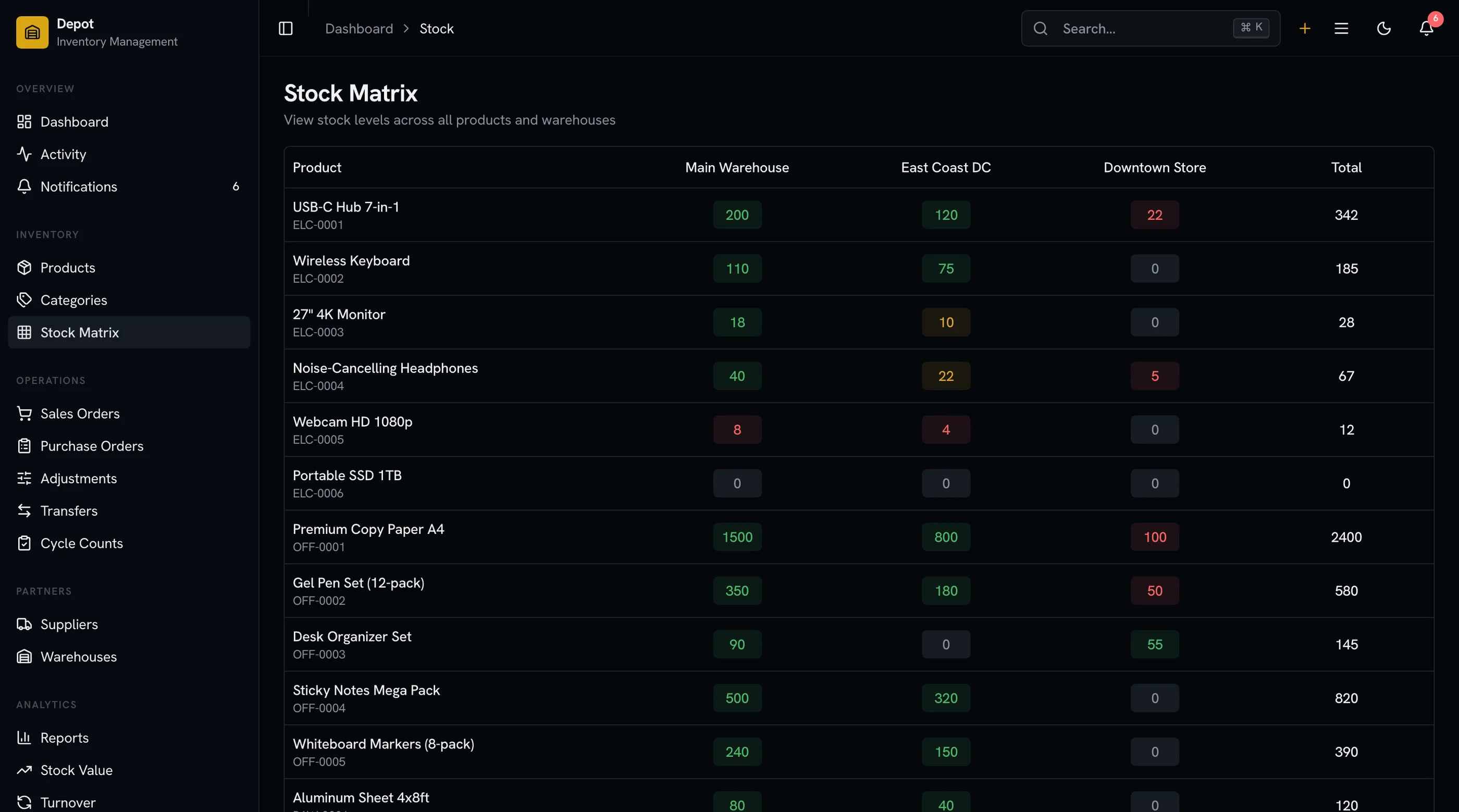
- Stock distribution view showing how each SKU is spread across locations
- Stock transfer workflows between warehouses with in-transit status
- Stock adjustments for damages, losses, or found inventory with reason codes
- Audit trail showing every stock change with who, when, and why
Multi-warehouse is the single most under-served feature in inventory templates. Most ship single-warehouse only and force a hacky workaround.
Supplier Directory and Performance Tracking
Supplier relationships are operational data, not contact data. Real supplier management:
- Supplier records with contact info, terms, payment details
- Lead time tracking computed from actual PO history (not vendor claims)
- On-time delivery rate per supplier
- Quality metrics (defect rate, return rate) where you capture them
- Order history linked to each supplier
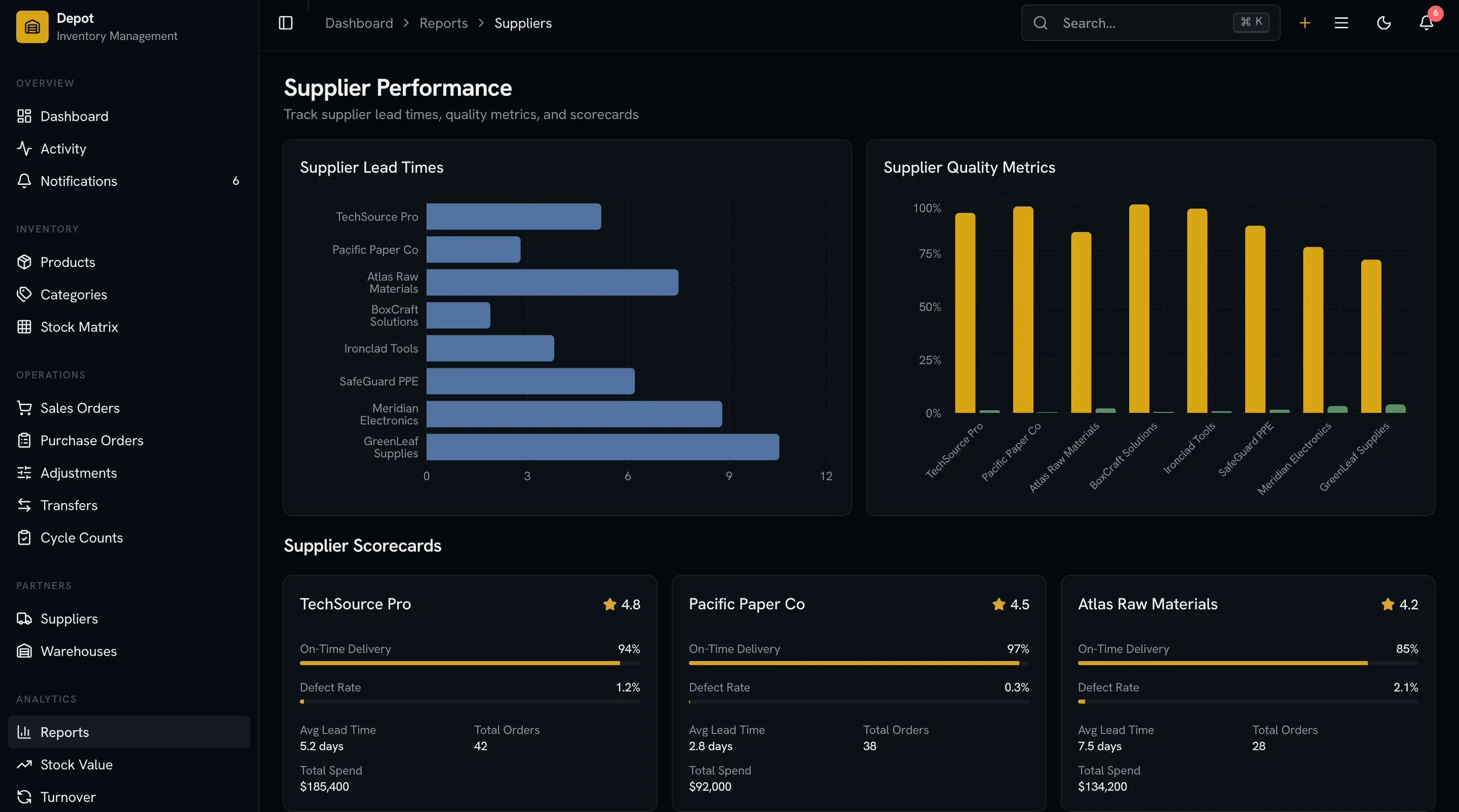
- Performance comparison so the team can rank vendors
If the supplier section is a contact list, it's not enough. If it surfaces lead times and reliability, it's actually useful for procurement decisions.
Reports and Analytics That Catch Stockouts Early
Most inventory reporting is reactive: "we ran out of X last week, why?" Real analytics surface the issue before stockout:
- Stock value report showing inventory dollars by category, warehouse, and supplier
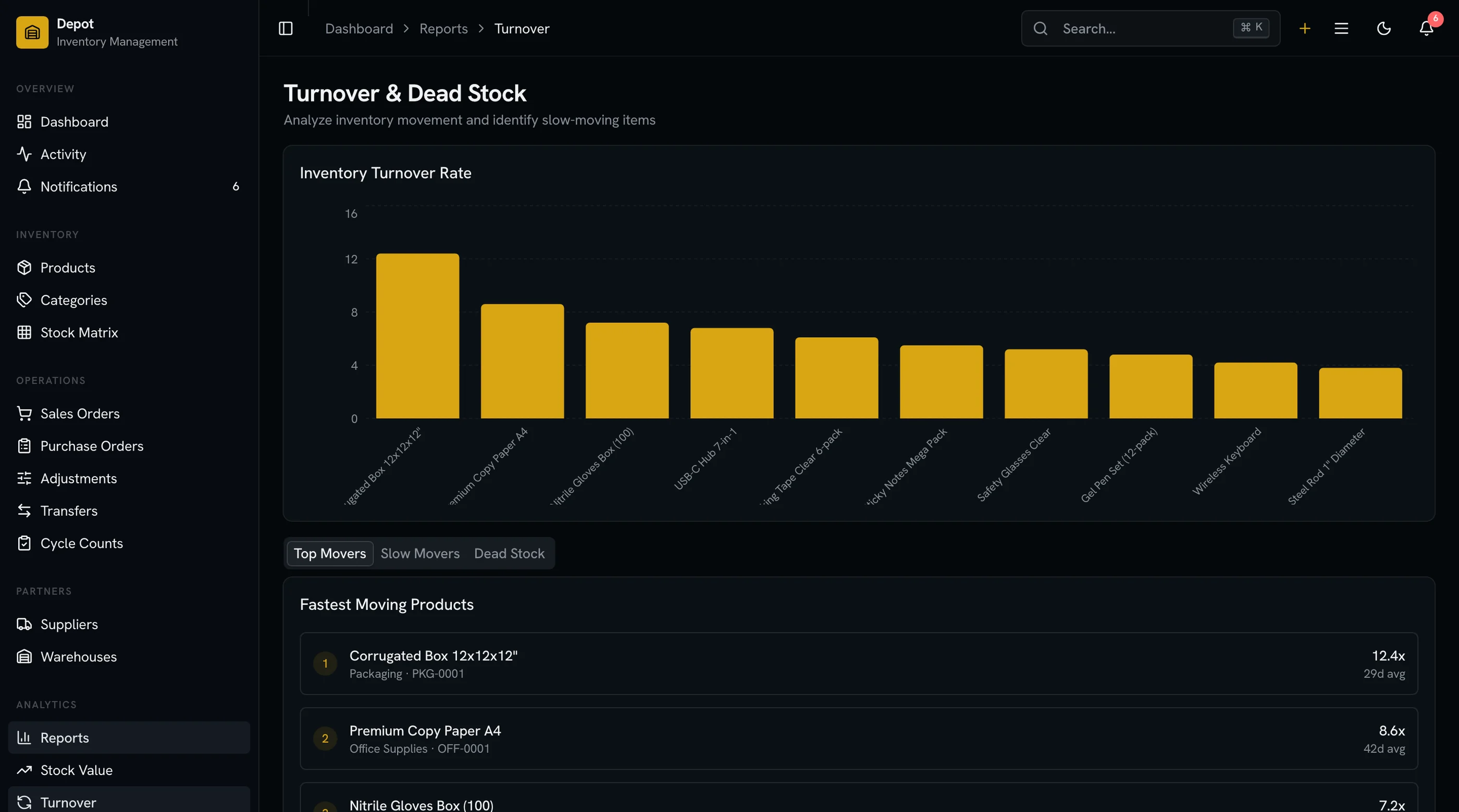
- Turnover analytics identifying slow-moving stock that's tying up capital
- Supplier performance report ranking vendors on lead time and reliability
- Reorder forecast projecting when each product will hit reorder point based on consumption velocity
- Stockout alerts when products fall below threshold
A dashboard with one chart doesn't prevent stockouts. A dashboard with forecasting does.
Accessibility for Long-Hour Warehouse Use
Warehouse staff often work 8-hour shifts in the inventory system. The basics:
- Keyboard navigation across the product table (most warehouse work is fast keyboard editing)
- Screen reader announcements for stock level changes and PO status updates
- WCAG AA color contrast on stock status pills and low-inventory warnings
- Color not as the only differentiator (red doesn't help colorblind staff identify "out of stock")
- Tab order that matches actual workflow (scan SKU, then quantity, then warehouse)
This isn't a procurement requirement but it's a real productivity multiplier for staff using the tool all day.
Build vs Buy: Honest Math
A weekend-quality inventory dashboard with a product list and stock count is achievable in two weeks. A production-ready Next.js inventory management template covering the criteria above is 6 to 10 weeks of frontend work for a competent developer.
The math:
- Build it yourself: 6–10 weeks × your loaded rate, plus maintenance
- Buy a paid template ($79–$299): you skip the frontend; you still wire up the database, barcode scanning, and integrations
- Use a hosted platform (Cin7, Fishbowl, Zoho Inventory): $100–$500/month per user, locked into their UX
The decision usually comes down to:
- Is inventory your product or your internal tool? Selling inventory software → build/buy. Internal → use a hosted platform.
- Do you need integrations the hosted platforms don't have? Shopify-only, Amazon-only, or generic ERP? Use the platform. Custom WMS, IoT sensors, or industry-specific compliance? Build/buy.
A Practical Evaluation Checklist
Before committing to any Next.js inventory management template, run it through:
- Open the demo. Look at the product list. Are there filters by stock status, category, and warehouse?
- Open a product. Does the detail page show stock per warehouse, reorder point, and supplier info?
- Look for a purchase order section. Click on a PO. Is there a receiving workflow that lets you log received quantities against line items?
- Open the warehouses section. Is there more than one warehouse? Can you see stock distribution?
- Find stock transfers. Is there a flow that moves stock between warehouses with in-transit status?
- Check the supplier section. Does each supplier show lead time and performance, or just contact info?
- Open reports. Are there separate views for stock value, turnover, and supplier performance?
- Check the screen count. Under 25 screens means you're building the rest.
Templates that pass all eight are worth the price. Most fail on at least four.
How the Inventory Management Kit Approaches Each Requirement
The Inventory Management Kit was built specifically to clear this checklist. 32 screens covering catalog, purchase orders, suppliers, warehouses, stock operations, reports, settings, and auth — all on Next.js 16, Tailwind CSS v4, shadcn/ui, and Recharts.
The product catalog ships with search across SKU/name/description, category hierarchy, stock-status filters, and detail pages showing per-warehouse stock with reorder points and supplier info.
Purchase orders include the full create → ordered → partially received → received → closed lifecycle. The receiving workflow lets staff log actual received quantities against PO line items, capture discrepancies, and adjust costs.
Multi-warehouse support is built in. Warehouse directory with capacity tracking, stock distribution per SKU per warehouse, and transfer workflows with in-transit status. Stock adjustments include reason codes and full audit trail.
Supplier directory tracks lead time computed from PO history, on-time delivery rate, and order history. Suppliers are ranked on performance metrics for procurement decisions.
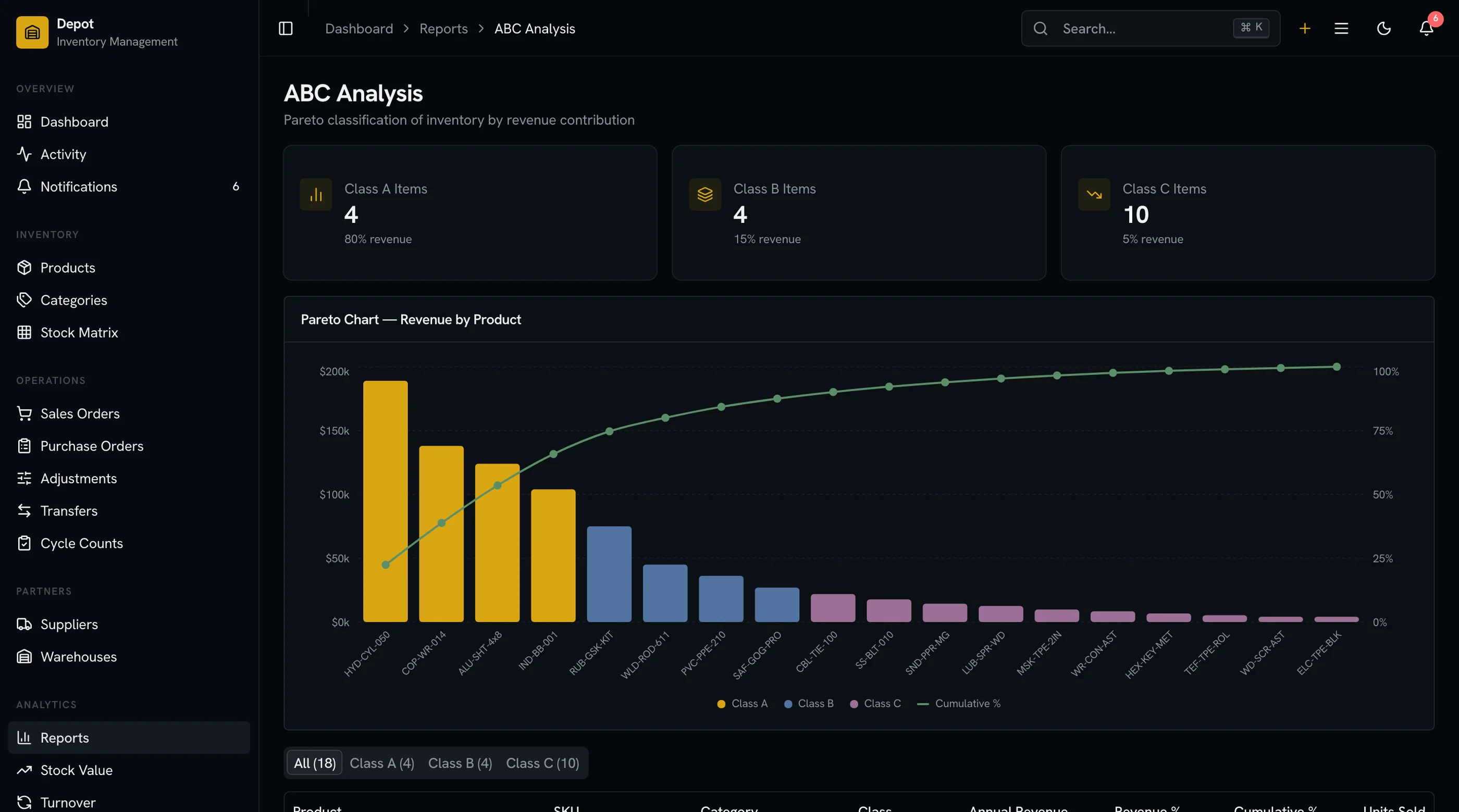
Reports cover stock value (by category, warehouse, supplier), turnover analytics for slow-moving stock, supplier performance comparison, and reorder forecasting based on consumption velocity.
WCAG AA accessibility verified across the product table, PO workflows, and stock adjustment flows.
Try the live demo to evaluate the receiving workflow specifically — that's where most templates fall apart.
Common Mistakes When Building From Scratch
Treating PO as "an order form." A PO is a workflow with receiving, discrepancy handling, and cost capture. Build the receiving flow first — without it, the rest is decoration.
Single-warehouse model that you "extend later." Multi-warehouse is a fundamental data model decision. Adding it to a single-warehouse design means rewriting the data layer.
Skipping stock adjustments. Damaged, lost, and found inventory are daily reality. A system without adjustment workflows forces staff back to spreadsheets to reconcile.
Forgetting the audit trail. Every stock change should be logged with who, when, and why. Adding audit later means losing all historical changes.
Underestimating barcode and SKU complexity. SKUs aren't always unique strings. Some products have multiple SKUs (manufacturer + retailer codes). Build the data model to allow this.
Adjacent Reads
- Best Inventory Management Templates 2026 — head-to-head comparison of 7 options
- Best React E-commerce Templates 2026 — for the storefront alongside inventory
- Best Next.js Dashboard Templates 2026 — broader dashboard category
- Next.js Boilerplate vs Building From Scratch — the broader build-vs-buy decision
FAQ
What is a Next.js inventory management template?
A Next.js inventory management template is a pre-built warehouse management UI that runs on the Next.js framework. A complete template includes the product catalog with variants and stock levels, purchase order workflows with receiving, multi-warehouse stock with transfers, supplier directory with performance tracking, stock adjustments with audit trail, and reports for stock value and turnover. Using one means you skip 6 to 10 weeks of frontend work and focus on your ERP integrations, barcode scanning, and the warehouse logic that differentiates your system from Cin7 or Fishbowl.
Can I connect an inventory template to my existing ERP or e-commerce backend?
Yes, if the template uses typed TypeScript interfaces. Replace the seed data imports with API calls to Shopify, Amazon Seller Central, NetSuite, or your own backend. The UI layer should be backend-agnostic. Templates with hardcoded mock data are harder to integrate; look for clearly defined data interfaces.
How many screens does a real inventory management system need?
Minimum 25 screens: dashboard, product list, product detail, product edit, category management, PO list, PO detail, PO receiving, supplier list, supplier detail, warehouse list, warehouse detail, stock overview, stock adjustments, stock transfers, 3-4 report pages, settings, and auth. A full-featured system runs 30 to 40+ screens. The Inventory Management Kit ships 32 screens.
Do I need multi-warehouse support if I only have one location?
If you're sure you'll never expand, no. If there's any chance you'll add a second location (or use third-party warehouses, 3PL providers, or drop-shipping), build multi-warehouse from day one. Retrofitting it is significantly harder than designing for it.
What's the difference between inventory management and warehouse management?
Overlapping but distinct. Inventory management tracks what you have and what you've ordered. Warehouse management tracks where things physically are inside a warehouse (bin locations, pick paths, slotting). Most teams need inventory management. Only operations with large warehouses need full WMS. Templates labeled "inventory management" rarely include WMS features.
Is barcode scanning part of the template?
Usually no. Templates ship the UI but the barcode scanning depends on hardware (USB scanners that act as keyboard input, or mobile camera-based scanning). The template should have a SKU input field that accepts scanned codes; the actual scanning hardware is your integration.