Best Inventory Management Templates 2026
Best Inventory Management Templates in 2026
Building an inventory management system from scratch is one of the most screen-heavy frontend projects you can take on. You need a product catalog with variants, categories, and real-time stock levels. Purchase order management with creation workflows, status tracking, approval chains, and receiving against POs. Multi-warehouse support with capacity utilization, zone mapping, and stock distribution views. Stock operations including adjustments with reason codes, transfers between locations, and a full audit trail. A supplier directory with performance metrics, lead times, and order history. Reports covering stock value, turnover rates, and supplier performance. Plus a settings suite for teams, notifications, and general configuration.
That's 25-35 screens before you write a line of backend code. And inventory systems are unforgiving: a missing stock adjustment screen or a receiving workflow that doesn't track quantities against the original PO means your users fall back to spreadsheets within a week. An inventory management template gives you the UI layer so you can focus on your ERP integrations, barcode scanning, and the warehouse logic that makes your system different from Cin7 or Fishbowl.
We compared 7 inventory management templates on what matters: product catalog depth, purchase order workflows, warehouse management, stock operations, supplier tracking, accessibility, and whether the template actually has enough screens to run a real inventory operation or just a product list with a chart.
Or skip the choice: get every kit for $749
If you're shipping more than one product, All UI Kits unlocks every Next.js kit on thefrontkit. The full Inventory Management Kit (catalog, purchase orders, multi-warehouse), plus the SaaS Starter Kit, CRM Dashboard, HR Dashboard, E-commerce, AI UX, Blog CMS, and 11 more. Plus every future kit. One-time payment, lifetime access, no subscription.
What Makes a Good Inventory Management Template?
Product catalog. The product list is where warehouse staff spend most of their time. You need list and detail views with search across SKU, name, and description. Category browsing with hierarchy support. Filters for stock status, supplier, and warehouse. Individual product pages showing current stock levels across locations, reorder points, supplier info, and variant details. Add and edit flows with form validation. If the product catalog is just a data table, you're building the real catalog yourself.
Purchase orders. Creating a PO is the easy part. A production inventory system needs the full lifecycle: draft creation with line items and supplier selection, status tracking from draft to approved to shipped to received, and a receiving workflow where staff verify quantities against the original order. Most templates skip receiving entirely, which is exactly where inventory accuracy breaks down in practice. You also need PO detail views, edit capabilities for pending orders, and history tracking.
Warehouse management. If your inventory lives in one closet, any template works. If you operate two or more locations, you need multi-warehouse support with location details, capacity utilization indicators, stock distribution views per warehouse, and zone mapping. Warehouse detail pages should show which products are stored where and how much capacity remains. Adding multi-warehouse support after the fact means restructuring your entire data model and every screen that displays stock levels.
Stock operations. Stock adjustments and transfers are the daily reality of warehouse work. Damaged goods, miscounts, items moving between locations. You need adjustment forms with quantity, reason codes, and date tracking. Transfer workflows that move inventory between warehouses with confirmation steps. An audit trail showing every stock change with who, when, why, and how much. Without these screens, your inventory numbers drift from reality within days.
Supplier management. A contact list is not supplier management. You need a directory with performance ratings, average lead times, fill rates, and order history. Supplier detail pages showing all POs associated with that vendor. New supplier registration forms. This data drives procurement decisions: which supplier to use for the next PO depends on who delivered on time last quarter.
Accessibility. Inventory systems are used in warehouse offices, on tablets in aisles, and at receiving docks. Staff cycle through product tables, order forms, and stock adjustment screens hundreds of times per day. Keyboard navigation for data tables, screen reader support for forms, and proper labeling are not optional. Enterprise customers and logistics companies will audit for WCAG compliance before deploying any warehouse tool.
The 7 Best Inventory Management Templates
1. thefrontkit Inventory Management Kit
Best overall inventory management template for production applications.
The Inventory Management Kit from thefrontkit is the most complete inventory-specific template available. 32 screens covering the full inventory lifecycle from product catalog to warehouse operations to supplier analytics.
The product catalog includes a searchable list with filters for stock status, category, and supplier. Individual product detail pages show stock levels across warehouses, supplier information, reorder points, and variant details. Category management supports hierarchy browsing. The add and edit flows have full form validation with proper error handling.
Purchase order management goes beyond basic creation. You get the full PO lifecycle: draft creation with line items, supplier selection, and cost totals. Status tracking from draft through approved, shipped, and received. The receiving workflow lets staff verify quantities against the original order line by line, which is the screen most templates skip and the one that matters most for inventory accuracy. PO detail views, editing for pending orders, and full order history are all included.
Warehouse management supports multiple locations with capacity utilization indicators, stock distribution views, and zone mapping. Each warehouse has a detail page showing stored products, available capacity, and zone breakdowns. Stock operations include an overview dashboard, adjustment forms with reason codes and audit trail, and transfer workflows between warehouse locations with confirmation steps.
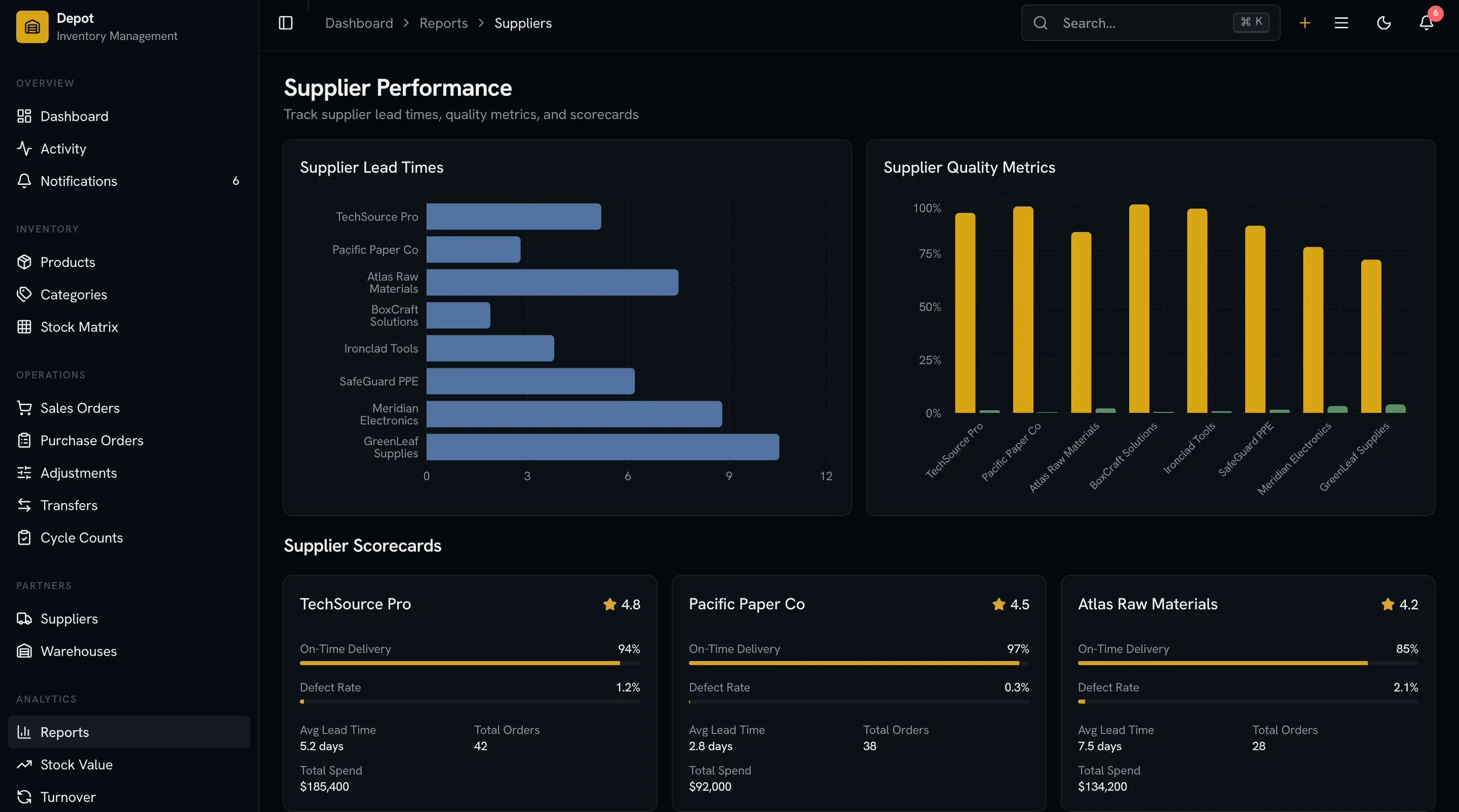
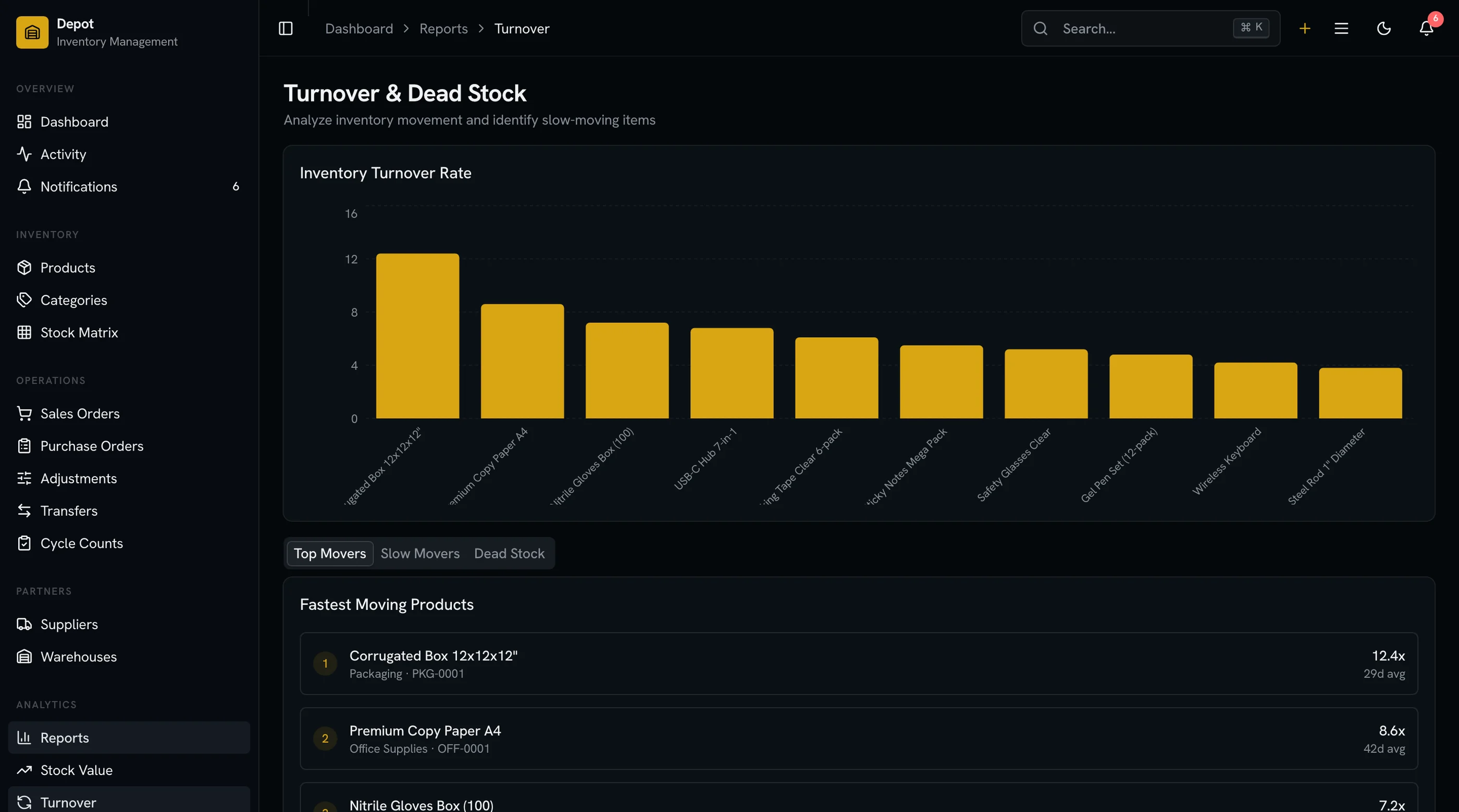
The supplier directory tracks performance metrics including lead times, fill rates, and reliability scores. Supplier detail pages show order history and associated POs. Inventory reports cover stock value with cost analysis, supplier performance comparisons, and turnover analytics with trend charts.
Every screen is WCAG AA accessible. Product tables and order lists support keyboard navigation, sorting, and filtering. Stock adjustment forms have proper labels and error handling that screen readers can announce. The design token system means rebranding your inventory platform takes minutes. Try the live demo.
- Screens: 32
- Products: Catalog with search, filters, categories, detail, edit, create
- Purchase Orders: Full lifecycle with receiving workflows
- Warehouses: Multi-location with capacity tracking and zone mapping
- Stock: Adjustments, transfers, audit trail
- Suppliers: Directory with performance metrics and order history
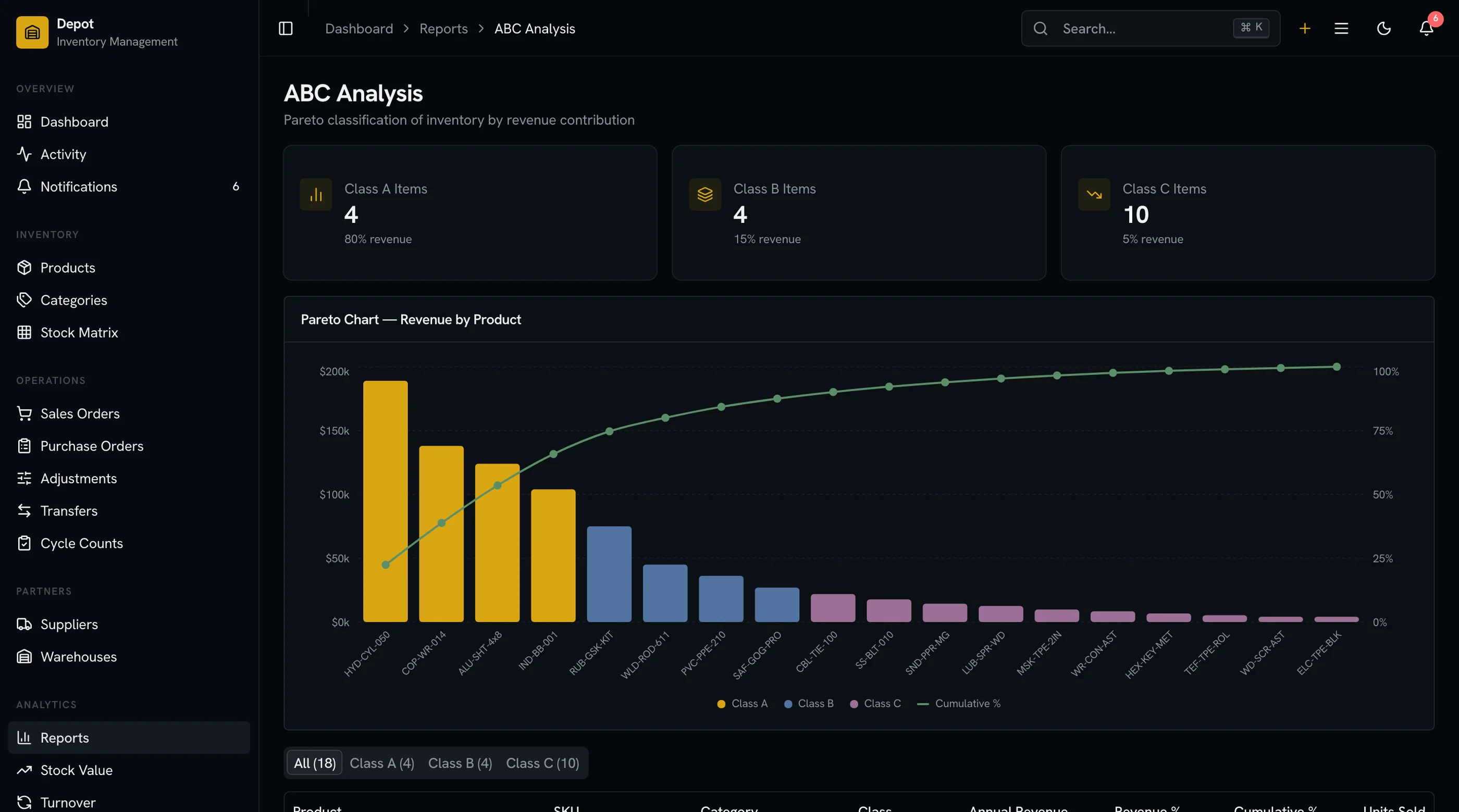
- Reports: Stock value, supplier performance, turnover analytics
- Stack: Next.js 16, Tailwind CSS v4, shadcn/ui, Recharts
- Accessibility: WCAG AA
- Price: From $131
2. Shadboard Inventory Variant
Best free option with adaptable dashboard layouts.
Shadboard is a free Next.js dashboard that includes analytics, e-commerce, and other dashboard types. You can adapt the general admin tables, charts, and form primitives into inventory-specific views. The component library gives you data tables, metric cards, and layout scaffolding.
You'll build the product catalog, purchase order workflows, warehouse management, and stock operations yourself. There are no inventory-specific screens included. The value is in the layout structure and the shadcn/ui component primitives that save you from building a design system from scratch.
- Screens: 5-8 (adaptable for inventory)
- Products: Basic table layout
- Purchase Orders: Not included
- Warehouses: Not included
- Stock: Not included
- Stack: Next.js, shadcn/ui, Tailwind CSS
- Accessibility: Basic
- Price: Free
3. TailAdmin Inventory Pages
Best free Tailwind dashboard with inventory-adaptable components.
TailAdmin includes data tables, charts, and form components that you could repurpose for inventory workflows. The component library is large (40+ components), so you have building blocks for product lists, order tables, and warehouse views. But there are no inventory-specific screens included out of the box.
You're starting with a general admin template and building every inventory feature yourself. Good for teams who want Tailwind component primitives and plan to invest 2-3 months in inventory customization. The free version covers basics; the Pro tier adds more chart types and table features.
- Screens: 3-5 (inventory-adaptable)
- Products: Data table primitives
- Purchase Orders: Not included
- Warehouses: Not included
- Stack: Next.js, React, Tailwind CSS
- Accessibility: Basic
- Price: Free, Pro from $49
4. Apex Dashboard Inventory Theme
Best premium admin template you could theme for inventory.
Apex is a premium admin dashboard with multiple layout variants. The components are high quality, and you could build inventory views using the included tables, charts, and form elements. The dashboard cards could display stock levels, order counts, and warehouse metrics.
The inventory functionality is surface-level. You'd get metric cards and chart layouts that could show stock data, but product catalog management, purchase order workflows, warehouse views, and stock adjustment forms all need to be built from scratch. You're buying an admin template that happens to work for inventory dashboards, not an inventory template.
- Screens: 2-3 (inventory-themed dashboard)
- Products: Not included
- Purchase Orders: Not included
- Warehouses: Not included
- Stack: Next.js 16, React 19, Tailwind CSS v4, shadcn/ui
- Accessibility: Partial
- Price: Premium
5. Open Source Inventory Projects
Best for studying inventory UI patterns.
Several open-source projects on GitHub attempt to build inventory management systems with React. These range from simple product lists with stock counters to more ambitious projects with warehouse views and order tracking. Quality and completeness vary wildly. Most are abandoned after a few commits, and the ones that are maintained tend to be full-stack projects where extracting the frontend layer is non-trivial.
Check the last commit date, star count, and issue tracker before investing time. Some projects have useful UI patterns for stock adjustment forms or warehouse layouts that you can study, but few are suitable as production foundations.
- Screens: Varies (3-12)
- Products: Basic lists, sometimes detail views
- Purchase Orders: Sometimes basic creation
- Warehouses: Rarely
- Stack: React (various), some Vue
- Accessibility: Minimal
- Price: Free (open source)
6. React Admin Inventory with CRUD Frameworks
Best for data-heavy inventory tables with minimal UI design.
React Admin and similar CRUD frameworks (Refine, AdminJS) can generate inventory interfaces from your data model. You define resources for products, orders, suppliers, and warehouses, and the framework builds list, detail, and edit views automatically. The result is functional but generic.
The generated UI covers basic CRUD operations well. Where it falls short is in inventory-specific workflows: receiving against POs, stock transfers between warehouses, adjustment forms with reason codes, and analytics dashboards. These need custom screens that the framework won't generate. Good for internal tools where functionality matters more than design.
- Screens: Auto-generated (varies)
- Products: CRUD views (list, detail, edit, create)
- Purchase Orders: Basic CRUD (no receiving workflow)
- Warehouses: Basic CRUD
- Stock: Basic quantity fields (no transfer/adjustment workflows)
- Stack: React Admin, Refine, or AdminJS
- Accessibility: Framework-dependent
- Price: Free (open source), enterprise tiers available
7. Google Sheets Inventory Templates
Best for non-technical teams who don't need a web app.
If you searched "inventory management template" and you're tracking 50-200 SKUs in a single location, you might need a spreadsheet, not a web application. Google Sheets inventory templates give you product lists with stock columns, basic reorder alerts with conditional formatting, and simple purchase tracking without writing any code.
This is only relevant if a spreadsheet solves the problem. If you're building an inventory product, managing multiple warehouses, need role-based access, or have a team of warehouse staff who need concurrent access, you need a web-based solution from the options above.
- Type: Spreadsheet (not a web template)
- Price: Free
Comparison Table
| Template | Screens | Product Catalog | Purchase Orders | Warehouse Mgmt | Stock Operations | Suppliers | Accessibility | Price |
|---|---|---|---|---|---|---|---|---|
| thefrontkit | 32 | Full (list, detail, edit, categories) | Full (lifecycle + receiving) | Multi-location with capacity | Adjustments, transfers, audit trail | Directory with metrics | WCAG AA | From $131 |
| Shadboard | 5-8 | Basic table | Not included | Not included | Not included | Not included | Basic | Free |
| TailAdmin | 3-5 | Data table primitives | Not included | Not included | Not included | Not included | Basic | Free/$49 |
| Apex | 2-3 | Not included | Not included | Not included | Not included | Not included | Partial | Premium |
| OSS Projects | 3-12 | Basic lists | Sometimes | Rarely | Rarely | Rarely | Minimal | Free |
| React Admin | Auto-gen | CRUD views | Basic CRUD | Basic CRUD | Basic fields | Basic CRUD | Varies | Free |
| Google Sheets | N/A | Rows | Columns | Not applicable | Manual counts | Not applicable | N/A | Free |
Which Template Should You Pick?
For a production inventory application with product catalog management, purchase order workflows, multi-warehouse support, and stock operations, the thefrontkit Inventory Management Kit covers the most ground. 32 screens across 8 sections is enough to build a complete inventory platform without starting from scratch. The receiving workflow and stock transfer screens are the ones that separate a usable inventory system from a demo. Try the demo.
For a free starting point where you'll build the inventory features yourself, Shadboard or TailAdmin give you layout primitives and component libraries. Expect to spend 3-4 months building the inventory-specific screens, especially purchase order receiving and stock transfer workflows.
For an internal tool where design matters less than function, React Admin or a similar CRUD framework generates working list and detail views from your data model. You'll still need custom screens for inventory-specific workflows.
For a small operation tracking products in a single location without a development team, start with a Google Sheets inventory template. Build the web app when you outgrow the spreadsheet.
Common Questions
How many screens does a production inventory system need?
A minimum viable inventory application needs 15-20 screens: product list, product detail, product create/edit, purchase order list, PO detail, PO create, stock overview, stock adjustment form, basic reports, and settings. A full-featured inventory platform has 25-35+ screens when you add multi-warehouse management, receiving workflows, stock transfers, supplier management, and analytics dashboards. The thefrontkit Inventory Management Kit ships with 32 screens.
Can I use an inventory template with my own backend?
Yes. Inventory templates provide the frontend UI layer. You connect them to your own backend API (Node.js, Python, Rails, Go), an ERP system, or a headless inventory service. The templates include TypeScript interfaces and component structures. You replace the seed data with API calls to your actual inventory data source.
What's the difference between an inventory template and an inventory platform?
An inventory template is source code you own and customize. An inventory platform (Cin7, Fishbowl, Zoho Inventory) is a hosted service you subscribe to. Templates give you full control over the UI and can integrate with any backend, but they require development work. Platforms give you instant functionality but limit customization and charge recurring fees. If you're building an inventory product to sell or need a custom warehouse dashboard, you need a template. If you just need inventory tracking for your own business, consider a platform first.
Do I need multi-warehouse support?
If you operate from a single location today but plan to expand, build with multi-warehouse from the start. Retrofitting multi-location support means restructuring your data model, stock level queries, and every screen that displays quantities. The thefrontkit template includes multi-warehouse support with capacity tracking and stock distribution views out of the box.
How long does it take to build an inventory management system from scratch?
A basic inventory system with product catalog, purchase orders, and stock tracking takes 3-4 months of frontend work. A full-featured platform with multi-warehouse management, receiving workflows, stock transfers, supplier analytics, and reporting takes 6-10 months. Templates compress the frontend to days, letting you focus on ERP integrations, barcode scanning, and warehouse-specific business logic.