How to Build a Trading Dashboard in Next.js (2026)
How to Build a Trading Dashboard in Next.js in 2026
Building a trading dashboard looks like building any dashboard until you start hitting real-time price streams that update every tick, portfolio valuations that need to recompute on every price change, charts that have to render 50 candlesticks at 60fps, and a P&L calculation that can't be off by a cent. The fintech requirements compound. A real Next.js trading dashboard is eight to twelve weeks of work.
This guide walks through what a trading dashboard actually needs, the architecture decisions that make or break performance, and the realistic path from zero to a dashboard traders trust.
Or skip the build entirely: get every kit for $749
If you're shipping more than one product, All UI Kits unlocks every Next.js kit on thefrontkit. That includes the Trading Dashboard Template for trading interfaces and the Finance Dashboard Kit for personal finance, plus the SaaS Starter Kit, CRM, HR, Kanban, and 12 more.
What a Real Trading Dashboard Has to Do
The features that distinguish a real trading product from a chart with sample data.
Real-Time Price Feeds
The single biggest technical challenge.
- WebSocket connection to a price provider (Polygon, Alpaca, Finnhub for stocks; Binance, Coinbase for crypto)
- Reconnection logic that handles dropped connections gracefully
- Backpressure when the UI can't keep up with tick volume
- Throttling so the UI doesn't re-render on every microsecond tick
- Multiple symbol subscription with efficient batching
- Fallback to REST polling when WebSocket is unavailable
A trading dashboard that lags is a useless trading dashboard. The realtime layer has to be solid.
Charts That Stay Smooth Under Load
Candlestick or line charts that update in real-time without jank:
- TradingView Lightweight Charts is the production default in 2026 (free, ~45kb, GPU-accelerated)
- Update efficiency — append new candles, don't rebuild the chart
- Timeframe switching (1m, 5m, 1h, 1d, 1w) without losing state
- Indicators (RSI, MACD, moving averages) calculated on the client
- Drawing tools (trend lines, fibonacci) saved per chart
- Multiple symbol overlay for comparison
Don't try to build candlestick charts on D3. Use Lightweight Charts.
Portfolio Valuation
The dashboard's main number:
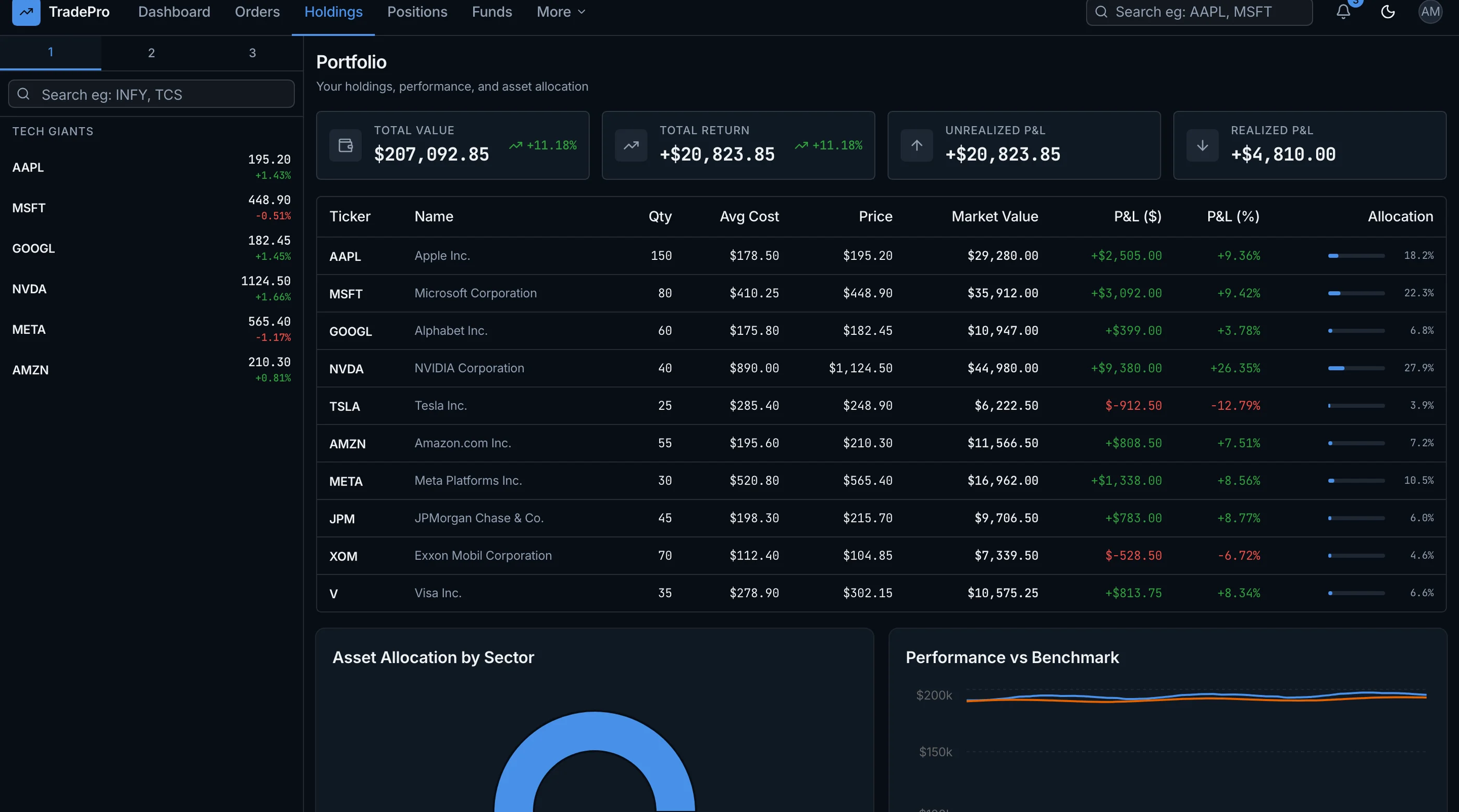
- Holdings table with symbol, quantity, avg cost, current price, value, P&L
- Real-time valuation updated as prices stream in
- P&L breakdown (today, week, month, year, all-time)
- Allocation chart (pie or treemap showing % per holding)
- Sector or asset class breakdown
- Performance vs benchmark (your portfolio vs S&P 500, etc.)
The P&L math is straightforward but error-prone. Use a battle-tested library or write extensive tests.
Order Entry (For Trading Apps)
If your app places trades:
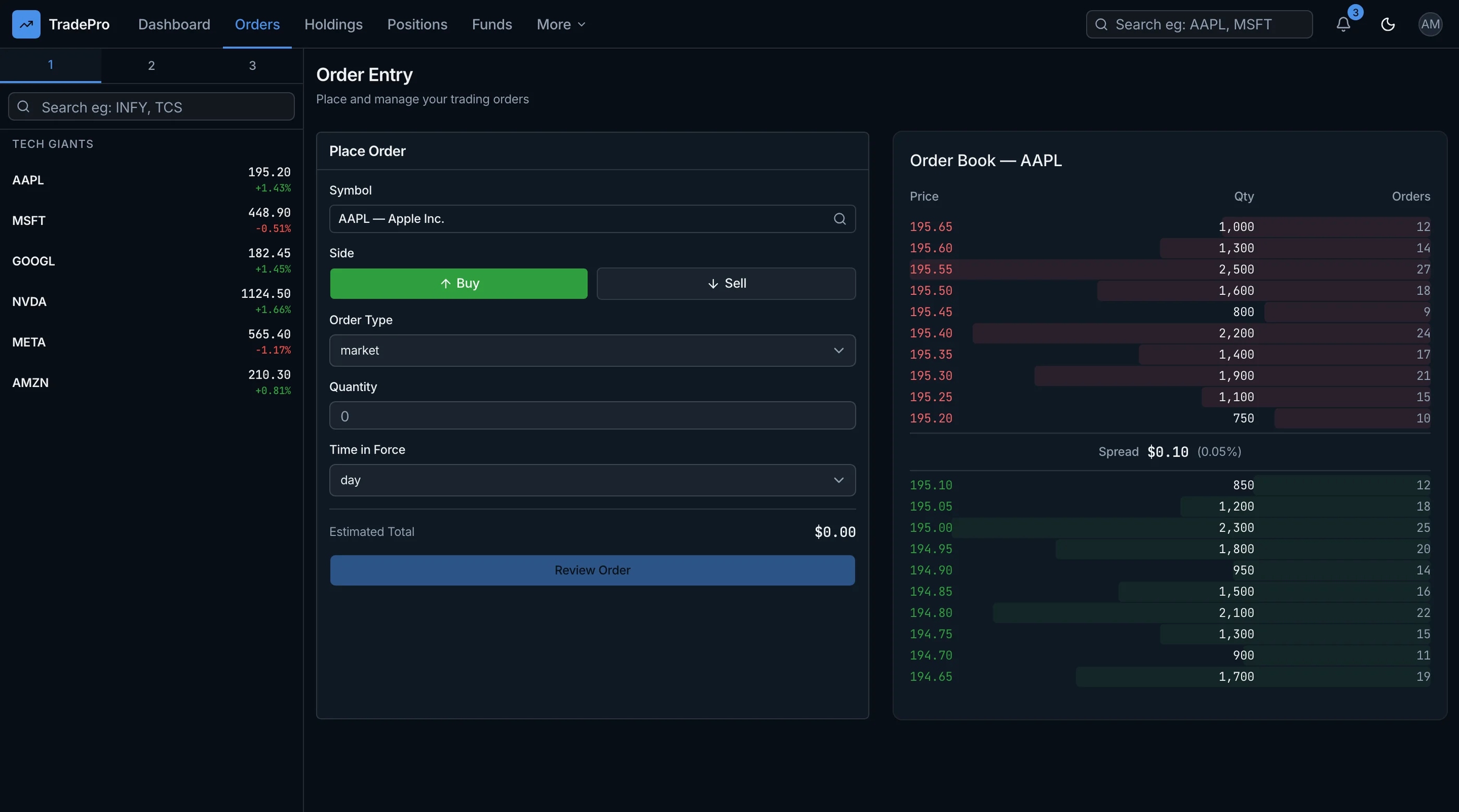
- Symbol search with auto-complete
- Order type (market, limit, stop, stop-limit, trailing stop)
- Quantity input with shares or dollar amount
- Estimated cost with fees
- Confirmation modal showing the final order
- Order status updates (pending, filled, canceled, partial)
- Order history with execution details
Order entry is the highest-stakes UX in the app. A typo in quantity or order type can cost real money. Build extensive validation and confirmation.
Watchlists
Most-used feature in any trading dashboard:
- Custom watchlists with user-defined symbols
- Real-time price ticker for each symbol
- Quick alerts ("alert me if AAPL drops below $150")
- Watchlist reordering via drag-and-drop
- Sharing watchlists (optional, common in social trading apps)
Watchlists drive engagement. Build them well.
Market Data Beyond Price
Real traders want context:
- Order book (depth chart) for crypto
- Recent trades feed
- News feed per symbol (from a provider like Benzinga)
- Earnings calendar for stocks
- Economic calendar (Fed announcements, CPI prints)
- Insider trading disclosures (stocks)
- Options chain (if your app trades options)
Skip in v1 unless you're directly competing with Robinhood or similar.
Reporting and Tax Tools
Year-end is when traders need this:
- Realized vs unrealized P&L breakdown
- Tax lot accounting (FIFO, LIFO, specific identification)
- 1099 export (US) or equivalent
- Capital gains report by holding period
- Wash sale detection (US tax rule)
Tax reporting is a feature that drives churn if it's missing in April.
Tech Stack: Trading Dashboard Specific Decisions
Real-time price feeds: Polygon.io for stocks ($29-$1500/month). Alpaca Markets for stocks (free with brokerage account). Binance/Coinbase WebSocket for crypto (free).
Charts: TradingView Lightweight Charts is the production default in 2026.
Real-time UI: WebSocket connection in a singleton service. React Query for REST state. Avoid putting WebSocket data directly in component state.
Database: Postgres for portfolio data. Time-series database (TimescaleDB extension on Postgres, or InfluxDB) for historical price data if you store it.
Background jobs: Inngest for end-of-day P&L snapshots, tax-lot calculations, scheduled alerts.
Number handling: Decimal.js or big.js for money math. Never use native JS numbers for currency.
Build Path 1: From Scratch (8 to 12 Weeks)
Week 1-2: Foundation. Next.js, auth, database with portfolio holdings and transactions.
Week 3: Real-time price feed integration. WebSocket connection, reconnection logic, throttling.
Week 4-5: Charts. Wire Lightweight Charts, candle stream updates, indicators.
Week 6-7: Portfolio valuation. Holdings table, real-time P&L, allocation charts.
Week 8: Watchlists. Custom watchlists with real-time tickers.
Week 9-10: Order entry (if applicable). Type-safe order forms, status updates.
Week 11: Reporting. Tax lots, realized/unrealized P&L, exports.
Week 12: Polish. Mobile, dark mode (essential for traders), accessibility.
For most teams: 12 to 18 weeks. Real-time price feed reliability alone is routinely 3-4 weeks.
Build Path 2: Using a Trading Dashboard Kit (1 to 2 Weeks)
A production-ready Next.js trading kit ships:
- WebSocket abstraction with reconnection and throttling
- Lightweight Charts integration with candle streaming
- Portfolio holdings with real-time P&L
- Watchlists with drag-and-drop ordering
- Order entry UI with type-safe validation
- Watchlist alerts
- Tax-lot accounting (FIFO/LIFO/specific ID)
- Reporting and exports
- 25-35 screens, WCAG AA accessible
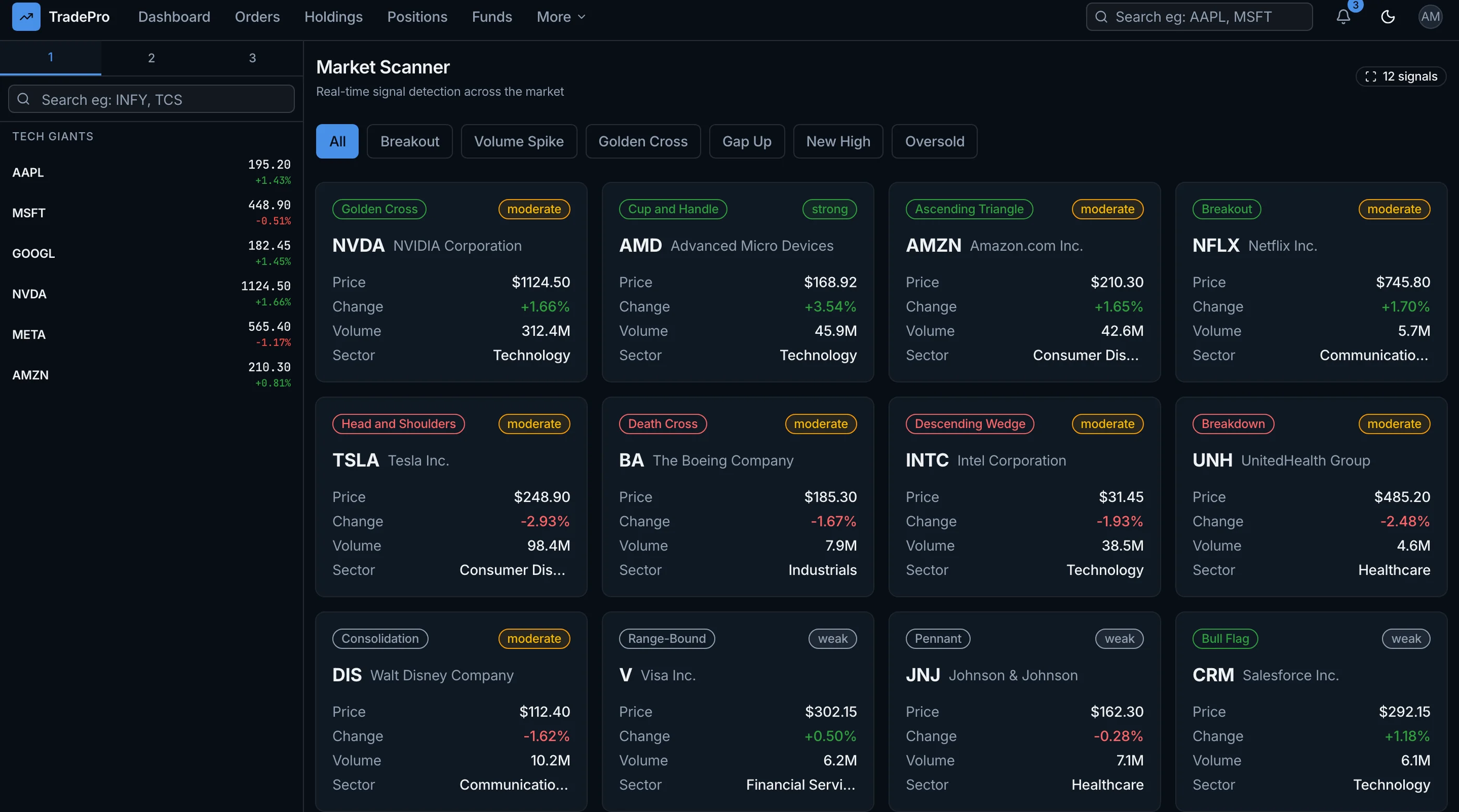
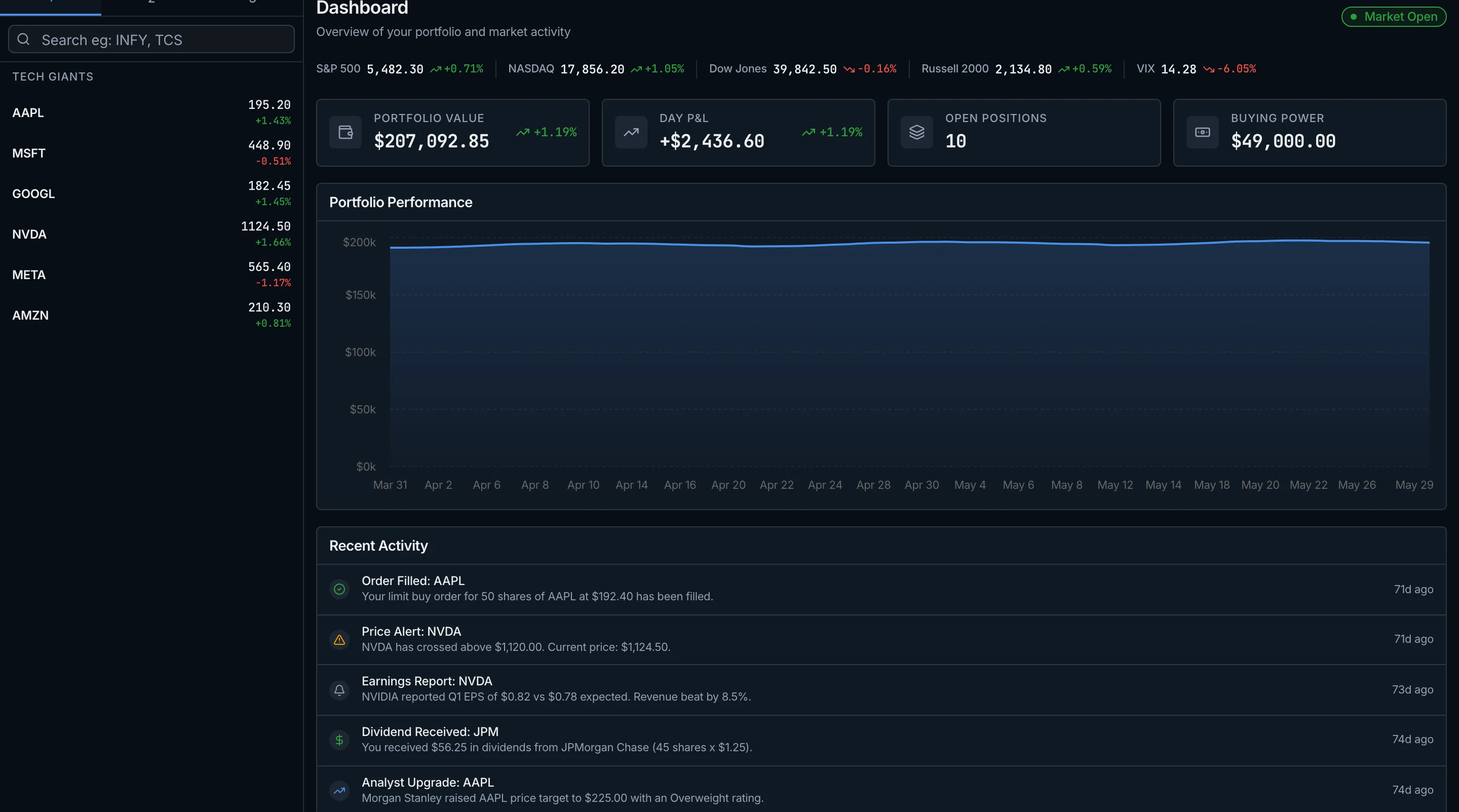
The data plumbing above is yours to build, but the screens are not. The thefrontkit Trading Dashboard Template ships 70 screens in a Kite-inspired layout: order entry with order book depth, a holdings table with cost basis and P&L, an always-visible watchlist panel, a filterable screener, risk analytics with VaR and Sharpe, and backtesting. No market data feed or brokerage API included, so connect your own. Try the live demo.
Common Pitfalls
Putting WebSocket data in component state. Re-renders on every tick. Use a singleton service + a throttled subscription model that updates the UI 4-10 times per second, not 100.
Using native JS numbers for currency. Float math fails for money. Use Decimal.js or big.js from day one.
Building charts on D3. TradingView Lightweight Charts is free, faster, and 100x less work. Use it.
Skipping reconnection logic. WebSockets disconnect. Phones lock. WiFi drops. Without graceful reconnect, your dashboard shows stale data.
No fallback to REST polling. WebSocket sometimes fails. A REST polling fallback (every 5 seconds) keeps the dashboard functional during outages.
Underbuilding the order confirmation flow. A typo on quantity costs real money. Always show a confirmation modal with the final order details.
Forgetting tax reporting. Year-end is when users churn if they can't get their 1099 or capital gains report. Build it from v1.
Not testing P&L math. Edge cases (stock splits, dividends, mergers, fractional shares) break naive P&L. Write tests for every transaction type before launch.
Adjacent Reads
- How to Build a Finance Dashboard in Next.js — personal finance variant
- Best Trading & Fintech Templates 2026 — head-to-head comparison
- Connect Supabase to a Next.js Template — pair with database
FAQ
Should I build this or use a hosted brokerage's UI?
Hosted brokerage UIs (Interactive Brokers, Charles Schwab, Robinhood) handle 100% of standard trading needs. Build your own when you're building a product TO sell (a portfolio tracker, a paper trading platform, a copy-trading app), not a personal trading interface. For personal use, use the brokerage.
Which price feed provider is best?
For stocks: Polygon.io for serious use ($29-$1500/month based on tier), Alpaca for free with brokerage accounts. For crypto: Binance and Coinbase WebSocket are free. For both: Finnhub is a decent middle ground with a free tier.
Do I need TimescaleDB for historical prices?
Only if you're storing tick-level history. For daily/hourly candles, vanilla Postgres handles millions of rows fine. TimescaleDB starts mattering at 100M+ rows of tick data.
How do I handle the SEC / financial regulations?
This guide is about building a dashboard UI. Regulatory compliance (broker-dealer registration, FINRA, SEC, KYC, AML) is a separate legal/business problem. Get a securities lawyer before launching anything that takes money from users or routes orders.
Is real-time data expensive?
Free for crypto via exchange WebSockets. For stocks: $29/month gets you most retail use cases on Polygon. Real-time NYSE/Nasdaq licensed data is $$$$ — typically $1500+/month for direct feeds. Plan accordingly.
How many screens does a real trading dashboard need?
The minimum is around 18: overview dashboard, portfolio detail, holdings table, watchlist, chart per symbol, order entry, order history, alerts, news feed, reporting, tax tools, settings, integrations, and auth (5 screens). A full-featured product with social, options, options chains lands at 30-40 screens.
Want it shipped without hiring a developer?
The build path above assumes you have engineers. If you don't, the team behind thefrontkit does done-for-you launches: we deploy the kit, apply your branding, and wire it to your stack. Fixed quotes, most builds ship in 2-4 weeks, from $1999.