TradingView Alternatives: 10 Free & Paid Platforms for 2026
TradingView Alternatives: 10 Free & Paid Platforms for 2026
TradingView's free Basic plan gives you 2 indicators per chart, 1 chart per tab, 3 price alerts and ads. The upgrade path is steep: Essential is $14.95/month, Plus $34.95, Premium $69.95, and Ultimate $239.95 (annual billing knocks those down to $12.95, $29.95, $59.95 and $199.95). Real-time exchange data costs extra on top of that.
So people leave for two reasons. Most want the same charting for less money, or for free. A smaller group are developers who want charts and data they actually own, because Pine Script doesn't run anywhere else and TradingView's terms limit what you can do with their feed.
This post covers both. Platforms 1 to 8 are charting and trading tools you can use today. Platforms 9 and 10 are for people building their own trading dashboard or product.
We checked every price below on the vendor's own pricing page in September 2026.
Building a trading product? Skip the dashboard build
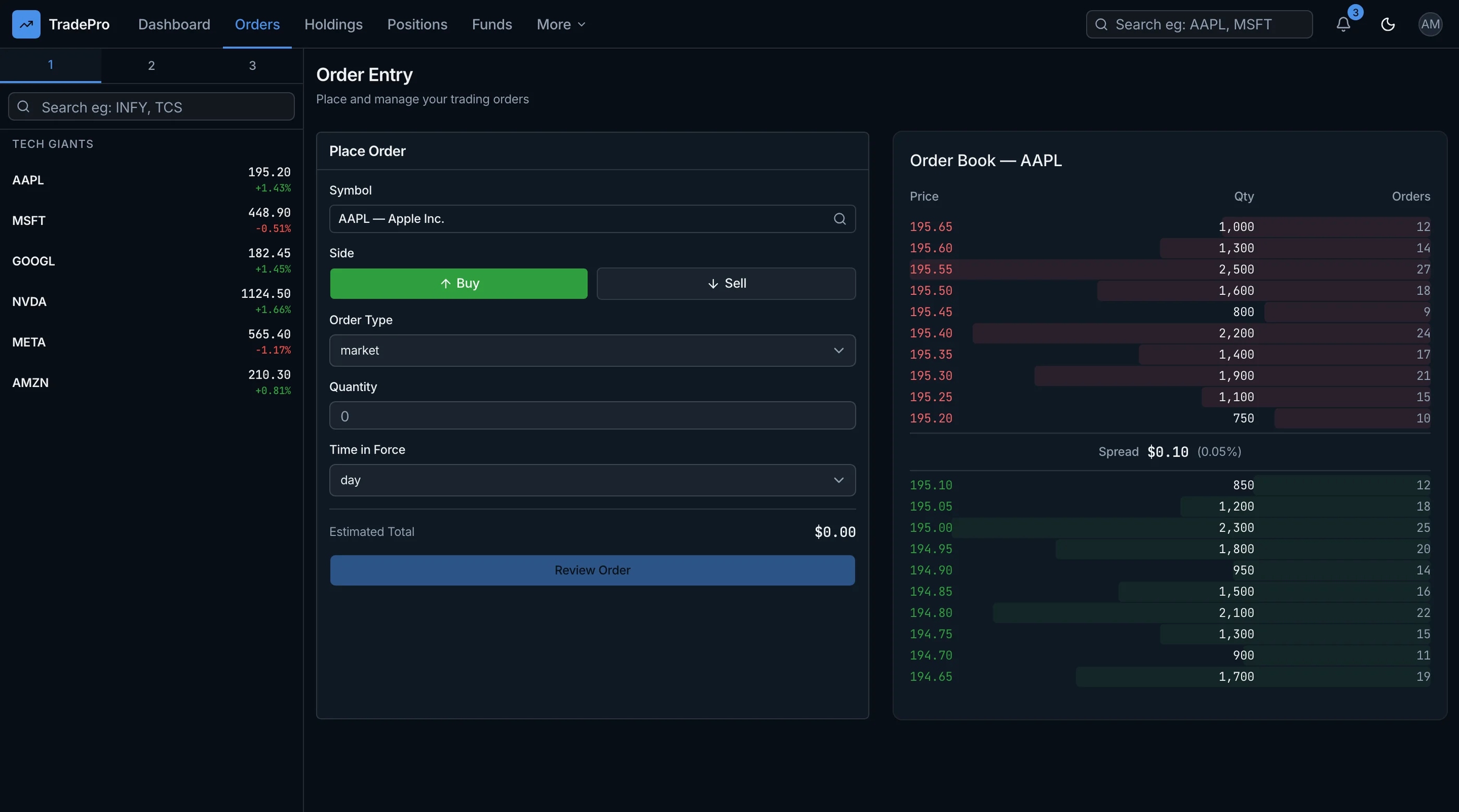
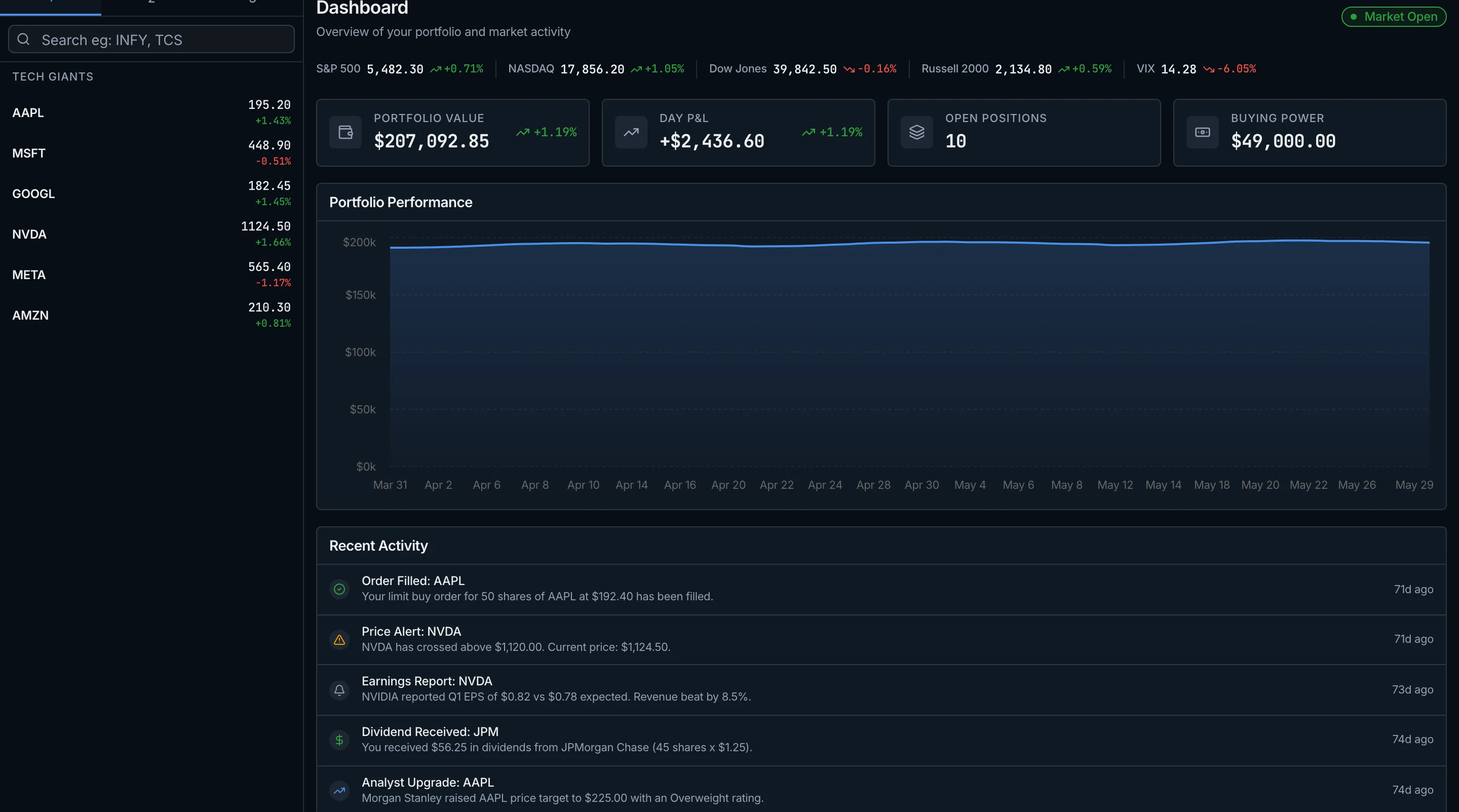
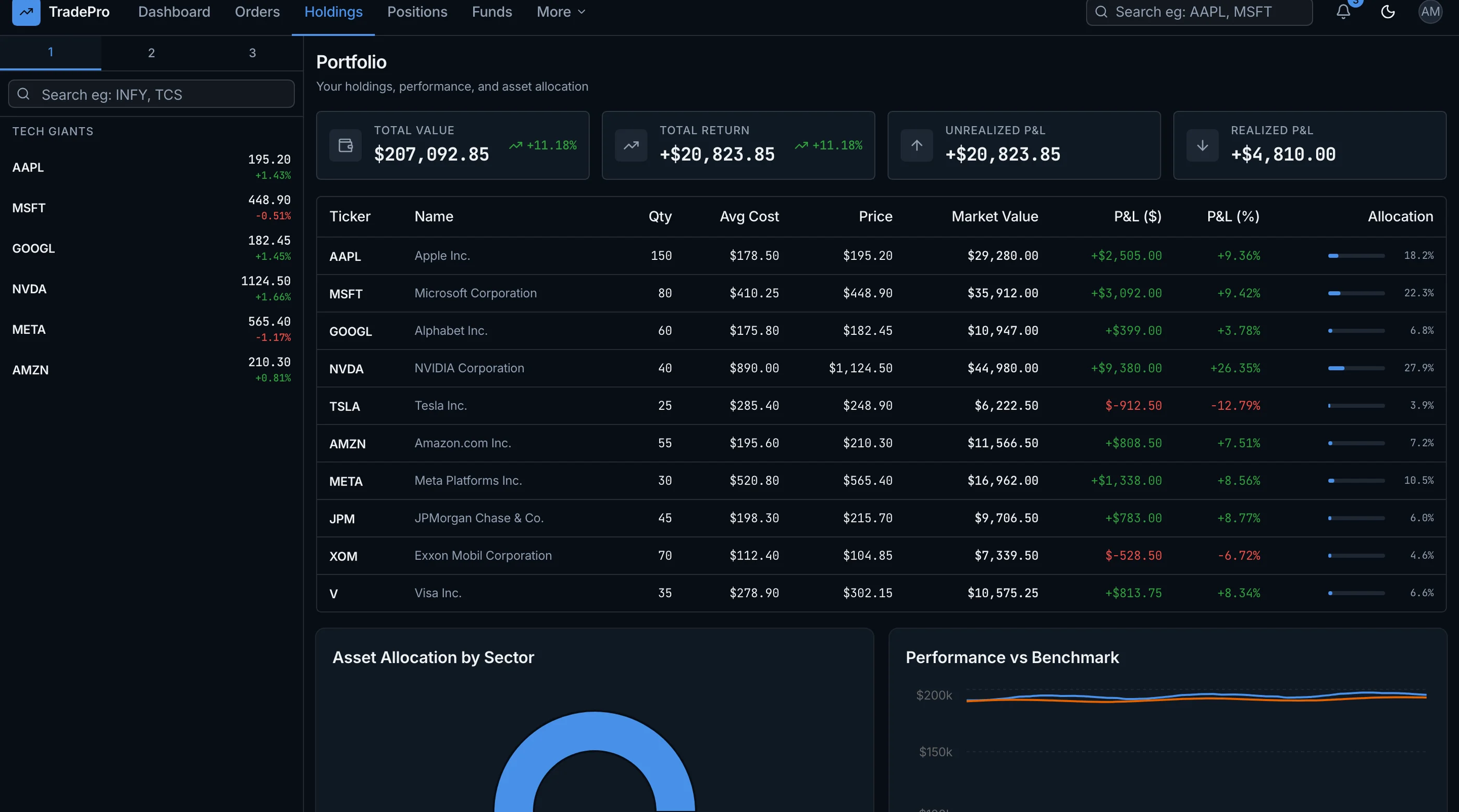
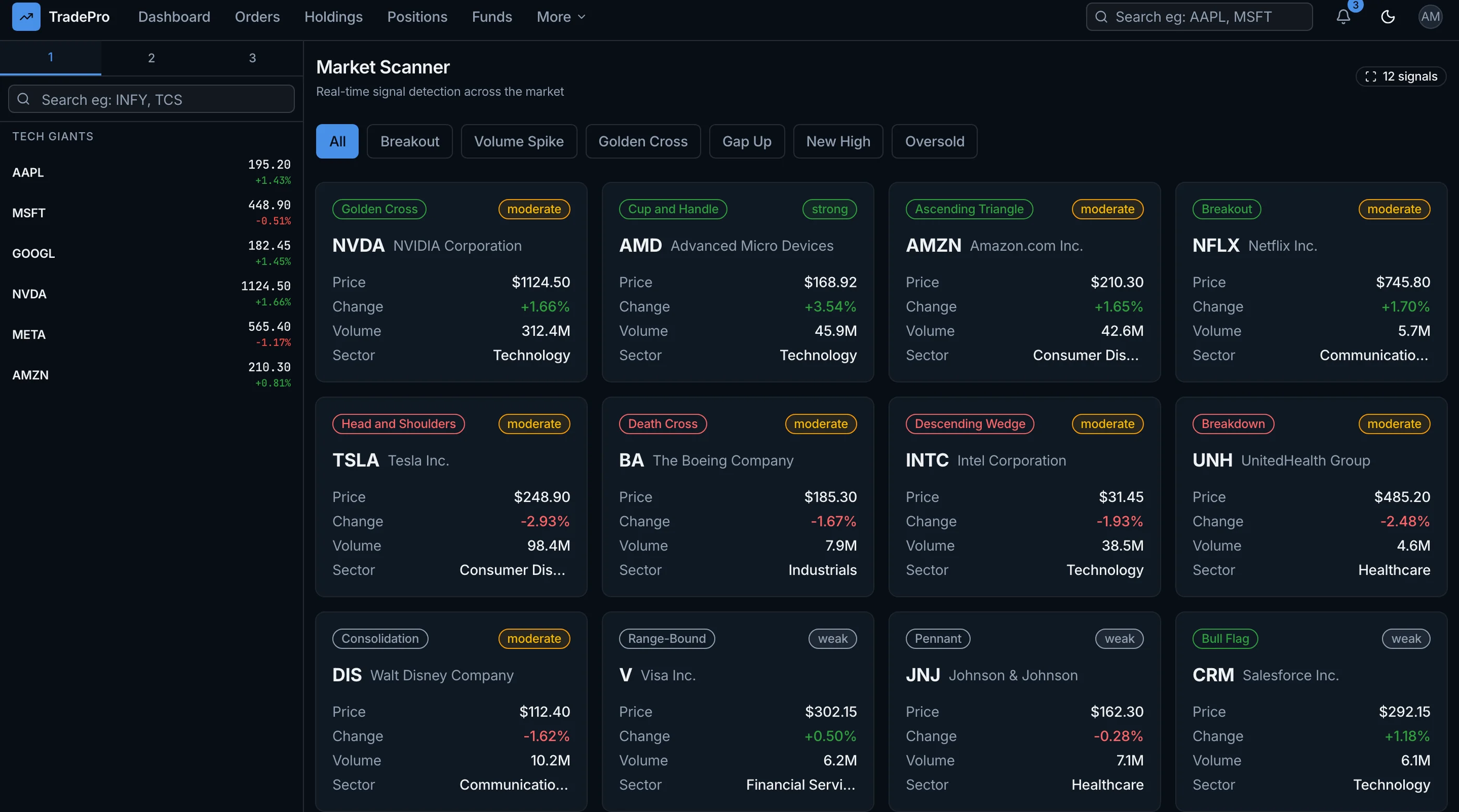
The Trading Dashboard Kit gives you 70 screens in a Kite-inspired layout: portfolio and holdings, order entry with order book, an always-visible watchlist, a market screener, risk analytics and backtesting. Next.js 16, Tailwind CSS v4 and shadcn/ui, with Recharts for analytics. $131 solo, $199 team, $349 agency.
Get the Trading Dashboard Kit → or get every kit (18 total) for $749 via All UI Kits →
TL;DR: Quick Picks for 2026
| Need | Top pick | Price |
|---|---|---|
| Best free alternative (US stocks, options, futures) | thinkorswim | Free with a Schwab account |
| Free charting + trading, including crypto | Webull | Free |
| Free web charting, no brokerage account | GoCharting | Free, paid data from $17/mo |
| Research and fundamentals | Koyfin | Free, Plus from $39/mo |
| Automated technical analysis | TrendSpider | From $54/mo (annual) |
| US stock scanning | TC2000 | From $24.99/mo |
| Forex and CFDs | MetaTrader 5 | Free via your broker |
| Crypto across many exchanges | Coinigy | From $18.66/mo |
| Self-hosted crypto bot with a dashboard | Freqtrade + FreqUI | Free, open source |
| Charts inside your own app | Lightweight Charts, or the Trading Dashboard Kit for the full UI | Free library, kit $131+ |
What TradingView Actually Does Well
Credit where it's due. TradingView is the best all-round charting tool on the market. Pine Script is the easiest indicator language anyone has shipped, the community scripts library is huge, and it covers stocks, futures, forex and crypto on web, desktop and mobile with one login.
Nothing on this list beats it at everything. Each alternative wins on one thing: price, a specific market, deeper research data, automation, or ownership.
When to Leave TradingView
You're a good candidate to switch if one of these is true:
- You're paying for Premium just for more indicators or alerts. Free platforms like thinkorswim and Webull don't cap indicators the way TradingView Basic does.
- You already have a brokerage account. Charting inside your broker means you trade off the same chart, with no extra subscription.
- You trade one market heavily. Forex traders tend to be better served by MetaTrader 5, and crypto traders running many exchanges by Coinigy.
- You're building a product. You need charts and data you're allowed to show your own users.
If you're a discretionary trader who lives in charts across several markets and Pine Script matters to you, TradingView is probably still worth paying for.
1. thinkorswim (Schwab)
The strongest free alternative if you trade US markets. It's Schwab's trading platform, and it costs nothing for Schwab clients. There's no minimum deposit to open the account.
Strengths:
- Free with a Schwab account, no minimum funding
- Desktop, web (no download) and mobile versions
- Stocks, ETFs, options, futures and forex
- thinkScript lets you write your own indicators and scans
- Paper trading built in
- $0 stock commissions, $0.65 per options contract
Weaknesses:
- You need a Schwab account to log in beyond the guest pass
- The desktop app has a steep learning curve
- Crypto isn't in the platform itself (Schwab offers it through a separate account)
- US-focused
Best for: US stock, options and futures traders who want TradingView-level charting without a subscription.
schwab.com/trading/thinkorswim
2. Webull
A free trading app with a proper desktop charting platform. Webull covers more asset classes than most free brokers, including crypto.
Strengths:
- No platform fee
- Desktop for Mac, Windows and Linux, plus a web version and mobile
- Stocks, ETFs, options, futures and crypto in one account
- $0 commissions on US stocks, ETFs and most options
Weaknesses:
- No forex
- Charting is good but less flexible than TradingView for custom indicators
- Tied to a Webull brokerage account
Best for: Retail traders who want one free app for charting and trading, crypto included.
3. GoCharting
The closest thing to a TradingView clone that runs in the browser. You don't need a brokerage account, and the free plan has no indicator cap.
Strengths:
- Free plan with unlimited built-in indicators
- Web-first, with iOS and Android apps
- Order flow and footprint-style charts that TradingView doesn't do well
- Covers US stocks, CME futures, crypto, forex/CFDs and Indian markets
Weaknesses:
- The free plan uses end-of-day US stock data and has no alerts
- Free is limited to 2 charts per tab and 1 device
- Real-time data is sold per market: CME futures $35/month ($30 annual), crypto and forex $20/month ($17 annual)
Best for: Futures and crypto traders who want TradingView-style web charting and are fine paying only for the data they use.
4. Koyfin
Koyfin is for research more than trading. Think fundamentals, valuation charts and macro dashboards, with good charting on top.
Strengths:
- Free plan includes advanced charting, 2 custom dashboards, 2 watchlists and 2 screens
- Deep financial data: statements, estimates and valuation multiples
- Clean web app, no install
- Plus is $49/month ($39 annual), Premium $110/month ($79 annual)
Weaknesses:
- No trading. You still need a broker.
- The free plan only shows 2 years of financials and 1 year of estimates
- Built for stocks and ETFs, not intraday crypto or forex traders
Best for: Long-term investors and analysts who use TradingView mostly to look at fundamentals.
5. TrendSpider
The pick for automated technical analysis. TrendSpider draws trendlines and patterns for you, and lets you backtest and automate strategies without code.
Strengths:
- Automated trendline and pattern detection
- No-code strategy backtesting
- US stocks, ETFs, forex and crypto included
- Web, mobile and a Chrome extension
Weaknesses:
- No free plan. Paid 14-day trials start at $19.
- Standard is $82/month ($54 annual), and the top Advanced plan is $321/month ($214 annual)
- Futures data (+$7.50/month) and options data (+$9.50/month) cost extra
Best for: Active technical traders who spend hours drawing lines and want software to do it.
6. TC2000
A long-running US stock charting and scanning platform. Its scanner is the reason people pay for it.
Strengths:
- Real-time US stock data included in the price
- Fast scans and custom screening formulas
- Windows, Mac or web
- Free paper trading simulator
Weaknesses:
- No free plan. Basic is $24.99/month, Premium $49.99, Premium Plus $99.99 (annual billing gets you 2 months free)
- US stocks and options only. No futures, forex or crypto.
- Real-time options data is +$9.99/month
Best for: US swing traders who scan the market daily.
7. MetaTrader 5
The standard platform for forex. MetaTrader 5 is free to download, and you trade through a broker that supports it.
Strengths:
- Free, with demo accounts for practice
- Forex, stocks and futures
- MQL5 language for custom indicators and trading robots (Expert Advisors)
- Windows, Mac, Linux, web and mobile
Weaknesses:
- What you can trade depends on your broker
- The interface looks dated next to TradingView
- Your charts and data live with the broker you pick
Best for: Forex traders, and anyone who wants to automate a strategy with a trading robot.
8. Coinigy
A hosted dashboard for crypto traders who hold positions on several exchanges and want one screen for charts, portfolio and orders.
Strengths:
- Connects to 39 exchanges and more than 21,000 crypto markets
- Portfolio tracking across all your exchange accounts
- Web and mobile
- API access on the higher plan
Weaknesses:
- Crypto only
- No permanent free plan (Starter is a 7-day free trial)
- Pro Trader is $18.66/month and API Dev Pro is $99.99/month
- Hosted, so your data lives in their cloud like TradingView
Best for: Crypto traders running positions across 5+ exchanges.
9. Freqtrade + FreqUI (self-hosted)
Now for the self-hosted options. Freqtrade is an open-source crypto trading bot, and FreqUI is its web dashboard. You run both on your own server.
Strengths:
- Free and open source (GPL-3.0)
- Backtesting, dry runs and live trading in one tool
- Built-in trade history, P&L and performance metrics
- Uses CCXT under the hood, so it connects to most major exchanges
Weaknesses:
- Crypto only
- Built for bot operators, not traders who click on charts
- You're responsible for hosting, keys and uptime
Best for: Crypto algo traders who want their strategy runtime and dashboard on their own hardware.
10. Build Your Own with Lightweight Charts
If you're putting charts in front of your own users, you need a chart engine you're allowed to ship. TradingView publishes one: Lightweight Charts. It's open source under Apache 2.0, about 62 KB gzipped, and works with any data you bring. You do have to show TradingView's attribution notice and a link to tradingview.com (a built-in logo option handles this).
A typical stack:
- Chart engine: Lightweight Charts
- Crypto data: CCXT, an MIT-licensed library with one API across 100+ exchanges
- Stock data: a vendor like Alpaca or Polygon
- Storage: Postgres (with Drizzle) for trades and history
- App: Next.js
What you get: full data ownership, indicators in JavaScript or Python instead of Pine Script, and charts you can embed in your product.
What it costs: 4 to 8 weeks for a solid first version (chart, indicators, alerts, P&L), ongoing data feed fees, and you own accuracy and latency. Our How to Build a Trading Dashboard in Next.js guide walks through the architecture.
tradingview.com/lightweight-charts
Skip the build: Trading Dashboard Kit
The Trading Dashboard Kit is that app's frontend, already built. 70 screens in Next.js 16, Tailwind CSS v4 and shadcn/ui: portfolio and holdings with P&L, order entry with order book depth, an always-visible watchlist, a filterable screener, risk analytics with VaR and Sharpe ratio, social trading and strategy backtesting. Analytics charts use Recharts, and you can drop Lightweight Charts in for price charts. Try the live demo.
It's a frontend kit. You bring your market data feed (CCXT for crypto, Alpaca or Polygon for equities) and your execution layer. $131 solo, $199 team, $349 agency. Or get every kit (18 total) for $749 via All UI Kits.
Get the Trading Dashboard Kit → or See All UI Kits →
Pricing at a Glance (September 2026)
| Platform | Free option | Paid from (monthly billing) | Paid from (annual billing) | Markets |
|---|---|---|---|---|
| TradingView | Basic (2 indicators, ads) | $14.95 | $12.95 | Stocks, futures, forex, crypto |
| thinkorswim | Yes, with Schwab account | N/A | N/A | Stocks, options, futures, forex |
| Webull | Yes | N/A | N/A | Stocks, options, futures, crypto |
| GoCharting | Yes (end-of-day US data) | $20 (crypto/forex data) | $17 | Stocks, futures, crypto, forex |
| Koyfin | Yes | $49 | $39 | Stocks, ETFs, macro (no trading) |
| TrendSpider | No (paid trial) | $82 | $54 | Stocks, forex, crypto (+futures, options) |
| TC2000 | Paper trading only | $24.99 | 2 months free | US stocks, options |
| MetaTrader 5 | Yes, via broker | N/A | N/A | Forex, stocks, futures |
| Coinigy | 7-day trial | $18.66 | N/A | Crypto |
| Freqtrade | Yes, open source | N/A | N/A | Crypto |
Recommendation by Use Case
| Use case | Pick |
|---|---|
| Want TradingView-level charts for free (US) | thinkorswim |
| Want free charts and trading, crypto included | Webull |
| Want free web charting without opening a broker account | GoCharting |
| Mostly research fundamentals | Koyfin |
| Spend hours drawing trendlines | TrendSpider |
| Scan US stocks daily | TC2000 |
| Trade forex | MetaTrader 5 |
| Trade crypto across many exchanges | Coinigy |
| Run a crypto bot | Freqtrade |
| Building a fintech or portfolio product | The Trading Dashboard Kit, plus Lightweight Charts for price charts |
| Use Pine Script and trade many markets | Stay on TradingView |
Frequently Asked Questions
What is the best free alternative to TradingView?
For US traders, thinkorswim. It's free with a Schwab account (no minimum deposit), has desktop, web and mobile versions, and covers stocks, options, futures and forex. If you don't want a brokerage account, GoCharting's free web plan is the closest match, though it uses end-of-day US stock data.
What platforms are like TradingView?
GoCharting is the most similar: browser-based, multi-market, with a large indicator library. thinkorswim and Webull are the closest if you also want to trade from the chart. Koyfin is similar for research, and TrendSpider for technical analysis with automation.
What is the best TradingView alternative for crypto?
Webull if you want free charting and trading in one app. Coinigy if you hold positions across many exchanges and want one dashboard (it connects to 39). Freqtrade if you want to run your own trading bot.
Is TradingView Premium worth it?
Premium is $69.95/month, or $59.95/month billed annually. It's worth it if you need 25 indicators per chart, 8 charts per tab and hundreds of alerts across several markets. If you mainly trade US stocks and options, thinkorswim gives you comparable charting for free.
Can I use TradingView charts in my own app?
Yes, with Lightweight Charts, TradingView's open-source charting library (Apache 2.0). You need to show TradingView's attribution notice and a link to tradingview.com on a page your users can see. The library gives you the chart, and you bring the data, indicators and the rest of the dashboard.
Does TradingView have an API?
Not a public data API for general use. You can embed TradingView widgets, and brokers can integrate with the platform, but if you need market data in your own app you'll get it from a data vendor (Alpaca, Polygon) or from exchanges directly through a library like CCXT.
The Honest Take
TradingView is still the best all-rounder, and for plenty of traders the free plan or Essential is enough. If you're paying for Premium, though, check whether your broker's own platform already gives you the same charts. For US traders, thinkorswim often does.
If you're building a product, the question is different. You need charts and data you're allowed to ship, and that means Lightweight Charts plus your own data feed, with a dashboard kit for the screens around them.
Want it shipped without hiring a developer?
The build path above assumes you have engineers. If you don't, the team behind thefrontkit does done-for-you launches: we deploy the kit, apply your branding, and wire it to your stack. Fixed quotes, most builds ship in 2-4 weeks, from $1999.