WCAG AA Checkout for React E-commerce
Accessible E-commerce: Why Your Store Needs WCAG AA from Day One
Here's a number that should get your attention: over 1.3 billion people worldwide live with some form of disability. That is roughly 16% of the global population. In the US alone, adults with disabilities have a combined disposable income exceeding $490 billion.
If your online store is not accessible, you are turning away customers. And increasingly, you are also opening yourself to legal action.
The Legal Reality in 2026
E-commerce accessibility lawsuits have been climbing every year. In the US, the ADA applies to online stores. In the EU, the European Accessibility Act requires e-commerce sites to be accessible by June 2025. Similar legislation exists in Canada, the UK, and Australia.
The legal standard that courts and regulators reference? WCAG 2.1 AA. That is the bar your store needs to meet.
Fixing accessibility after your store is live is expensive and disruptive. Building it in from the start costs almost nothing extra if you choose the right components and patterns.
Where E-commerce Accessibility Breaks
Shopping online involves complex interactions. Here are the patterns that fail most often:
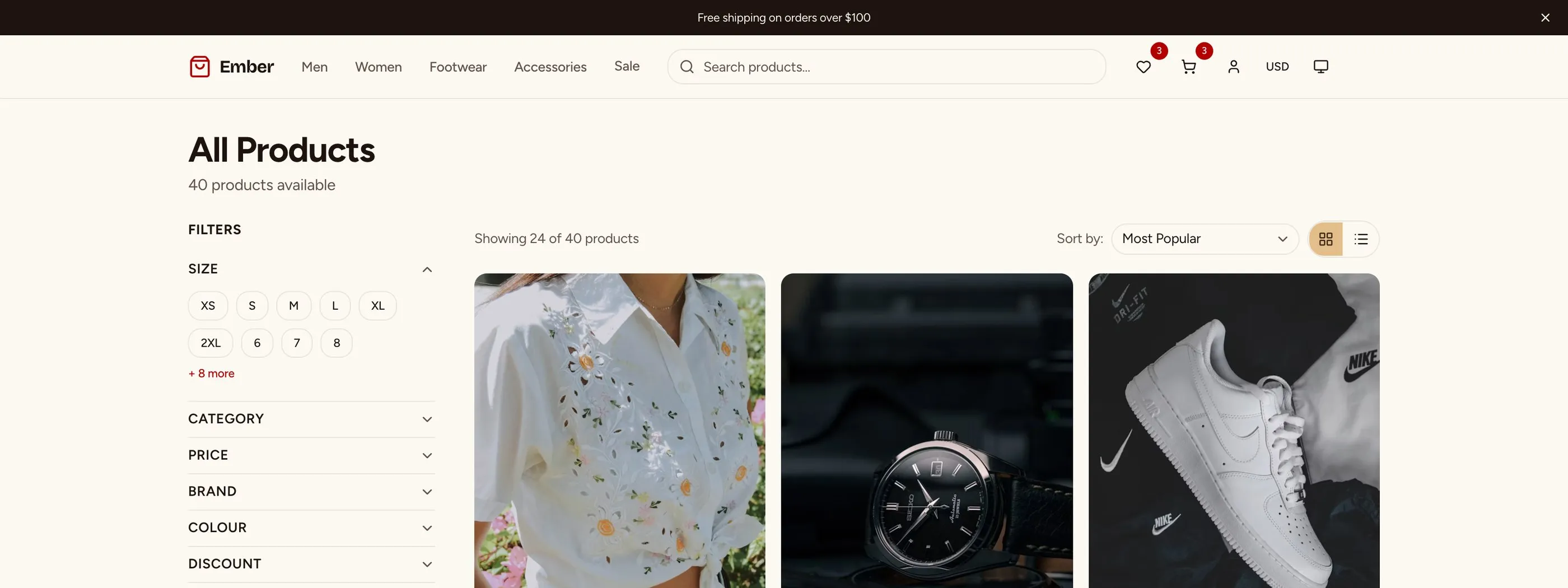
Product Listing Pages
Common failures:
- Filter controls that only work with a mouse (price sliders, color swatches)
- Product cards with no text alternative for images
- Sort dropdowns that trap keyboard focus
- Grid/list toggle with no accessible label
What WCAG AA requires:
- All filter controls must be keyboard operable (tab, arrow keys, enter, escape)
- Product images need descriptive alt text ("Blue running shoe, size 10" not "product-img-3847")
- Sort and filter changes should announce updates to screen readers via ARIA live regions
- Grid and list views need proper landmark roles and labels
Product Detail Pages
Common failures:
- Image galleries that cannot be navigated with keyboard
- Zoom functionality that only responds to mouse hover
- Variant selectors (size, color) without proper ARIA labels
- "Add to cart" buttons with no feedback for screen readers
- Tab panels for description/specs/reviews that do not follow the WAI-ARIA tabs pattern
What WCAG AA requires:
- Gallery images must be keyboard navigable with arrow keys
- Zoom should work with keyboard activation (enter/space) or touch gestures
- Each variant option needs an accessible name ("Size: Large" not just "L")
- Add-to-cart must confirm the action to assistive technology
- Tab panels must use proper ARIA roles and keyboard patterns
Shopping Cart
Common failures:
- Quantity controls that are not labeled ("+" and "-" buttons with no context)
- Remove buttons with no confirmation
- Price updates that are not announced to screen readers
- Promo code validation messages that are not associated with the input
What WCAG AA requires:
- Quantity controls need labels: "Decrease quantity for Blue Running Shoe"
- Remove actions should confirm what is being removed
- Price changes in the order summary must trigger ARIA live region announcements
- Error messages must be programmatically associated with their inputs using aria-describedby
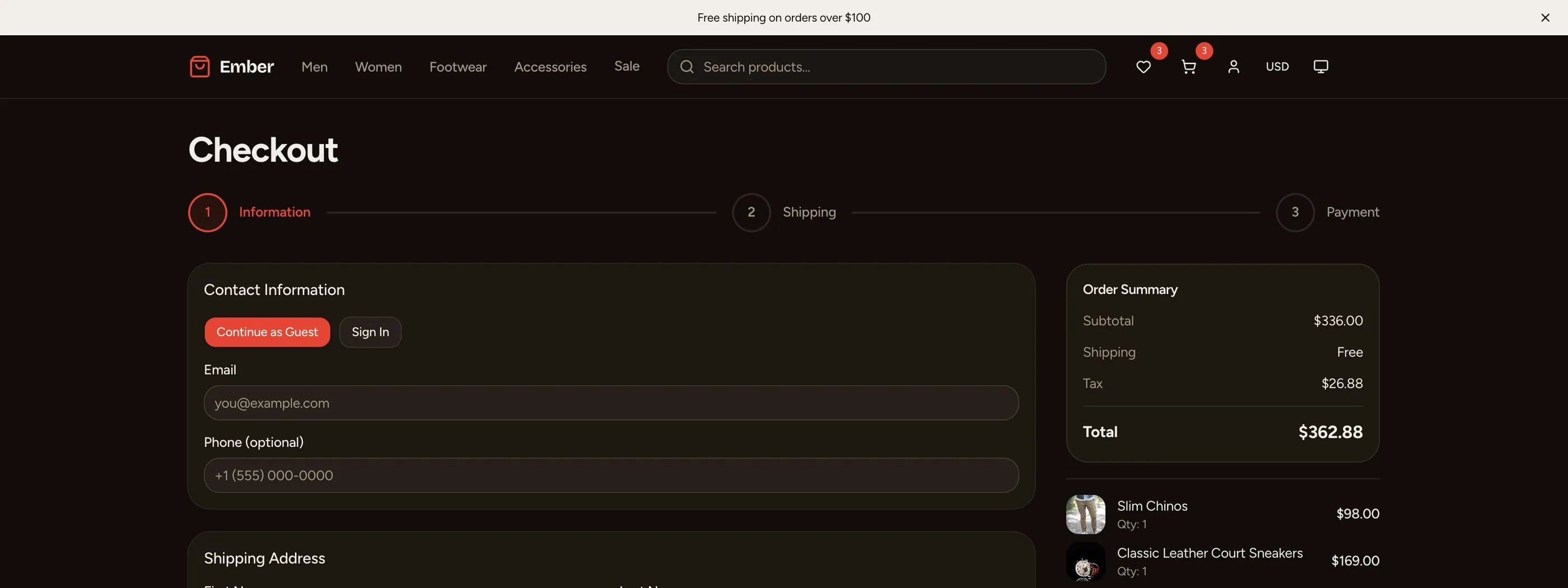
Checkout
This is the most critical flow for accessibility. A customer who cannot complete checkout cannot buy from you.
Common failures:
- Form fields without visible labels (placeholder-only is not accessible)
- Inline validation that appears visually but is not announced
- Multi-step progress that screen readers cannot interpret
- Address autocomplete that drops keyboard focus
- Payment inputs that conflict with screen reader virtual cursor
What WCAG AA requires:
- Every form field needs a visible
<label>element with a properforattribute - Validation errors must appear in an error summary at the top AND inline, both programmatically associated
- Multi-step progress needs ARIA attributes: current step, total steps, completion status
- Stripe Elements has built-in accessibility, but the surrounding form must be accessible too
- "Place order" button should disable and announce processing state
Patterns That Work
Here are concrete patterns for building accessible e-commerce screens:
Accessible Price Display
<div aria-label={`Price: $49.99, was $79.99, 37% off`}>
  <span className="line-through text-gray-500" aria-hidden="true">$79.99</span>
  <span className="font-bold text-green-700">$49.99</span>
  <span className="text-sm text-red-600" aria-hidden="true">37% off</span>
</div>
The visual display shows strikethrough and badge. The aria-label gives screen readers the full context in one announcement.
Accessible Filter Controls
<fieldset>
  <legend>Filter by Size</legend>
  {sizes.map(size => (
    <label key={size}>
      <input
        type="checkbox"
        name="size"
        value={size}
        onChange={handleFilter}
      />
      {size}
    </label>
  ))}
</fieldset>
Using <fieldset> and <legend> groups related controls and gives screen readers context for each checkbox.
Accessible Quantity Controls
<div role="group" aria-label={`Quantity for ${productName}`}>
  <button
    aria-label={`Decrease quantity for ${productName}`}
    onClick={() => updateQty(qty - 1)}
    disabled={qty <= 1}
  >
    -
  </button>
  <input
    type="number"
    aria-label={`Quantity for ${productName}`}
    value={qty}
    min={1}
    onChange={handleChange}
  />
  <button
    aria-label={`Increase quantity for ${productName}`}
    onClick={() => updateQty(qty + 1)}
  >
    +
  </button>
</div>
Accessible Checkout Step Indicator
<nav aria-label="Checkout progress">
  <ol>
    {steps.map((step, i) => (
      <li
        key={step}
        aria-current={i === currentStep ? 'step' : undefined}
      >
        <span className="sr-only">
          {i < currentStep ? 'Completed: ' : i === currentStep ? 'Current: ' : ''}
        </span>
        {step}
      </li>
    ))}
  </ol>
</nav>
The Cost of Retrofitting
We have seen teams spend 3-4 weeks retrofitting accessibility on a 15-screen e-commerce frontend. That includes auditing every component, fixing ARIA attributes, adding keyboard handlers, adjusting color contrast, and testing with screen readers.
If those same teams had started with accessible components, the additional effort would have been close to zero.
Building accessible means choosing the right primitives. Components built on Radix UI and shadcn/ui are accessible by default because the primitives handle focus management, keyboard interactions, and ARIA attributes. You get accessibility for free when you build on the right foundation.
How We Handle It
The thefrontkit E-commerce Starter Kit builds WCAG AA accessibility into every one of its 56 screens. Product grids, filter controls, cart interactions, checkout forms, and admin data tables all use proper ARIA attributes, keyboard navigation, focus management, and color contrast.
We did not bolt it on after the fact. Every component is built on shadcn/ui and Radix UI primitives, which means the accessibility layer is structural, not cosmetic.
Checklist for Your Store
Before launch, verify these accessibility requirements for each screen type:
Product listing:
- All filters are keyboard operable
- Product images have descriptive alt text
- Sort changes are announced to screen readers
- Focus is managed when filters are applied
Product detail:
- Image gallery is keyboard navigable
- Variant selectors have accessible labels
- Add-to-cart confirms the action
- Tabs follow WAI-ARIA pattern
Cart:
- Quantity controls are labeled with product name
- Price updates trigger live region announcements
- Remove buttons identify what is being removed
Checkout:
- All form fields have visible labels
- Validation errors appear in summary and inline
- Step progress is announced to screen readers
- Place order button indicates processing state
Accessibility is not a feature. It is a baseline. Build it in from day one and you will never have to think about an expensive retrofit.
Want to scan your store before launch? Run our free accessibility checker to catch automated WCAG 2.1 AA failures on any URL in seconds. For a storefront that ships accessibility-ready by default, our Next.js E-commerce Template covers WCAG AA across all 56 screens.
Want this checked on your own site?
Automated scans verify about 30% of WCAG 2.1 AA. We test the rest by hand: keyboard-only navigation, NVDA and VoiceOver output, focus management, and whether someone can actually complete your key flows. You get a report your developers can work from, mapped to criteria with severity and reproduction steps. Audits from $499.