How to Build a Kanban App in Next.js (2026)
How to Build a Kanban App in Next.js in 2026
A weekend-quality kanban board with a few columns and basic drag-and-drop is a one-week project. A production project management app with sprints, multiple views, accessible drag-and-drop, real-time collaboration, and a credible task detail modal is more like ten to fourteen weeks.
This guide walks through what a real kanban app has to actually do, the data model that makes everything else possible, and the two paths to ship one — from scratch or starting from a kit.
Or skip the build entirely: get every kit for $749
If you're shipping more than one product, All UI Kits unlocks every Next.js kit on thefrontkit. The Kanban PM Kit (45 screens with drag-and-drop board, sprints, roadmap, workload), plus the SaaS Starter Kit, CRM, HR, E-commerce, AI UX, and 12 more. One-time payment, lifetime access, no subscription.
What a Real Kanban App Has to Do
The features that separate a real project management tool from a kanban board demo.
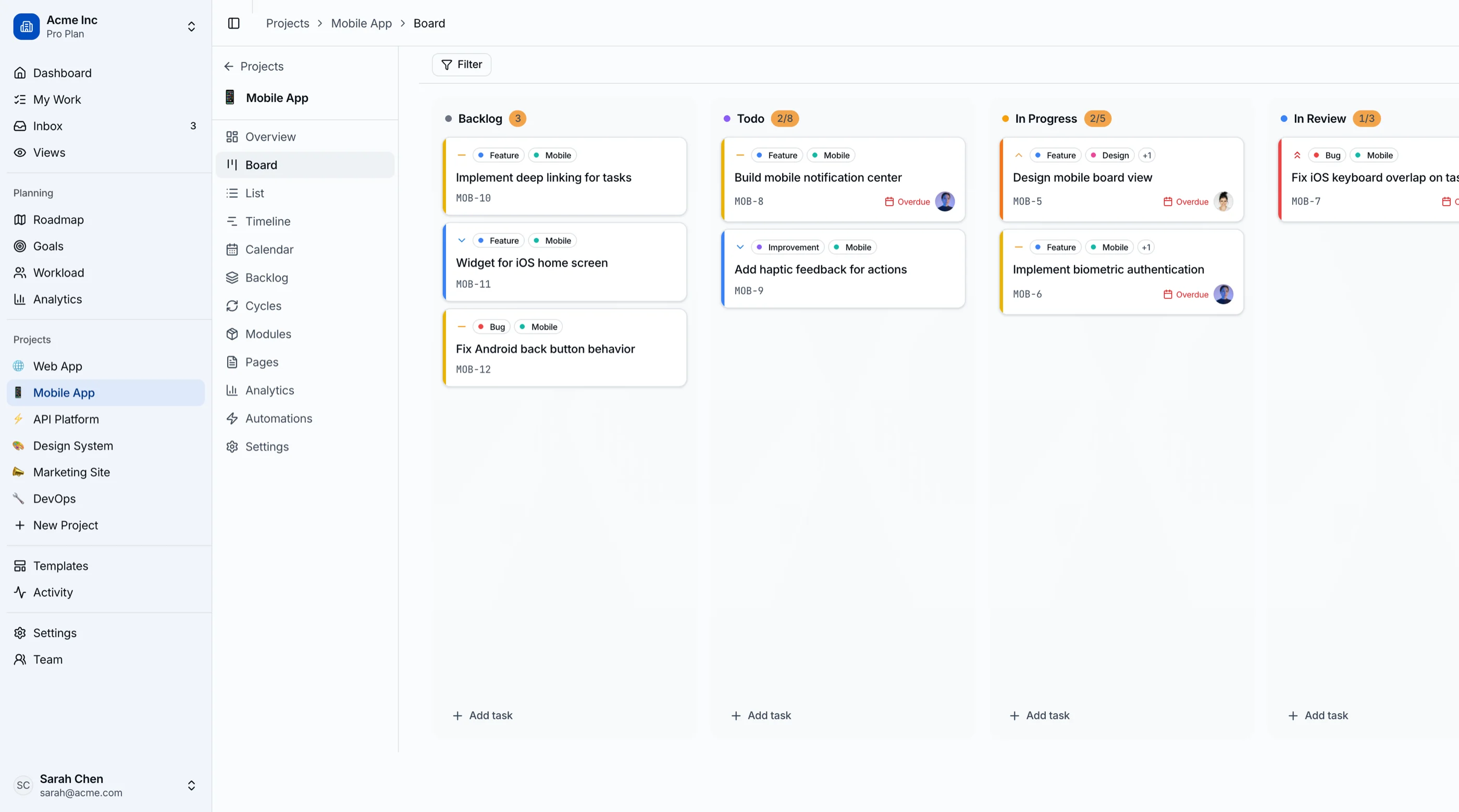
Drag-and-Drop That Survives Reality
The interaction users judge the product on. The bar:
- Touch support so the board works on phones (mobile usage is huge for status checks)
- Keyboard alternatives — Tab, Space to pick up, arrows to move, Space to drop, Escape to cancel
- Smooth animations with cards lifting visually and drop targets highlighting
- Autoscroll when dragging near column edges or board edges
- Multi-column dragging without layout jank
- Optimistic updates so dropping a card moves it immediately, with rollback on API error
- Accessibility announcements via
aria-liveso screen reader users get stage-change feedback
Don't write drag-and-drop yourself. @hello-pangea/dnd (the maintained fork of react-beautiful-dnd) and dnd-kit are the two production-grade options.
Multiple Views, Not Just a Board
Boards are great for status. Bad for deadlines, dependencies, and capacity. A complete kanban app needs:
- Board view with columns by status
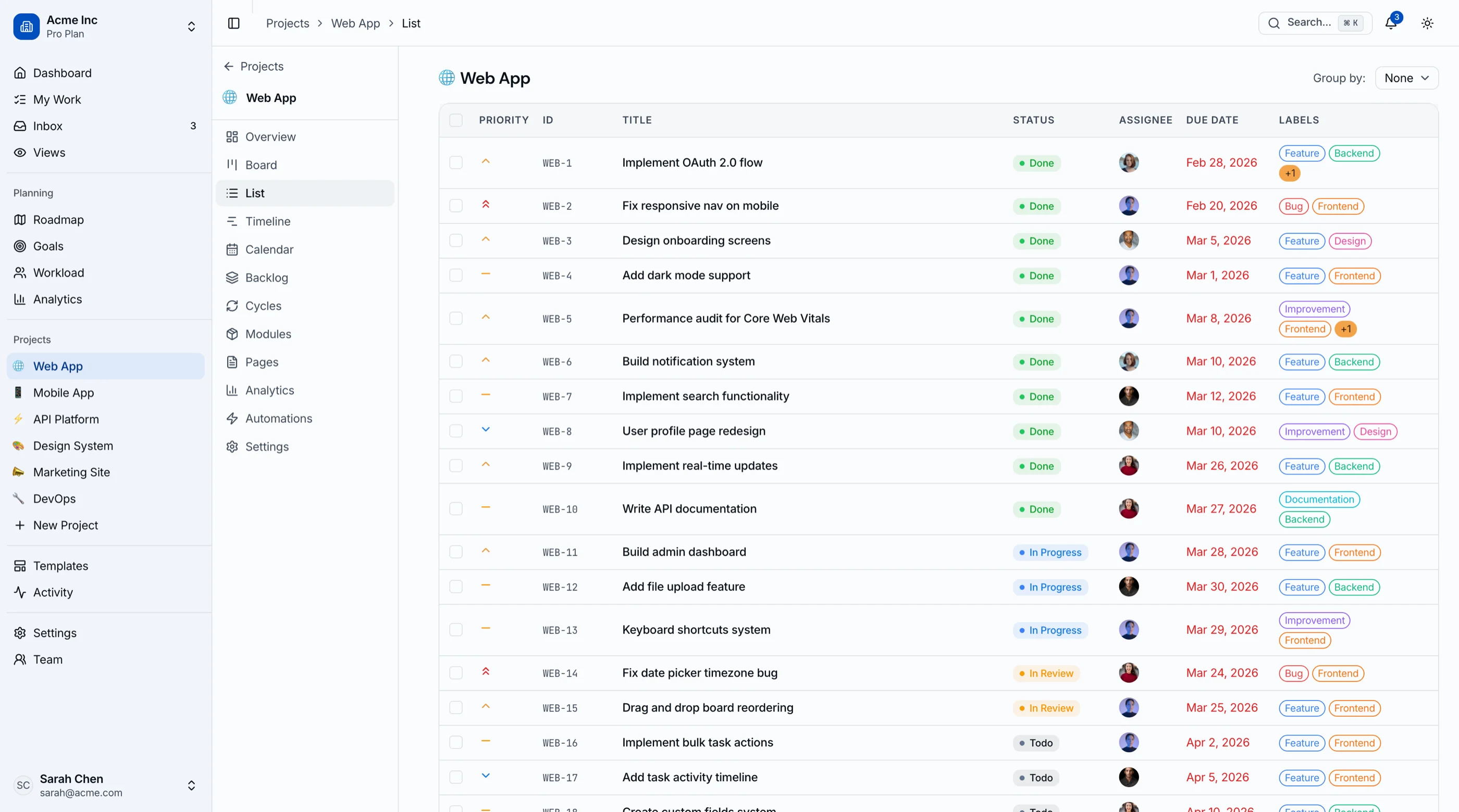
- List view for tabular sorting, bulk operations, and filtering
- Calendar view showing due dates in their actual time context
- Timeline / Gantt view for projects with dependencies
- Backlog view for prioritization separate from active work
- Workload view for capacity planning across the team
Switching between views should preserve filters and search. Building one view well is a week; building five views well is two months.
Task Detail Modal With Depth
A title and description is not a task. The fields that survive contact with a real team:
- Assignees (often multiple)
- Due dates with timezone awareness
- Priority (P1/P2/P3 or High/Medium/Low — pick one)
- Labels for flexible categorization
- Subtasks with checkboxes and percent complete
- Attachments with inline image previews
- Comments with @-mentions and resolution states
- Activity log showing changes
- Dependencies linking blocking tasks
- Custom fields per project
The task detail modal is genuinely two weeks of work on its own. Underbuilding it is the most common reason kanban apps feel like toys.
Sprint Planning for Agile Teams
If you target any agile team:
- Cycle entity with start date, end date, optional goal
- Backlog separate from the active board
- Drag from backlog → active sprint flow
- Capacity planning showing committed vs available hours
- Burndown chart during the sprint
- Velocity tracking across sprints
- Sprint review showing what shipped vs what didn't
Sprint planning is its own mental model. Don't try to make it "a kanban with a start date." Build it as a sibling experience.
Real-Time Collaboration
Less critical for v1 than founders think, but important once teams use it:
- Presence indicators showing who's viewing the same board
- Live updates when someone else moves a card or edits a task
- Optimistic conflict resolution when two people edit the same task
WebSockets via Pusher or Ably is the fast path. Liveblocks if you want a higher-level abstraction. Skip in v1 if you're moving fast.
Filters That Persist
Filters look simple. Done right, they take a week:
- Filter by assignee, label, priority, status, due date range
- Saved filter presets ("my high-priority tasks this week")
- URL-persistent filters so users can share a filtered view
- Apply across all views (board, list, calendar, timeline)
If you let users build a filter and lose it on reload, they will stop using filters.
Tech Stack: Kanban-Specific Decisions
Drag-and-drop: @hello-pangea/dnd for board-style boards. dnd-kit for more complex interactions (multi-board, custom collision detection).
Real-time (if needed): Pusher, Ably, or Liveblocks. Liveblocks is the most ergonomic but has its own pricing.
Charts (burndown, velocity): Recharts. Don't reach for D3 unless you have a visualization specialist.
Calendar UI: date-fns + custom month-view component. FullCalendar if you need week/day views.
Search: Postgres tsvector for v1. Algolia or Typesense at scale.
Database: Postgres. Drizzle or Prisma. Foreign keys, not denormalized blobs.
Background jobs: Inngest for due-date reminders and sprint roll-over automation.
Build Path 1: From Scratch (10 to 14 Weeks)
Week 1-2: Foundation. Auth, app shell, project entity, task entity, basic CRUD.
Week 3-4: Board view with drag-and-drop. Get this right; everything else depends on it. Use @hello-pangea/dnd.
Week 5-6: Task detail modal. All the fields above. Comments, activity, subtasks.
Week 7-8: Additional views. List, calendar, timeline. Backlog as a separate flow.
Week 9-10: Sprints. Cycle entity, backlog-to-sprint flow, burndown, velocity.
Week 11-12: Filters and search. Persistent filters, full-text search, saved views.
Week 13-14: Polish. Empty states, mobile, dark mode, accessibility, performance.
Realistic for most teams is 14 to 18 weeks because the task detail modal alone fills 3 to 4 weeks.
Build Path 2: Using a Kanban PM Kit (2 Weeks)
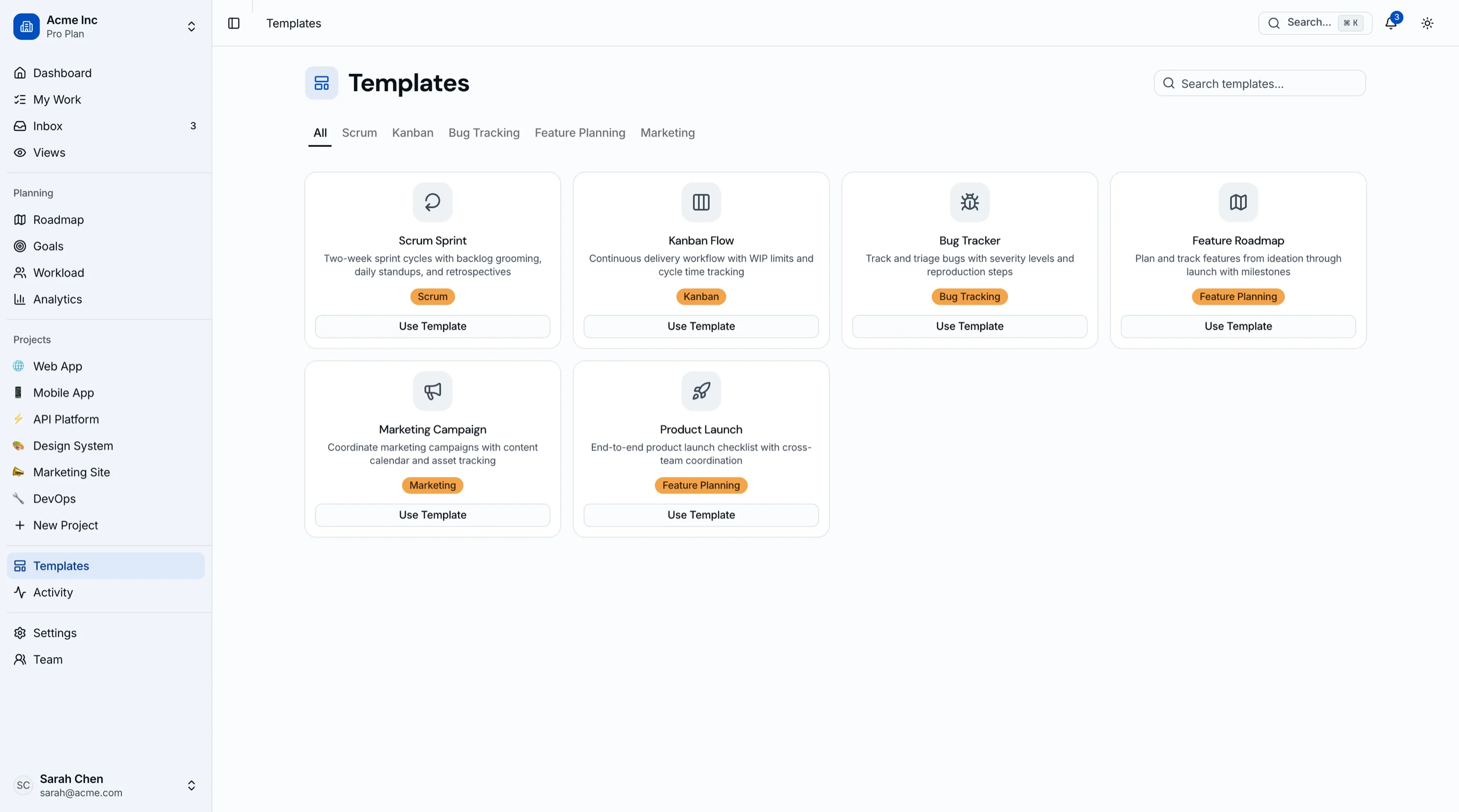
The Kanban PM Kit ships:
- Board view with
@hello-pangea/dnddrag-and-drop (touch + keyboard accessible) - List, calendar, Gantt timeline, and backlog views
- Task detail modal with assignees, dates, priorities, labels, subtasks, attachments, comments, activity, dependencies
- Sprint cycles with backlog flow, burndown, and velocity tracking
- Goals and roadmap views
- Workload view for capacity planning
- Persistent filters across views, with saved presets
- 45 screens on Next.js 16, Tailwind v4, shadcn/ui
What remains:
- Wire auth and database
- Real-time layer (Pusher, Liveblocks, or skip in v1)
- Your project-specific custom fields and workflows
Two weeks of customization vs fourteen weeks of building.
Build Path 3: Start From the Full-Stack Kanban PM Kit (Backend Included)
Persisting drag-and-drop order, sprints and per-project task numbers is where kanban builds get slow. The Full-Stack Kanban PM Kit ships that backend on Supabase:
- 44 routes: boards, list, timeline, calendar and backlog views, cycles, modules, goals, roadmap, workload and analytics
- 31 tables with migrations, row-level security, triggers and per-project task numbering
- Drag-and-drop that saves to the database, sprint cycles with velocity and burndown, and seven chart types
- Supabase Auth with email/password, Google and GitHub sign-in
- Server Actions for every mutation, across 16 action files
It starts at $332, and the docs cover setup. Or have us launch it for you.
Step-by-Step from the Kit
Day 1-2: Setup, brand, database. Schema migration. Replace seed data.
Day 3-4: Auth. Wire your provider. Set up project membership roles.
Day 5-6: Customize task fields. Adjust priorities, labels, statuses to match your team's workflow.
Day 7-8: Sprint configuration. Set sprint length, working hours, holiday calendar.
Day 9-10: Real-time (optional). Wire Pusher or Liveblocks if you need it for v1.
Day 11-12: Filters and saved views. Configure default filters per role.
Day 13-14: Deploy and beta. Vercel deploy, custom domain, beta test with one team.
Common Pitfalls
Building the board before the task model. Tempting because the board is visible. Then the task detail modal needs fields the schema doesn't have. Define the full task model first.
Custom drag-and-drop. Always worse than the library version. Use @hello-pangea/dnd or dnd-kit from day one.
Treating sprints as boards with start dates. Sprints have backlogs, capacity planning, burndown, velocity, and retrospectives. Build them as a sibling concept.
Skipping keyboard accessibility. Drag-and-drop is the hardest interaction to retrofit a11y into. Get it right first or use a library that does.
Underbuilding the task detail modal. Two weeks of work shows up as "a card with a title and description shows up." That feels broken to anyone who's used Linear or Jira.
Building one view well, four views never. Each view is a week. Plan all five up front so the data model supports them.
Filters that don't persist. Build URL-persistent filters from day one. Retrofitting persistence into filter state means rewriting the entire filter system.
Ignoring empty states. Day-one boards are empty. Empty columns with "drag a task here" copy and a CTA to create the first task are not optional polish — they're how the app introduces itself.
Adjacent Reads
- How to Choose a Next.js Kanban Template — evaluation rubric
- Best Kanban Board Templates 2026 — head-to-head comparison
- Best Next.js Dashboard Templates 2026 — broader category
FAQ
How long does it take to build a kanban app in Next.js from scratch?
A competent solo engineer at full speed builds a credible kanban product management tool in 10 to 14 weeks. Realistic timelines, including the long tail of touch drag-and-drop edge cases, accessibility, multiple views, and a credible task detail modal, land closer to 14 to 20 weeks. The task detail modal alone is routinely 3 to 4 weeks. A kanban PM kit removes 12 of those weeks.
What drag-and-drop library should I use in 2026?
Two options: @hello-pangea/dnd (the maintained fork of react-beautiful-dnd) for board-style kanbans, and dnd-kit for more complex interactions. react-beautiful-dnd itself is deprecated; don't start new projects with it. Both libraries have solid touch support and keyboard accessibility. Custom drag-and-drop is almost never worth it; the edge cases (autoscroll, nested scroll, multi-column, mobile autoscroll-on-edge) are genuinely hard.
Do I need real-time collaboration in v1?
Usually no. Most teams ship without it and add it in v2 once users start asking. Pusher, Ably, or Liveblocks make it a 1-2 week add-on. The trade-off is signaling: a product with real-time presence indicators feels modern; without them, it feels like static SaaS. If your competitors all have real-time, ship it in v1.
Should I let users create custom task fields?
Yes, after v1. Most teams don't need them on day one and the architecture is non-trivial. Build the v1 with hardcoded fields (assignee, due date, priority, labels). Add custom fields when at least one paying customer asks. The architecture: a custom_field_definitions table linked to projects, and a JSONB column on tasks for values.
How many pages does a real kanban app need?
The minimum for a credible product management tool is around 20 pages: project list, individual project (with 3-5 views), task detail, settings (general, members, custom fields, workflows, billing), and auth (5 screens). A full-featured tool competing with Linear or Jira lower-tier is 40 to 50 pages. The Kanban PM Kit ships 45 screens to clear this bar.
Can I use a kanban kit with my own backend (Jira, Linear, custom API)?
Yes, if the kit's data layer is typed and decoupled. Production-ready kanban kits use TypeScript interfaces for tasks, projects, and users. Replace the data loading with API calls to Jira, Linear, your own Supabase tables, or anything else. The UI works the same. Avoid kits with API calls scattered throughout components.
Is there a kanban kit with the backend already built?
Yes. The Full-Stack Kanban PM Kit wires boards, sprints, goals and analytics to Supabase: 31 tables with row-level security, Supabase Auth, and Server Actions for every mutation.
Want it shipped without hiring a developer?
The build path above assumes you have engineers. If you don't, the team behind thefrontkit does done-for-you launches: we deploy the kit, apply your branding, and wire it to your stack. Fixed quotes, most builds ship in 2-4 weeks, from $1999.