How to Choose a Next.js Kanban Template in 2026
How to Choose a Next.js Kanban Template in 2026
Most "kanban templates" you find on Google are not what you actually need. They are static screenshots, drag-and-drop demos that break on mobile, or admin templates with one kanban page bolted on. Building a real project management tool with kanban at its center takes more.
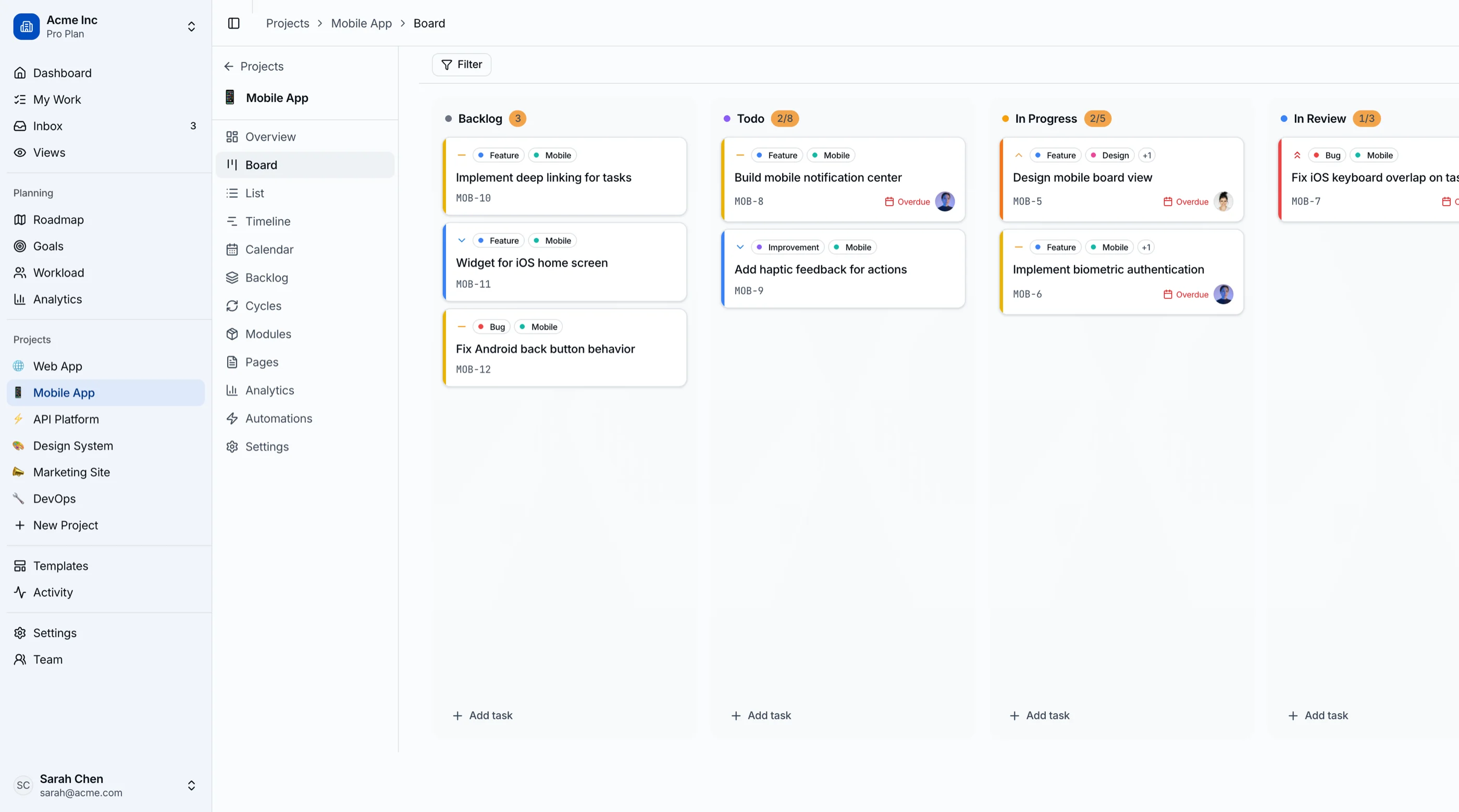
A production-ready Next.js kanban template should give you the board plus the surrounding screens that make the board useful: task detail modals, list and calendar views, sprint planning, roadmap timeline, workload visibility, and a settings flow that handles the long tail of customization. Without those, the board is a toy.
This guide walks through the criteria that actually matter when evaluating a Next.js kanban template, the trade-offs between building from scratch and buying, and a practical checklist you can run any candidate template through.
Or skip the choice: get every kit for $749
If you're shipping more than one product, All UI Kits unlocks every Next.js kit on thefrontkit. The full Kanban PM Kit (drag-and-drop board, sprints, roadmap), plus the SaaS Starter Kit, CRM Dashboard, HR Dashboard, E-commerce, AI UX, Blog CMS, and 11 more. Plus every future kit. One-time payment, lifetime access, no subscription.
What a Real Next.js Kanban Template Needs
A kanban board is one component. A kanban template is everything that surrounds it. Here's the difference between the two.
Drag-and-Drop That Works on Mobile and With Keyboards
The board itself is the obvious starting point. What separates a real implementation from a demo:
- Touch drag-and-drop. Over half of project management dashboard usage happens on phones for quick status checks. If the board breaks on touch, the template is desktop-only and that's a problem.
- Keyboard alternatives. Drag-and-drop is one of the hardest interactions to make accessible. A real template uses arrow keys + Space to pick up and move cards, with screen reader announcements when stages change.
- Smooth animation, no jank. Cards should lift visually when picked up, drop targets should highlight clearly, and the layout should not shift unexpectedly during the drag.
The mainstream libraries that handle this well in 2026 are @hello-pangea/dnd (the maintained fork of the deprecated react-beautiful-dnd) and dnd-kit. Avoid templates that wrote their own drag-and-drop logic from scratch — the edge cases (autoscroll, nested scroll containers, multi-column dragging) are genuinely hard.
Multiple Views, Not Just a Board
Boards are great for status. They are bad for deadlines, dependencies, and capacity planning. A complete kanban template includes:
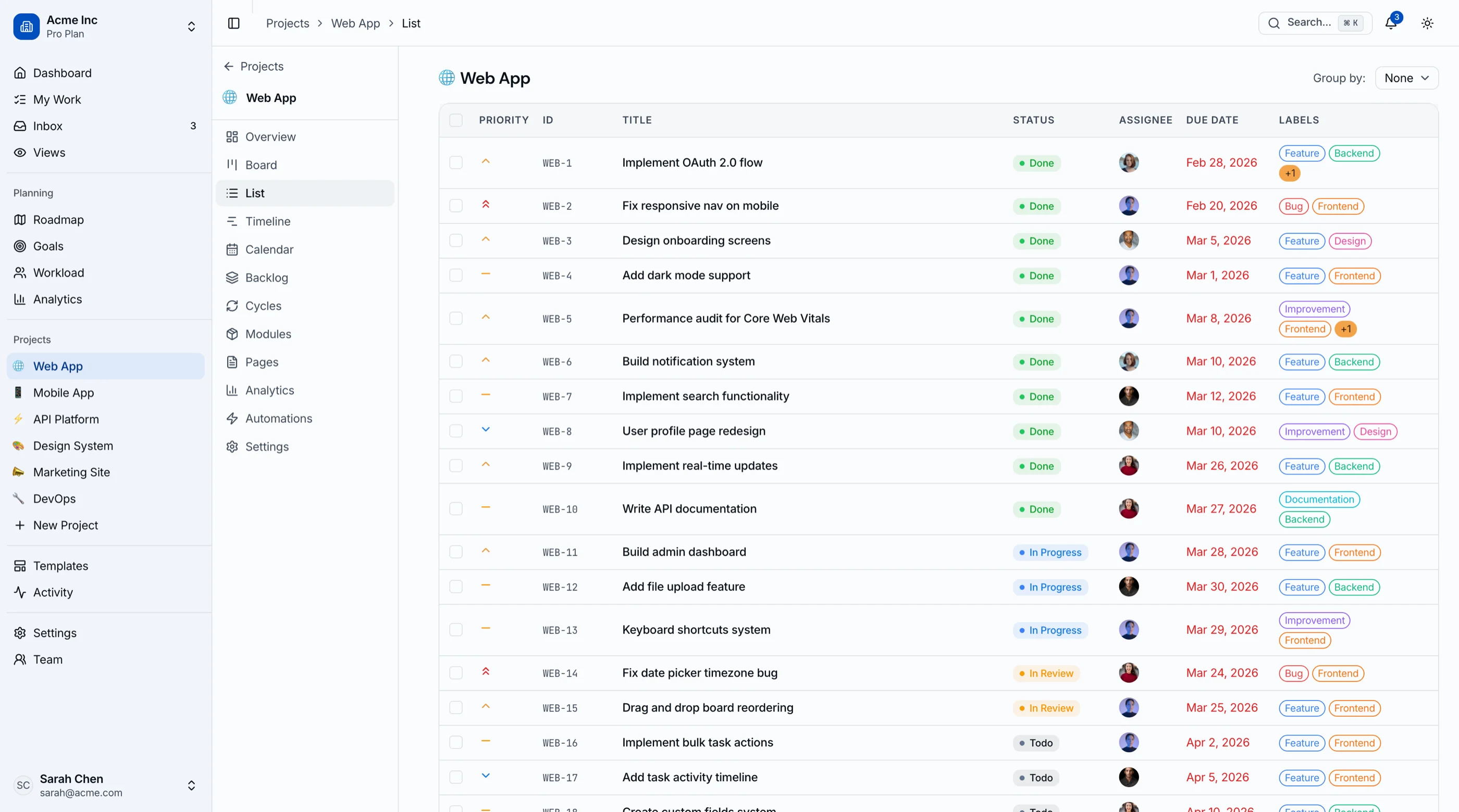
- List view for tabular sorting and bulk operations
- Calendar view showing due dates in their actual time context
- Timeline / Gantt view for projects with dependencies
- Backlog view for prioritization separate from the active board
- Workload view for capacity planning across the team
Users expect to switch between these without reloading filters. Templates that only ship the board force you to build the rest, and the rest is usually more work than the board itself.
Sprint Planning for Agile Teams
If you're targeting any team that does agile, you need sprint cycles. The minimum viable sprint implementation:
- Cycle entity with start and end dates, optionally a sprint goal
- Backlog → sprint assignment flow (drag tasks in, set capacity)
- Burndown chart so the team can see progress against the goal
- Completion metrics at sprint close (velocity, cycle time, stories shipped)
- Sprint review screen to retroactively measure each cycle
Most kanban templates skip this entirely or include a "sprints" page that's just a renamed list. Real sprint planning needs its own data model and its own UX.
Task Management Depth
A card with a title and description won't survive contact with a real team's workflow. The fields that actually get used:
- Assignees (often multiple per task)
- Due dates with timezone awareness
- Priority (P1/P2/P3 or High/Medium/Low — pick one and stick)
- Labels or tags for flexible categorization
- Subtasks for breaking work down
- Attachments at minimum, ideally inline image previews
- Comments with @-mentions and resolution states
- Activity log showing who changed what when
- Dependencies linking tasks that block other tasks
If the template's card detail modal has fewer than half of these, you're going to be building the editor yourself within a month.
Accessibility on the Hardest Interaction in UX
Drag-and-drop accessibility is famously hard. Most templates fail entirely. The bar for production use:
- Keyboard alternative for every drag operation. Tab to focus a card, Space to pick up, arrow keys to navigate columns, Space again to drop.
aria-liveregions announcing stage changes ("Task X moved from In Progress to Done") so screen reader users get the same signal as sighted users.- Focus management that doesn't get lost when the DOM reorders during drag.
- Color contrast on column headers, priority badges, and status indicators that passes WCAG AA in both light and dark themes.
If you're building for enterprise customers, accessibility shows up in procurement requirements. Catching it after launch means rewriting the most complex interaction on the page.
Build vs Buy: Honest Math
A weekend-quality kanban with one view and basic drag-and-drop is achievable in a week. A production-ready kanban template covering the criteria above is genuinely 6 to 10 weeks of frontend work for a competent developer, plus design and accessibility review.
The math:
- Build it yourself: 6–10 weeks × your loaded rate, plus the maintenance tail (every dependency update, every Tailwind upgrade, every accessibility regression).
- Buy a paid template ($79–$299 in this market): you skip the 6–10 weeks but you inherit the template author's choices. Customization is on you.
- Free open source: zero cost, but most free kanban templates are demo-quality, lack sprint planning entirely, and have weak accessibility. Plan to spend 2–3 weeks bringing one up to production standard.
The decision usually comes down to two questions:
- Is kanban the differentiator? If yes, build it yourself so you own every interaction. If no (it's table stakes for your product), buy or fork.
- Will you need more than the board? If you also need sprints, roadmap, and workload — buy. The surrounding screens are where the real time savings are.
A Practical Evaluation Checklist
Before committing to any Next.js kanban template, run it through this checklist with the live demo open:
- Open the demo on your phone. Does the board adapt? Can you drag a card on touch?
- Tab through the board with your keyboard. Can you focus a card? Pick it up? Move it?
- Open the card detail. Count the fields: assignee, due date, priority, labels, subtasks, comments, activity log. How many are there?
- Switch views. Is there a list view? Calendar? Timeline?
- Look for a sprints section. If it exists, click it. Does it have backlog and burndown, or is it just a renamed list?
- Toggle dark mode. Does everything update, or do some components stay in light mode?
- Inspect the URL bar after filtering or sorting. Do filters persist on reload?
- Open the comparison or pricing page. Look at the screen count. Under 20 screens means you're building the rest yourself.
The templates that pass all eight are the ones worth paying for. Most fail on three or more.
How the Kanban PM Kit Approaches Each Requirement
The Kanban Board & Project Management Template was built specifically to clear the checklist above. 45 screens of project management UI, all on Next.js 16, Tailwind CSS v4, and shadcn/ui.
The board uses @hello-pangea/dnd for production-grade drag-and-drop with smooth animations and column-level reorder. Keyboard navigation is wired into the same handlers — Tab to focus, Space to pick up, arrows to move between columns, Space again to drop. Screen readers get aria-live announcements on every stage change.
Five views ship per project: board, list, calendar, Gantt-style timeline, and backlog. Switching between them preserves filters and search. Saved views can be pinned to the sidebar for quick access.
Sprint planning is built in. Cycles have start/end dates and goals. The backlog → sprint flow is drag-and-drop. Burndown is rendered with Recharts. Velocity and completion metrics surface automatically at sprint close.
The task detail modal includes assignees (multiple), due date with timezone, priority, labels, subtasks (with their own checkboxes and progress percentage), attachments, comments with @-mentions, full activity log, and dependency linking. Card edits sync optimistically and roll back on API error.
WCAG AA accessibility is verified throughout. Keyboard alternatives are tested against screen readers. Color contrast passes in light and dark modes. Focus management is preserved during drag operations.
Try the live demo on your phone first — that's the fastest way to evaluate the touch experience without committing.
Common Mistakes When Building From Scratch
Even strong frontend teams hit these walls when they roll their own kanban:
Building the board before the surrounding screens. It feels productive to ship the board first. Then six weeks later when the team realizes they need a list view, a backlog, and a calendar, the board's data model doesn't fit. Refactor or live with the limitation. Plan all views up front.
Skipping keyboard accessibility "for later." Drag-and-drop is the hardest interaction to retrofit accessibility into. Doing it after the board is built means rewriting the board. Either get accessibility right in the first implementation or use a library (@hello-pangea/dnd, dnd-kit) that does it for you.
Underestimating the task detail modal. A title and description is not a task. By the time you've shipped assignees, dates, priorities, labels, subtasks, attachments, comments, activity, and dependencies, the modal is two weeks of work on its own.
Building sprint planning as "a kanban with start and end dates." Sprint planning is a different mental model: you're committing to scope, you're tracking velocity, you're closing cycles with retros. Don't conflate it with the board. Build it as a sibling experience.
Forgetting the empty state. A blank board on day one looks broken. A blank board with a "Create your first column" CTA and explanatory text looks like a product. This is usually the last thing built and the first thing users see.
Adjacent Reads
- How to Build a Kanban App in Next.js — step-by-step build walkthrough
- Best Kanban Board Templates 2026 — head-to-head comparison of 7 options
- Best Next.js Dashboard Templates 2026 — broader dashboard category
- Best shadcn Dashboard Templates 2026 — shadcn/ui specifically
- Next.js Boilerplate vs Building From Scratch — the broader build-vs-buy decision
FAQ
What is a Next.js kanban template?
A Next.js kanban template is a pre-built project management UI that runs on the Next.js framework. A complete template includes the kanban board (with drag-and-drop, status columns, task cards), plus task detail modals, alternative views (list, calendar, timeline), sprint planning, and the surrounding settings and team-management screens. Using one means you skip 6 to 10 weeks of frontend work and focus on your backend, integrations, and the workflow logic that differentiates your tool from generic project management software.
What's the difference between a kanban board library and a kanban template?
A library (like @hello-pangea/dnd or dnd-kit) gives you the drag-and-drop primitives. You still build everything around them: columns, cards, task data model, modals, views, and settings. A template gives you the entire interface assembled, styled, and accessible. Use a library when you want full control and have weeks to invest. Use a template when you need to ship the surrounding workflow, not the drag-and-drop itself.
Can I use a kanban template with my own backend (Jira, Linear, custom API)?
Yes, if the template is built properly. Production-ready Next.js kanban templates use typed TypeScript interfaces for tasks, columns, and users. Replace the seed data imports with API calls to any backend (Jira REST, Linear GraphQL, your own Supabase tables, anything else) and the UI keeps working. The UI layer should be backend-agnostic.
Does a kanban template support touch drag-and-drop on mobile?
The best ones do, but not all. Test it before you buy. Open the demo on your phone, try to drag a card between columns, and check whether the autoscroll works at the column edges. If it doesn't, you have a desktop-only product. For a real production-grade implementation, look for templates using @hello-pangea/dnd (which has solid touch support) and that explicitly state mobile testing in their docs.
Is keyboard accessibility realistic for a kanban board?
Yes, but it requires deliberate effort. The pattern: Tab cycles through focusable elements (cards, column headers, action buttons). Space picks up a focused card. Arrow keys move it between columns and within columns. Space again drops it. Escape cancels. aria-live announces stage changes for screen reader users. If you're starting from scratch, plan for this in the data model from day one. If you're picking a template, look for explicit WCAG AA claims and verify with a keyboard-only test.
How many screens does a real kanban product management tool need?
The minimum for a credible product is around 20 screens: project list, individual project (with at least 3 views), task detail, settings, auth (login/register/recovery), team management, and a few utility pages. A full-featured tool that competes with Linear or Jira at the lower end is 40 to 45 screens. The Kanban PM Kit ships 45 screens to clear this bar.