Best Kanban Board Templates in 2026
Best Kanban Board Templates in 2026
Building a kanban board from scratch sounds simple until you start. Drag-and-drop between columns, task detail modals, filters, swimlanes, assignees, due dates, priority levels. Then you need views beyond the board itself: list view, calendar view, a timeline or Gantt chart. Add sprint planning, workload tracking, and analytics, and you're looking at months of frontend work.
A kanban board template gives you the visual structure and interaction patterns so you can focus on your backend, integrations, and the workflow logic that makes your tool different.
We compared 7 kanban board templates on the criteria that matter for real project management dashboards: board features, views, sprint planning support, task management depth, and whether the template actually works for production use or is just a demo with pretty screenshots.
Or skip the choice: get every kit for $749
If you're shipping more than one product, All UI Kits unlocks every Next.js kit on thefrontkit. The full Kanban PM Kit (drag-and-drop board, sprints, roadmap), plus the SaaS Starter Kit, CRM Dashboard, HR Dashboard, E-commerce, AI UX, Blog CMS, and 11 more. Plus every future kit. One-time payment, lifetime access, no subscription.
What Makes a Good Kanban Board Template?
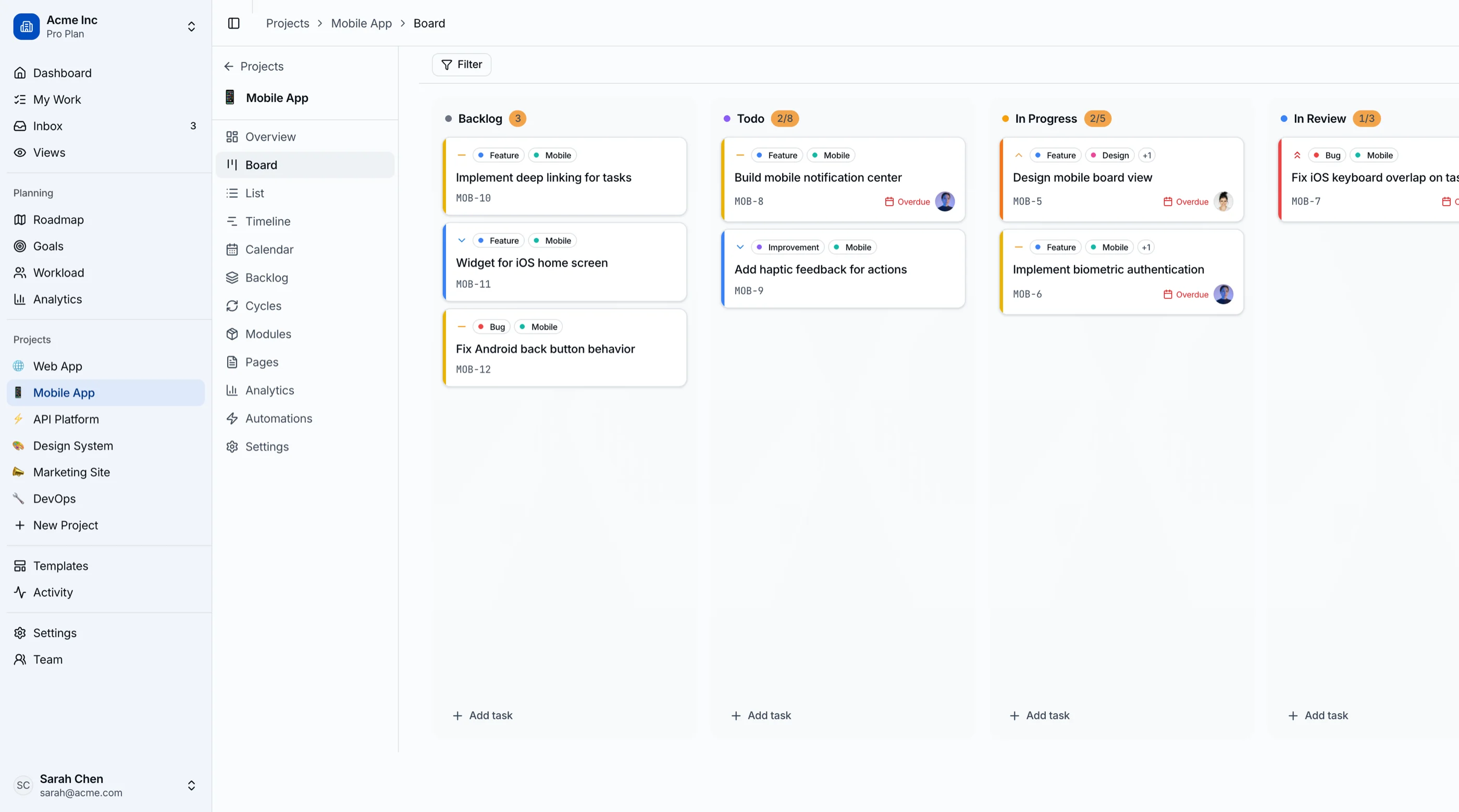
Drag-and-drop that works. The core interaction needs to be smooth, with visual feedback during drags, clear drop targets, and no layout jank. Test it on mobile too. Touch-based drag-and-drop is notoriously tricky.
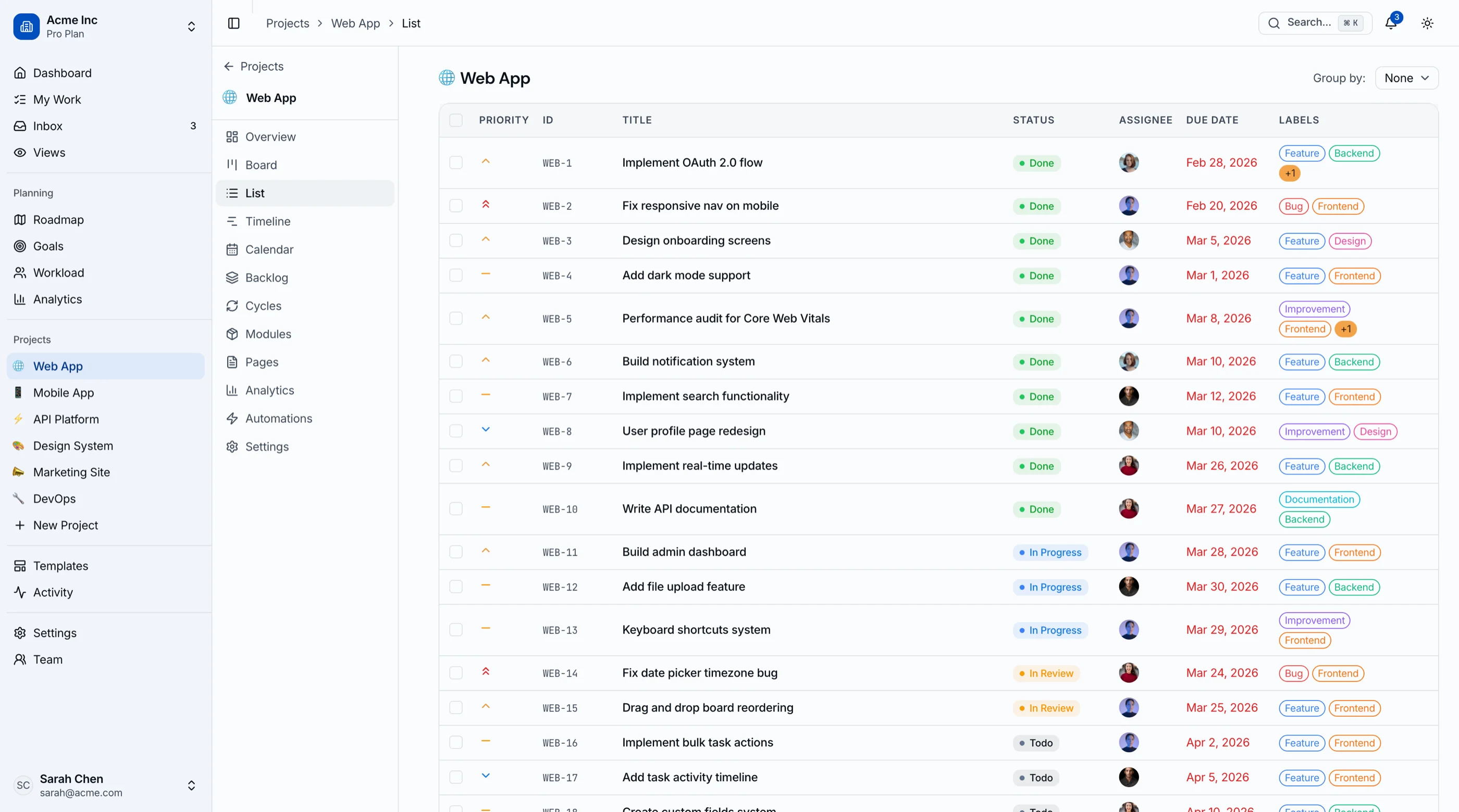
Multiple views. A kanban board alone isn't enough. Users expect list view, calendar view, and often a timeline or table view. If the template only gives you the board, you'll build the rest from scratch.
Task management depth. Can tasks have subtasks, assignees, due dates, labels, priority, attachments, and comments? A basic card with a title and description won't survive contact with real project workflows.
Sprint planning. If you're building for agile teams, you need sprint cycles, backlog management, burndown charts, and velocity tracking. Not every template covers this.
Filtering and search. As boards grow, finding specific tasks becomes critical. Filter by assignee, priority, label, due date. Full-text search across task titles and descriptions.
Accessibility. Drag-and-drop is one of the hardest interactions to make accessible. Keyboard users need an alternative way to move cards between columns. Screen readers need to announce the board state. Most templates fail here entirely.
The 7 Best Kanban Board Templates
1. thefrontkit Kanban Board & Project Management Template
Best overall kanban board template for production project management apps.
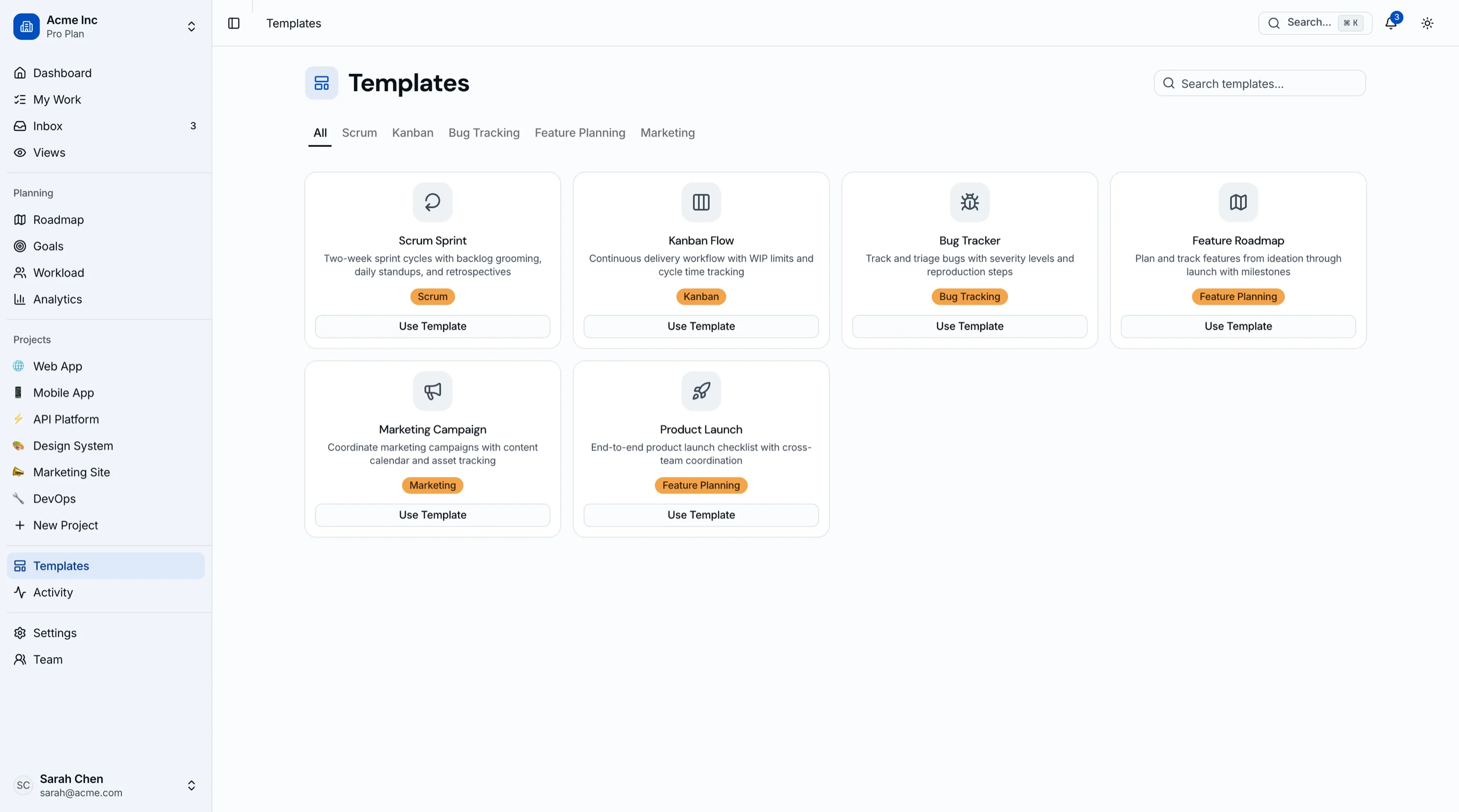
The Kanban Board & Project Management Template from thefrontkit is the most complete option on this list. 45 screens. This isn't a kanban board component you drop into an existing app. It's a full project management dashboard.
The kanban board itself has drag-and-drop with @hello-pangea/dnd, card detail modals, assignees, priority labels, and due dates. But the real value is everything around it: list view, calendar view, Gantt-style timeline, workload view, sprint cycles with burndown tracking, modules for feature grouping, roadmap planning, goals and OKRs, team management, project analytics, activity feed, inbox notifications, wiki-style pages, automation rules, and a full settings suite.
Sprint planning is built in. You get backlog management, sprint creation with date ranges, capacity planning, and burndown charts. This is the only template on the list that covers the full agile workflow.
WCAG AA accessibility throughout. The kanban board has keyboard alternatives for drag-and-drop. Screen readers can navigate boards, task lists, and sprint views. Color contrast works in both light and dark themes.
- Screens: 45 screens
- Views: Kanban board, list, calendar, timeline, workload view
- Sprint planning: Yes, with burndown charts and capacity tracking
- Stack: Next.js 16, Tailwind CSS v4, shadcn/ui, Recharts, @hello-pangea/dnd
- Accessibility: WCAG AA
- Live demo: Try the kanban board demo
- Price: From $131
2. Shadcn Dashboard Starter by Kiranism
Best free open-source kanban board for Next.js.
This is the most popular free Next.js dashboard starter on GitHub with over 6,000 stars. It includes a kanban board along with data tables, charts, and auth pages. The kanban board covers the basics: columns, cards, drag-and-drop, and card detail views.
The kanban is one feature inside a broader admin dashboard template. You won't get sprint planning, multiple views, or advanced task management. But if you need a free starting point and plan to build on top of it, the code quality is solid.
- Screens: 10-15 (dashboard-wide)
- Views: Kanban board, data tables
- Sprint planning: No
- Stack: Next.js, shadcn/ui, Tailwind CSS
- Accessibility: Basic (Radix defaults)
- Price: Free (open source)
3. Apex Dashboard
Best premium admin dashboard with a kanban board included.
Apex is a production-ready Next.js 16 admin template with 5 dashboard variations and 20+ application pages. The kanban board is one of several apps alongside chat, mail, file manager, and calendar.
The board itself is functional with drag-and-drop and task cards, but it's designed as one feature in a general-purpose admin template rather than as the centerpiece of a project management tool. If you need an admin dashboard that happens to include a kanban board, Apex is a strong choice. If you need a dedicated project management dashboard, look elsewhere.
- Screens: 20+ pages total
- Views: Kanban board (single view)
- Sprint planning: No
- Stack: Next.js 16, React 19, TypeScript, Tailwind CSS v4, shadcn/ui
- Accessibility: Partial
- Price: Premium
4. Zenith Dashboard
Best for teams wanting a feature-rich admin layout.
Zenith offers 50+ routes, six layout variants, and 34 shadcn/ui components. The kanban board is included alongside AI chat, calendar, a TipTap rich text editor, and Leaflet maps. It's a general-purpose admin template with strong component coverage.
The kanban board supports drag-and-drop and basic card management. No sprint planning or multiple views. Like Apex, the board is a feature within a broader admin template rather than a dedicated project management solution.
- Screens: 50+ routes
- Views: Kanban board (single view)
- Sprint planning: No
- Stack: Next.js, shadcn/ui, Tailwind CSS
- Accessibility: Partial
- Price: Premium
5. Syncfusion React Kanban
Best as a standalone component rather than a full template.
Syncfusion's React Kanban Board is a commercial UI component, not a complete template. You get a polished kanban board widget with drag-and-drop, swimlanes, column toggling, card templates, and WIP limits. It integrates into any React app.
The component is well-engineered with good API design and documentation. The tradeoff is that you're buying a single component, not a project management dashboard. You'll build everything else (navigation, sprint planning, analytics, settings) yourself.
- Type: UI component (not a template)
- Views: Kanban board with swimlanes
- Sprint planning: No
- Stack: React (framework-agnostic)
- Accessibility: Keyboard support included
- Price: Commercial license required
6. Shadboard
Best free dashboard with CRM and kanban combined.
Shadboard is a comprehensive free Next.js dashboard that includes analytics, e-commerce, CRM, inbox, chat, calendar, kanban board, file manager, and settings pages. It's one of the most feature-complete free options available.
The kanban board covers basic column and card management. The value of Shadboard is breadth rather than depth. If you need a kanban board alongside CRM and other features in a single free template, this works.
- Screens: 15+ pages
- Views: Kanban board (single view)
- Sprint planning: No
- Stack: Next.js, shadcn/ui, Tailwind CSS
- Accessibility: Basic
- Price: Free
7. Kanban-next by jonaszb
Best minimal open-source kanban for learning or prototyping.
A standalone kanban board built with Next.js and Supabase. It includes customizable columns and cards, user authentication (Google, GitHub, email), and cloud-hosted database storage. The scope is intentionally narrow: just a kanban board.
Good for prototyping or learning how to build a kanban app with Next.js. Not suitable as the foundation for a production project management dashboard. No sprint planning, no analytics, no additional views.
- Screens: 2-3
- Views: Kanban board only
- Sprint planning: No
- Stack: Next.js, Supabase
- Accessibility: Minimal
- Price: Free (open source)
Comparison Table
| Template | Screens | Views | Sprint Planning | Accessibility | Price |
|---|---|---|---|---|---|
| thefrontkit | 50 | 5 (board, list, calendar, timeline, workload) | Yes | WCAG AA | From $131 |
| Shadcn Starter | 10-15 | 1 | No | Basic | Free |
| Apex | 20+ | 1 | No | Partial | Premium |
| Zenith | 50+ | 1 | No | Partial | Premium |
| Syncfusion | Component | 1 (with swimlanes) | No | Keyboard | Commercial |
| Shadboard | 15+ | 1 | No | Basic | Free |
| Kanban-next | 2-3 | 1 | No | Minimal | Free |
Which Kanban Board Template Should You Pick?
For a full project management dashboard with sprint planning, multiple views, analytics, and production-level accessibility, the thefrontkit Kanban Board template covers the most ground. 45 screens is hard to beat if you're building something that competes with tools like Linear or Jira.
For a free starting point where you'll build the project management features yourself, the Shadcn Dashboard Starter by Kiranism gives you a solid kanban board inside a well-maintained admin layout.
For a standalone kanban component to add to an existing app, Syncfusion's React Kanban Board is the most polished widget-level option.
For a general admin dashboard that includes a kanban board alongside other features, Apex or Zenith give you the broadest feature set outside of dedicated project management templates.
Common Questions
Can I use a kanban board template for Jira or Trello alternatives?
Yes, but only if the template includes enough depth beyond the board itself. A board with drag-and-drop is table stakes. You need sprint planning, backlog management, multiple views, and analytics to compete with established tools. Only the thefrontkit template on this list covers that full scope.
Do I need drag-and-drop for a kanban board?
For user experience, yes. Drag-and-drop is the expected interaction for moving cards between columns. But make sure the template also supports keyboard-based card movement for accessibility. Some users can't use a mouse.
What's the best tech stack for a kanban board in 2026?
Next.js with React, Tailwind CSS, and a drag-and-drop library like @hello-pangea/dnd or dnd-kit. shadcn/ui provides the component primitives. Recharts or similar for analytics dashboards. This is the stack most modern templates use.
How long does it take to build a project management dashboard from scratch?
A basic kanban board takes 2-4 weeks. A full project management dashboard with sprint planning, multiple views, analytics, and settings takes 3-6 months of frontend work. Templates compress that timeline to days.
Is the kanban board template accessible for keyboard users?
Most templates on this list rely on drag-and-drop without keyboard alternatives. Only the thefrontkit template includes WCAG AA level accessibility with keyboard-based card movement. If accessibility matters for your users (or your enterprise customers), check before you buy.
Related Guides
- Kanban Template Overview — drag-and-drop board, sprints, roadmap, workload view
- Project Management Dashboard Template — broader PM dashboard with analytics
- Best shadcn Dashboard Templates — 10 shadcn/ui dashboard templates compared
- Best Next.js Dashboard Templates — 8 Next.js dashboard options reviewed
- Jira Alternatives: 9 Options Compared — if you're choosing a PM tool rather than building one