10 Best React E-commerce Templates 2026 (Free & Paid)
Best React E-commerce Templates in 2026
Building an e-commerce site from scratch with React is a 3 to 6 month project. You need product listings, a product page with a gallery and variant selectors, a cart, a multi-step checkout, customer accounts and some kind of admin. Every one of those has edge cases that take longer than the happy path.
We compared 10 React e-commerce templates, 8 of them free, and checked every repo, licence, price and framework version in September 2026. A few things changed since last year: Medusa's popular Next.js starter is archived, Saleor's storefront isn't MIT licensed, and Shopify's own React starter doesn't use Next.js.
One of the 10 is our own kit, marked so you can weigh that.
Or skip the choice: get every kit for $749
If you're shipping more than one product, All UI Kits unlocks every Next.js kit on thefrontkit: the E-commerce Template, plus the SaaS Starter, CRM Dashboard, HR Dashboard, Kanban PM, AI UX, Blog CMS, and 11 more. Plus every future kit. One-time payment, no subscription.
Quick Picks
| Need | Pick | Price |
|---|---|---|
| Free, you sell on Shopify | Next.js Commerce | Free |
| Free, with a CMS and admin built in | Payload e-commerce template | Free |
| Free, you want a Laravel backend | Bagisto Next.js Commerce | Free |
| Free, open-source Node backend | Medusa DTC starter | Free |
| Full storefront + admin UI, WCAG AA | thefrontkit E-commerce Template (ours) · live demo | $165 |
| Cheapest polished design | ThemeForest templates | $14 to $29 |
What to Look For
Screen coverage. Count the screens. A storefront needs a homepage, category pages, product listing, product detail, cart, wishlist, search results, and checkout. Customer accounts need login, registration, order history, and address management. An admin panel needs product management, order management, and analytics. If the template covers fewer than 20 screens, you'll be building the rest yourself.
Checkout flow. This is where money changes hands. The checkout needs form validation, Stripe or payment gateway integration, address autocomplete, shipping options, order summary, and confirmation. A broken checkout directly costs you revenue.
Mobile experience. Over 70% of e-commerce traffic comes from mobile devices. Product grids need to work on 375px screens. Image galleries need touch gestures. The cart needs to be accessible with one thumb. If the desktop demo looks great but the mobile experience is an afterthought, skip it.
Accessibility. E-commerce accessibility isn't just about compliance (although lawsuits are increasing). Screen reader users need to understand product variants and pricing. Keyboard users need to navigate product grids and complete checkout. Color-blind users need to identify sale prices and stock status without relying on color alone.
For a deeper look at what matters, see our Next.js e-commerce template guide.
The 10 Best React E-commerce Templates
1. thefrontkit E-commerce Template (ours)
Best for a complete storefront and admin UI with accessibility built in.
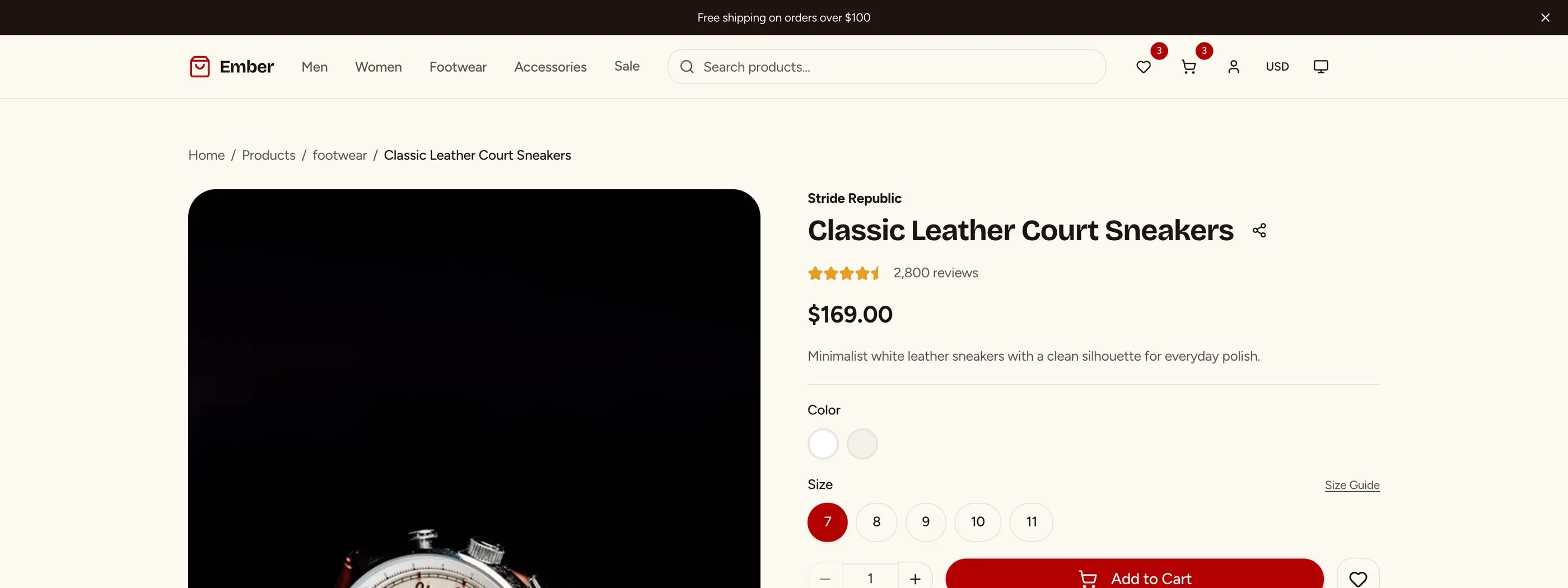
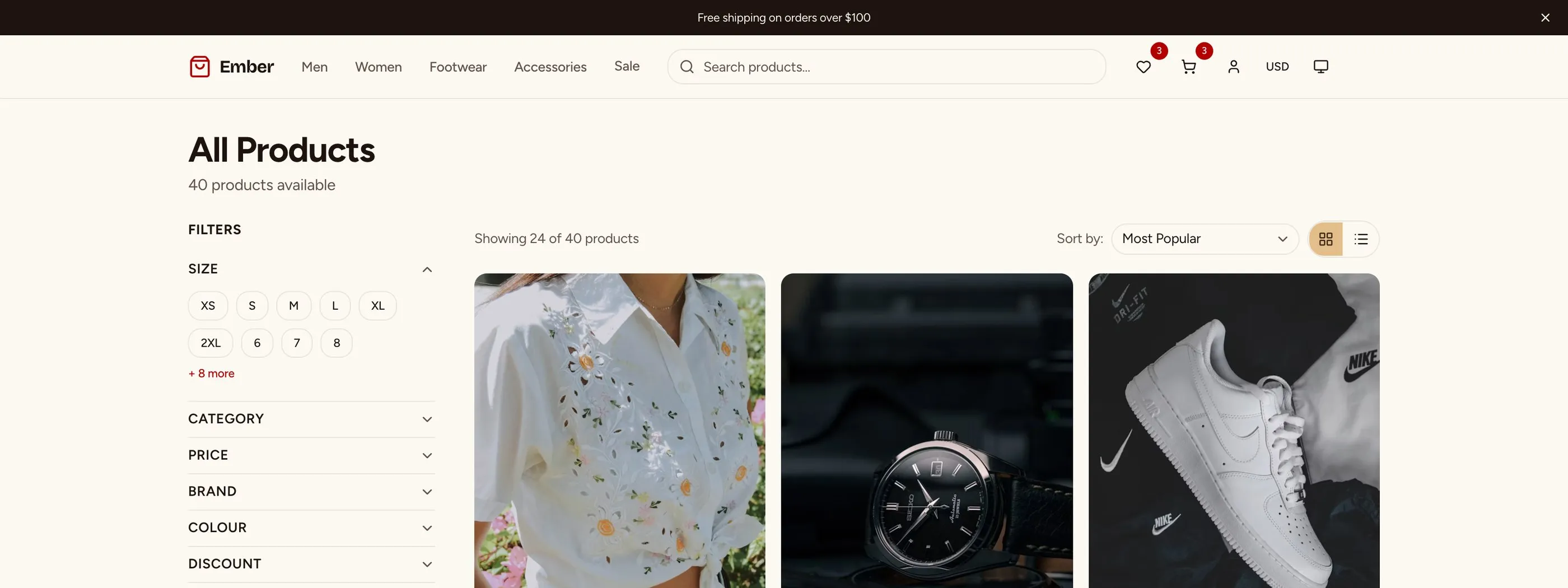
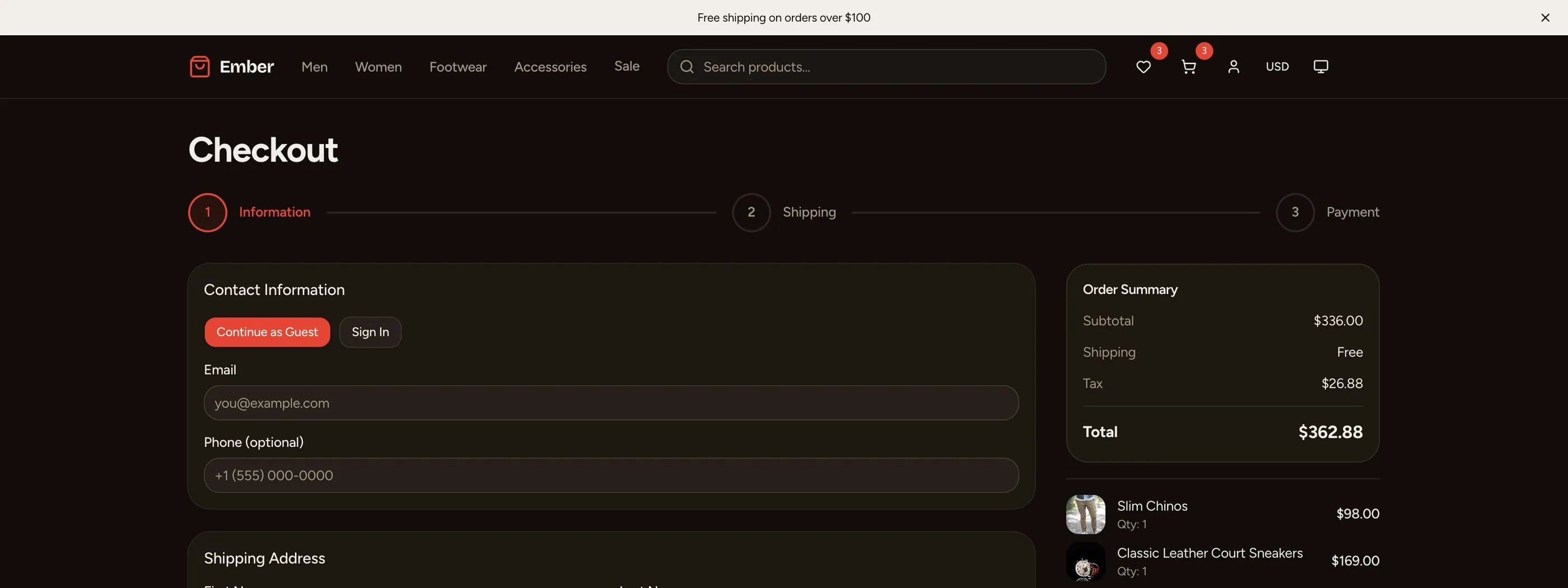
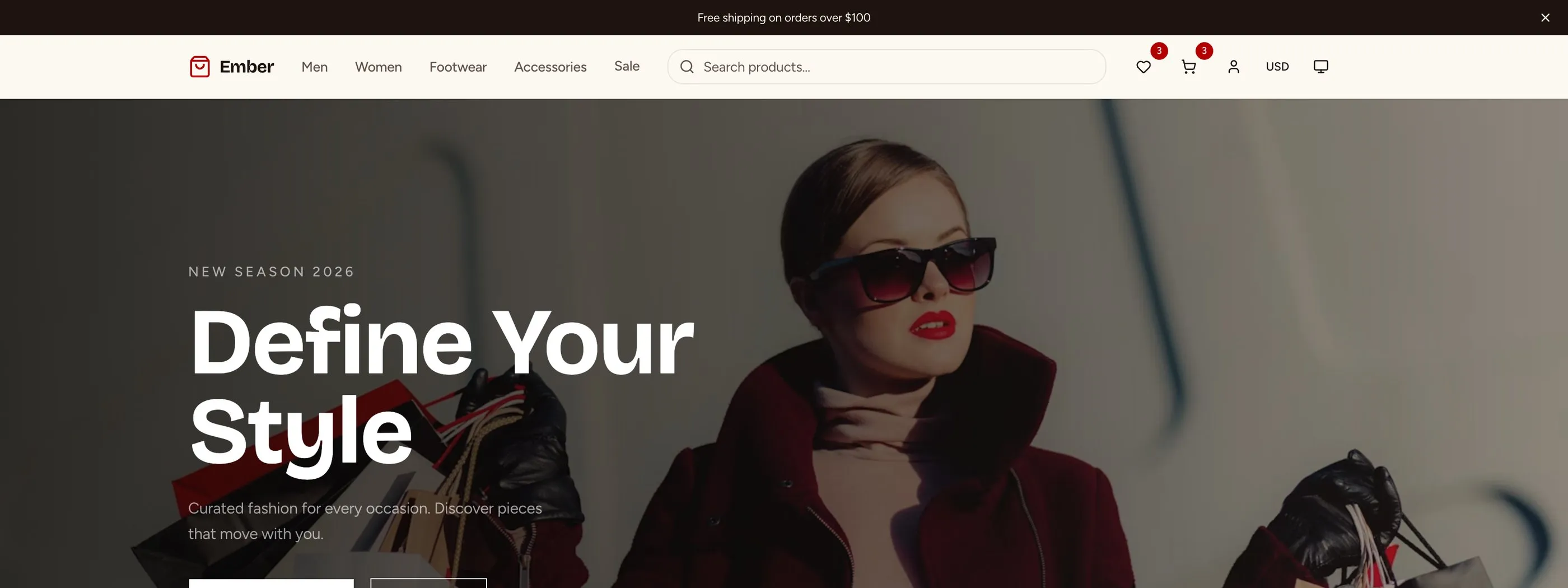
The E-commerce Template has 56 screens on Next.js 16, Tailwind CSS v4 and shadcn/ui, covering the storefront, customer accounts and an admin dashboard.
Storefront: homepage, product listing with filters and sort, product detail with gallery and variants, category pages, search, cart with promo codes, multi-step checkout, order confirmation and wishlist.
Customer accounts: login, registration, password recovery, account dashboard, order history and addresses.
Admin: revenue dashboard, product management, orders with status updates, customers, discount codes and store settings.
It's built to WCAG AA: keyboard-navigable product grids, labelled checkout fields with announced errors, and sale prices and stock status that don't rely on colour alone. It's a frontend kit, so you connect your own backend. If you want the backend too, the Full-Stack E-commerce Kit adds Supabase and Stripe.
- Screens: 56
- Stack: Next.js 16, Tailwind v4, shadcn/ui
- Accessibility: WCAG AA
- Live demo: Try it in your browser
- Price: From $165
2. Next.js Commerce by Vercel
Best free template if you sell on Shopify.
Next.js Commerce (about 14k stars) is Vercel's storefront for Shopify's Storefront API. It's fast, clean and actively maintained, on the App Router and Tailwind v4. Vercel now maintains the Shopify version only, so other platforms maintain their own forks (Bagisto's, below, is one).
There's no admin panel, because Shopify is the admin. That's the point: you keep Shopify's inventory, payments and shipping and own the frontend.
- Stack: Next.js App Router, Tailwind v4, Shopify
- Licence: MIT
- Price: Free
For the trade-offs, read our Next.js vs Shopify for developers guide.
3. Payload e-commerce template
Best free template with a real admin and CMS included.
Payload is an open-source headless CMS that runs inside your Next.js app, and its official e-commerce template gives you a storefront plus Payload's admin panel for products, orders and content. It's on Next.js 16 and Tailwind v4, and it lives in the main Payload repo, which is very actively maintained.
It's the free option closest to "everything in one app", at the cost of learning Payload.
- Stack: Next.js 16, Tailwind v4, Payload CMS
- Licence: MIT
- Price: Free
4. Bagisto Next.js Commerce
Best free option if you want a Laravel backend.
Bagisto (about 6.4k stars) is a Laravel e-commerce platform, and this is its Next.js storefront, on Next.js 16 and Tailwind v4. The admin panel is part of the Laravel backend. A good fit if your team already knows PHP.
- Stack: Next.js 16, Tailwind v4, Laravel (Bagisto)
- Licence: MIT
- Price: Free
5. Medusa DTC starter
Best free option for an open-source Node commerce backend.
Medusa is an open-source headless commerce engine. Its long-running nextjs-starter-medusa repo is now archived, and Medusa points to the newer dtc-starter: a monorepo with the Medusa backend and a Next.js storefront. You own the database, API and business logic, which also means running them. The storefront is on Next.js 15 and Tailwind v3.
- Stack: Next.js 15, Tailwind v3, Medusa
- Licence: MIT
- Price: Free
6. Saleor Storefront
Best for complex catalogues: multi-currency, multi-warehouse.
Saleor's storefront is a Next.js 16 app on Saleor's GraphQL commerce API. Saleor handles multi-currency, multi-language and complex variants that simpler setups struggle with. For a small store it's overkill.
Check the licence: the storefront is under the Functional Source License (FSL-1.1-ALv2), which converts to Apache 2.0 later, not MIT. Read it before you build a competing product on it.
- Stack: Next.js 16, Tailwind v3, GraphQL, Saleor
- Licence: FSL-1.1-ALv2
- Price: Free, Saleor Cloud is paid
7. BigCommerce Catalyst
Best if you're on BigCommerce.
Catalyst is BigCommerce's official Next.js storefront, on Next.js 16. It's actively maintained and MIT licensed, but it needs a BigCommerce store behind it.
- Stack: Next.js 16, Tailwind v3, BigCommerce
- Licence: MIT
- Price: Free (BigCommerce plan required)
8. Shopify Hydrogen
Best for Shopify stores that don't need Next.js.
Hydrogen is Shopify's own React framework for custom storefronts, and its skeleton template is the official starting point. It's built on React Router 7, not Next.js, and deploys to Shopify's Oxygen hosting. Pick it over Next.js Commerce if you want to stay entirely inside Shopify's stack.
- Stack: React Router 7, Shopify
- Licence: MIT
- Price: Free
9. NextMerce
Best paid Next.js template with a CMS included.
NextMerce sells Next.js and Tailwind e-commerce templates with Sanity CMS, Stripe and PayPal wired in, plus Figma files. Pricing is one-time: $79 Starter, $149 Business, $449 Extended when we checked (listed down from $149, $279 and $999).
- Stack: Next.js, Tailwind, Sanity, Stripe
- Price: From $79 one-time
10. ThemeForest React e-commerce templates
Cheapest way to a polished design.
Top-selling React e-commerce templates on ThemeForest cost $14 to $29 for a Regular Licence (PickBazar and Multikart are $29, for example). Design quality is generally high and many include an admin panel.
The risk is the code. Quality varies a lot between authors, and older templates use dated React patterns. Check the last update date, the React and Next.js versions, and the licence terms (a Regular Licence covers one end product) before buying.
- Price: $14 to $29 (Regular Licence)
Also worth knowing: EverShop (about 10.5k stars) is a full open-source e-commerce platform with a React frontend, but it's GPL-3.0 and not built on Next.js.
Comparison Table
| Template | Price | Framework | Licence | Admin | Backend |
|---|---|---|---|---|---|
| thefrontkit E-commerce | $165 | Next.js 16 | Commercial | Yes (UI) | Bring your own |
| Next.js Commerce | Free | Next.js | MIT | Shopify | Shopify |
| Payload e-commerce | Free | Next.js 16 | MIT | Yes (Payload) | Payload |
| Bagisto Next.js Commerce | Free | Next.js 16 | MIT | Laravel | Bagisto |
| Medusa DTC starter | Free | Next.js 15 | MIT | Medusa | Medusa |
| Saleor Storefront | Free | Next.js 16 | FSL-1.1-ALv2 | Saleor | Saleor |
| BigCommerce Catalyst | Free | Next.js 16 | MIT | BigCommerce | BigCommerce |
| Shopify Hydrogen | Free | React Router 7 | MIT | Shopify | Shopify |
| NextMerce | From $79 | Next.js | Commercial | Sanity | Sanity |
| ThemeForest | $14 to $29 | Varies | Envato licence | Varies | Varies |
Choosing the Right Template
- Already on Shopify? Next.js Commerce for Next.js, Hydrogen if you'd rather stay in Shopify's stack.
- Want everything in one free app? The Payload template.
- Want to own the commerce backend? Medusa for Node, Bagisto for Laravel, Saleor for complex catalogues.
- Need 56 finished screens and WCAG AA without designing them? The thefrontkit E-commerce Template.
- Tight budget and a quick launch? A recent ThemeForest template, after checking the code.
Mobile E-commerce Checklist
Before you launch, test every one of these on a real phone:
- Product images load fast and support pinch-to-zoom
- Product grid shows 2 columns on mobile with adequate tap targets
- Add-to-cart button is always visible without scrolling
- Cart is accessible from every page (sticky header or floating button)
- Checkout form inputs use proper types (tel, email, numeric for ZIP)
- Payment form works with mobile keyboard
- Order confirmation is clearly visible
- Filters and sort controls work with touch
For accessible checkout patterns specifically, see our accessible e-commerce WCAG checkout guide.
FAQ
What is the best free React e-commerce template?
It depends on your backend. On Shopify, use Next.js Commerce (MIT, about 14k stars). If you want a CMS and admin in the same app, use Payload's e-commerce template. If you want to own an open-source backend, use Bagisto (Laravel) or Medusa's DTC starter (Node). All four are free and on the Next.js App Router.
What is the best React e-commerce template in 2026?
For a complete storefront, customer accounts and admin UI with WCAG AA accessibility, the thefrontkit E-commerce Template has 56 screens. For free options, see the question above.
Is the Medusa Next.js starter still maintained?
No. medusajs/nextjs-starter-medusa is archived, and its README points to the newer medusajs/dtc-starter, a monorepo with the Medusa backend and a Next.js storefront.
Should I use React or Shopify for my online store?
If you need full design control and custom features, use React with Next.js. If you want managed payments, inventory and hosting, use Shopify. Many teams do both: Shopify as the backend and a Next.js or Hydrogen frontend. Read our Next.js vs Shopify comparison.
Do I need an admin panel in my e-commerce template?
If you use a commerce platform (Shopify, BigCommerce, Medusa, Saleor, Bagisto), the admin comes from that platform. If you're building a custom store, you'll need admin screens for products, orders and analytics. Payload's template and the thefrontkit E-commerce Template both include them.
How do I make my React e-commerce site accessible?
Product grids need keyboard navigation and meaningful alt text. Variant selectors (size, colour) need to announce the selected option. Checkout forms need visible labels, connected error messages and proper input types. Cart updates need ARIA live regions. Sale prices need text, not just colour. Our guide on how to make a website accessible covers the full checklist.
What payment gateway should I use with a React e-commerce template?
Stripe is the most common choice for custom React stores because of Stripe Elements and its docs. If you're on a platform, use its payments (Shopify Payments, for example). Most templates here either integrate Stripe or get payments from their backend platform.
What about inventory management for a custom e-commerce store?
Commerce platforms handle inventory natively. If you're building a custom backend, you'll need screens for the catalogue, stock levels, purchase orders and warehouses. The Inventory Management Template ships 32 screens for that.