How to Build an E-commerce Site in Next.js (2026)
How to Build an E-commerce Site in Next.js in 2026
E-commerce is one of those categories that looks straightforward until you start. Product pages, cart, checkout, accounts, orders, an admin panel, search, filters, inventory tracking, payments, shipping, taxes, emails. A real e-commerce site in Next.js is sixteen to twenty weeks of work, not the weekend Shopify alternative most engineers imagine.
This guide walks through what an e-commerce site has to actually do, the architecture decisions that bite you later if you skip them, and the two paths to ship one — from scratch or starting from a kit.
Or skip the build entirely: get every kit for $749
If you're shipping more than one product, All UI Kits unlocks every Next.js kit on thefrontkit. The E-commerce Kit (56 screens with storefront, cart, multi-step checkout, admin), plus the SaaS Starter Kit, CRM, HR, Kanban, Blog CMS, and 12 more. One-time payment, lifetime access, no subscription.
What a Real Next.js E-commerce Site Has to Do
Not Shopify, but credibly competing with Shopify for products that benefit from a custom build.
Product Catalog with Variants
A product is rarely one SKU. A t-shirt has size (S, M, L, XL) and color (black, white, navy). Each combination is a variant with its own SKU, price, inventory, and images.
The data model:
- Product with name, description, base price, category, tags
- Variants with attribute combinations, prices, inventory counts, images
- Attributes defined per category (size, color, material, etc.)
- Variant selection UX that updates price, availability, and images as the user picks options
Most early e-commerce builds skip variants and regret it the moment they want to sell a t-shirt in multiple sizes. Build variants from day one.
Storefront: Product Listing and Detail Pages
The pages that drive revenue:
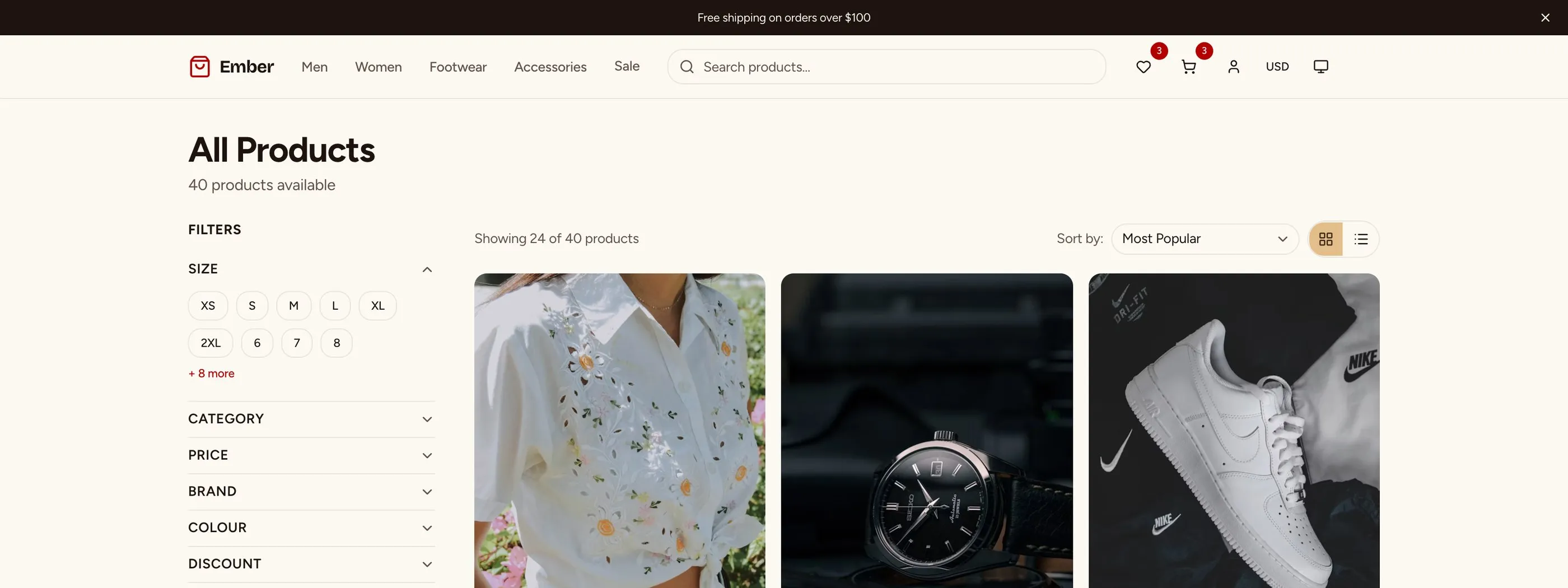
- Category pages with grid layout, filters (price, color, size, brand), sort options (newest, price, popularity)
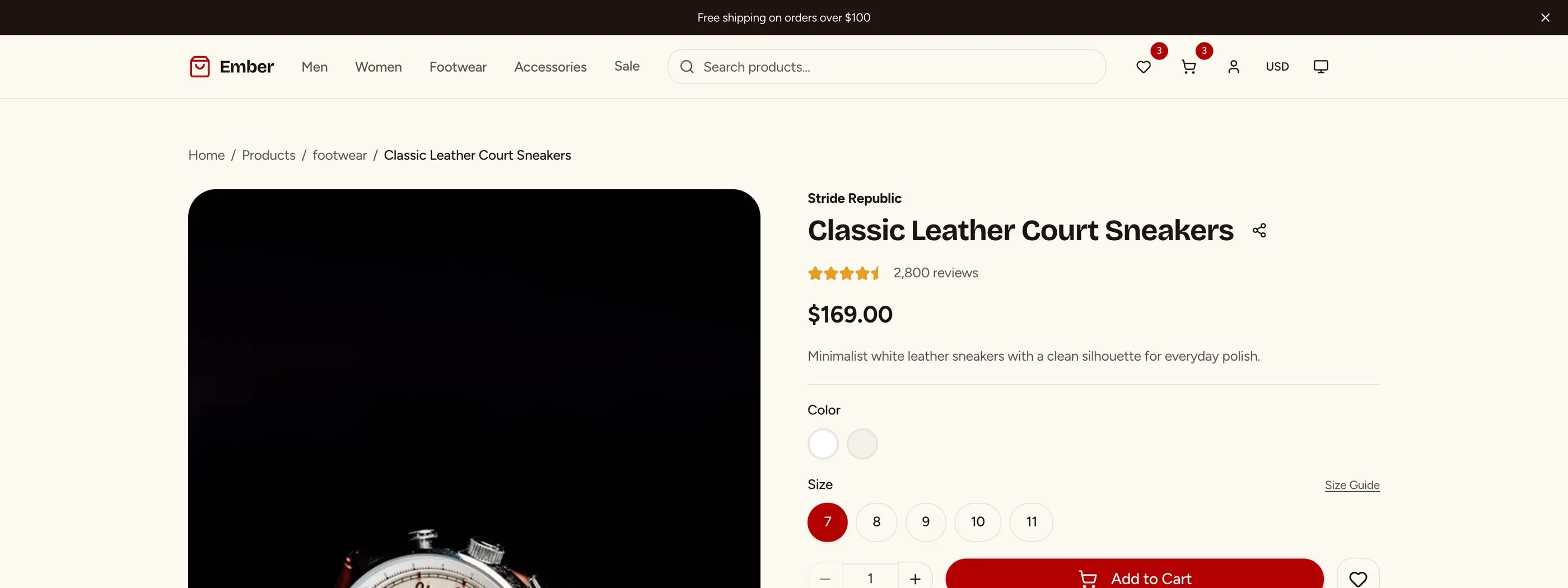
- Product detail page with image gallery (with zoom), variant picker, quantity selector, add-to-cart, related products, reviews
- Search results page with the same filtering as category pages
- Quick view modal for cart additions without leaving the listing
The product detail page is where conversion happens. Image quality, page speed, trust signals (reviews, return policy, shipping info) matter more than any feature.
Cart and Checkout
The drop-off zone in every e-commerce funnel.
- Cart drawer or page showing items with quantity adjustment, remove, and updated totals
- Cart persistence — logged-in carts to the database, guest carts to localStorage
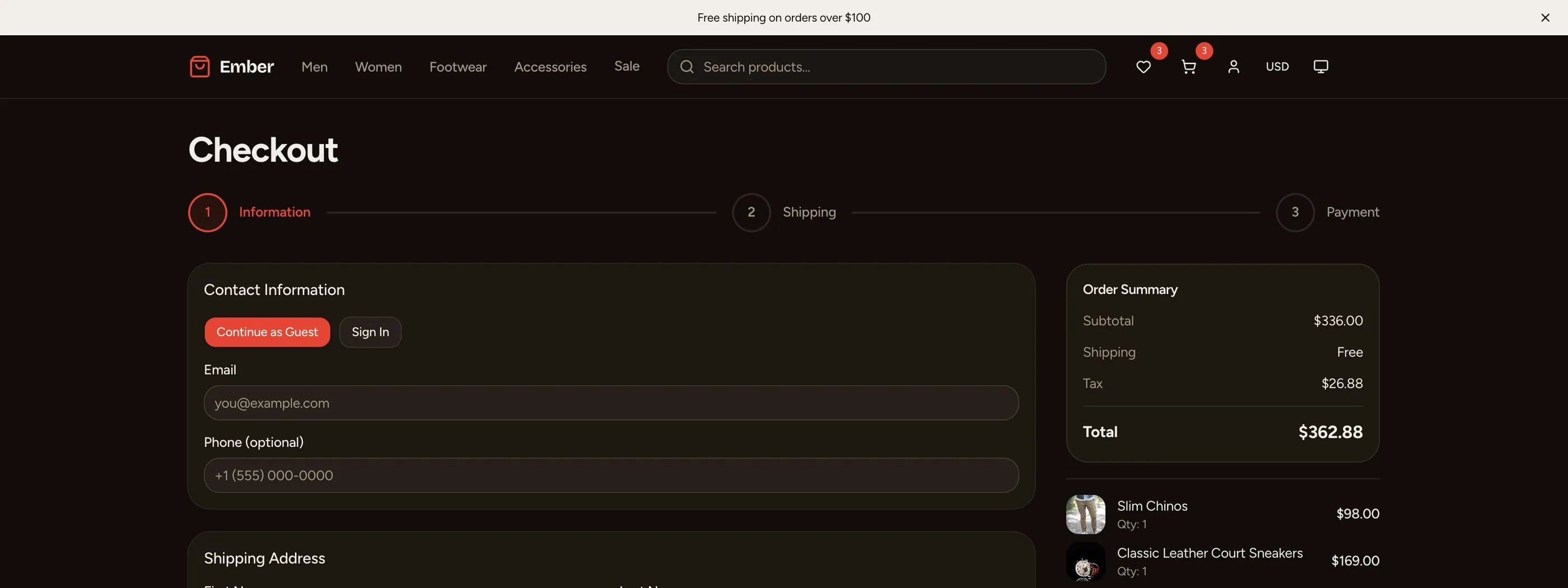
- Multi-step checkout (cart → information → shipping → payment → review → confirmation) or one-page checkout
- Guest checkout option (don't force account creation; it kills conversion)
- Address book for returning customers
- Shipping calculator with rates from carriers (USPS, FedEx, UPS) or flat rates
- Tax calculation by destination (TaxJar or built-in for simple cases)
- Payment via Stripe, with support for cards, Apple Pay, Google Pay
- Order confirmation with email send
Multi-step vs one-page is a real debate. One-page tends to convert better on desktop; multi-step is clearer on mobile. Test with your audience.
Customer Accounts
Logged-in shoppers need:
- Order history with status (pending, processing, shipped, delivered, returned, cancelled)
- Order detail with tracking links and order items
- Re-order for repeat purchases
- Saved addresses
- Saved payment methods (via Stripe customer portal)
- Wishlist
- Account settings (email, password, marketing preferences)
- Returns and refunds request flow
These are unsexy but every returning customer interacts with them.
Admin Panel
Where the operator manages the store.
- Order management — list, filter by status, search by customer or order ID, view detail, update status, refund
- Product management — create, edit, archive, bulk operations
- Inventory tracking — current stock, low-stock alerts, manual adjustments
- Customer management — list, view orders per customer, customer lifetime value
- Discount codes and promotions — percentage off, dollar off, free shipping, BOGO, minimum purchase
- Reports — revenue, top products, conversion rate, average order value, returning customer rate
The admin panel is half the build. Most early e-commerce projects underbuild this and regret it.
Email Workflows
Transactional and marketing:
- Order confirmation immediately on purchase
- Shipping notification when status changes to "shipped"
- Delivery confirmation when delivered
- Abandoned cart after 24 hours of inactivity (60+ percent recovery rate when done well)
- Review request 7-14 days after delivery
- Welcome series for new customers
- Replenishment reminders for consumables (e.g., supplements at the 25-day mark on a 30-day supply)
Resend + React Email is the modern Next.js default for these.
Tech Stack: E-commerce Specific Decisions
Payments: Stripe is the default in 2026. Razorpay if India-first. Adyen at enterprise scale.
Search: Algolia, Typesense, or Meilisearch. Postgres tsvector works for under 5,000 products; it falls down on filters and faceted search.
Image handling: Cloudinary, imgix, or self-hosted via Cloudflare Images. Critical because images are the heaviest part of the page. Generate srcset variants automatically.
Email: Resend + React Email for transactional. Klaviyo or Customer.io for marketing automation.
Inventory: Database-tracked if you're the only sales channel. Multi-channel inventory (Shopify, Amazon, retail) needs a system of record like Inflow or a custom build.
Shipping rates: Shippo or EasyPost APIs to pull live rates. Hardcoded flat rates for v1.
Tax: TaxJar, Avalara, or Stripe Tax. Stripe Tax is the simplest path for US-only stores.
Database: Postgres with Drizzle or Prisma. Index everything related to filtering and search.
Cache: Next.js ISR for product pages (revalidate every minute or so). Redis or Vercel KV for cart sessions if scale demands it.
Build Path 1: From Scratch (16 to 20 Weeks)
The realistic order:
Week 1-2: Foundation. Next.js, auth (optional for guest checkout), database schema for products, variants, categories.
Week 3-4: Storefront. Category pages, product detail, image gallery, variant picker.
Week 5-6: Cart. Cart drawer, persistence (guest + logged-in), quantity adjustments.
Week 7-9: Checkout. Multi-step or one-page flow, address handling, shipping calculator, tax calculation, Stripe integration.
Week 10-11: Customer accounts. Order history, profile, addresses.
Week 12-14: Admin panel. Order management, product management, inventory.
Week 15-16: Email workflows. Transactional first, abandoned cart second.
Week 17-18: Discounts and promotions. Code redemption, automatic discounts, BOGO logic.
Week 19-20: Polish. Search and filters, related products, reviews if scope allows.
For most teams: 20 to 26 weeks. The admin panel routinely takes 5-6 weeks alone.
Build Path 2: Using an E-commerce Kit (2 to 3 Weeks)
The E-commerce Kit ships:
- Storefront with category, product, search, and detail pages
- Product variant picker with image, price, and inventory updates
- Cart drawer with guest and logged-in persistence
- Multi-step checkout (information → shipping → payment → review)
- Customer account with order history, addresses, wishlist
- Admin panel with order management, product CRUD, inventory tracking, discount codes
- Reports for revenue, top products, conversion
- Transactional email templates (order, shipping, delivery, abandoned cart)
- 56 screens on Next.js 16, Tailwind v4, shadcn/ui
What remains:
- Wire your payment provider (Stripe webhook handling)
- Connect database, replace seed products with real catalog
- Wire shipping rate provider (Shippo, EasyPost, or flat rates)
- Configure tax (Stripe Tax for US-only, TaxJar/Avalara for international)
- Customize email templates with your brand
Two to three weeks of customization vs twenty weeks of building.
Build Path 3: Start From the Full-Stack E-commerce Kit (Backend Included)
Checkout, orders and carts that survive login are the hard part of a store. The Full-Stack E-commerce Kit ships them on Supabase and Stripe:
- 53 routes across the storefront, checkout, account and admin
- 18 tables with migrations, row-level security and triggers
- Stripe Checkout with orders created from the webhook
- A hybrid cart: stored locally for guests, in Supabase once signed in, merged on login
- Supabase Auth with email/password, Google and GitHub sign-in, and Server Actions for every mutation
It starts at $332. Try the live demo or read the docs.
Step-by-Step from the Kit
Day 1-2: Setup, brand, database. Schema migration. Import your product catalog.
Day 3: Auth. Wire Clerk, Auth.js, or your provider. Configure guest checkout.
Day 4-5: Stripe. Set up products and prices (or use one-time payments). Wire the webhook handler. Test with Stripe's test cards.
Day 6: Shipping. Wire Shippo or EasyPost for live rates, or configure flat-rate zones.
Day 7: Tax. Stripe Tax for US, TaxJar/Avalara for global.
Day 8-9: Email. Connect Resend. Customize the transactional templates.
Day 10-12: Admin training and content. Walk your team through the admin. Load real product photos. Configure discount codes for launch.
Day 13-15: Deploy and beta. Vercel deploy, custom domain, soft launch.
Common Pitfalls
Skipping variants because v1 is "one size fits all." Then you want to sell two sizes and the data model needs a rewrite. Build variants from day one even if every product currently has one variant.
Forcing account creation before checkout. Drops conversion by 20-30 percent. Always offer guest checkout.
Hardcoding shipping rates. Then you launch in a new country and recalculating shipping requires a code change. Use a rate-calculator pattern even for flat rates.
Underbuilding the cart drawer. A cart that doesn't persist across page loads, doesn't update totals immediately, or doesn't show shipping estimates loses sales. Spend a week on the cart UX.
Skipping tax. Then you launch in California and realize you need to collect sales tax. Wire tax calculation from day one even if the rate is zero in most jurisdictions.
Building the admin last. Then launch day comes and your operator can't process orders without engineering help. Build admin in parallel with storefront, not after.
Ignoring abandoned cart emails. They typically recover 10-20 percent of abandoned revenue. Skipping them is leaving money on the table. Wire them after launch but within the first month.
Slow product images. Largest LCP contributor on most e-commerce sites. Generate proper srcsets, use WebP/AVIF, lazy-load below-the-fold images, preload above-the-fold.
Adjacent Reads
- Next.js E-commerce Template Guide 2026 — evaluation rubric
- Best React E-commerce Templates 2026 — head-to-head comparison
- Next.js vs Shopify for Developers — platform trade-off
- Accessible E-commerce WCAG Checkout Guide — checkout accessibility
FAQ
How long does it take to build an e-commerce site in Next.js from scratch?
A competent solo engineer at full speed builds a credible Next.js e-commerce site in 16 to 20 weeks. Realistic timelines, including the admin panel, email workflows, and the long tail of edge cases (variants, shipping zones, tax, refunds), land closer to 20 to 28 weeks. The admin panel alone routinely takes 5 to 6 weeks. An e-commerce kit removes 18 of those weeks by giving you both storefront and admin pre-built.
Should I build with Next.js or use Shopify?
Depends on your differentiation. Shopify is the right answer if your store is standard (sell SKUs, take payments, ship). Next.js makes sense when you need custom UX, you're integrating with non-standard backends, your product type is unusual (subscriptions, configurable products, B2B with complex pricing), or you want full control over performance and SEO. See Next.js vs Shopify for Developers for the deeper trade-off analysis.
Do I need a CMS for product content?
For under 100 SKUs, manage products in your admin panel. For more, or for content-rich product pages with marketing copy, a headless CMS (Sanity, Contentful, Storyblok) starts paying off. Most stores in the 100-1000 SKU range benefit from a CMS for marketing pages and category landing copy while keeping product data in the e-commerce admin.
How do I handle inventory across multiple channels (Shopify, Amazon, retail)?
You need a system of record. Either pick one channel (usually Shopify) as the source of truth and sync to others via Zapier or custom integrations, or use a dedicated inventory management platform (Inflow, Skubana, Cin7) and sync to all channels. Single-channel stores can use database-tracked inventory. Multi-channel without a system of record means inventory drift, oversells, and angry customers.
Can I use an e-commerce kit with a custom payment provider?
Yes, if the kit treats payments as a pluggable layer. Production-ready Next.js e-commerce kits separate the cart and checkout UI from the payment provider. Adding Razorpay or Adyen alongside Stripe is implementing a provider interface, not rewriting checkout. Verify with the demo before buying.
How many pages does a real e-commerce site need?
The minimum for a credible storefront is around 25 pages: home, category list, category detail, product detail, search, cart, checkout (3-5 steps), order confirmation, account (profile, orders, addresses, wishlist), admin (login, orders, products, inventory, customers, discounts, reports), and 4-5 marketing/legal pages. A full-featured store with content marketing lands at 35 to 50 pages. The E-commerce Kit ships 56 screens to clear this bar.
Is there an e-commerce kit with the backend already built?
Yes. The Full-Stack E-commerce Kit wires the storefront, account and admin screens to Supabase and Stripe: 18 tables with row-level security, webhook-driven orders and a cart that merges on login.
Want it shipped without hiring a developer?
The build path above assumes you have engineers. If you don't, the team behind thefrontkit does done-for-you launches: we deploy the kit, apply your branding, and wire it to your stack. Fixed quotes, most builds ship in 2-4 weeks, from $1999.