Best Next.js Blog Templates 2026: 10 Free & Paid Picks
Best Next.js Blog Templates 2026: 10 Free & Paid Picks
Last updated: September 22, 2026. Re-checked every repo on GitHub: stars, licence, last update, Next.js and Tailwind versions. Four entries from the previous version were dropped because they're abandoned, not Next.js, or don't exist as a template.
Setting up a blog with Next.js shouldn't take a week. But pick the wrong template or starter and you'll spend more time fighting the setup than writing.
The right Next.js blog template gives you MDX or a CMS, good SEO defaults, fast pages and a reading layout that works on phones. The wrong one gives you a pretty homepage, a broken RSS feed and a dependency nobody maintains.
Here are 10 options: 9 free and 1 paid (ours, marked). If you're weighing any blog template, our How to Choose a Next.js Blog Template guide has the full rubric. For templates beyond blogs, see the best Next.js website templates.
TL;DR: Quick Picks for 2026
| Need | Top pick | Price |
|---|---|---|
| Free, batteries-included MDX blog | Tailwind Nextjs Starter Blog | Free |
| Free blog with a real CMS and admin | Payload website template | Free |
| Docs plus blog | Nextra | Free |
| Minimal official starter | Vercel Blog Starter Kit | Free |
| Blog frontend with a Ghost-style admin UI | thefrontkit Blog CMS Kit (ours) | $131 |
Or skip the choice: get every kit for $749
If you're shipping more than one product, All UI Kits unlocks every Next.js kit on thefrontkit: the Blog CMS Kit, plus the SaaS Starter Kit, CRM Dashboard, HR Dashboard, Kanban PM, E-commerce, AI UX, and 11 more, plus every future kit. One-time payment, no subscription.
What to Look for in a Blog Template
Content format. Does it use MDX, plain markdown, or a headless CMS? MDX lets you embed React components inside your posts. Plain markdown is simpler and more portable. CMS-backed templates add complexity but give non-technical authors an editor.
SEO out of the box. Your blog template should generate proper meta tags, Open Graph images, canonical URLs, JSON-LD article schema, and a sitemap without you having to wire any of it up. If you need to install three plugins and write custom middleware for basic SEO, that's a bad sign.
Code block support. If you're writing technical content, you need syntax highlighting that looks good on mobile. Some templates ship with Prism or Shiki built in. Others leave you to set it up yourself.
Reading experience on mobile. Over 57% of blog traffic comes from mobile devices. Your template needs proper typography scaling, comfortable line lengths on small screens, and images that don't break the layout.
RSS feed. It's 2026 and RSS is making a comeback. A good blog template generates an RSS feed automatically.
The 10 Best Next.js Blog Templates
1. Tailwind Nextjs Starter Blog
Best free blog template for technical writers.
Tailwind Nextjs Starter Blog by timlrx (about 10.6k stars) is the most feature-complete free Next.js blog. MDX, tags, search, comments, analytics, newsletter integration, KaTeX for maths, syntax highlighting, RSS and a sitemap all come configured. It's on Next.js 15 and Tailwind v4 with the App Router.
Two things to know. The design is functional rather than distinctive. And its content pipeline is built on Contentlayer, which is barely maintained now. It works today, but it's a dependency to keep an eye on.
- Content: MDX files
- Stack: Next.js 15, Tailwind v4
- Licence: MIT
- Price: Free
2. Payload website template
Best free template if writers need a real CMS.
Payload is an open-source CMS that runs inside your Next.js app, and its official website template gives you pages, posts, an admin panel, SEO fields and live preview out of the box. It's on Next.js 16 and Tailwind v4, and it's part of the very active Payload repo (about 45k stars).
It's more than a blog, which is the trade-off: you're adopting a CMS, a database and Payload's way of doing things.
- Content: Payload CMS (admin editor)
- Stack: Next.js 16, Tailwind v4, Payload
- Licence: MIT
- Price: Free
3. Nextra (blog theme)
Best for docs sites that also need a blog.
Nextra (about 14k stars, now version 4) is a documentation framework on Next.js with an official blog theme. You get MDX, search, dark mode and good SEO defaults. The blog layout is secondary to the docs layout, so a pure blog takes more customization than a blog-first template.
- Content: MDX
- Stack: Next.js 16
- Licence: MIT
- Price: Free
4. Vercel Blog Starter Kit
Best minimal official starting point.
The Blog Starter Kit from the Next.js examples is as lean as it gets: markdown files in a _posts folder, a clean reading layout, the App Router. No RSS, no syntax highlighting, basic SEO. It's still on Tailwind v3. Great if you want to build everything else yourself.
- Content: Markdown files
- Stack: Next.js (latest), Tailwind v3
- Licence: MIT
- Price: Free
5. Vercel Portfolio and Blog starter
Best minimal starter that's already on Tailwind v4.
Vercel's Portfolio Starter Kit is a personal blog and portfolio with MDX posts, SEO, RSS and dynamic Open Graph images, on Next.js 16 and Tailwind v4. It's more complete than the Blog Starter Kit while staying minimal.
- Content: MDX files
- Stack: Next.js 16, Tailwind v4
- Licence: MIT
- Price: Free
6. Lee Robinson's next-mdx-blog
Best tiny MDX blog to learn from.
next-mdx-blog (about 7.6k stars) is the repo Lee Robinson's old leerob.io site now redirects to: a small, clean MDX blog on Next.js 16 and Tailwind v4. There's no licence file, so check with the author before shipping it commercially.
- Content: MDX files
- Stack: Next.js 16, Tailwind v4
- Licence: None stated
- Price: Free
7. Sanity + Next.js clean template
Best for teams already on Sanity.
Sanity's clean template pairs a Next.js 16 and Tailwind v4 frontend with Sanity Studio for posts and pages. Content lives in Sanity's hosted content lake, so your writers get a good editor and you don't run a database. Sanity has its own plans once you pass the free tier.
- Content: Sanity Studio
- Stack: Next.js 16, Tailwind v4, Sanity
- Price: Free template, Sanity plan separate
8. Outstatic
Best Git-based CMS with a visual editor.
Outstatic is a CMS rather than a template. It adds a visual editor to your Next.js app that commits Markdown and MDX straight to your GitHub repo, with basic and advanced blog examples to start from. No database needed. It's on Next.js 16 and Tailwind v4. Self-hosting is free, and a hosted Pro plan is $9.99 per user per month. Note the licence is FSL-1.1 (converts to Apache 2.0 later), not MIT.
- Content: Visual editor, commits to Git
- Licence: FSL-1.1-ALv2
- Price: Free self-hosted, Pro $9.99/user/month
9. Keystatic
Best Git-based CMS with structured content.
Keystatic (about 2.4k stars) is a Git-based CMS from Thinkmill with a Next.js template. Writers edit in a visual UI, and content is stored as Markdown, JSON or YAML in your repo. It's good at structured content schemas. The ecosystem of ready-made themes is small.
- Content: Visual editor, Git-backed
- Licence: MIT
- Price: Free
10. thefrontkit Blog CMS Kit (ours)
Best if you want a finished blog frontend and a Ghost-style admin UI.
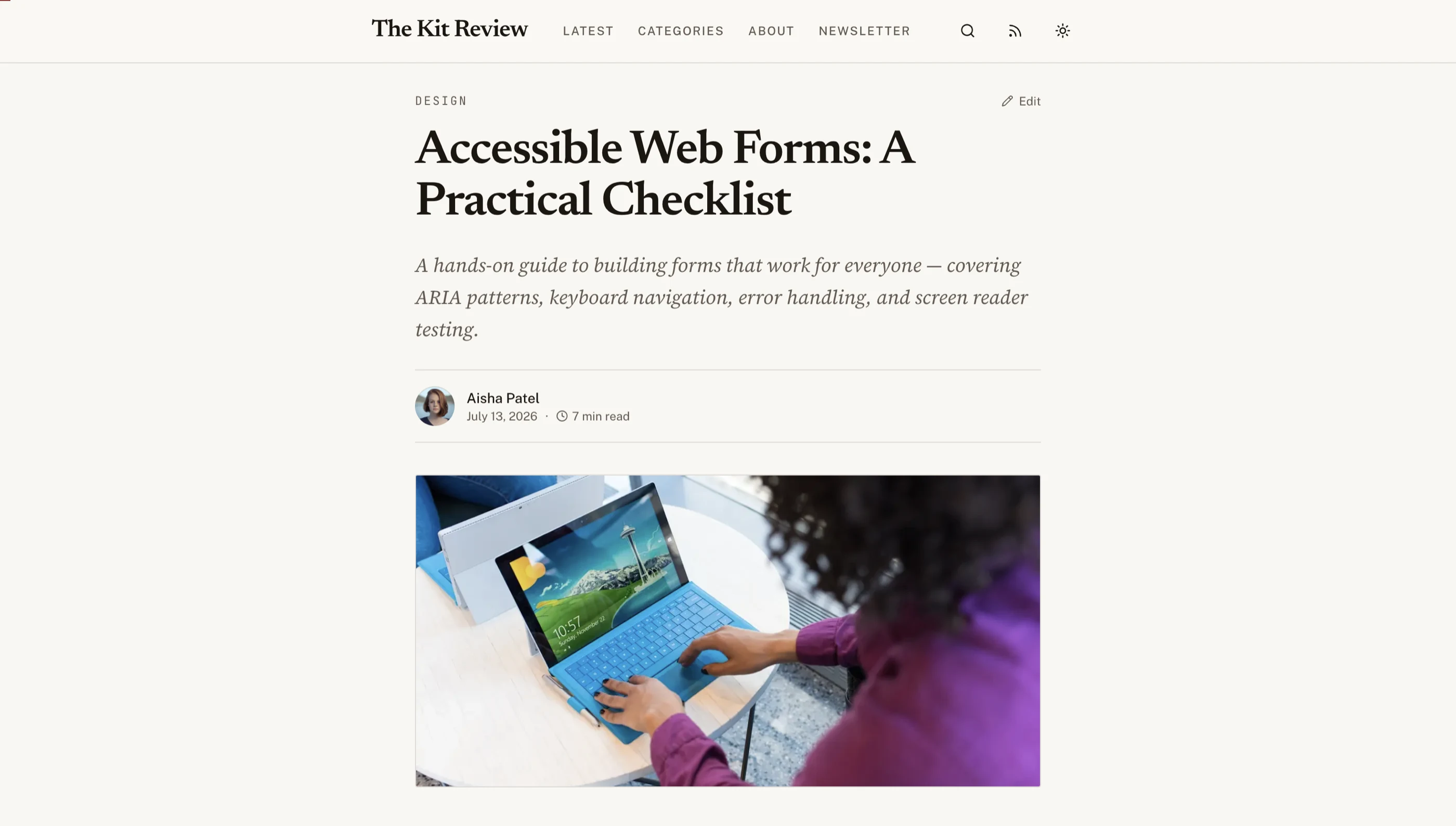
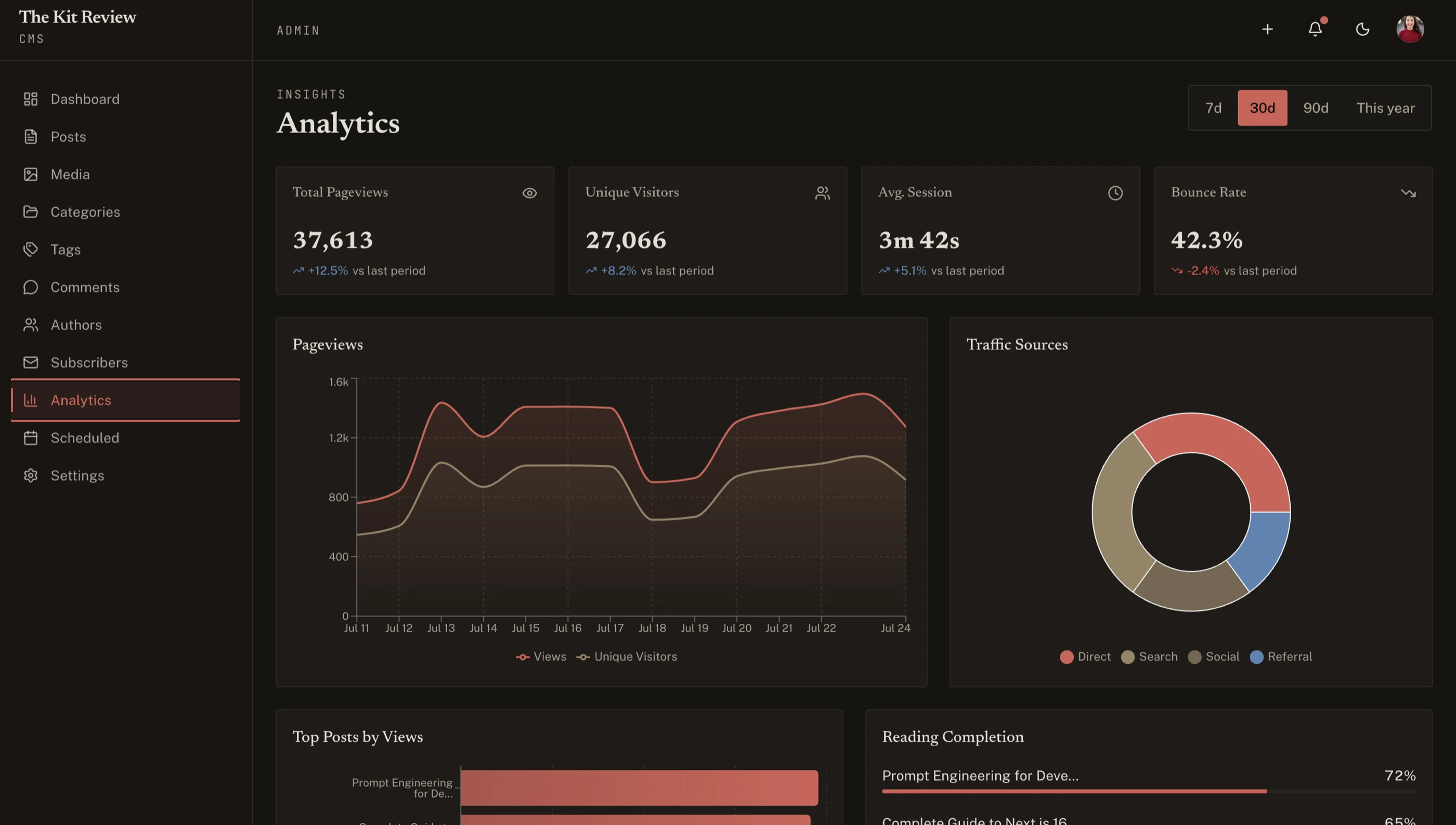
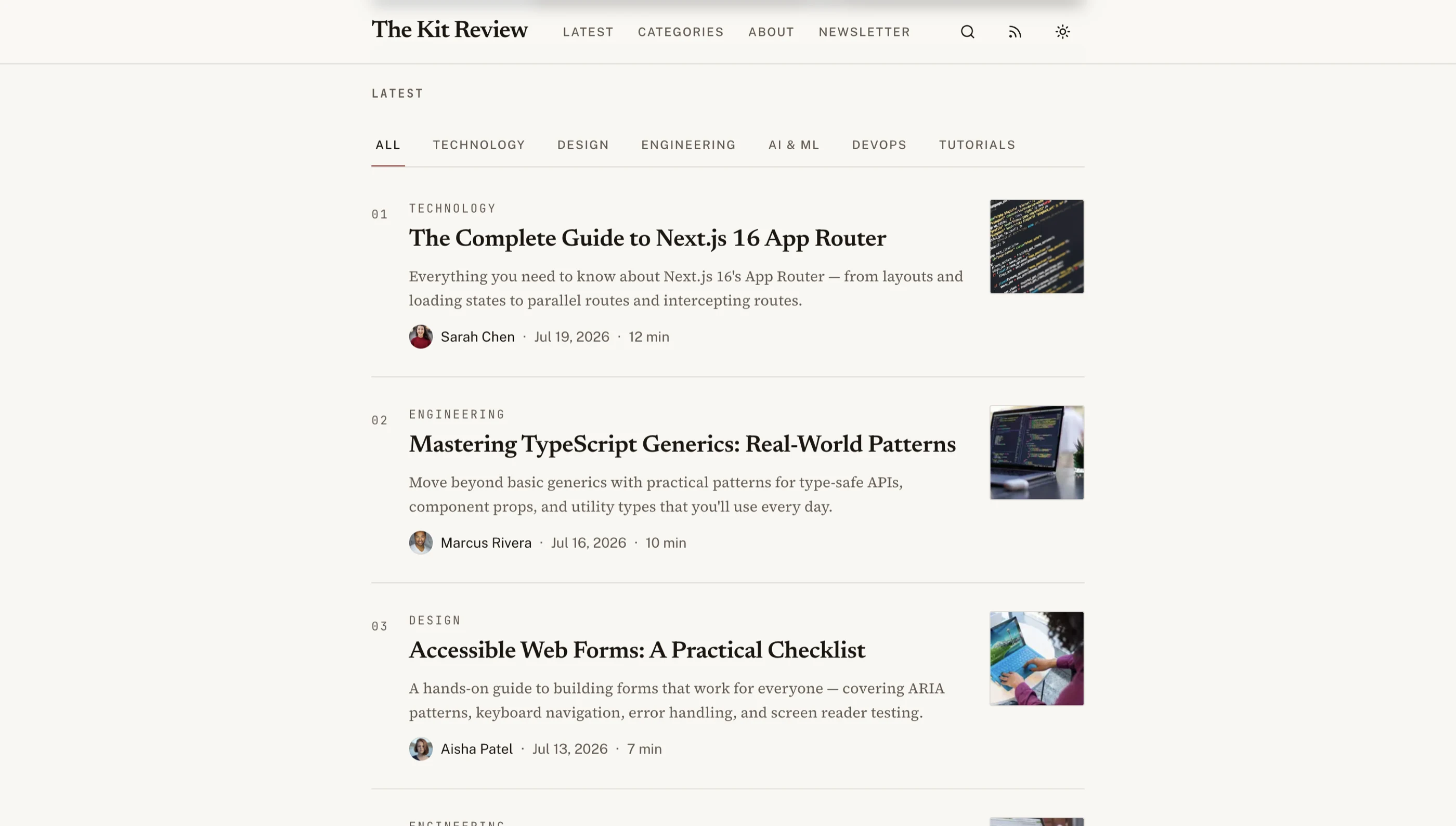
The Blog CMS Kit has 27 screens on Next.js 16, Tailwind v4 and shadcn/ui: a 9-screen public blog (article pages, categories, tags, author profiles, search) and a 13-screen admin (Markdown post editor with SEO fields per post, media library, comment moderation, newsletter subscribers, a Recharts analytics dashboard, and settings with RSS and sitemap previews). The reading layout is editorial, with a serif column, pull quotes and a reading progress bar, in light and dark themes. Try the live demo.
It's a frontend kit, so you connect it to your own backend or headless CMS. If you want that done too, the Full-Stack Blog CMS Kit adds a Supabase backend (29 routes).
- Screens: 25 (public blog, 12-screen admin, auth)
- Stack: Next.js 16, Tailwind v4, shadcn/ui
- Accessibility: WCAG AA
- Licence: Commercial
- Price: $131
Comparison Table
| Template | Price | Licence | Content | Next.js | Tailwind | Stars |
|---|---|---|---|---|---|---|
| Tailwind Nextjs Starter Blog | Free | MIT | MDX | 15 | v4 | ~10.6k |
| Payload website template | Free | MIT | Payload CMS | 16 | v4 | ~45k (Payload) |
| Nextra | Free | MIT | MDX | 16 | n/a | ~14k |
| Vercel Blog Starter Kit | Free | MIT | Markdown | latest | v3 | Next.js repo |
| Vercel Portfolio Starter | Free | MIT | MDX | 16 | v4 | vercel/examples |
| next-mdx-blog | Free | None stated | MDX | 16 | v4 | ~7.6k |
| Sanity clean template | Free + Sanity | Not stated | Sanity | 16 | v4 | ~400 |
| Outstatic | Free / $9.99 per user | FSL-1.1 | Git CMS | 16 | v4 | ~3.2k |
| Keystatic | Free | MIT | Git CMS | 15 | Not stated | ~2.4k |
| thefrontkit Blog CMS | $131 | Commercial | Admin UI | 16 | v4 | Paid |
Dropped from This List
- Contentlayer blog starters. Contentlayer's repo hasn't been updated since November 2024, and its maintainer said back in 2023 that he could only give it about a day a month. Fine for existing projects, risky for new ones.
- Ghost + Next.js. Ghost has no official Next.js starter. The Next.js repo's
cms-ghostexample is on the old Pages Router and hasn't changed since April 2025. - "shadcn blog template". There isn't one. The closest is shadcn's Taxonomy demo, which is archived and on Next.js 13.
- Astro Starlight. A great docs framework, but it's Astro, not Next.js.
Should You Use a Template or Build From Scratch?
If you're a developer who blogs occasionally, grab the Tailwind Nextjs Starter Blog and start writing. It covers 90% of what you need.
If you need a real blog with an admin panel, post editor, media library, and analytics, the thefrontkit Blog CMS gives you 27 screens, including a 12-screen admin. It gives you the admin screens designed and built, ready to connect to your backend. Try the demo.
If you're building a SaaS product and the blog is part of your marketing site, use a template that shares your product's design system. Having your blog look different from your app creates a jarring experience for visitors. The thefrontkit SaaS Starter Kit handles this by giving you a unified frontend for both.
If you have non-technical writers on your team, you'll need a CMS. Payload (in your app), Sanity (hosted) or a Git-based CMS like Outstatic or Keystatic are the strongest options.
For a deeper look at the build-vs-buy decision, check out our comparison of Next.js boilerplate vs building from scratch.
Related reading: If you're building a marketing site or product page alongside your blog, check out our guide to the best Next.js landing page templates in 2026.
Mobile Optimization Tips for Your Blog
A few things most blog templates get wrong on mobile:
- Line length. Keep body text under 75 characters per line on mobile. If your paragraphs run edge-to-edge on a phone, add horizontal padding.
- Code blocks. Add horizontal scrolling to code blocks instead of letting them overflow. Wrap long lines where it makes sense.
- Images. Use Next.js Image component for automatic responsive sizing. Set proper width and height to prevent layout shift.
- Touch targets. Prev/next navigation links, tag pills, and share buttons should be at least 24x24px (the WCAG 2.2 AA minimum), and ideally 44x44px.
- Font size. 16px minimum for body text on mobile. Anything smaller and iOS Safari will zoom in on input focus, which breaks your layout.
FAQ
Why build a blog with Next.js instead of WordPress or Ghost?
Next.js gives you full code control over the blog (custom layouts, components, integrations) while still handling SEO essentials out of the box: server-side rendering, automatic image optimization, sitemap generation through next-sitemap, and metadata via the App Router. Compared to WordPress, you skip the maintenance burden of plugins and updates. Compared to Ghost, you don't need to run a separate service. The trade-off is content editing: WordPress and Ghost both have native editors, while Next.js typically needs a markdown workflow or a CMS layer (like the admin panel in thefrontkit's Blog CMS Kit) to give non-technical writers an editor.
What is the best Next.js blog template in 2026?
For a free, developer-focused blog, the Tailwind Nextjs Starter Blog by timlrx ships with MDX, syntax highlighting, SEO, RSS and a sitemap configured. For a free blog with a real CMS, use Payload's website template. For a finished blog frontend with a Ghost-style admin UI, the thefrontkit Blog CMS Kit has 27 screens.
Can I use MDX with Next.js for my blog?
Yes. MDX lets you write markdown that includes React components. Several templates (Nextra, Tailwind Nextjs Starter Blog, Vercel's Portfolio Starter, next-mdx-blog) support MDX out of the box. It's useful for technical blogs where you want to embed interactive examples or custom components inside your posts.
How do I add SEO to my Next.js blog?
A good blog template handles SEO automatically. You need: a unique title and meta description per post, Open Graph tags for social sharing, JSON-LD Article schema for search engines, a sitemap.xml for crawlers, and canonical URLs to prevent duplicate content. If your template doesn't generate these from your post frontmatter, consider switching to one that does.
Do I need a CMS for my Next.js blog?
Not necessarily. If you're comfortable writing in markdown and deploying through Git, file-based content works well and has zero hosting costs. You only need a CMS if non-technical team members need to publish content. See our guide on what a Next.js template includes for more context on the options.
What's the difference between a Next.js blog template and a SaaS starter kit with a blog?
A blog template gives you just the blog. A SaaS starter kit with blog functionality gives you the blog plus an authenticated app shell, dashboard, auth flows, and settings pages, all sharing the same design system. If your blog exists to drive signups for a SaaS product, using a unified kit like thefrontkit means your marketing site and product share consistent styling and accessibility standards.
What's the difference between a Next.js blog theme and a blog template?
In practice, they're the same thing. "Theme" usually implies a focus on visual design , colors, typography, layout. "Template" implies more structure , routing, data fetching, content management. Most Next.js blog options are technically templates: they include both the design and the application architecture. If you're searching for "Next.js blog themes," the options in this list are what you're looking for. For dashboard-focused templates, see our guide to the best Next.js dashboard templates in 2026.
What's the best Next.js blog starter?
If you want minimal and official, Vercel's Blog Starter Kit (markdown) or Portfolio Starter Kit (MDX, RSS, OG images, Tailwind v4). If you want everything configured, the Tailwind Nextjs Starter Blog. If you want a CMS from day one, Payload's website template.
Are there free Next.js blog templates?
Yes. Several strong options are completely free and open source. The Tailwind Nextjs Starter Blog by timlrx is the most popular free option , it includes MDX, syntax highlighting, SEO, RSS, and dark mode out of the box. Payload's website template is the best free option with a CMS, and Nextra is a solid free choice for a documentation-style blog. Vercel's Blog Starter Kit and Portfolio Starter Kit are the minimal official options.