Best Tailwind Dashboard Templates 2026
11 Best Tailwind Dashboard Templates in 2026
Tailwind CSS is the dominant styling choice for dashboard development. The utility-first approach makes it fast to build custom layouts, and the design constraints (spacing scale, color palette, responsive breakpoints) keep things consistent without a heavy component library.
But building a dashboard from scratch with Tailwind still takes weeks. You need a sidebar layout, data tables, chart components, form patterns, auth pages, and dark mode. Templates handle the structural work so you can focus on the features that make your dashboard unique.
We reviewed 11 Tailwind dashboard templates across the spectrum from free open-source to premium kits. Here's what's worth your time and what's not.
Or skip the choice: get every kit for $749
If you're shipping more than one product, All UI Kits unlocks every Next.js + Tailwind kit on thefrontkit. SaaS Starter, CRM Dashboard, HR Dashboard, Kanban PM, E-commerce, Blog CMS, AI UX, Inventory Management, Social Media Dashboard, and 9 more. Plus every future kit. One-time payment, lifetime access, no subscription.
What Matters in a Tailwind Dashboard Template
Responsive sidebar. The sidebar is the backbone of any dashboard. It needs to collapse on mobile (drawer pattern), support nested navigation, and handle active states. If the template's sidebar breaks on a 375px screen, everything else is irrelevant.
Data tables. Most dashboard work involves displaying and manipulating data. Your template's table component needs sorting, filtering, pagination, row selection, and the ability to handle hundreds of rows without performance issues. A pretty table that chokes on real data is useless.
Chart integration. A dashboard without charts isn't a dashboard. The template should include chart components that match the Tailwind design. Mismatched chart styling (from a random charting library with its own CSS) looks unprofessional.
Dark mode. If your dashboard doesn't support dark mode in 2026, users will notice. Dark mode needs to be built into the Tailwind config with proper token switching, not hacked on with CSS overrides.
Accessibility. Dashboard users spend hours in the interface. Keyboard navigation for data tables, screen reader support for charts, and proper focus management in modals aren't nice-to-haves. They're requirements. Especially if you're selling to enterprise customers who audit for WCAG compliance.
The 11 Best Tailwind Dashboard Templates
1. thefrontkit SaaS Starter Kit
Best for production SaaS dashboards with design system and accessibility.
The SaaS Starter Kit from thefrontkit is a complete dashboard foundation built on Tailwind CSS, shadcn/ui, and Radix UI. You get a sidebar layout, data tables with sorting and pagination, chart components, settings pages, auth flows, and 50+ production-ready components. If you're specifically looking for shadcn dashboard templates, this kit showcases best practices for building with shadcn's component primitives.
The design token system is what makes it stand out from other Tailwind dashboards. Colors, spacing, radii, and typography are all driven by CSS custom properties mapped to Tailwind's theme. Rebranding means updating a few variables, not touching component files.
WCAG AA accessibility is built into every component. Data table rows are keyboard-navigable. Modal focus is trapped correctly. Form errors are announced by screen readers. If you're building a dashboard for enterprise customers, this handles the compliance requirements upfront.
- Stack: Next.js, React, Tailwind CSS, shadcn/ui
- Components: 50+
- Dark mode: Token-driven
- Accessibility: WCAG AA
- Price: From $79
2. thefrontkit Kanban Board & Project Management Dashboard
Best for project management dashboards with kanban boards and sprint planning.
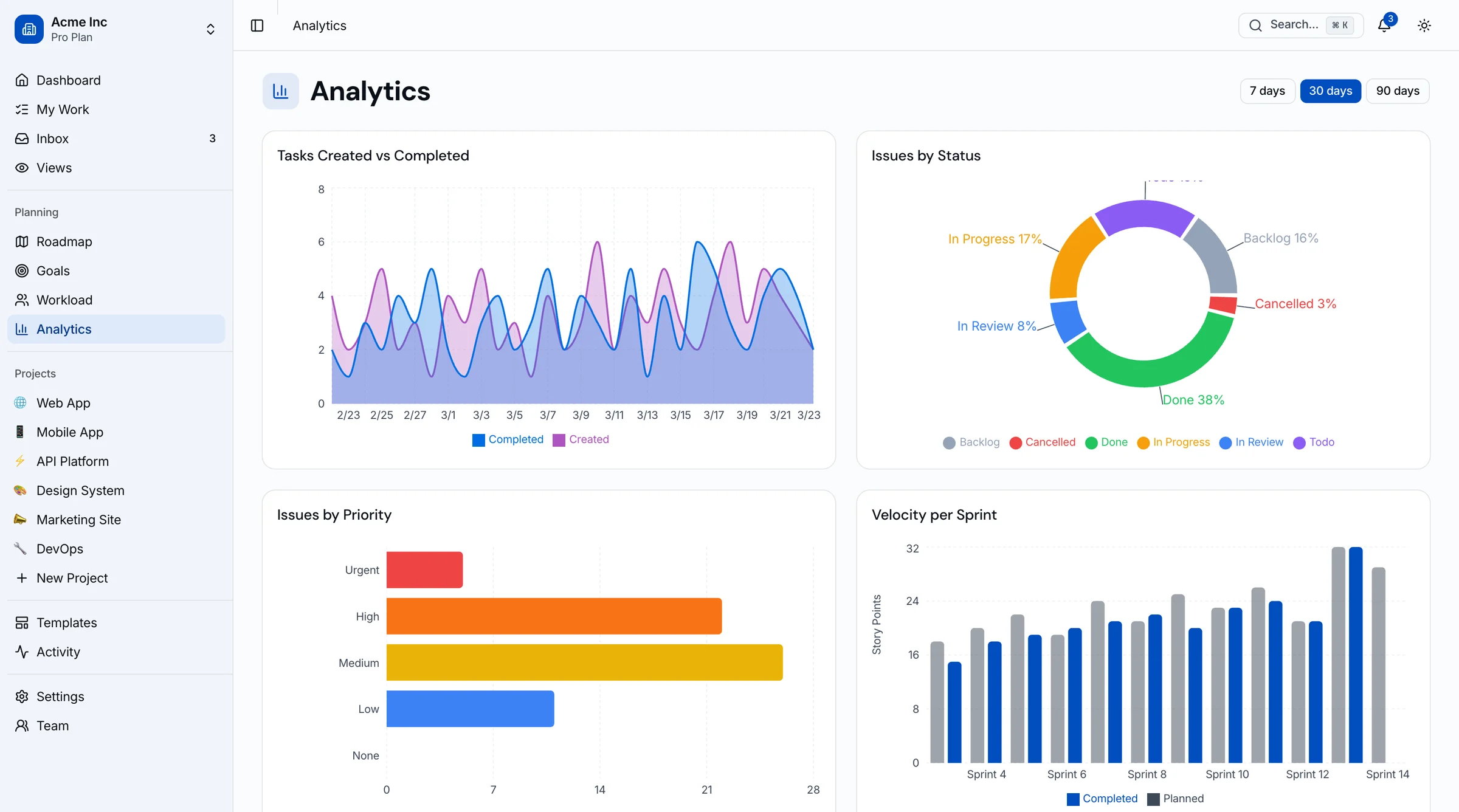
The Kanban Board & Project Management Template from thefrontkit ships with 45 screens of project management UI. Kanban board with drag-and-drop, list view, calendar view, Gantt-style timeline, workload view, sprint cycles with burndown tracking, roadmap planning, goals and OKRs, team management, project analytics, and a full settings suite.
All styled with Tailwind CSS v4 and the same design token architecture as the SaaS Starter Kit. WCAG AA accessible with keyboard alternatives for all drag-and-drop interactions. Try the live demo.
- Stack: Next.js, React, Tailwind CSS v4, shadcn/ui, Recharts
- Components: 50+ project management components
- Dark mode: Token-driven
- Accessibility: WCAG AA
- Price: From $131
3. thefrontkit Social Media Dashboard
Best for social media analytics and content management dashboards.
The Social Media Dashboard Template from thefrontkit covers multi-platform analytics (Instagram, Twitter/X, Facebook, LinkedIn, TikTok, YouTube), content calendar with drag-and-drop, post composer, audience insights, sentiment analysis, competitor tracking, social inbox, and reporting with export. 35+ screens total.
Built with Tailwind CSS v4 and Recharts. Full design token system for easy rebranding. WCAG AA accessible across all screens. Try the live demo.
- Stack: Next.js, React, Tailwind CSS v4, shadcn/ui, Recharts
- Components: 50+ social media components
- Dark mode: Token-driven
- Accessibility: WCAG AA
- Price: From $131
4. TailAdmin
Best free Tailwind dashboard with a large component library.
TailAdmin is one of the most popular free Tailwind dashboard templates. It includes a wide range of components: charts (ApexCharts), data tables, forms, calendar, and auth pages. The React and Next.js versions are well-maintained.
The component variety is impressive for a free template. The trade-offs are typical: no design token system, accessibility is basic, and the styling can feel inconsistent across different component types.
-
Stack: Next.js, React, Tailwind CSS
-
Components: 40+
-
Dark mode: Yes
-
Accessibility: Basic
-
Price: Free (open source), Pro from $49
5. Tailwind UI (Application UI)
Best for building custom dashboards from premium components.
Tailwind UI's Application UI package gives you professionally designed dashboard components: stacked layouts, sidebar navigation, table layouts, stats sections, and form patterns. These are components, not a complete template. You assemble your dashboard from parts.
The quality is the highest of any Tailwind component collection. The HTML/JSX is clean, accessible, and follows best practices. The downside is the assembly required. You get ingredients, not a finished meal.
-
Stack: React + Tailwind CSS (bring your own framework)
-
Components: 100+ application components
-
Dark mode: Support varies by component
-
Accessibility: Good
-
Price: $149+ (all access)
6. Tremor
Best for analytics dashboards focused on data visualization.
Tremor is a React library specifically designed for building analytics dashboards with Tailwind CSS. It provides chart components (area, bar, donut, scatter), metric cards, tables, and layout components tuned for data-heavy interfaces.
The chart components are the strongest part. They look native to Tailwind (no style clashing), support dark mode, and handle responsive resizing well. If your dashboard is primarily about visualizing metrics, Tremor is the best starting point.
-
Stack: React, Tailwind CSS
-
Components: 30+ (analytics-focused)
-
Dark mode: Yes
-
Accessibility: Moderate (charts are complex)
-
Price: Free (open source)
7. Mosaic by Cruip
Best for marketing and sales dashboards.
Mosaic is a premium Tailwind dashboard template designed for marketing analytics. It includes well-designed chart layouts, customer analytics pages, finance dashboards, and campaign tracking views. The visual design is polished, with good use of whitespace and typography.
The component set is fixed. Customization beyond what's included requires significant work since there's no token system underneath.
-
Stack: React, Tailwind CSS
-
Components: Dashboard-specific
-
Dark mode: Yes
-
Accessibility: Basic
-
Price: $89
8. WindUI Dashboard
Best free minimal Tailwind dashboard.
WindUI provides a clean, lightweight dashboard template with basic components: sidebar, cards, tables, and charts. It's intentionally minimal. If you want a simple starting point without the overhead of a large component library, WindUI works well.
-
Stack: HTML + Tailwind CSS (React wrapper available)
-
Components: 15+
-
Dark mode: Yes
-
Accessibility: Basic
-
Price: Free
9. Notus by Creative Tim
Best free Tailwind dashboard for quick prototypes.
Notus ships with a dashboard layout, card components, tables, and several page templates (profile, settings, landing page). The design is clean and modern. Creative Tim's templates are widely used, so you'll find community support.
The code quality is decent for a free template. The main limitation is that components are basic. Data tables don't have sorting or filtering built in. Charts use a basic Chart.js setup.
-
Stack: React, Tailwind CSS
-
Components: 20+
-
Dark mode: No
-
Accessibility: Minimal
-
Price: Free (open source), Pro available
10. Flowbite Admin Dashboard
Best for teams already using the Flowbite component library.
Flowbite's admin dashboard builds on their Tailwind component library. If you're already using Flowbite components, the dashboard template integrates seamlessly. It includes a sidebar layout, data tables with Flowbite's table component, charts, and CRUD interfaces.
-
Stack: React, Tailwind CSS, Flowbite
-
Components: Flowbite library + dashboard layouts
-
Dark mode: Yes
-
Accessibility: Moderate (Flowbite has ARIA support)
-
Price: Free (open source), Pro from $149
11. Horizon UI
Best for visually distinctive dashboards.
Horizon UI is a Tailwind dashboard template with a distinctive visual style: rounded cards, gradient accents, and generous spacing. It looks different from the typical "corporate dashboard" aesthetic, which can be a strength if you want your product to stand out.
The visual design is the selling point. The code quality and component flexibility are secondary.
-
Stack: React, Tailwind CSS, Chakra UI (uses both)
-
Components: 25+
-
Dark mode: Yes
-
Accessibility: Basic
-
Price: Free, Pro from $69
Comparison Table
| Template | Price | Components | Dark Mode | WCAG AA | Design Tokens |
|---|---|---|---|---|---|
| thefrontkit SaaS | $79 | 50+ | Yes | Yes | Yes |
| thefrontkit Kanban | $131 | 50+ | Yes | Yes | Yes |
| thefrontkit Social Media | $131 | 50+ | Yes | Yes | Yes |
| TailAdmin | Free/$49 | 40+ | Yes | Basic | No |
| Tailwind UI | $149+ | 100+ | Partial | Good | No |
| Tremor | Free | 30+ | Yes | Moderate | No |
| Mosaic | $89 | Dashboard | Yes | Basic | No |
| WindUI | Free | 15+ | Yes | Basic | No |
| Notus | Free | 20+ | No | Minimal | No |
| Flowbite | Free/$149 | Library | Yes | Moderate | No |
| Horizon UI | Free/$69 | 25+ | Yes | Basic | No |
How to Choose
For production SaaS with enterprise customers: You need accessibility compliance and a design system. The thefrontkit SaaS Starter Kit is the most complete option. For CRM and sales workflows specifically, the CRM Dashboard Template provides pipeline and deal management screens out of the box. See our full guide on CRM dashboard templates for more options. Tailwind UI components are a solid alternative if you want to build custom.
For project management dashboards: The thefrontkit Kanban Board template covers kanban boards, sprint planning, roadmaps, and analytics across 45 screens. It's the only Tailwind dashboard template with a full agile workflow built in.
For social media dashboards: The thefrontkit Social Media Dashboard handles multi-platform analytics, content calendars, and reporting across 35+ screens. No other Tailwind template is purpose-built for social media management.
For analytics dashboards: Tremor gives you the best chart components in the Tailwind ecosystem. Combine it with a sidebar layout from another source.
For quick prototypes and MVPs: TailAdmin is the best free option. Lots of components, decent quality, and active maintenance.
For internal admin tools: Any template works. Internal tools prioritize function over form. Pick the one whose data table component is the strongest.
For maximum flexibility: Tailwind UI components. You'll spend more time assembling, but you control every detail.
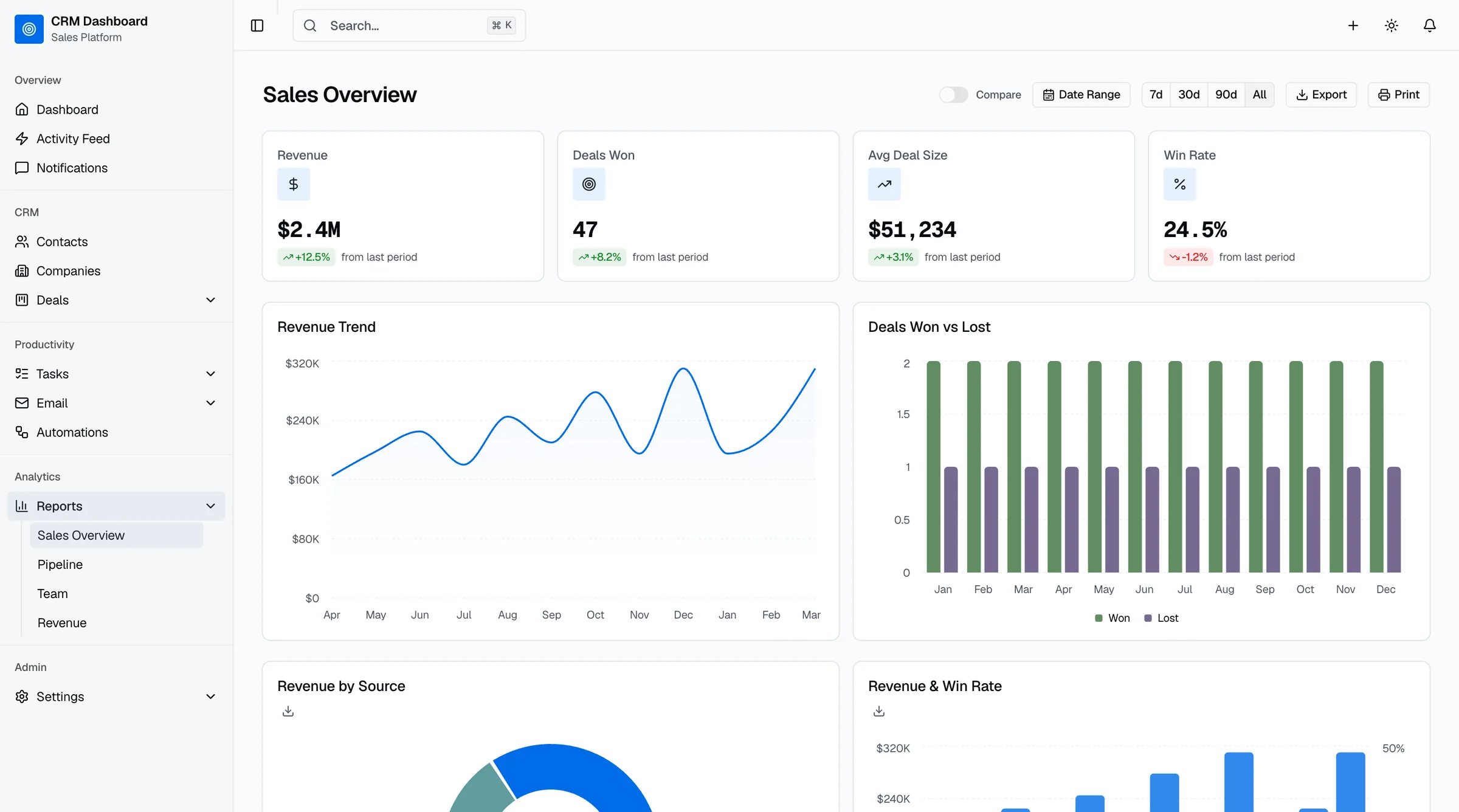
For domain-specific dashboards: Pick a template tuned to the workflow you actually need. The Sales Dashboard Template covers revenue forecasting, pipeline analytics, and rep leaderboards. The Finance Dashboard Template handles invoicing, expense tracking, and budget breakdowns. The HR Dashboard Template ships employee directory, leave management, and performance reviews. Each kit shares the same Tailwind + shadcn/ui foundation as the SaaS Starter Kit.
Whatever you choose, test these three things before committing:
- Mobile sidebar behavior. Open the demo on your phone. Does the sidebar become a drawer?
- Data table with real data. Load 500+ rows. Does it still perform?
- Dark mode consistency. Switch to dark mode. Do all components update, or do some stay light?
Our guide on Tailwind CSS design tokens for SaaS covers how to set up a token system if your chosen template doesn't include one.
Frequently Asked Questions
What is the best Tailwind CSS dashboard template?
For production use, the thefrontkit SaaS Starter Kit offers the most complete package with WCAG AA accessibility and a production-ready design token system. For free options, TailAdmin has the best component coverage. For analytics-heavy dashboards, Tremor provides the strongest chart components.
Is Tailwind CSS good for dashboards?
Yes. Tailwind's utility-first approach makes it fast to build custom dashboard layouts. The built-in spacing scale, color palette, and responsive breakpoints provide design constraints that keep dashboards consistent. The main gap is that Tailwind gives you utilities, not components, so you need a component layer (like shadcn/ui or a template) on top.
Are there free Tailwind CSS admin dashboard templates?
Yes. TailAdmin is the most popular free Tailwind admin dashboard with 7 layout variants. Other strong free options include TailPanel (React 19 + TypeScript + Tailwind 4), the Tremor component library for data-heavy dashboards, and Vuestic Admin for Vue teams. All support dark mode and responsive design out of the box.
How do I add dark mode to a Tailwind dashboard?
The best approach is CSS custom properties mapped to Tailwind's theme. Define light and dark values for each token, switch them with a data-theme attribute or the Tailwind dark: variant, and your entire dashboard updates automatically. Templates with built-in design token systems handle this out of the box.
Can I use Tailwind CSS with Next.js for a dashboard?
Yes, and it's the most common combination for dashboard development in 2026. Next.js provides the app framework (routing, SSR, API routes), and Tailwind handles the styling. Add shadcn/ui for accessible components, and you have a production-ready dashboard stack. Most templates on this list support this combination. For a framework-focused comparison, see our guide to the best Next.js dashboard templates.
What's the best Tailwind dashboard template for React?
For React specifically, look for templates built on Next.js with shadcn/ui components. This gives you server-side rendering, the App Router, and accessible Radix-based components styled with Tailwind. The best React + Tailwind dashboard templates include responsive sidebars, data tables with sorting/filtering, chart libraries (Recharts or Tremor), and design tokens for easy theming.