15 Best Next.js Website Templates 2026 (Free & Paid)
15 Best Next.js Templates in 2026
Next.js is the default choice for building modern websites. Server-side rendering, static generation, image optimization, and the App Router make it the best framework for sites that need to rank in search engines and load fast on mobile.
But starting from a blank Next.js project means weeks of building layouts, components, and page structures before you ship anything useful. Templates skip that phase. The right one gives you a production-quality starting point. The wrong one gives you a demo that falls apart once you start customizing.
We reviewed 15 Next.js website templates across seven categories and checked every repo, version and price in September 2026. A few long-time favourites didn't survive the check: Taxonomy and the original Medusa starter are both archived, and Tailwind UI is now Tailwind Plus. Here's what's worth your time.
If you're new to templates, start with what a Next.js template is and how to judge one.
Or skip the choice: get every kit for $749
If you're shipping more than one product, All UI Kits unlocks every Next.js kit on thefrontkit. SaaS, CRM, HR, Kanban, E-commerce, Blog CMS, AI UX, Inventory, Social Media Dashboard, and 9 more. Plus every future kit we ship. One-time payment, lifetime access, no subscription.
What to Look For
Component quality. Open the code. If every component is a 400-line file with hardcoded colors and no props, you'll spend more time refactoring than building. Good templates use composable components with clean APIs.
Responsive design. Test on a 375px screen, not just the desktop preview. Over 60% of web traffic is mobile. If the template doesn't look good on a phone, it's not ready.
Accessibility. Can you navigate the template with a keyboard? Do images have alt text? Does the contrast pass WCAG AA? Most templates fail here. If you need help evaluating this, our guide on how to make a website accessible covers what to check.
Performance. Run Lighthouse on the demo. If a template scores below 80 on mobile performance with demo content, it'll score worse with your real content.
Customization. The best templates use design tokens or CSS custom properties so you can rebrand by changing a few values instead of hunting through dozens of files.
SaaS Website Templates
1. thefrontkit SaaS Starter Kit
Best for the app side of a SaaS product (pair it with a landing template).
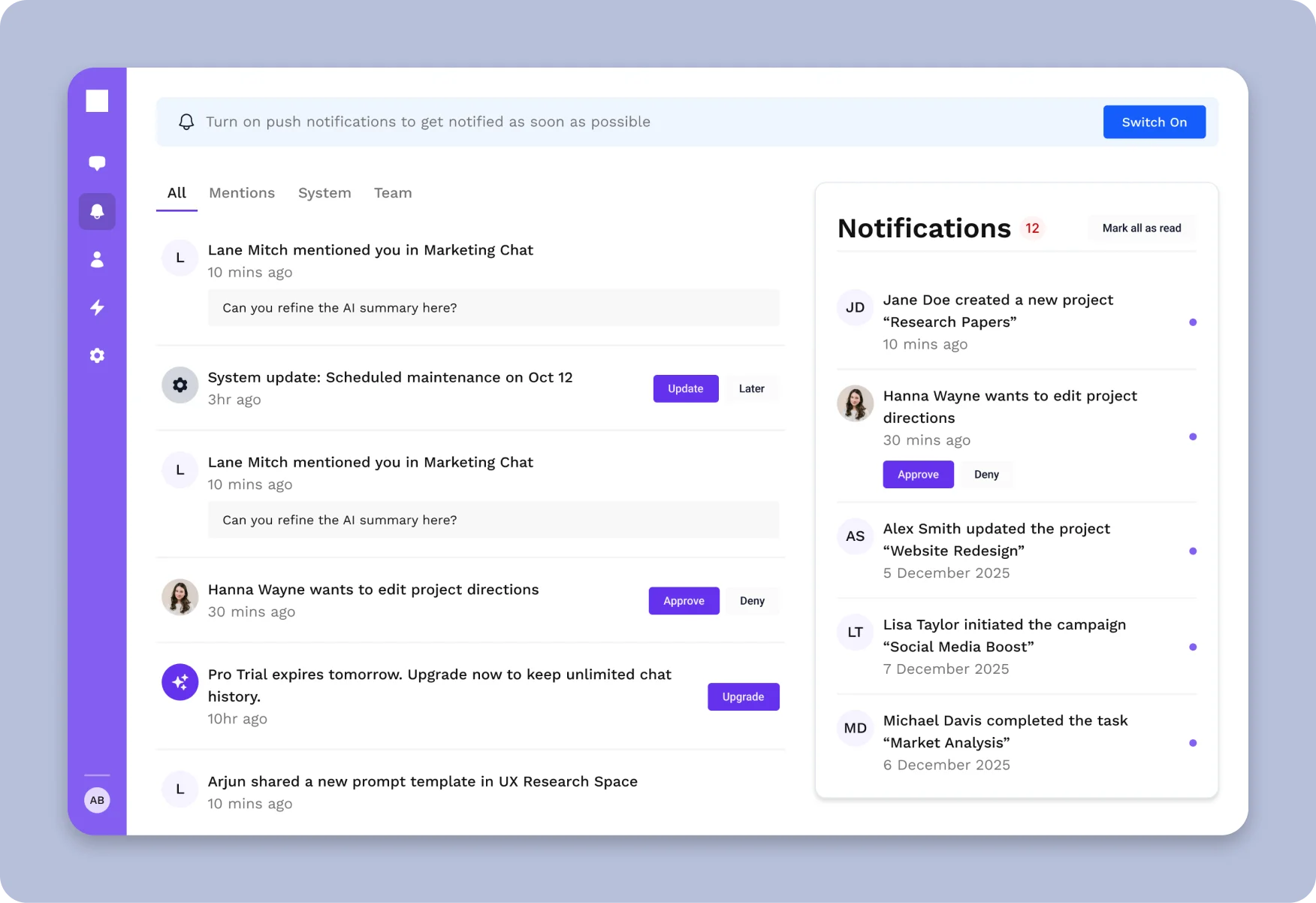
The SaaS Starter Kit from thefrontkit is the app side of a SaaS rather than the marketing site: 135+ components covering auth flows, a dashboard shell, settings (account, billing, team, notifications), team management and data tables. Pair it with a landing page template from further down this list for the marketing pages.
The design token system is the standout feature. Every color, spacing value, font size, and border radius is driven by a production-ready token architecture. Rebranding takes minutes, not days.
WCAG AA accessibility is built into every component. Keyboard navigation, screen reader support, proper ARIA attributes, and contrast compliance are all handled. This matters because most SaaS templates skip accessibility entirely, and retrofitting it later is expensive.
- Use case: SaaS products, dashboards, internal tools
- Stack: Next.js, React, Tailwind CSS, shadcn/ui, TypeScript
- Accessibility: WCAG AA
- Live demo: Try it in your browser
- Price: From $79
2. Vercel's SaaS Starter
Best free option for simple SaaS marketing sites.
The official Next.js SaaS Starter (about 16k stars) gives you email and password auth, Stripe subscriptions, a Postgres database with Drizzle, shadcn/ui components and a minimal marketing page and dashboard. It's lean and well-coded but intentionally basic, so you'll build most screens yourself.
-
Use case: Simple SaaS with auth and billing
-
Stack: Next.js App Router, Tailwind CSS v4, shadcn/ui, Postgres, Drizzle, Stripe
-
Accessibility: Basic
-
Price: Free
3. next-shadcn-dashboard-starter
Best free starter for the app side of a SaaS.
next-shadcn-dashboard-starter (about 7k stars) covers the logged-in part of a SaaS: Clerk auth with organisations and billing, data tables, charts and forms, on Next.js 16, Tailwind v4 and shadcn/ui. Pair it with a landing page template for the marketing side. See more options in our Next.js dashboard templates guide.
(This slot used to go to Taxonomy by shadcn. Its README now says it's archived, and it's still on Next.js 13 and Tailwind v3, so we no longer recommend starting from it.)
- Use case: SaaS app dashboards
- Stack: Next.js 16, Tailwind CSS v4, shadcn/ui, Clerk
- Accessibility: Good (Radix UI primitives)
- Price: Free (MIT)
E-commerce Website Templates
4. thefrontkit E-commerce Starter Kit
Best for custom storefronts that need accessibility.
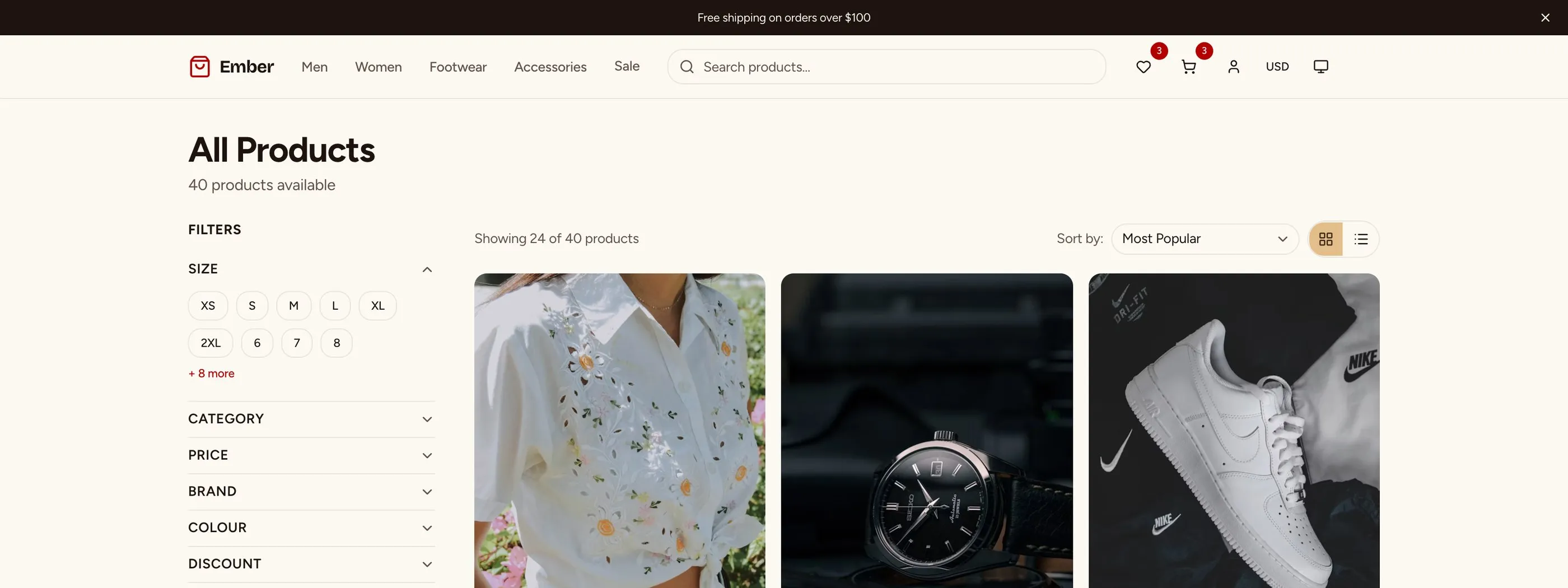
The E-commerce Starter Kit ships with 56 pre-built screens covering the full shopping experience: storefront with product listings, product detail pages with variants, shopping cart, multi-step checkout, customer accounts, and a complete admin dashboard.
Like the SaaS kit, it uses a design token system and ships with WCAG AA accessibility. The checkout flow is fully keyboard-navigable, product grids work with screen readers, and all form inputs have proper labels and error handling.
- Use case: Custom e-commerce storefronts
- Stack: Next.js 16, React, Tailwind CSS v4, shadcn/ui, checkout UI
- Accessibility: WCAG AA
- Live demo: Try it in your browser
- Price: From $165
Need the backend too? The Full-Stack E-commerce Kit adds Supabase and Stripe.
For a deeper comparison of e-commerce options, see our Next.js e-commerce template guide.
5. Next.js Commerce by Vercel
Best free e-commerce starter connected to Shopify.
Next.js Commerce (about 14k stars) is a fast, minimal storefront that connects to Shopify's Storefront API. Vercel now maintains the Shopify version only, and other commerce platforms keep their own forks. The design is clean, performance is excellent, and deployment is one-click. The limitation is flexibility. Customizing beyond the included design requires significant work, and it's tightly coupled to Shopify.
-
Use case: Shopify-powered storefronts
-
Stack: Next.js App Router, Tailwind CSS v4, Shopify Storefront API
-
Accessibility: Basic
-
Price: Free
6. Medusa DTC Starter
Best for developers who want full control over their commerce backend.
Medusa is an open-source headless commerce platform. Its long-running nextjs-starter-medusa repo is now archived, and Medusa points people to its newer DTC starter, a monorepo with the Medusa backend and a Next.js storefront. You get far more backend control than Shopify, but it's newer and less battle-tested than the old starter, so expect more customization work.
-
Use case: Custom commerce with headless backend
-
Stack: Next.js, Medusa
-
Accessibility: Basic
-
Price: Free (open source)
Project Management Dashboard Templates
7. thefrontkit Kanban Board & Project Management Template
Best for building project management tools like Linear or Jira.
The Kanban Board & Project Management Template from thefrontkit is purpose-built for project management apps. 45 screens covering kanban boards with drag-and-drop, list and calendar views, Gantt-style timeline, sprint cycles with burndown tracking, workload view, roadmap planning, goals and OKRs, team management, project analytics, and a full settings suite.
Same design token system and WCAG AA accessibility as the SaaS and E-commerce kits. If you're building a project management tool, this covers the entire frontend. Try the live demo.
- Use case: Project management tools, kanban boards, sprint planning dashboards
- Stack: Next.js 16, React, Tailwind CSS v4, shadcn/ui, Recharts, @hello-pangea/dnd
- Accessibility: WCAG AA
- Price: From $131
For a deeper comparison, see our best kanban board templates guide.
Social Media Dashboard Templates
8. thefrontkit Social Media Dashboard Template
Best for building social media management and analytics tools.
The Social Media Dashboard Template from thefrontkit covers the full social media workflow across 35+ screens. Multi-platform analytics for Instagram, Twitter/X, Facebook, LinkedIn, TikTok, and YouTube. Content calendar with drag-and-drop scheduling. Post composer with multi-platform previews. Audience insights, competitor tracking, sentiment analysis, social inbox, and reporting with export.
WCAG AA accessible with the same design token architecture. If you're building a social media management tool, this is the most complete Next.js template available. Try the live demo.
- Use case: Social media management tools, analytics dashboards
- Stack: Next.js 16, React, Tailwind CSS v4, shadcn/ui, Recharts
- Accessibility: WCAG AA
- Price: From $131
For a deeper comparison, see our best social media dashboard templates guide.
Portfolio and Personal Website Templates
9. Next.js Portfolio Starter
Best for a quick personal site launch.
Vercel's Portfolio Starter Kit gets you live in minutes, with MDX posts, SEO, RSS and dynamic OG images built in. A hero section, about page, and project grid. It's deliberately minimal. Great if you want a fast starting point. Less great if you want rich project showcases or a design that stands out.
- Use case: Developer portfolios
- Stack: Next.js 16, Tailwind CSS v4, MDX
- Accessibility: Basic
- Price: Free (MIT)
For more options in this category, see our full guide on Next.js personal website templates.
10. Lee Robinson's Next.js MDX Blog
Best reference implementation for a developer personal site.
Lee Robinson's old personal site repo (leerob.io) now redirects to next-mdx-blog (about 7.6k stars), a minimal MDX blog template on Next.js 16 and Tailwind v4. It's fast and well-structured, and the design is intentionally sparse, which works for some and feels too bare for others. The repo has no license file, so check before you ship it commercially.
-
Use case: Developer blog + portfolio
-
Stack: Next.js 16, MDX, Tailwind CSS v4
-
Accessibility: Good
-
Price: Free
Blog Templates
11. thefrontkit Blog CMS Kit
Best for teams that want a real editor, not just MDX files.
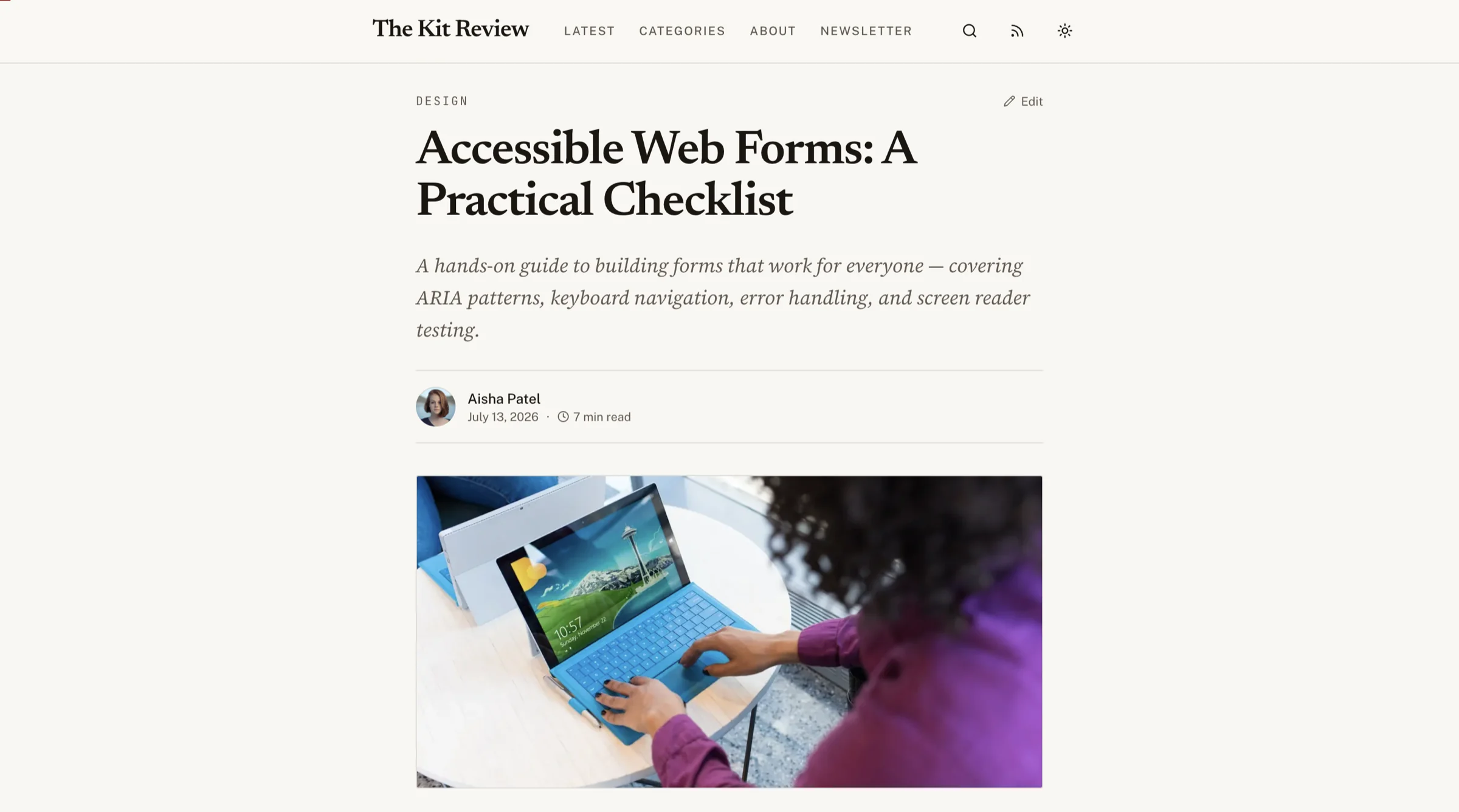
Most Next.js blog templates hand you MDX and a folder. The Blog CMS Kit hands you a publishing workflow: 27 screens split across a 9-screen public blog and a 13-screen Ghost-style admin with a Markdown post editor, SEO fields per post, a media library, newsletter and subscriber management, and an analytics dashboard. Two auth screens and three utility pages (404, RSS, sitemap preview) are included.
The reading experience is deliberately editorial: a centred serif column, drop caps, pull quotes, and a reading progress indicator, in both light and a warm night-reading dark theme. Headless-friendly, so you bring your own database.
- Use case: Company blogs, editorial sites, content marketing
- Stack: Next.js 16, React, Tailwind CSS v4, shadcn/ui
- Accessibility: WCAG AA
- Price: From $131
For a wider comparison, see our Next.js blog template guide and the blog CMS template guide.
12. Tailwind Nextjs Starter Blog
Best batteries-included blog template.
Tailwind Nextjs Starter Blog (about 10.6k stars, version 2.4) is the most feature-complete free Next.js blog template. MDX support, syntax highlighting, newsletter integration, RSS, sitemap, SEO tags, search, tags, and multiple layout options. The design is functional rather than beautiful, but the feature set is hard to beat.
-
Use case: Technical blogs, developer content
-
Stack: Next.js 15, MDX, Tailwind CSS v4, Pliny, Contentlayer
-
Accessibility: Good
-
Price: Free
See our Next.js blog template guide for a deeper comparison.
13. Nextra
Best for documentation sites with a blog section.
Nextra (about 14k stars, now on version 4) is a documentation framework that handles blog content well too. Built-in search, dark mode, MDX support, and good SEO. The blog is secondary to docs, so the blog-specific features are less developed than dedicated blog templates.
-
Use case: Docs + blog
-
Stack: Next.js, MDX
-
Accessibility: Good
-
Price: Free
Landing Page Templates
14. Cruip Next.js Templates
Best for marketing teams that need polished designs.
Cruip offers several Next.js landing page templates with strong visual design. Hero sections, feature grids, pricing tables, and testimonials are well-crafted. Two free ones (Simple Light and Open React, about 4.5k stars each) are on Next.js 15 and Tailwind v4. Paid templates are one-time: $49 to $129 each, or $79 for the Classic Bundle of 20 templates. Customization means editing components directly, since there's no token system.
-
Use case: Marketing sites, product launches
-
Stack: Next.js, Tailwind CSS
-
Accessibility: Basic
-
Price: Free templates, paid from $49 one-time
15. Tailwind Plus (formerly Tailwind UI)
Best component library for building custom landing pages.
Tailwind UI was renamed Tailwind Plus in 2025. It's mostly a collection of professionally designed components you assemble yourself, plus a set of full site templates and the Catalyst UI kit. It's a one-time purchase with lifetime access, no subscription. This gives you maximum flexibility but requires more setup. The component quality is high, and accessibility is better than most templates.
-
Use case: Custom marketing sites
-
Stack: React + Tailwind CSS (bring your own Next.js)
-
Accessibility: Good
-
Price: One-time (check the current price on tailwindcss.com/plus)
For more landing page options, see our guide on Next.js landing page templates.
Comparison Table
| Template | Category | Price | WCAG AA | Design Tokens | Mobile-First |
|---|---|---|---|---|---|
| thefrontkit SaaS | SaaS | $79 | Yes | Yes | Yes |
| Vercel SaaS Starter | SaaS | Free | Basic | No | Yes |
| next-shadcn-dashboard-starter | SaaS app | Free | Good | No | Yes |
| thefrontkit E-commerce | E-commerce | $165 | Yes | Yes | Yes |
| Next.js Commerce | E-commerce | Free | Basic | No | Yes |
| Medusa DTC Starter | E-commerce | Free | Basic | No | Yes |
| thefrontkit Kanban | Project Mgmt | $131 | Yes | Yes | Yes |
| thefrontkit Social Media | Social Media | $131 | Yes | Yes | Yes |
| Portfolio Starter | Portfolio | Free | Basic | No | Yes |
| next-mdx-blog (leerob) | Portfolio/Blog | Free | Good | No | Yes |
| thefrontkit Blog CMS | Blog | $131 | Yes | Yes | Yes |
| Tailwind Blog | Blog | Free | Good | No | Yes |
| Nextra | Docs/Blog | Free | Good | No | Yes |
| Cruip | Landing Page | Free, paid from $49 | Basic | No | Yes |
| Tailwind Plus | Components | One-time | Good | No | Yes |
How to Choose
Building a SaaS product? You need two things: a marketing site and the app behind sign-up. Use a landing page template (see the landing section above) for the first, and the thefrontkit SaaS Starter Kit for the second: dashboard, auth, settings and data tables. Pick a landing template on Tailwind so the two share a design language.
Building an e-commerce site? If you want Shopify, use Next.js Commerce. If you want full control and accessibility, the thefrontkit E-commerce Starter Kit covers the most ground. Read our comparison of Next.js vs Shopify for developers.
Building a personal site or blog? The Tailwind Nextjs Starter Blog is the best free option. If you want something more minimal, start from Lee Robinson's next-mdx-blog.
Need maximum flexibility? Tailwind Plus components let you build exactly what you want, but you're assembling from parts rather than starting with a complete template.
Accessibility is non-negotiable? Your options narrow significantly. Most free templates don't meet WCAG AA. The thefrontkit kits and Tailwind Plus are the strongest choices. Learn why accessibility matters in our guide on why accessibility should be your first priority.
Building a project management tool? The thefrontkit Kanban Board template covers kanban boards, sprint planning, roadmaps, and analytics across 45 screens. See the demo.
Building a social media management tool? The thefrontkit Social Media Dashboard handles multi-platform analytics, content calendars, and reporting across 35+ screens. See the demo.
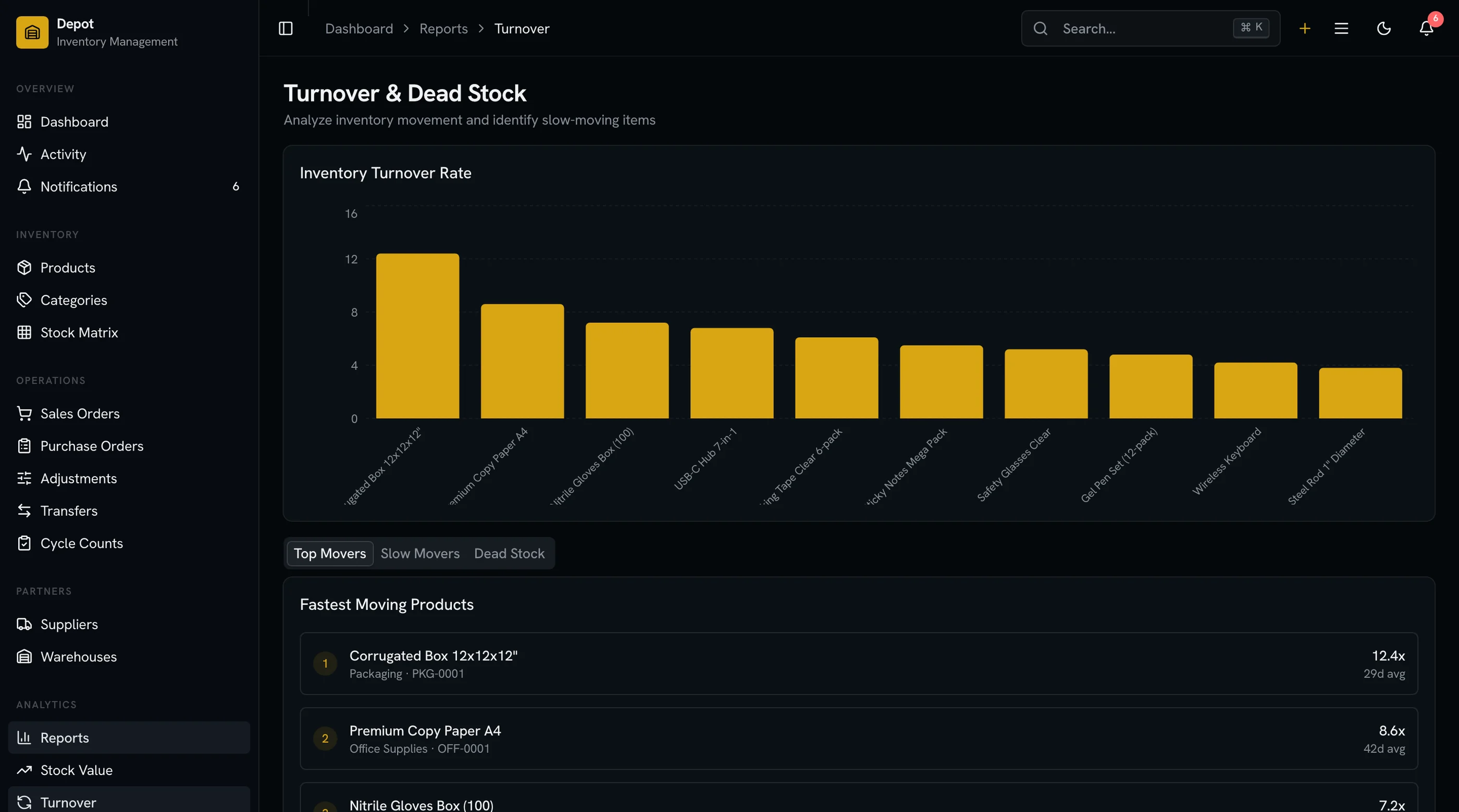
Looking for a specific business app? Browse the full app catalog for purpose-built apps including the CRM Dashboard Template, E-commerce Template, Kanban Board Template, and Social Media Dashboard.
Frequently Asked Questions
What is the best Next.js website template in 2026?
It depends on what you're building. For the app side of a SaaS product, the thefrontkit SaaS Starter Kit is the most complete option, with WCAG AA accessibility and a design token system; pair it with a landing template for the marketing site. For blogs, the Tailwind Nextjs Starter Blog has the best free feature set. For e-commerce, the thefrontkit E-commerce Kit or Next.js Commerce (if you use Shopify) are the top choices. For portfolios, Vercel's portfolio starter is the fastest path to a deployed personal site.
Are free Next.js templates good enough for production?
For personal projects and MVPs, yes. For commercial products where accessibility, performance, and customization matter, free templates usually require significant work to get production-ready. You'll spend time adding proper meta tags, fixing accessibility issues, implementing responsive design, and building missing components. Sometimes that time investment exceeds the cost of a premium template.
What's the difference between a Next.js template and a Next.js boilerplate?
A template gives you pre-built UI components and page layouts you customize visually. A boilerplate gives you project structure, configuration, and tooling without UI. Templates save design and frontend time. Boilerplates save setup and configuration time. Some products (like thefrontkit) combine both. Read our detailed comparison of boilerplate vs building from scratch.
How do I customize a Next.js website template?
The best templates use design tokens (CSS custom properties) so you change colors, fonts, and spacing in one place and it updates everywhere. Without tokens, you'll search-and-replace through component files. Check that your template supports easy rebranding before buying. Our article on what design tokens are explains how token systems work.
Is Taxonomy by shadcn still maintained?
No. The shadcn-ui/taxonomy README now says the project is archived and won't get updates. It's also on Next.js 13 and Tailwind v3. For a maintained free SaaS starter, use the official Next.js SaaS Starter or next-shadcn-dashboard-starter.
Should I use the Pages Router or App Router for my Next.js website?
App Router. In 2026, the App Router is stable and offers significant advantages: React Server Components for better performance, nested layouts for consistent UI, and streaming for faster page loads. All modern Next.js templates should be built on the App Router. If a template still uses the Pages Router, it's outdated.
What are the best free Next.js templates?
The top free Next.js templates in 2026 include the official Next.js SaaS Starter (about 16k stars, auth and Stripe included), Tailwind Nextjs Starter Blog (about 10.6k stars, best for content sites), Next.js Commerce for Shopify stores, Vercel's Portfolio Starter Kit, Nextra for docs, and next-shadcn-dashboard-starter for SaaS dashboards. All are MIT licensed.