7 Best Social Media Dashboard Templates for 2026
7 Best Social Media Dashboard Templates for Developers
Social media management tools are complex. You need multi-platform analytics spanning Instagram, Twitter/X, Facebook, LinkedIn, TikTok, and YouTube. A content calendar with scheduling. A post composer that handles platform-specific formatting. Audience insights. Competitor tracking. Reporting with export. An inbox for managing conversations across platforms.
Building that from scratch with React and Next.js is 4-6 months of frontend development before you write a single line of backend integration code.
A social media dashboard template gives you the UI layer: the analytics dashboards, calendar interactions, composer layouts, and reporting screens. You wire up the APIs to the social platforms and focus on the features that differentiate your tool.
We compared 7 options on what matters: analytics depth, content calendar, platform coverage, reporting, and whether you get enough screens to build a real product. One honest finding first: very few templates are built for social media management. Most things sold as "social media templates" are social network UIs (feeds, profiles, messaging), or general admin dashboards you'd adapt. We say which is which for every entry, and we checked prices, licences and maintenance in September 2026.
Or skip the choice: get every kit for $749
If you're shipping more than one product, All UI Kits unlocks every Next.js kit on thefrontkit. The full Social Media Dashboard Kit (35+ screens, multi-platform analytics, content calendar), plus the SaaS Starter Kit, CRM Dashboard, HR Dashboard, E-commerce, AI UX, Blog CMS, and 11 more. Plus every future kit. One-time payment, lifetime access, no subscription.
What Makes a Good Social Media Dashboard Template?
Multi-platform analytics. A single dashboard showing metrics from Instagram, Twitter/X, Facebook, LinkedIn, TikTok, and YouTube. Follower growth, engagement rates, impressions, reach, and post performance. The template should include chart components that handle time-series data well.
Content calendar. Drag-and-drop scheduling across a calendar view. The ability to see posts across platforms on a single timeline. Monthly, weekly, and daily views. This is the core workflow for social media managers.
Post composer. Creating posts that go to multiple platforms simultaneously, with platform-specific previews and character limits. Image and video upload handling. Draft management.
Reporting and export. Stakeholders want PDF or CSV reports showing performance over time. The template needs report layouts that can pull from analytics data and present it in a format clients or leadership can understand.
Audience insights. Demographics, active hours, geographic distribution, and engagement patterns. This data drives content strategy decisions.
Accessibility. Analytics dashboards are data-heavy. Charts need to be readable by screen readers or have text alternatives. Data tables need proper column headers. Calendar interactions need keyboard support.
The 7 Best Social Media Dashboard Templates
1. thefrontkit Social Media Dashboard Template
Best overall social media dashboard template for production management tools.
The Social Media Dashboard Template from thefrontkit is purpose-built for social media management. 35+ screens covering the full workflow from analytics to publishing to reporting.
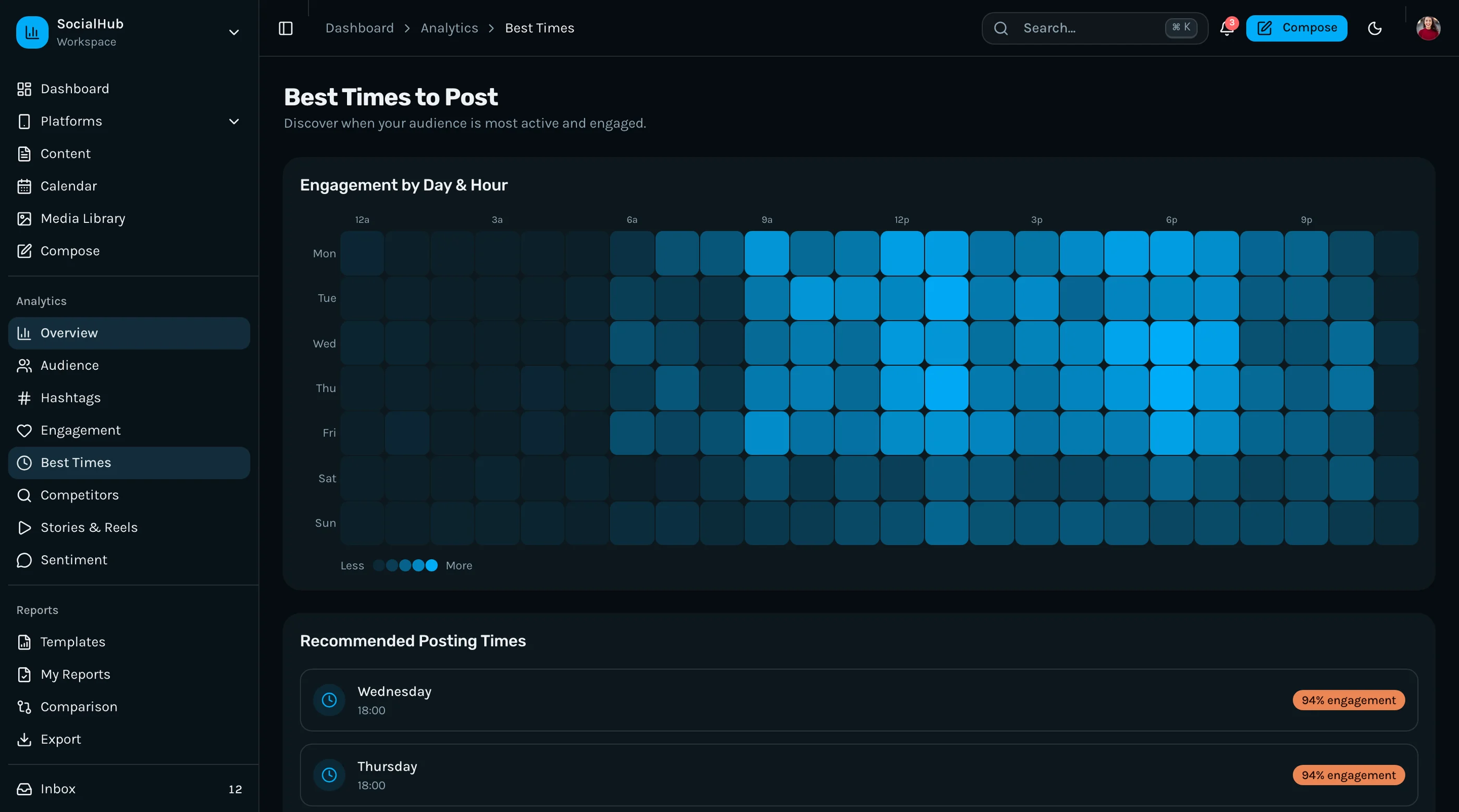
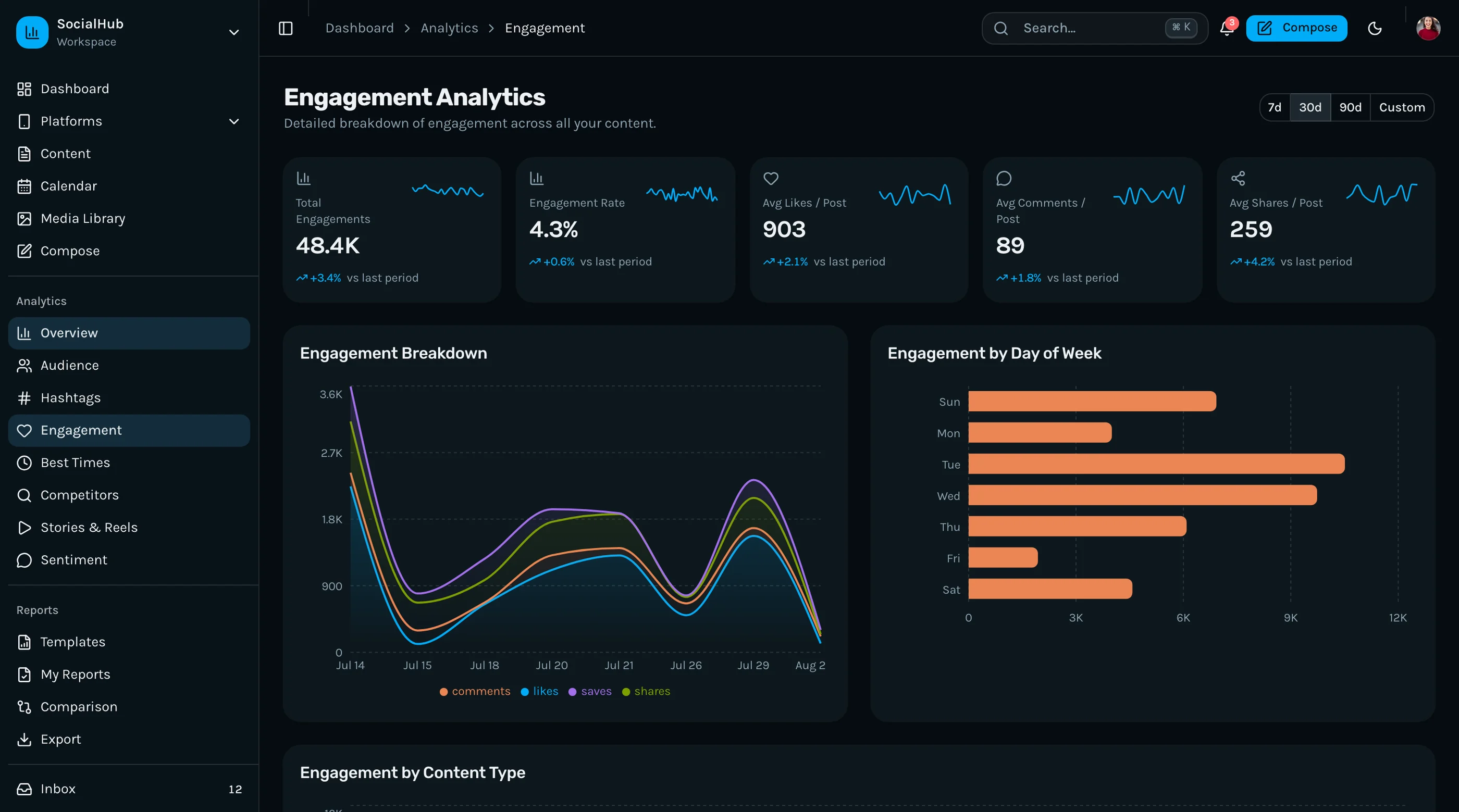
The analytics layer covers Instagram, Twitter/X, Facebook, LinkedIn, TikTok, and YouTube with dedicated dashboard views per platform plus a unified overview. You get follower growth charts, engagement rate trends, impressions and reach over time, post performance rankings, and best posting time heatmaps. All charts are built with Recharts and match the design system.
The content calendar has drag-and-drop scheduling with monthly, weekly, and daily views. The post composer supports multi-platform publishing with platform-specific previews and character count validation. Draft management and approval workflows are included.
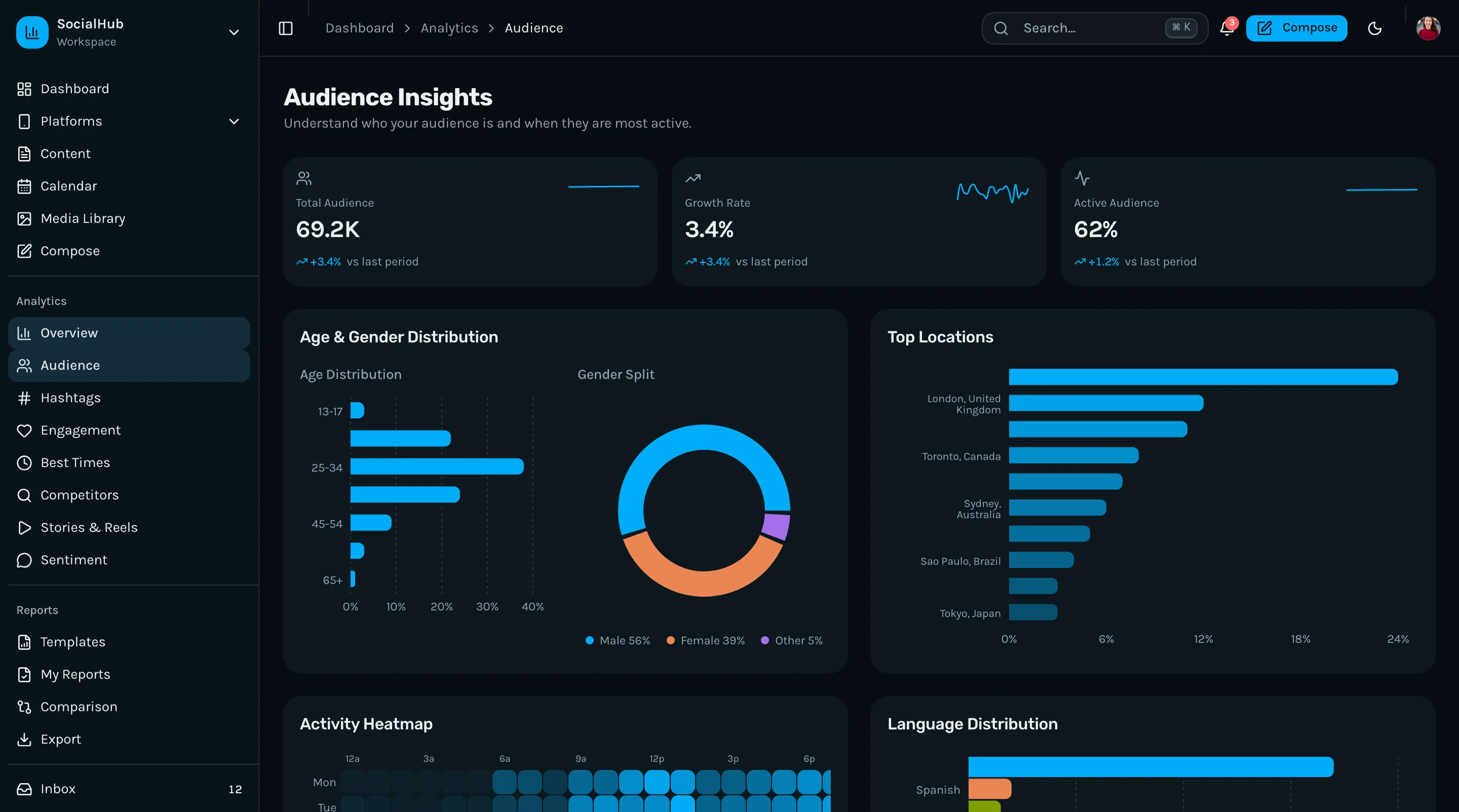
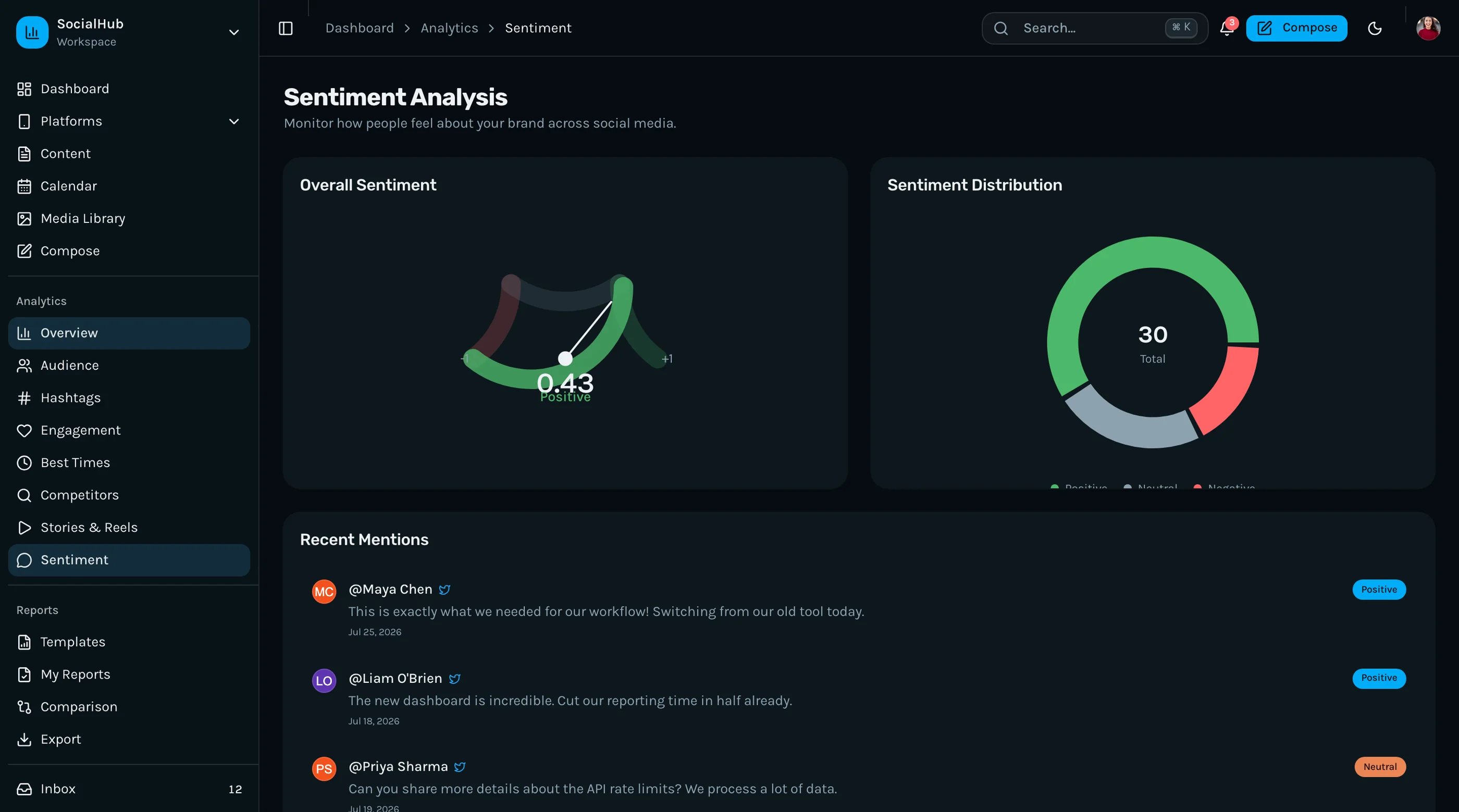
Beyond the basics: audience demographic dashboards, sentiment analysis views, competitor tracking, hashtag analytics, story and reel performance metrics, a social inbox for managing conversations, and reporting with export functionality. The settings suite covers team management, connected accounts, notification preferences, and billing.
WCAG AA accessibility across all screens. Chart components have text alternatives. Data tables have proper semantics. Calendar and composer interactions work with keyboard navigation.
- Screens: 40+
- Platforms: Instagram, Twitter/X, Facebook, LinkedIn, TikTok, YouTube
- Content calendar: Yes, with drag-and-drop
- Post composer: Yes, multi-platform with previews
- Reporting: Yes, with export
- Stack: Next.js 16, Tailwind CSS v4, shadcn/ui, Recharts
- Accessibility: WCAG AA
- Live demo: Try the social media dashboard demo
- Price: From $131
2. Postiz (open source)
Best free option if you'd rather fork a working app than start from a template.
Postiz (about 36k stars) is a full open-source social media scheduler, not a template: calendar, composer, multi-platform publishing, analytics and team features, running on Next.js with a backend included. You can self-host it or build on it.
The catch is the licence. Postiz is AGPL-3.0, so if you run a modified version as a service, you have to publish your changes. That's fine for internal use and a deal-breaker for many commercial products.
- Type: Full app (frontend and backend)
- Content calendar: Yes
- Post composer: Yes
- Stack: Next.js, Tailwind CSS
- Licence: AGPL-3.0
- Price: Free (self-hosted), paid cloud plans
3. Mixpost (if Vue is fine)
Best open-source scheduler with a permissive licence.
Mixpost (about 3.7k stars) is a self-hosted social media management app with a calendar, composer and analytics. It's MIT licensed, which is much easier to build on commercially than Postiz. The catch for this list: it's built with Laravel and Vue, not React.
- Type: Full app (Laravel + Vue)
- Content calendar: Yes
- Post composer: Yes
- Licence: MIT (Lite), paid Pro editions
- Price: Free Lite version
4. Apex Dashboard by DashboardPack
Best paid admin template to adapt for social analytics.
Apex Dashboard is a Next.js 16, Tailwind v4, shadcn/ui and Recharts admin template with 12 dashboard variants, including Analytics and Marketing. None of them is social-media specific, so you'd build the calendar, composer and per-platform views yourself on top of its components. Pricing was $69 Personal, $149 Developer, $349 Lifetime when we checked.
- Type: General admin template
- Content calendar: No
- Post composer: No
- Stack: Next.js 16, Tailwind v4, shadcn/ui, Recharts
- Price: From $69
5. Devias Kit Pro
Best Material UI option, with social feed and profile pages.
Devias Kit Pro is a long-running MUI admin template for Next.js or Vite, with analytics dashboards plus Social Feed and Social Profile pages. It's not a management tool, but the analytics components and MUI's accessible defaults give you a solid base. $69 Standard (JavaScript), $129 Plus (TypeScript and design files), $599 Extended. There's also a free, MIT-licensed Material Kit version with fewer pages.
- Type: General admin template
- Content calendar: No
- Post composer: No
- Stack: Next.js or Vite, MUI v6, React 19
- Price: Free Material Kit, Pro from $69
6. Tailwind UI Kits Social Media Template
Best if you're building a social network, not a management tool.
Listed on Tailkits and sold on Gumroad by Tailwind UI Kits for $19, this Next.js, Tailwind and TypeScript template has 15+ pages: feed, profiles, messaging and a marketplace. It's a social network app template (think a small Facebook), not an analytics or scheduling dashboard.
- Type: Social network UI
- Stack: Next.js, Tailwind CSS, TypeScript
- Price: $19
7. ThemeForest React social templates
Best for cheap social network designs.
ThemeForest's React social templates (SocialV, Social, Friendbook, Sociala and others) cost roughly $14 to $29 for a Regular Licence. Like #6, these are social network UIs. Some include an admin panel. Check the React and Next.js versions and the last update date before you buy.
- Type: Social network UI
- Price: About $14 to $29
Skip: Horizon UI still appears in older lists, but horizon-ui.com was offline when we checked and its repos haven't been updated since January 2025.
Comparison Table
| Option | Type | Content Calendar | Post Composer | Stack | Price |
|---|---|---|---|---|---|
| thefrontkit | Management dashboard template | Yes | Yes | Next.js 16, shadcn/ui | From $131 |
| Postiz | Full app (AGPL) | Yes | Yes | Next.js | Free / cloud |
| Mixpost | Full app (MIT Lite) | Yes | Yes | Laravel + Vue | Free Lite |
| Apex Dashboard | General admin | No | No | Next.js 16, shadcn/ui | From $69 |
| Devias Kit Pro | General admin | No | No | MUI | Free Kit, Pro from $69 |
| Tailwind UI Kits template | Social network UI | No | No | Next.js | $19 |
| ThemeForest | Social network UI | Rarely | Sometimes | React (varies) | $14 to $29 |
Which Social Media Dashboard Template Should You Pick?
For a full social media management dashboard with platform-specific analytics, content calendar, post composer, and reporting, the thefrontkit Social Media Dashboard is the only template on this list built specifically for that use case. Everything else is a general-purpose admin dashboard you'd need to customize.
For a free starting point, Postiz gives you a complete working scheduler if AGPL works for you. If you need a permissive licence and can live with Vue, Mixpost's Lite version is MIT. For a free React admin shell to build on, Devias's free Material Kit is the most polished.
For a general admin dashboard that you plan to customize into a social media tool, Apex or Devias Kit Pro give you the best component libraries to build on. If you're building a business management tool rather than a social-specific dashboard, check out the best CRM dashboard templates.
For social network apps (user profiles, feeds, messaging) rather than management dashboards, the Tailwind UI Kits template or the ThemeForest options are the cheap route.
Common Questions
Is there a free social media dashboard template?
Not many good ones built for management. Postiz (AGPL-3.0) and Mixpost Lite (MIT, Laravel and Vue) are free full apps you can self-host or build on. For a free React admin shell to adapt, Devias's Material Kit is MIT licensed. Most free "social media dashboard" repos on GitHub are small demos that haven't been updated since 2023.
What's the difference between a social media dashboard and a social media management tool?
A dashboard displays analytics and metrics. A management tool adds publishing (content calendar, post composer), engagement (social inbox), and reporting (exportable reports). Among the templates on this list, only the thefrontkit one covers the full management workflow. Postiz and Mixpost do too, but they're complete apps rather than templates.
Do I need separate dashboards per social platform?
For a serious social media management tool, yes. Instagram metrics (stories, reels, engagement) are different from LinkedIn metrics (impressions, click-through, follower demographics). A unified overview plus platform-specific deep dives is the standard pattern.
Can I connect these templates to real social media APIs?
The templates provide the UI layer. You'll connect them to platform APIs (Meta Graph API, Twitter/X API, LinkedIn API, TikTok Developer API) through your backend. The templates include the data structures and chart configurations. You provide the actual data.
How long does it take to build a social media dashboard from scratch?
A basic analytics dashboard takes 3-4 weeks. A full social media management tool with multi-platform analytics, content calendar, post composer, inbox, and reporting takes 4-6 months of frontend work. Templates compress the UI layer to days.
What tech stack should I use for a social media dashboard in 2026?
Next.js with React, Tailwind CSS, and shadcn/ui for the frontend. Recharts or Chart.js for analytics visualizations. A drag-and-drop library for the content calendar. Your backend handles API connections to social platforms, data aggregation, and scheduling. For a broader look at dashboard options built with this stack, see our guide to the best Tailwind dashboard templates.