Mailchimp Alternatives and Competitors: 8 Cheaper Platforms
Mailchimp Alternatives and Competitors: 8 Options Compared for 2026
Short answer: if you are leaving Mailchimp on price, MailerLite and Brevo both do the same job for meaningfully less. If you publish to an audience, Kit. If automation depth is the point, ActiveCampaign. If you want to stop paying per contact entirely, Listmonk self-hosted. And if email is a feature inside the product you are building, own the interface.
Mailchimp is the default, and defaults are sticky. The editor is approachable, the templates are fine, and most marketers have used it somewhere before. That familiarity is most of what you are paying for.
The reason teams leave is the billing model. Mailchimp charges on total contacts rather than on emails sent, which means your bill grows with a list you are not necessarily mailing. Unsubscribed and non-mailable contacts have historically counted toward your tier. The free plan is now capped at 250 contacts and 500 sends a month, which is small enough that it functions as a trial rather than a tier. At 500 contacts you are looking at roughly $13/month on Essentials and $20 on Standard, and by 5,000 contacts that is roughly $75 and $100. Premium starts around $350.
None of that is outrageous on its own. It becomes a problem when the list grows faster than the revenue the list produces.
Eight alternatives worth comparing, from cheaper hosted tools to open source to owning the sending layer.
Or skip the build entirely: get the Email Marketing Kit
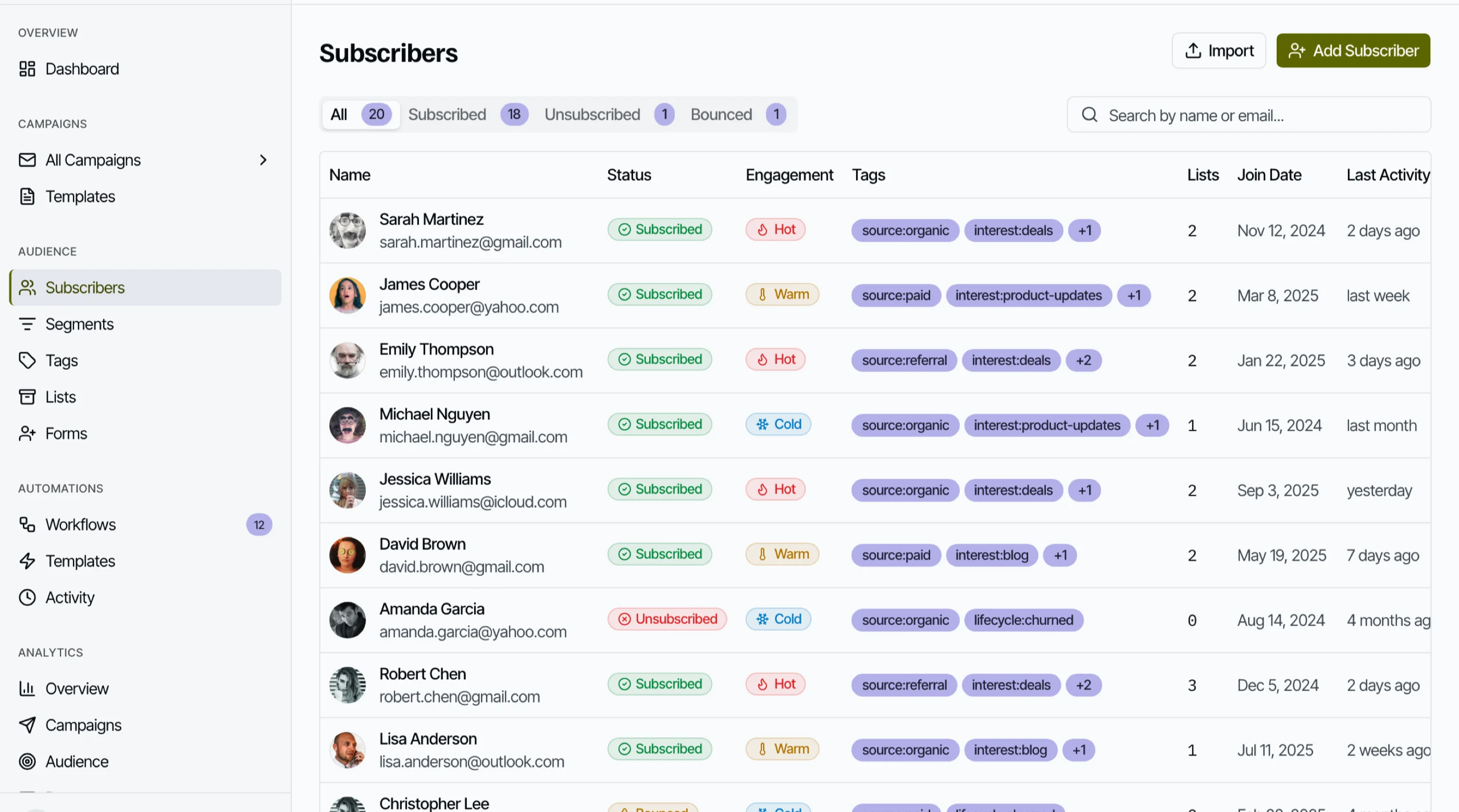
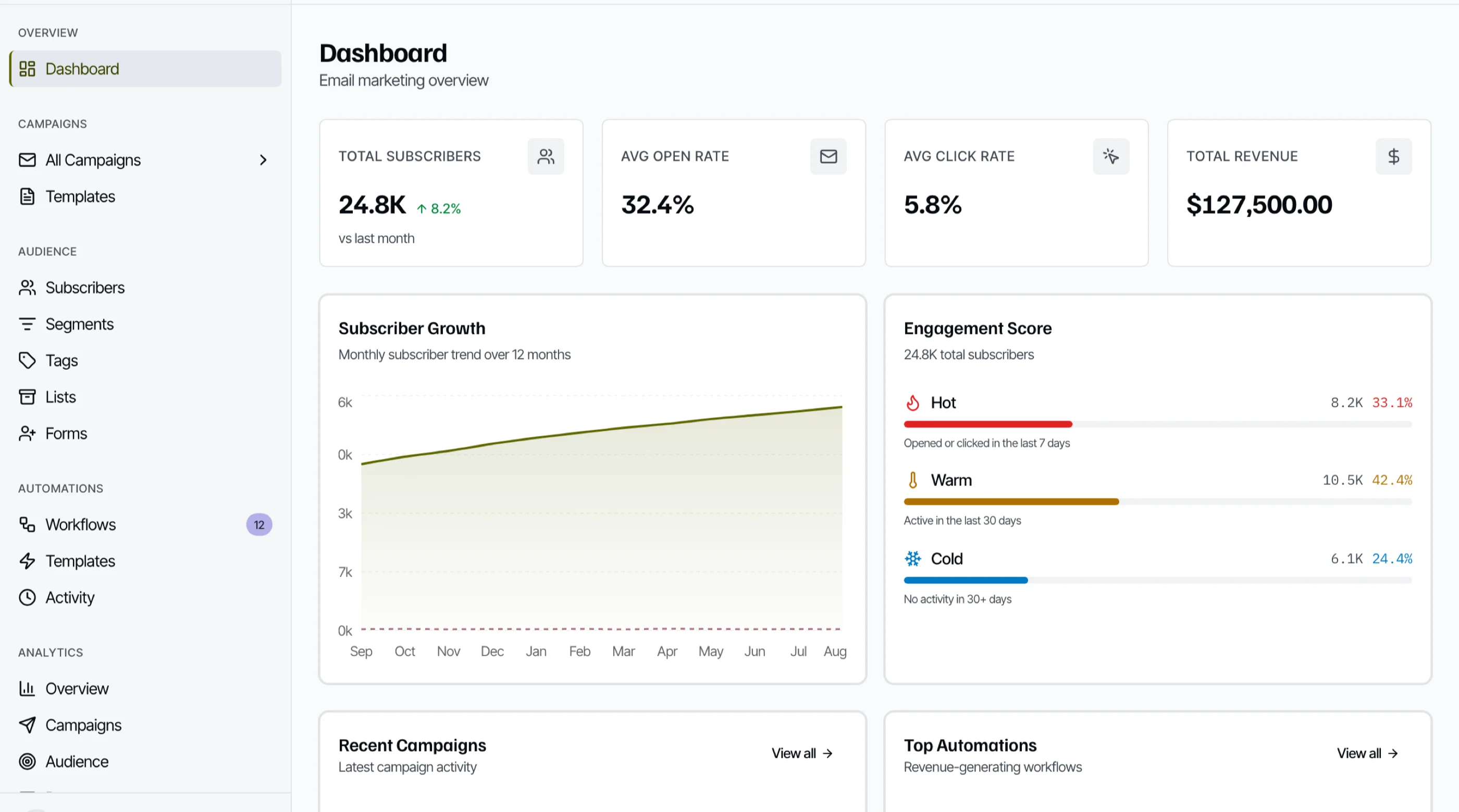
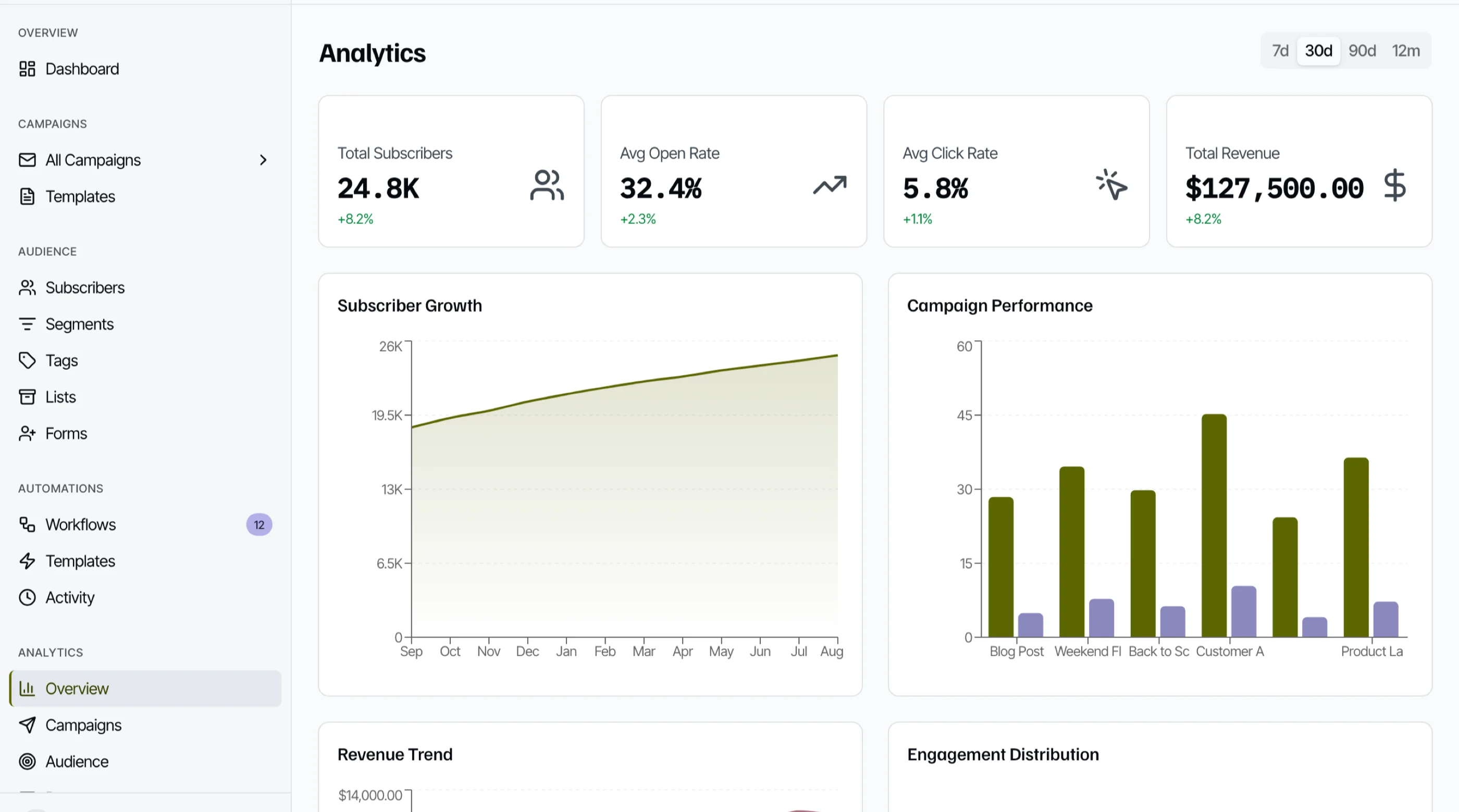
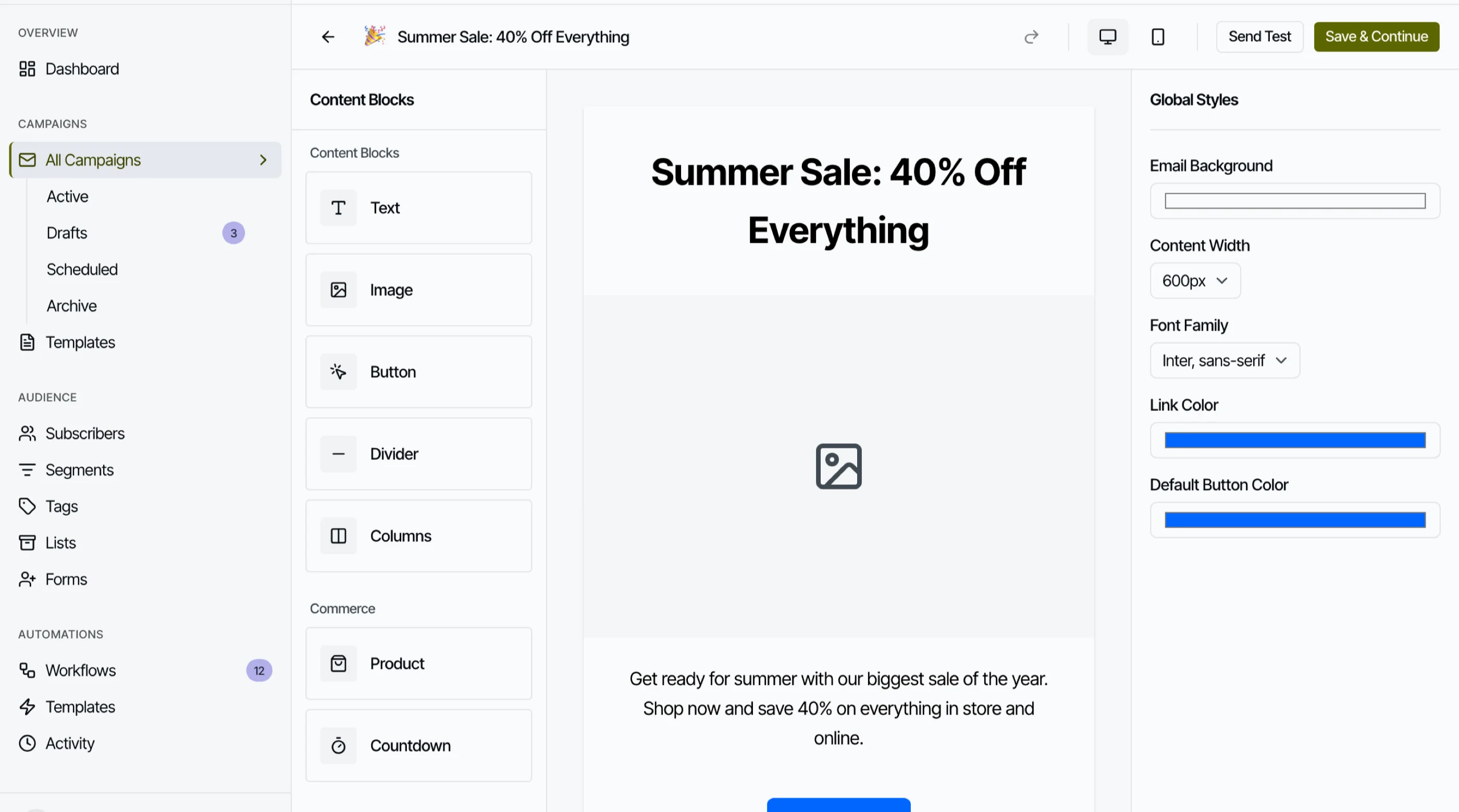
The Email Marketing Kit is shipped: 38 screens covering a block-based email editor, a node-graph automation canvas, subscriber management with segments and tags, A/B testing, deliverability monitoring, and click-map analytics. Next.js + Tailwind + shadcn/ui, dark mode throughout. $149 solo, $249 team, $399 agency.
Get the Email Marketing Kit → or get every kit (18 total) for $749 via All UI Kits →
TL;DR: Quick Picks for 2026
| Need | Top pick | Price |
|---|---|---|
| Best value like-for-like | MailerLite | Free tier, Comfort from roughly $12/mo |
| Pay for sends, not contacts | Brevo | Free tier, paid from roughly $9/mo |
| Newsletters and creators | Kit | Free to 10,000 subs, Creator from $33/mo |
| Automation depth | ActiveCampaign | From roughly $15/mo at 1,000 |
| Small business, phone support | Constant Contact | From roughly $12/mo |
| No licence fee at all | Listmonk | Free (self-host) |
| Email as code | Resend + React Email | Free tier, 3,000 emails/mo |
| Email inside your own product | thefrontkit Email Marketing Kit | $149+ one-time |
Note the two billing models. Contact-based pricing (Mailchimp, MailerLite, Kit) bills your list size. Send-based pricing (Brevo, Resend, Listmonk on your own SMTP) bills your volume. Which one is cheaper depends entirely on how often you mail.
What Mailchimp Actually Does Well
Worth being fair about. The onboarding is the best in the category, the template gallery is deep, and the integration list covers nearly every e-commerce and CRM tool you might already run. For a non-technical marketer who needs to send a decent-looking campaign this afternoon, nothing else on this list is faster to start.
The case for alternatives is rarely that Mailchimp is bad software. It is that you are paying a premium for a default.
When to Leave Mailchimp
Three signals:
- Your list is growing faster than your revenue per subscriber. Contact-based billing punishes exactly this, and cleaning the list becomes a monthly chore rather than good hygiene.
- You mail infrequently. If you send one campaign a month, you are paying a subscription sized for daily senders. Volume-based pricing inverts that.
- You are fighting the template editor. Once you are pasting custom HTML to get past the builder, you have lost the thing you were paying for.
1. MailerLite
The straight value swap, and the one most Mailchimp refugees land on.
Strengths:
- Materially cheaper at the same list size, with Comfort starting around $12/month
- Clean editor that most people find easier than Mailchimp's
- Free tier is 250 subscribers but allows 2,500 monthly sends, five times Mailchimp's
- Automations, landing pages and forms included rather than gated upmarket
Weaknesses:
- Still contact-based billing, so the underlying problem follows you
- Approval process on signup rejects some legitimate senders
- Reporting is shallower than ActiveCampaign or Klaviyo
- Fewer integrations than Mailchimp
Best for: Teams who want Mailchimp's job done for less without changing how they work.
2. Brevo
The one that changes the billing model rather than the price.
Strengths:
- Bills on emails sent, not contacts stored, so a large dormant list is free to keep
- Paid plans start around $9/month for 5,000 sends
- Includes SMS, and transactional sending on the same account
- Unlimited contacts on every tier
Weaknesses:
- The editor is less polished than MailerLite or Mailchimp
- Daily send caps on lower tiers catch people out
- Deliverability on shared IPs is inconsistent and improves on paid dedicated IPs
- The all-in-one spread means nothing is best in class
Best for: Large lists mailed occasionally, and anyone whose Mailchimp bill is mostly storage.
3. Kit (formerly ConvertKit)
Built for people who publish, rather than for companies that campaign.
Strengths:
- Tagging and sequence model fits newsletters far better than list-and-campaign
- Creator network and recommendations drive real subscriber growth
- Plain-text-first emails that tend to land in the primary tab
- Free tier up to 10,000 subscribers
Weaknesses:
- Expensive once you pass the free tier, with Creator at $33/month and Pro at $66
- Visual design tooling is deliberately minimal, which frustrates brand-led teams
- Weak fit for e-commerce and transactional flows
- Reporting is basic
Best for: Newsletters, courses and audiences. A poor fit for product email.
4. ActiveCampaign
The upgrade rather than the saving, if automation is the actual requirement.
Strengths:
- Best automation builder among the general-purpose tools
- Conditional logic, lead scoring and a real CRM attached
- Competitive entry pricing, around $15/month at 1,000 contacts
- Deliverability is consistently strong
Weaknesses:
- Price escalates sharply with contacts and with feature tiers
- Genuinely complex, and small teams underuse most of what they buy
- The editor is dated next to MailerLite
- Onboarding is a project, not an afternoon
Best for: Teams whose email strategy is behavioural rather than broadcast.
5. Constant Contact
The traditional small-business option, and the one with a phone number.
Strengths:
- Real human support, including phone, which nothing else here matches
- Simple enough for non-technical users
- Event and survey tooling built in
- Long track record on deliverability
Weaknesses:
- Automation is weak compared with everything else on this list
- Contact-based billing with limited room to negotiate
- Feels dated, and the editor shows its age
- Poor fit for developers or product-led teams
Best for: Non-technical small businesses that value support over features.
6. Listmonk
The option that removes the subscription line entirely.
Strengths:
- Free and open source, written in Go, genuinely fast at large list sizes
- No per-contact or per-send licence, you pay only your sending provider
- Single binary, straightforward to deploy
- Handles multi-million row lists on modest hardware
Weaknesses:
- You own deliverability, which is the hard part nobody warns you about
- No automation canvas, this is broadcast and scheduled sending
- Admin UI is functional rather than pleasant
- Needs someone technical to own it
Best for: Technical teams sending newsletters at volume who want to pay Amazon SES rates instead of Mailchimp rates.
7. Resend and React Email
Not a Mailchimp replacement so much as a different way to think about the problem.
Strengths:
- Emails written as React components, versioned in your repo, reviewed in pull requests
- Excellent TypeScript SDK and documentation
- Free tier covers 3,000 emails a month
- React Email is open source and works with any sending provider
Weaknesses:
- No campaign UI for marketers, this is a developer tool
- Audience management is minimal compared with a real ESP
- Somebody has to build the interface around it
- Not the answer if a non-technical colleague needs to send campaigns
Best for: Developer-led teams who want email in the codebase rather than in a SaaS.
8. Build It with the Email Marketing Kit
The option worth considering when email is part of the product rather than a channel pointed at it.
If you are building a platform where your customers send email, whether that is a creator tool, an agency dashboard or a SaaS with campaign features, embedding someone else's product means their branding and their constraints sitting inside your app. The interface layer is also the expensive part to build, and the part users judge you on.
The Email Marketing Kit ships 38 screens for that layer: a block-based email editor with content and commerce blocks, a node-graph automation canvas with triggers, waits and conditional splits, subscriber management with segments and tags, an A/B testing interface, a deliverability dashboard, click-map analytics, and a campaign template gallery. TypeScript throughout, Recharts for analytics, full dark mode.
Be clear about the boundary. It is the frontend. There is no sending backend, no authentication, no database, and no real deliverability data in the box. You wire it to your own infrastructure, which for most teams means Resend, Postmark or SES behind it. There is no per-contact fee, because there is no vendor.
- Screens: 34+
- Editor: Block-based, with commerce blocks and global styles
- Automation: Node-graph canvas with triggers, waits and splits
- Analytics: Click maps, campaign reporting, deliverability monitoring
- Not included: Sending backend, auth, database, real deliverability data
- Price: $149 solo / $249 team / $399 agency
Recommendation by Team Profile
| You | Pick |
|---|---|
| Want Mailchimp cheaper, same workflow | MailerLite |
| Big list, infrequent sends | Brevo |
| Newsletter or creator audience | Kit |
| Behaviour-driven automation | ActiveCampaign |
| Non-technical, want phone support | Constant Contact |
| Technical, high volume, cost-sensitive | Listmonk |
| Developers who want email in the repo | Resend + React Email |
| Building email into your own product | Email Marketing Kit |
| Non-technical team, list under 500 | Stay on Mailchimp |
Frequently Asked Questions
Who are Mailchimp's main competitors?
Constant Contact and ActiveCampaign are the direct ones at similar scale, competing on the same all-in-one marketing model. MailerLite and Brevo compete mainly on price for the same job. Kit, formerly ConvertKit, competes for creators and newsletter publishers specifically. Klaviyo takes the e-commerce segment. And Listmonk competes by removing per-contact billing entirely, since you self-host it.
What is cheaper than Mailchimp?
MailerLite and Brevo both are, for the same core job, and the gap widens as your list grows because Mailchimp prices on total contacts rather than sends. Brevo's pricing on send volume rather than list size is the one that changes the maths most for people with large but quiet lists. Cheapest of all is self-hosting Listmonk, where the software is free and you pay only for a server and an email sending service, though you then own deliverability yourself.
What is the best alternative to Mailchimp?
MailerLite for most teams, because it does the same job at a lower price with a better editor. Brevo if your list is large and you mail it rarely, since it bills sends rather than contacts. ActiveCampaign if you are upgrading rather than saving.
Is there a free alternative to Mailchimp?
Yes, and better ones than Mailchimp's own free tier, which is capped at 250 contacts and 500 monthly sends. MailerLite's free plan matches Mailchimp at 250 subscribers but allows 2,500 sends rather than 500. Brevo's free plan has unlimited contacts and caps you at 300 emails a day. Kit is free to 10,000 subscribers, and Listmonk is free to licence entirely if you can self-host.
Why did my Mailchimp bill go up?
Almost always contact growth rather than a price change. Mailchimp bills on contacts stored rather than emails sent, so a list that grows while your sending stays flat still moves you up a tier. Archiving or cleaning unengaged contacts is the usual fix, and is a good idea regardless.
Can I self-host a Mailchimp alternative?
Listmonk is the strongest option, and is free, fast and actively maintained. Mautic is the fuller marketing automation platform, though its main corporate backer scaled back investment in late 2024 and release velocity has slowed since. In both cases you take on deliverability, which is the genuinely hard part.
Should I switch if I only send one newsletter a month?
Probably, and to something volume-based. Paying contact-based pricing to send twelve campaigns a year is the clearest case for moving to Brevo, or to Listmonk on top of SES if you have someone technical.
The Honest Take
Mailchimp is not bad software, and switching costs are real. If your list is under 500 contacts and nobody on the team is technical, the money you save is not worth the migration.
Past that, the argument gets weak fast. You are paying a premium for familiarity, on a billing model that charges you for contacts you are not mailing. MailerLite does the same job for less, Brevo fixes the model rather than the price, and Listmonk removes the subscription entirely if you can carry the deliverability work.
The option most teams skip is the last one. If email is something your product does rather than something you do to your customers, no ESP is going to fit, and you will end up building the interface anyway. Worth deciding that on purpose rather than after eighteen months of fighting an embed.
Related Guides
- Klaviyo Alternatives: 7 E-commerce Email Platforms for stores where revenue attribution matters more than list price
- How to Build an E-commerce Site in Next.js for the storefront the campaigns point at
- Add Stripe Payments to a Next.js Template for the checkout behind the campaign
Want it shipped without hiring a developer?
The build path above assumes you have engineers. If you don't, the team behind thefrontkit does done-for-you launches: we deploy the kit, apply your branding, and wire it to your stack. Fixed quotes, most builds ship in 2-4 weeks, from $1999.