Asana Alternatives & Competitors: 8 PM Tools for 2026
Asana Alternatives and Competitors: 8 Options Compared for 2026
Asana Starter is $10.99/user/month and Advanced is $24.99, billed annually. The free Personal plan now allows only 2 users and keeps timelines, reporting and workflows behind paid tiers. For a 40-person company on Advanced, that's roughly $12,000/year for task management. And the common complaints have stayed consistent for years: notification overload, per-seat pricing that charges for viewers, and a feature ladder engineered to make the tier you need cost one step more than you budgeted.
Eight alternatives worth comparing, from work-OS platforms to engineering-native tools to open-source self-hosted options.
For what a kanban-based tool has to do underneath, see our How to Build a Kanban App in Next.js guide.
TL;DR: Quick Picks for 2026
| Need | Top pick | Price |
|---|---|---|
| Visual work-OS, ops-friendly | monday.com | $9+/seat/mo |
| Most features per dollar | ClickUp | Free tier, $7+/user/mo |
| Engineering teams | Linear | Free tier, $10+/user/mo |
| Simple kanban | Trello | Free tier, $5+/user/mo |
| Calm, opinionated, flat pricing | Basecamp | Free (1 project), $25+/mo flat |
| Open-source, modern | Plane | Free (self-host) |
| Open-source, Gantt-first | OpenProject | Free (self-host) |
| PM features inside your product | thefrontkit Kanban PM Kit | $131+ one-time |
What Asana Actually Does Well
Asana is the strongest cross-functional project tool: marketing, ops, design, and engineering can genuinely share it. Portfolios and goals give leadership real visibility, the rules engine automates busywork without an admin, and the UI stays approachable at feature depths where competitors get baroque. For coordinating many teams on many projects, it's a defensible choice.
The alternatives win on price, on specialization, or on escaping per-seat economics entirely.
When to Leave Asana
Three signals:
- You're paying for viewers. When stakeholders who only look at status cost the same as people doing work, the seat math is broken.
- One team dominates usage. If engineering (or ops) is 80% of activity, a specialized tool serves them better for less.
- The tier ladder keeps winning. The feature you need always living one tier up is a pricing strategy, and you're the target.
1. monday.com
The visual work-OS. Asana's closest head-to-head competitor.
Strengths:
- The most approachable UI in the category; boards non-technical teams love
- Strong automations and integrations at mid tiers
- Flexible enough for CRM-ish, ops, and marketing workflows beyond projects
- Aggressive pricing at small team sizes ($9-$12/seat)
Weaknesses:
- Per-seat pricing with 3-seat minimums and tier gates like Asana's
- Deep reporting requires higher tiers
- Can sprawl into a junk drawer of boards without discipline
Best for: Ops-led and mixed teams that want Asana's breadth with a friendlier learning curve.
2. ClickUp
The consolidation play: tasks, docs, goals, whiteboards, chat.
Strengths:
- Replaces Asana plus two or three other subscriptions
- Every view imaginable: list, board, Gantt, calendar, workload, mind map
- The most generous free tier among the majors
- $7-$12/user/month undercuts Asana tier-for-tier
Weaknesses:
- Density; onboarding takes real intent
- Performance wobbles on very large workspaces
- Some consolidated features are shallower than the tools they replace
Best for: Teams happy to spend a week configuring one tool that then replaces three.
3. Linear
The engineering-native option.
Strengths:
- Fastest, most keyboard-driven UI in project management
- Cycles, triage, and roadmaps that need zero configuration
- Git-native workflows: branches, PRs, auto-close
- Generous free tier
Weaknesses:
- Deliberately opinionated; your process adapts to Linear, not vice versa
- Wrong shape for marketing and ops work
- Reporting is lean
Best for: Product engineering teams for whom Asana always felt like a manager's tool. (It tops our Jira alternatives comparison for the same reason.)
4. Trello
The simplicity benchmark.
Strengths:
- A board with cards; everyone understands it in one minute
- Free tier covers small-team basics
- Power-ups add exactly the complexity you opt into
- $5-$10/user when you do pay
Weaknesses:
- Timeline, dashboard and table views need Premium ($10/user/mo); no native goals
- Scales poorly past a few dozen active cards
- Cross-project visibility is an afterthought
Best for: Small teams and simple pipelines where Asana was always overkill.
5. Basecamp
The calm, opinionated counterculture pick.
Strengths:
- To-dos, message boards, docs, and schedules in one fixed shape
- Flat monthly pricing instead of per-seat: Freelancer $25 (20 users), then Studio $59, Pro $99 and Unlimited $299 with unlimited users, billed annually
- Designed to reduce notifications and meetings, not multiply them
- Clients can be added free
Weaknesses:
- Card Tables handle kanban, but there's no Gantt and no sprints: the opinions are the product
- Reporting is minimal by design
- Wrong fit for process-heavy or agile-ritual teams
Best for: Agencies and small companies that want less project management, not more, and flat pricing.
6. Plane
The open-source modern option.
Strengths:
- Community Edition is free under AGPL v3 and self-hostable with Docker; Plane Cloud's free plan covers up to 12 users
- Issues, cycles, modules, and roadmaps with a genuinely modern UI
- Covers both engineering-ish and general project workflows
- Cloud option if self-hosting palls
Weaknesses:
- Younger project; integrations and polish still maturing
- You own uptime, upgrades, and backups
- Reporting is basic
- The Asana importer only works on Plane Cloud and the paid Commercial Edition, not the free Community Edition
Best for: Teams that want Asana-class basics with full data ownership and zero seat math.
7. OpenProject
The open-source pick for classic, structured project management.
Strengths:
- Gantt charts, dependencies, time tracking and boards in the free Community Edition
- 10+ years of releases, self-hosted free
- EU data-residency friendly
- Handles phase-gate and client-reporting workflows Asana approximates
Weaknesses:
- Dated UI next to everything above
- Rails stack to operate
- Agile boards are secondary
Best for: Organizations that need dependencies-and-Gantt project management, self-hosted.
8. Build PM Features Into Your Product with the Kanban PM Kit
The build path is for a different problem entirely: project management as a feature of your product. A client portal with per-project boards, an agency delivery dashboard, or a vertical SaaS where tasks sit alongside your real domain objects.
What this looks like:
- Your backend owns projects, tasks, and users
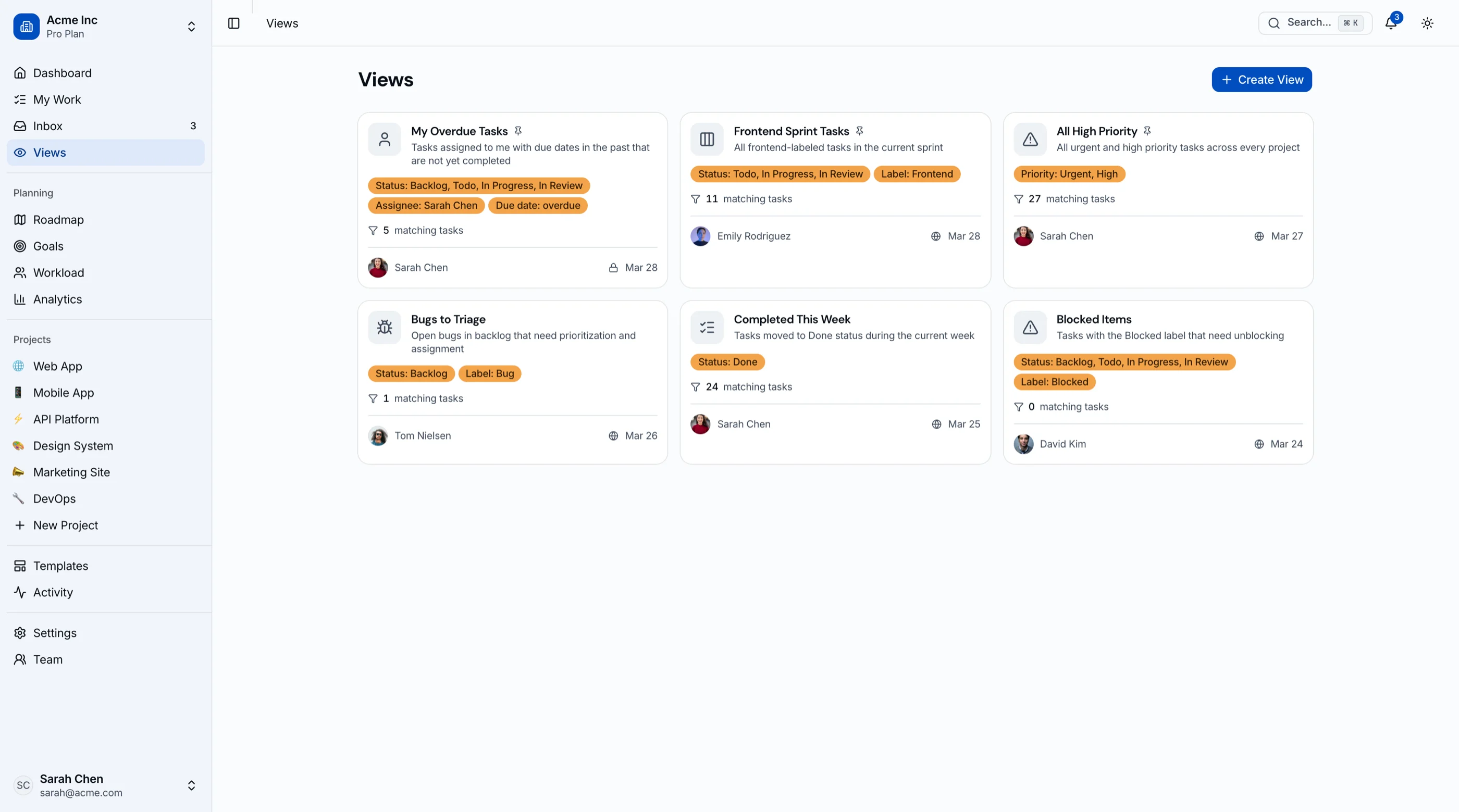
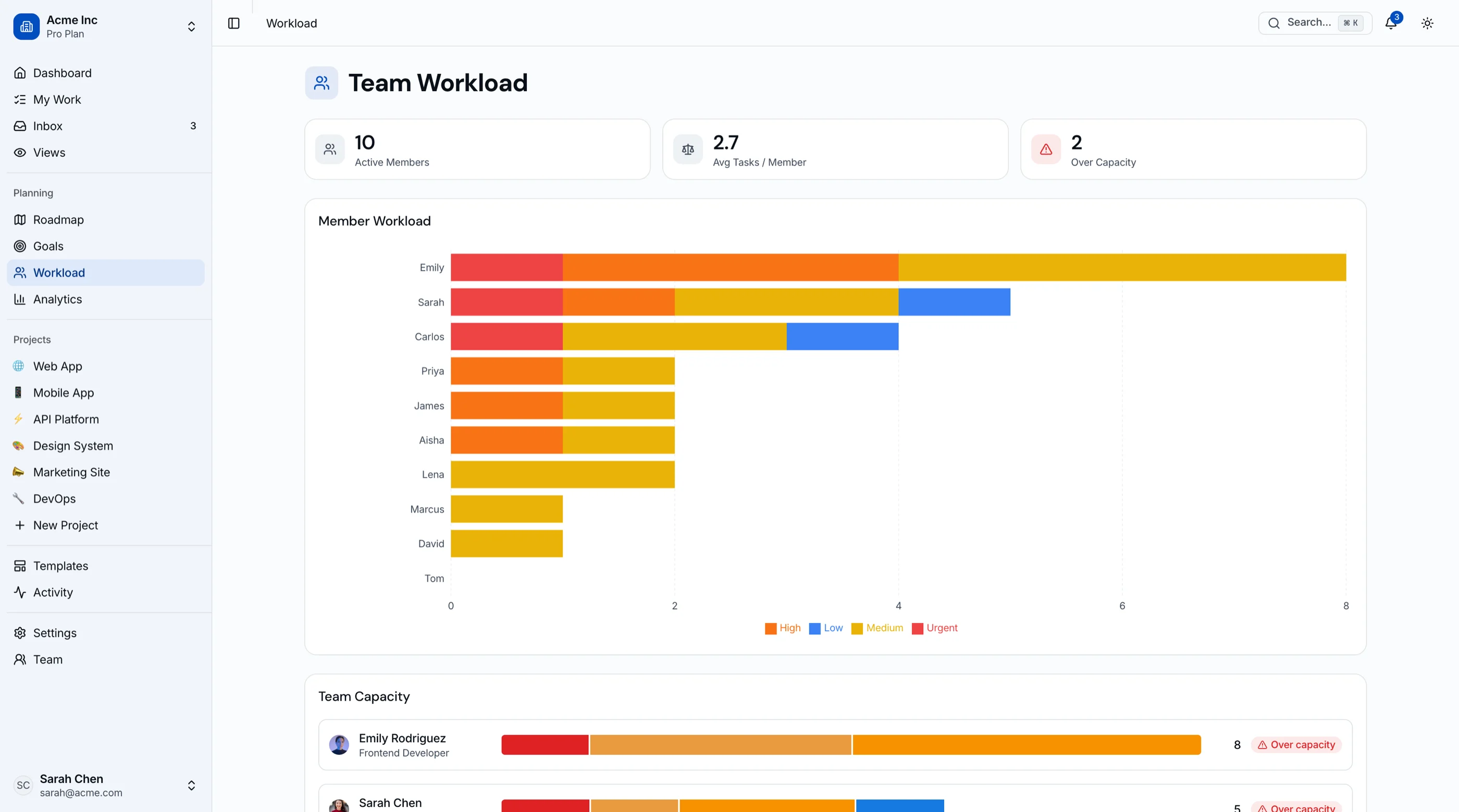
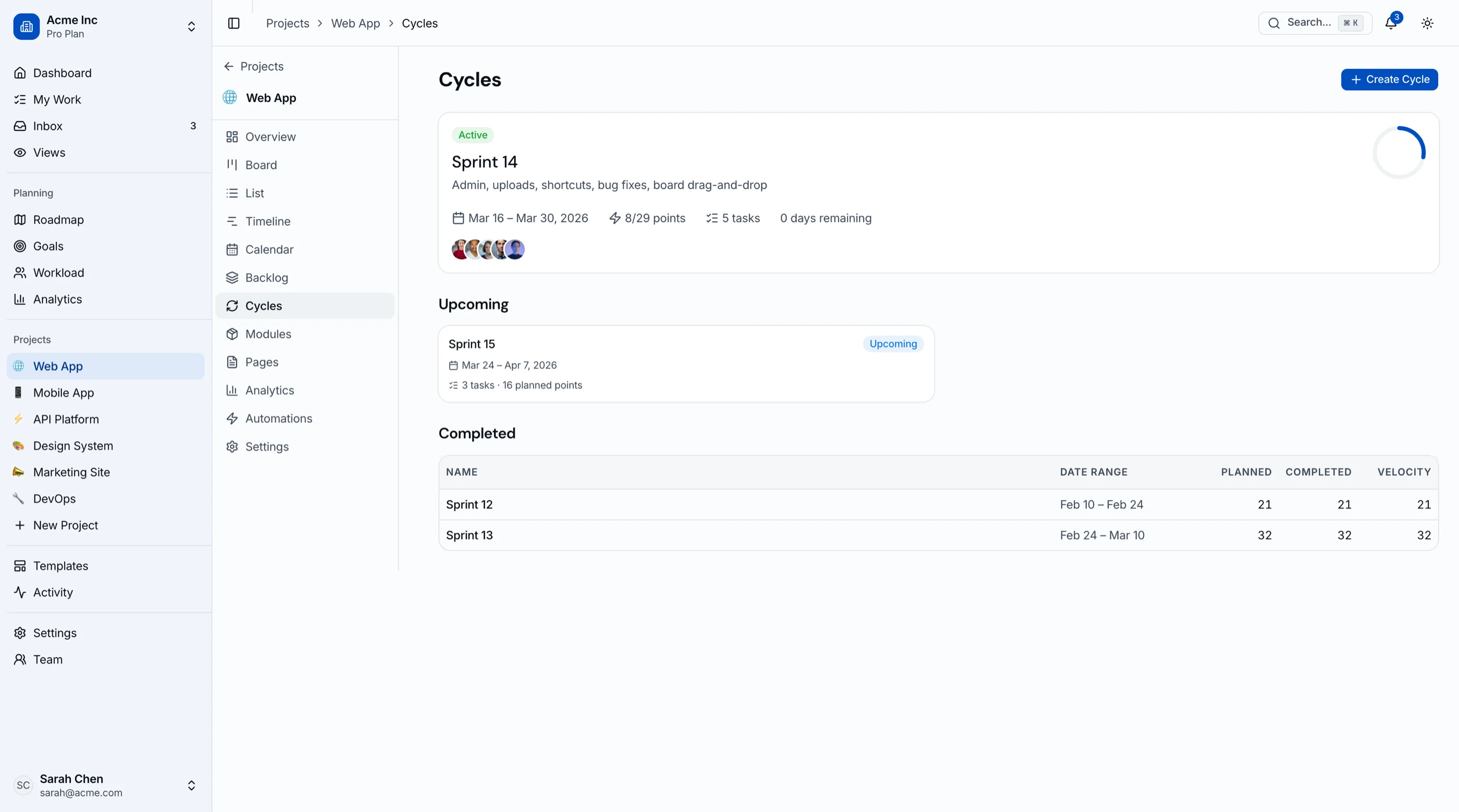
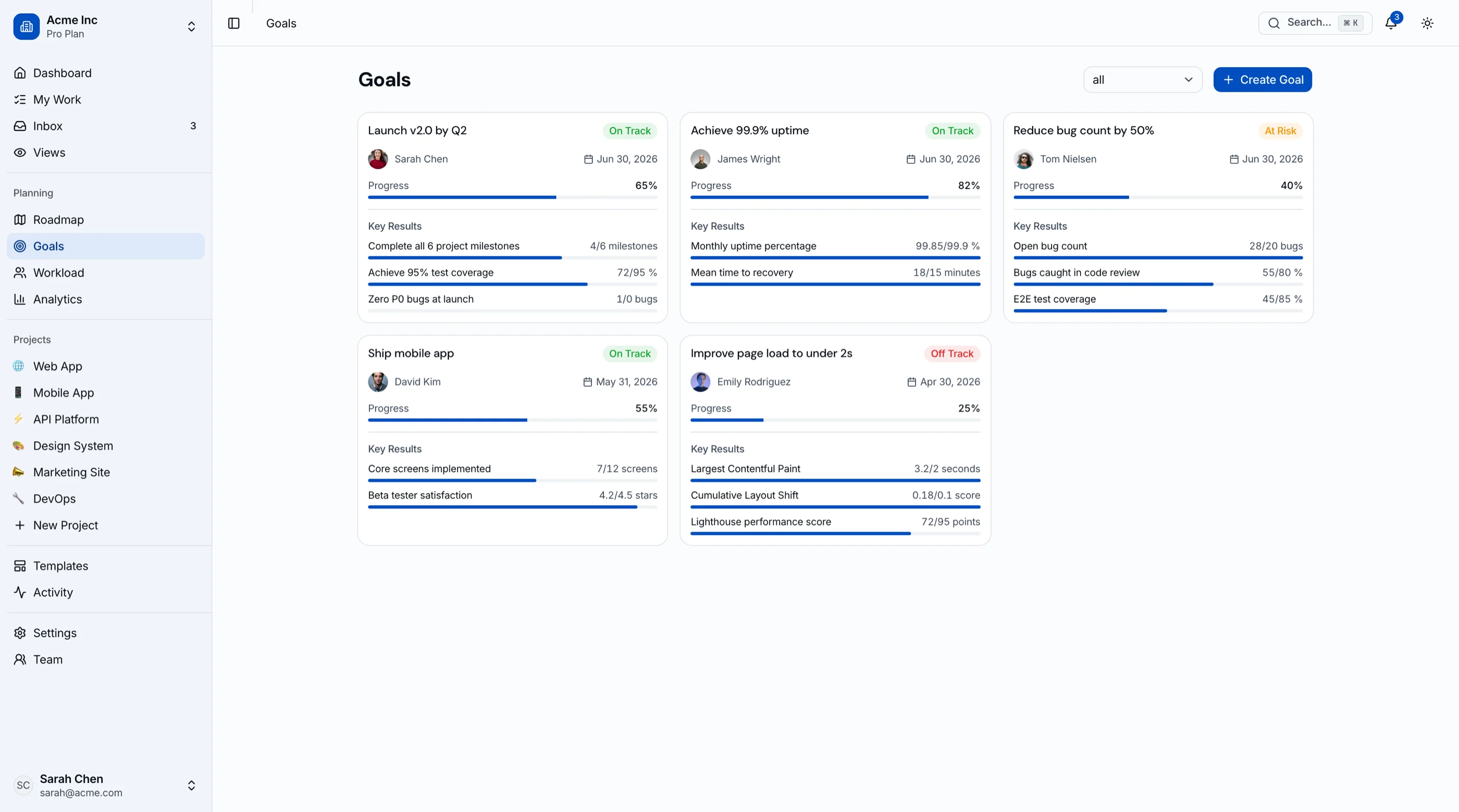
- The Kanban PM Kit provides the frontend: drag-and-drop kanban (with keyboard alternatives), list and calendar views, Gantt-style timeline, sprint cycles with burndown, workload view, roadmap, goals and OKRs, project analytics
- 45 screens, WCAG AA, Next.js + Tailwind + shadcn/ui, token-driven theming
- One-time $131-$349 instead of per-seat forever
Try the live demo, or get every kit (18 total) for $749 via All UI Kits. For the comparison-shopping view, see Best Kanban Board Templates.
Recommendation by Team Profile
| You | Pick |
|---|---|
| Mixed teams, want visual and friendly | monday.com |
| Consolidating tools, cost-focused | ClickUp |
| Engineering-led | Linear |
| Simple pipelines, small team | Trello |
| Want calm and flat pricing | Basecamp |
| Data ownership, modern UI | Plane |
| Gantt and dependencies, self-hosted | OpenProject |
| PM inside your product | Build with the Kanban PM Kit |
Pricing at a Glance (40-Person Company, Annual)
| Product | Typical tier | ~Annual cost (40 seats) |
|---|---|---|
| Asana (Starter) | $10.99/user/mo | $5,275 |
| Asana (Advanced) | $24.99/user/mo | $11,995 |
| monday.com (Standard) | $12/seat/mo | $5,760 |
| ClickUp (Unlimited) | $7/user/mo | $3,360 |
| Linear (Basic) | $10/user/mo | $4,800 |
| Trello (Standard) | $5/user/mo | $2,400 |
| Basecamp (Pro) | $99/mo flat, 25 active projects | $1,188 |
| Basecamp (Unlimited) | $299/mo flat | $3,588 |
| Plane (self-hosted) | Free | Hosting only (our estimate: ~$300-600) |
| OpenProject (self-hosted) | Free | Hosting only (our estimate: ~$300-600) |
| Kanban PM Kit (build path) | One-time $131-$349 | $131-$349 once, plus hosting |
Prices are annual list prices from each vendor's pricing page in September 2026. Basecamp's $299 Unlimited plan costs less than Asana Advanced from about 12 seats and less than Starter from about 27. If 25 active projects is enough, Basecamp Pro at $99 a month undercuts Starter from about 9 seats. The self-hosted pair removes seat costs entirely.
Connecting Asana to Your CRM and Dev Tools
Project tools earn their seats when work arrives on its own: a deal closes and onboarding starts, a bug gets filed and the right team sees it. Here's what Asana's own integrations do, as of September 2026:
- Salesforce: built by Asana and driven by Rules, for example creating tasks when an opportunity closes won. It needs Asana Advanced or above. (Asana apps)
- HubSpot: also built by Asana. It adds HubSpot deal and campaign widgets to tasks, and rules can create or update tasks when deals change. That's rule-driven task creation, not a two-way sync of records.
- Jira Cloud: a real two-way sync, with the direction set separately for tasks and fields, plus comment sync. Asana lists the full version for Advanced and Enterprise (under the older Business name) and a lighter one for Starter (formerly Premium), so check your current tier.
- Slack: create and complete tasks from messages, and send project updates to channels. Asana warns that updates from private projects can reach channel members who aren't on the project.
- API: 150 requests a minute on free workspaces, 1,500 on paid ones (rate limits).
These cover "make a task when something happens." The gaps show up when the handoff needs more than a task: a whole onboarding project with owners, dates and deal fields filled in from the CRM, or status flowing back to the deal so sales can see where delivery stands. That's usually custom middleware. And on Starter, the Salesforce integration isn't available at all. For lighter handoffs, Zapier, Make or n8n can fill the gap; our Zapier alternatives guide compares what each costs as volume grows.
That's work we do. Our CRM integration audit maps how deals, projects and tickets move between your tools today and what it takes to automate the handoffs, from $499. Or run the free sync health checklist first.
Frequently Asked Questions
What is the best free alternative to Asana?
ClickUp's free tier is the most complete hosted option, with unlimited members. Trello's free plan covers simple boards for up to 10 collaborators per Workspace. For no seat costs at all, self-host Plane's Community Edition. Asana's free Personal plan allows only 2 users and doesn't include timelines.
What is the best open-source alternative to Asana?
Plane for a modern general-purpose tool; OpenProject for classical Gantt-and-dependencies management. Both self-host with Docker-era tooling and charge nothing per seat.
Is monday.com or Asana better?
They're the two closest competitors in the category. Asana has the edge in goals, portfolios, and cross-project reporting; monday has the friendlier UI and better price at small sizes. Teams under 25 usually find monday faster to love; larger orgs doing portfolio management lean Asana.
Which Asana alternative avoids per-seat pricing?
Basecamp's flat plans (Studio $59, Pro $99 and Unlimited $299 a month, billed annually, all with unlimited users), and the self-hosted options (Plane, OpenProject). If the seat bill is the complaint, those three are the structural answers; everything else just moves the per-seat number.
How hard is it to migrate off Asana?
Asana exports CSV and JSON per project, and monday, ClickUp, Linear and Plane offer importers (Plane's Asana importer needs Plane Cloud or its paid Commercial Edition). Tasks and assignees move cleanly; comments, attachments, and rules mostly don't. Migrate active projects only, archive the rest in export files, and rebuild the two or three automations people actually notice.
Does Asana integrate with Salesforce?
Yes. Asana's own Salesforce integration uses Rules to create tasks from Salesforce events, such as an opportunity closing won. It's available on Asana Advanced, Enterprise and Enterprise+. Richer handoffs, like creating a full onboarding project with deal data filled in, usually need custom middleware.
The Honest Take
Asana remains excellent at cross-functional coordination; its problem is charging coordination-platform prices to teams that need a fraction of it. monday wins approachability, ClickUp wins consolidation, Linear wins engineering, Trello wins simplicity, Basecamp wins calm and flat pricing, and the open-source pair wins ownership.
And if the reason you're shopping is that your product needs boards and sprints inside it, stop shopping rentals. That's the build path: one-time cost, your data model, your brand.
Want it shipped without hiring a developer?
The build path above assumes you have engineers. If you don't, the team behind thefrontkit does done-for-you launches: we deploy the kit, apply your branding, and wire it to your stack. Fixed quotes, most builds ship in 2-4 weeks, from $1999.