Smartsheet Alternatives: 10 Project Tools for 2026
Smartsheet Alternatives: 10 Options Compared for 2026
Smartsheet Pro is $9 per member/month billed yearly ($12 monthly), but it caps out at 10 members, and Smartsheet's own pricing page now says Pro is only available to new customers. Past 10 editors you're on Business: $19 per member/month yearly, $24 monthly, 3-member minimum. That's also the tier where timeline view, workload tracking, and unlimited automations live (Pro gets 250 automations a month). So a 20-person team where everyone edits pays $4,560 a year on annual billing, or $5,760 month to month.
The money is only part of it. Teams usually start searching when the grid starts feeling like the problem. Every project is a spreadsheet with a Gantt bolted on, boards and dashboards feel like extra layers over rows, and the people who don't think in cells quietly stop updating anything. Ten alternatives, from the closest swap to the most different.
Want the PM tool as code you own?
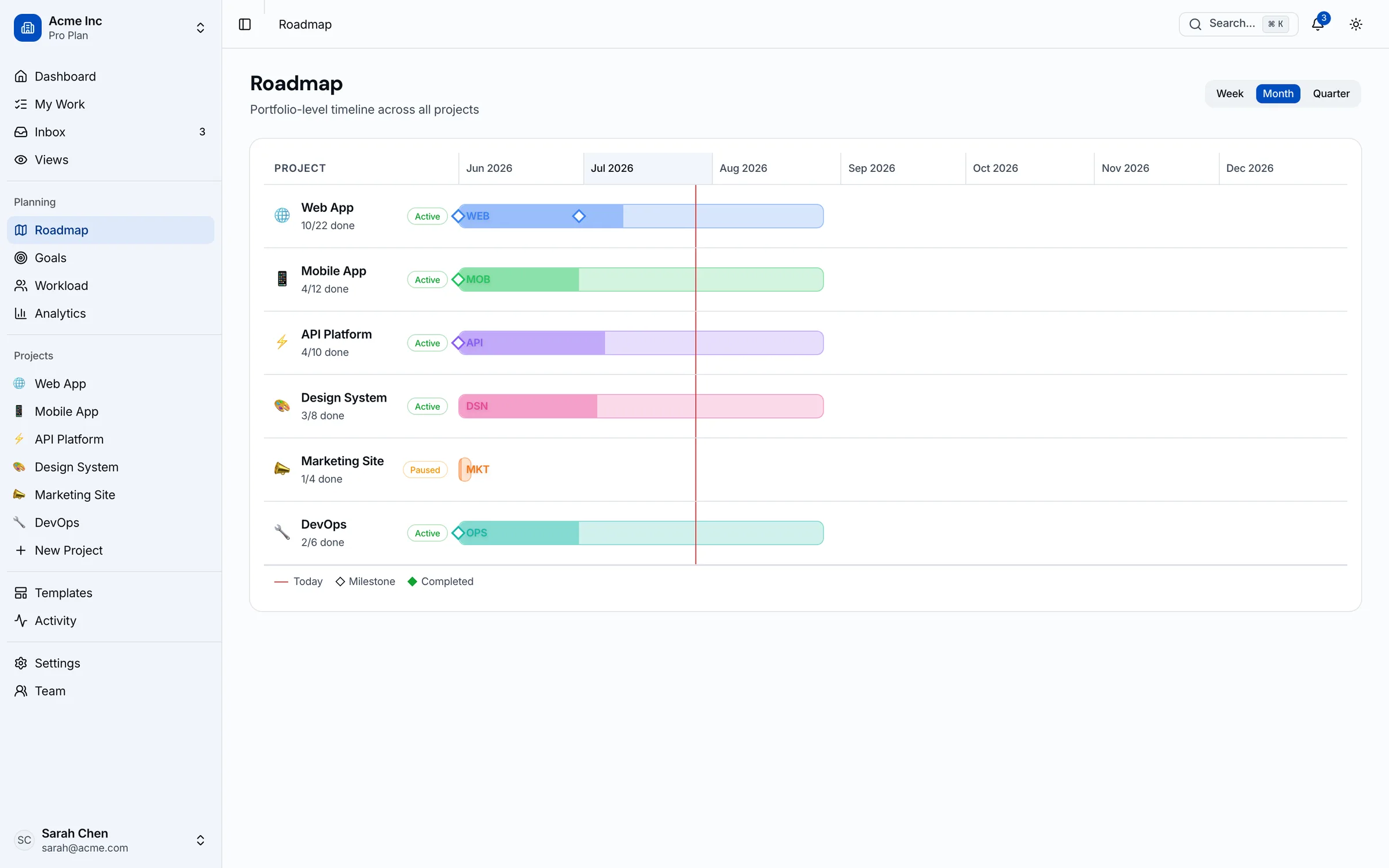
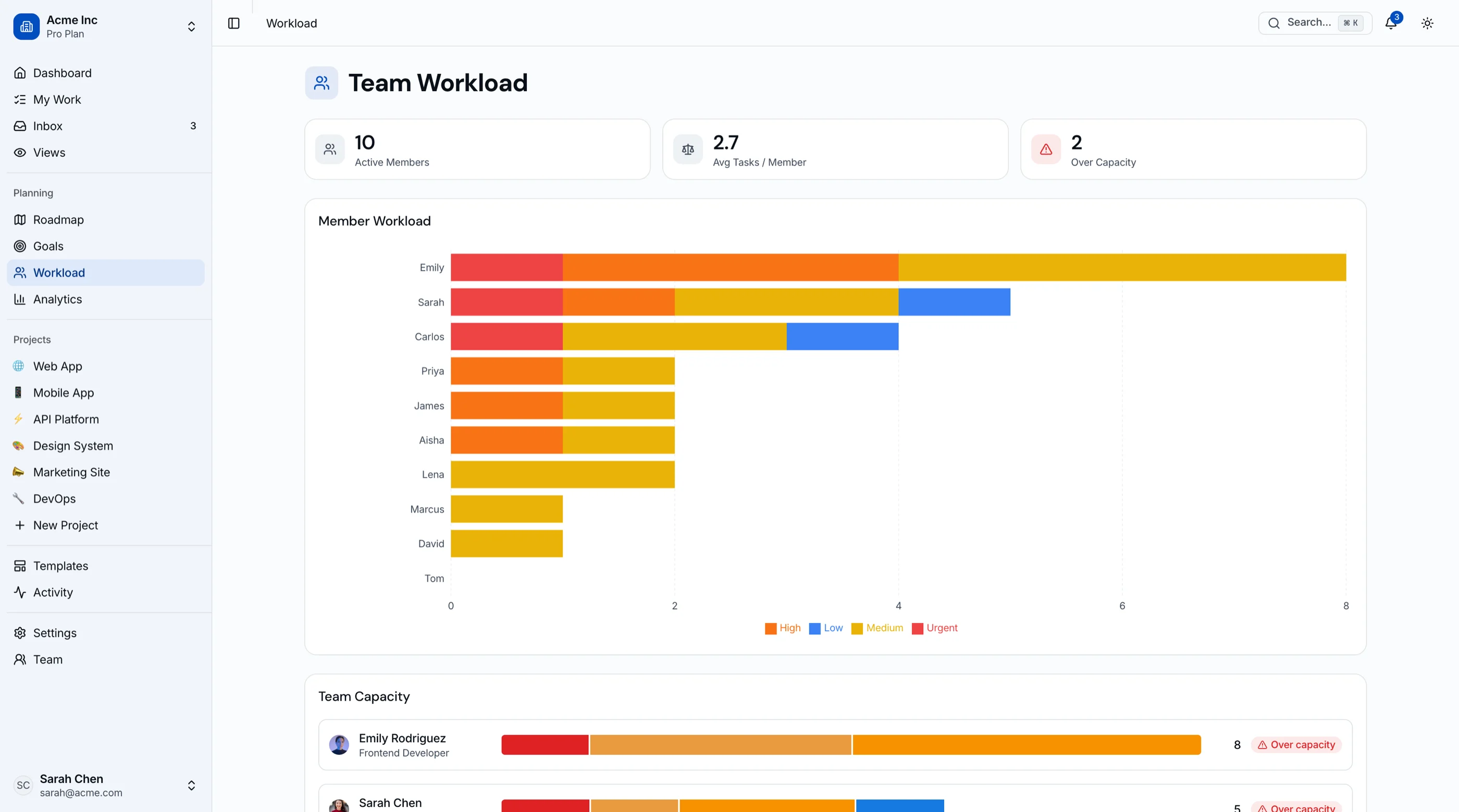
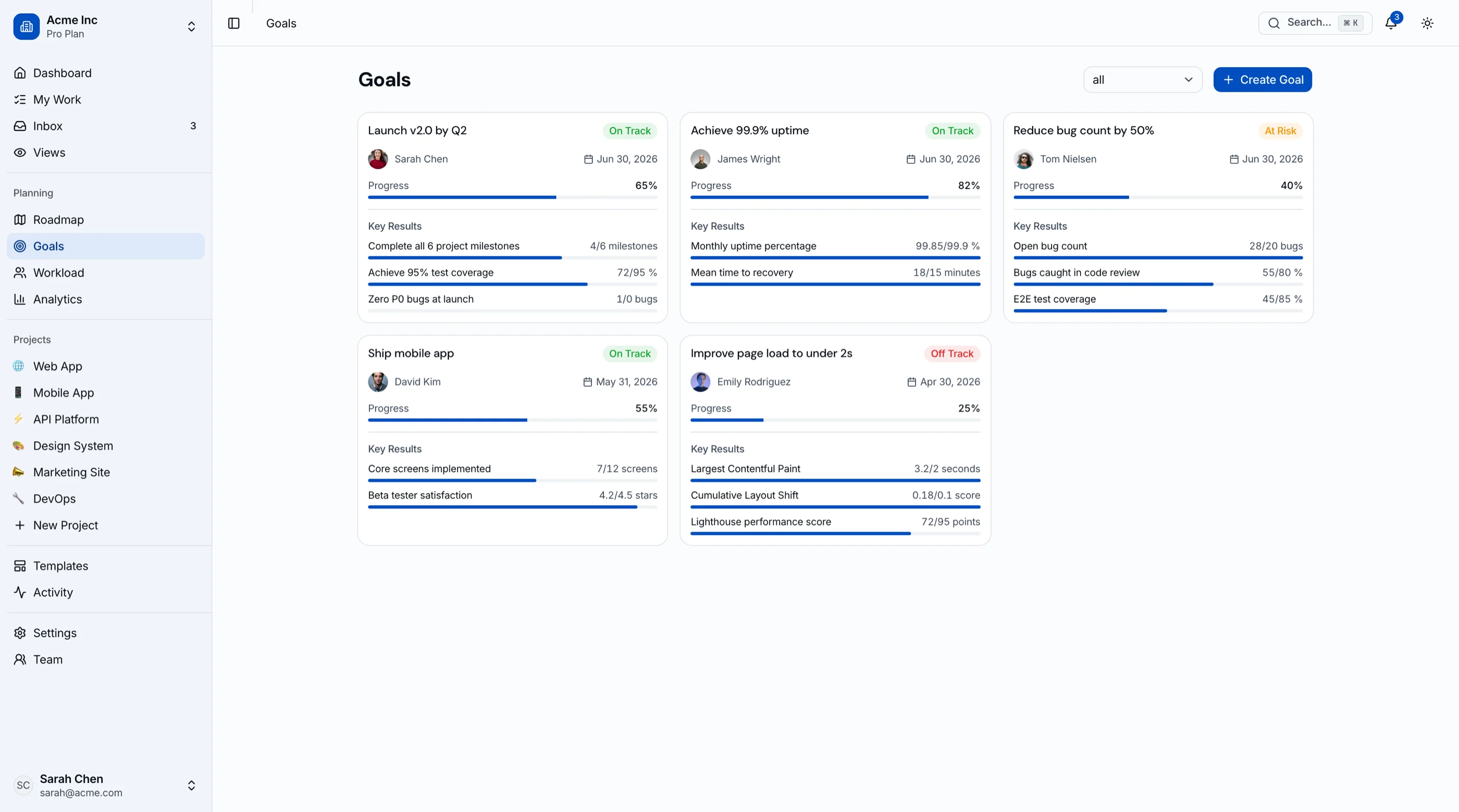
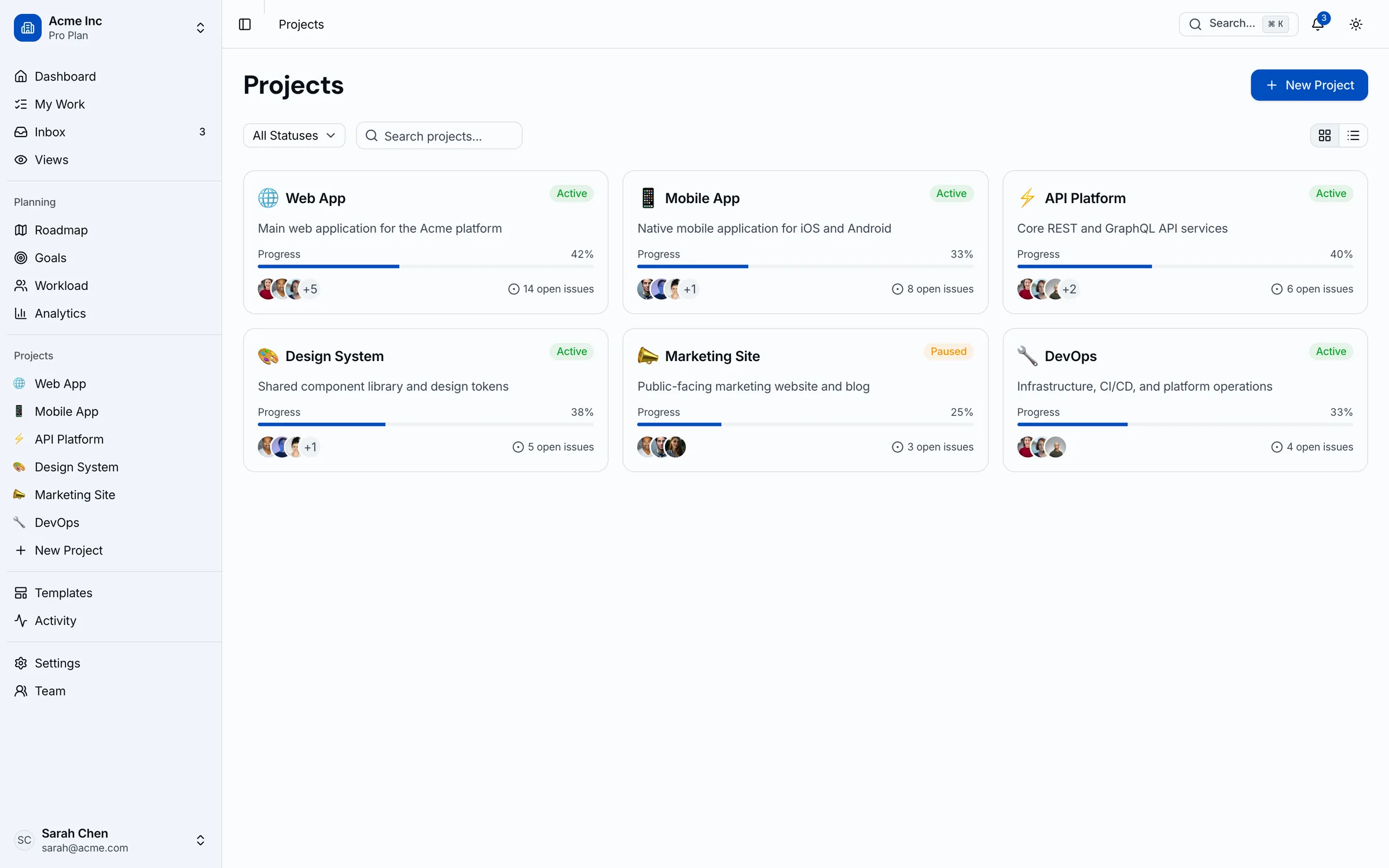
If you're building a project management product (or an internal one your team actually likes), the Kanban PM Kit gives you the frontend: 45 screens of kanban with drag-and-drop, sprints with burndown, a Gantt-style timeline and roadmap, a workload view with capacity status, goals/OKRs, and analytics. Next.js + Tailwind + shadcn/ui. $131 solo. Live demo.
Get the Kanban PM Kit → or get every kit (18 total) for $749 via All UI Kits →
TL;DR: Quick Picks for 2026
| Need | Top pick | Price |
|---|---|---|
| Grid-first, but more flexible | Airtable | Free tier, $20+/seat/mo |
| Easiest adoption for non-spreadsheet people | monday.com | Free (2 seats), $9+/seat/mo (3-seat min) |
| Enterprise-grade Gantt and dashboards | Wrike | Free tier, $10+/user/mo (annual) |
| Lowest per-seat price with Gantt and workload | GoodDay | Free up to 15 users, $4+/user/mo |
| Most features per dollar | ClickUp | Free tier, $7+/user/mo |
| Cross-team coordination and goals | Asana | Free (2 users), $10.99+/user/mo |
| Client projects with billable time | Teamwork.com | Free (5 users), $9.99+/user/mo (3-user min) |
| Already paying for Microsoft 365 | Microsoft Planner | $10+/user/mo (yearly) |
| Open-source grid you can self-host | Baserow | Free tier, $10+/user/mo |
| Your own PM tool or client portal | Build it | $131+ one-time |
What Smartsheet Actually Does Well
Smartsheet earned its install base honestly. Anyone who's used Excel can run a project in it on day one, and the grid holds a lot: formulas, cross-sheet references, row hierarchy, and Gantt on the same data. The enterprise side is deep too (Portfolios, Control Center, Data Shuttle, SSO), which is why construction, healthcare, and government programs lean on it.
The alternatives win when your team has outgrown the spreadsheet mental model, when the Business-tier price stops making sense, or when you want the data somewhere you control.
When to Leave Smartsheet
Three signals:
- You crossed 10 editors. Pro's 10-member cap pushes you to Business, which more than doubles the per-seat price ($9 to $19 yearly).
- Half the team works around the grid. If designers and engineers keep their real status in another tool and update Smartsheet on Fridays, the tool has already lost.
- You need workload views and automations without the tier jump. Several tools below ship both for under $10 a seat.
1. Airtable
The closest cousin: grid-first, but built as a database.
Strengths:
- Tables, linked records, and interfaces feel more modern than sheets with row hierarchy
- Read-only collaborators, form submissions, and share links don't count as paid seats
- Timeline, kanban, calendar, and gallery views on the same data
Weaknesses:
- Project management is something you build, since there's no native PM model
- Team at $20/seat is already above Smartsheet Business
- Record and automation limits show up fast on bigger bases
Pricing: Team $20/seat/month, Business $45/seat/month, billed annually. Only seats with edit permissions are charged. Enterprise Scale is custom.
Best for: Ops teams that used Smartsheet as a database more than a project plan. Our Airtable alternatives guide covers where it runs out of road.
2. monday.com
The pick when adoption is the real problem.
Strengths:
- Colorful boards onboard non-technical teams faster than any grid
- Gantt on Standard; time tracking and workload on Pro
Weaknesses:
- 3-seat minimum and seat bands, so you often pay for seats you don't use
- The useful stuff (time tracking, workload) sits in Pro
- Free plan caps at 2 seats
Pricing: Basic $9, Standard $12, Pro $19 per seat/month billed annually ($11, $15, and $24 monthly). 3-seat minimum. Enterprise is custom.
Best for: Mixed teams where half the people never opened a Smartsheet link. The pricing quirks are covered in our monday.com alternatives post.
3. Wrike
The enterprise-to-enterprise swap.
Strengths:
- Interactive Gantt charts from the Team plan up
- Free plan with unlimited users (board and table views)
- Dashboards, request forms, and workflows that match Smartsheet's PMO depth
Weaknesses:
- Annual billing only on paid plans, and seats sell in groups of 5 up to 30 seats
- Team plan caps at 15 users, so 20 people means Business at $25
- Advanced resource and capacity planning is Pinnacle, which is contact-sales
Pricing: Team $10/user/month (2-15 users), Business $25/user/month (5-200 users), billed annually. Pinnacle and Apex are custom.
Best for: PMOs that want Smartsheet's rigor in a tool built around tasks instead of rows. Our Wrike alternatives guide covers the other side of that trade.
4. GoodDay
The value pick for structured teams that care about workload.
Strengths:
- Free for up to 15 users with unlimited projects and tasks
- Gantt views, time tracking, and unlimited automations on Professional at $4/user
- Workload and resource management on Business at $7/user
- Goals and performance management exist, on the Enterprise tier
Weaknesses:
- Smaller ecosystem and fewer integrations than the big names
- Goals need an Enterprise quote, and Business has a 15-user minimum
Pricing: Professional $4/user/month annual ($6 monthly), 5-250 users. Business $7 annual ($10 monthly), 15-350 users. Enterprise on quote.
Best for: Teams of 15-50 who want Gantt plus workload views and would rather not pay Smartsheet Business prices for them.
5. ClickUp
The consolidation pick.
Strengths:
- Unlimited plan at $7/user includes Gantt, goals, and time tracking
- Docs, whiteboards, dashboards, and tasks in one place
- No seat minimum
Weaknesses:
- Gantt, goals, and workload are trial-only on the free plan
- Feature density means real onboarding time
Pricing: Unlimited $7/user/month annual ($10 monthly), Business $12 annual ($19 monthly). Enterprise is custom. AI plans cost extra.
Best for: Teams replacing Smartsheet plus two or three other tools at once. When ClickUp itself gets too heavy, see our ClickUp alternatives.
6. Asana
The coordination pick.
Strengths:
- Timeline view on Starter; goals, portfolios, and workload on Advanced
- Clean structure that holds up across dozens of teams
Weaknesses:
- Free Personal plan is limited to 2 users
- The portfolio features that replace Smartsheet's PMO layer sit at $24.99
- Every viewer who needs to comment needs a seat
Pricing: Starter $10.99/user/month annual ($13.49 monthly), Advanced $24.99 annual ($30.49 monthly). Enterprise is custom.
Best for: Cross-functional orgs that want goals tied to projects. Full breakdown in our Asana alternatives guide.
7. Teamwork.com
The agency pick.
Strengths:
- Free plan for up to 5 users includes Gantt, board, and table views
- Billable time tracking and reporting from Basics
- Workload and live capacity planning, time budgets, and invoicing from logged time on Accelerate
Weaknesses:
- 3-user minimum on Basics, 5 on Accelerate
- Capacity planning starts at $24.99/user
- Less useful for internal teams that never bill hours
Pricing: Basics $9.99/user/month, Accelerate $24.99/user/month, billed annually (annual saves about 29% vs monthly). Optimize and Enterprise are custom.
Best for: Agencies and consultancies that tracked client projects in Smartsheet and billed from a separate tool.
8. Microsoft Planner and Project
The pick when you already live in Microsoft 365.
Strengths:
- Basic Planner comes with most Microsoft 365 business subscriptions
- Works inside Teams and Outlook, where your people already are
- Planner and Project Plan 3 adds the scheduling depth classic Project is known for
Weaknesses:
- The naming and plan lineup keep changing, which makes buying confusing
- Plan 1 is light; the real Project scheduling features start at $30 a user
Pricing: Planner Plan 1 $10/user/month, Planner and Project Plan 3 $30/user/month, both paid yearly.
Best for: Microsoft shops where the path of least resistance beats a new vendor review.
9. Baserow
The open-source grid.
Strengths:
- Spreadsheet-database hybrid that feels familiar to Smartsheet users
- Self-hostable, so project data stays on your servers
- Kanban, calendar, and timeline views on Premium
- Free tier to start (3,000 rows per workspace on cloud)
Weaknesses:
- No real PM layer: no native Gantt dependencies or resource views
- Kanban and timeline views are paid, even self-hosted
Pricing: Premium $10/user/month annual ($12 monthly), Advanced $18 annual ($22 monthly). Enterprise is custom. Self-hosted plans mirror the cloud tiers.
Best for: Teams that mostly used Smartsheet as a shared grid and want ownership. NocoDB is the other option here; both are compared in our Airtable alternatives post.
10. Build Your Own PM Tool
Some Smartsheet setups are a product in disguise: the tracker customers log into, or the delivery tool with your own workflow. At that point you're paying per seat to rent a prototype.
What the build path looks like:
- Your backend owns projects, tasks, users, and permissions
- The Kanban PM Kit covers the frontend: kanban with drag-and-drop, sprints with burndown, Gantt-style timeline and roadmap, workload view with capacity status, goals/OKRs, and analytics across 45 screens
- $131 one-time for a solo license, with no per-seat bill as the team grows
For what the build involves, see How to Build a Kanban App in Next.js or compare options in Best Kanban Board Templates.
Recommendation by Profile
| You | Pick |
|---|---|
| Smartsheet was really a database | Airtable |
| Team won't adopt a grid | monday.com |
| PMO needs enterprise Gantt and dashboards | Wrike |
| 15-50 people, tight budget, want workload | GoodDay |
| Replacing several tools at once | ClickUp |
| Goals across many teams | Asana |
| Billing clients by the hour | Teamwork.com |
| Microsoft 365 everywhere | Microsoft Planner |
| Want the grid, self-hosted | Baserow |
| The tracker is becoming your product | Build it (Kanban PM Kit) |
Pricing at a Glance (20-Person Team, Annual)
| Product | Typical tier | ~Annual cost (20 seats) |
|---|---|---|
| Smartsheet (Business) | $19/member/mo | $4,560 |
| Airtable (Team) | $20/seat/mo | $4,800 |
| monday.com (Standard) | $12/seat/mo | $2,880 |
| monday.com (Pro) | $19/seat/mo | $4,560 |
| Wrike (Business) | $25/user/mo | $6,000 |
| GoodDay (Professional) | $4/user/mo | $960 |
| GoodDay (Business) | $7/user/mo | $1,680 |
| ClickUp (Unlimited) | $7/user/mo | $1,680 |
| Asana (Starter) | $10.99/user/mo | $2,638 |
| Asana (Advanced) | $24.99/user/mo | $5,998 |
| Teamwork.com (Basics) | $9.99/user/mo | $2,398 |
| Microsoft Planner (Plan 1) | $10/user/mo | $2,400 |
| Microsoft Planner and Project (Plan 3) | $30/user/mo | $7,200 |
| Baserow (Premium) | $10/user/mo | $2,400 |
| Kanban PM Kit (build path) | One-time | $131 once, plus hosting and dev time |
Annual list prices from each vendor's pricing page in September 2026. Smartsheet is on Business because Pro stops at 10 members; Wrike's Team plan stops at 15 users, so 20 people land on Business there too. For workload views specifically, GoodDay Business ($1,680) is the outlier.
Frequently Asked Questions
What is the best free alternative to Smartsheet?
GoodDay's free plan covers up to 15 users with unlimited projects, though Gantt needs Professional. Teamwork.com's free plan includes Gantt for up to 5 users. For a free self-hosted grid, Baserow's free tier works if you can live without kanban and timeline views.
Which Smartsheet alternative is most like a spreadsheet?
Airtable is the closest in feel, with a grid on top of a real database. Baserow gives you a similar grid open source. If what you want is Smartsheet's rows plus a stronger Gantt, Wrike and Teamwork.com both keep table views next to their Gantt charts.
Is there a cheaper alternative to Smartsheet with Gantt charts?
Yes. GoodDay Professional includes Gantt at $4/user/month billed annually. ClickUp Unlimited includes it at $7. monday.com Standard includes Gantt at $12 with a 3-seat minimum. All three undercut Smartsheet Business at $19 per member.
Why is Smartsheet Pro limited to 10 members?
Smartsheet sells Pro for small teams, 1-10 members with unlimited contributors, and its pricing page says Pro is only available to new customers. Past 10 members you move to Business ($19 yearly, 3-member minimum) or Enterprise (custom, 10+ members).
How do I migrate from Smartsheet?
Export each sheet to Excel or CSV, then import into the new tool. Most of the tools above accept CSV imports directly. Rows and columns come across cleanly. Formulas, cross-sheet references, automations, and dependencies usually don't, so plan to rebuild those.
The Honest Take
Smartsheet is still the right call for PMOs that think in spreadsheets and need enterprise controls around them. Its problems are the 10-member Pro ceiling, the Business-tier price for workload and timeline views, and a grid that half your team won't touch.
Airtable wins on flexibility, monday.com on adoption, Wrike on enterprise depth, GoodDay on price for workload management, ClickUp on consolidation, Asana on coordination, Teamwork.com on client work, Microsoft on convenience, and Baserow on ownership. Pick based on who has to update the thing every day. And if your Smartsheet tracker is turning into something customers log into, build the real product.
Want it shipped without hiring a developer?
The build path above assumes you have engineers. If you don't, the team behind thefrontkit does done-for-you launches: we deploy the kit, apply your branding, and wire it to your stack. Fixed quotes, most builds ship in 2-4 weeks, from $1,999.