Trello Alternatives: 8 Kanban Tools for 2026
Trello Alternatives: 8 Options Compared for 2026
Trello is the tool everyone starts with and half of everyone outgrows. The board-and-cards model is perfect until it isn't: no native sprints, no workload view, no real reporting, and cross-board visibility that never quite works. Standard is $5/user/month and Premium is $10, which is cheap, but teams rarely leave Trello over price. They leave because the work got more structured than a flat board can hold.
Eight alternatives worth comparing, split by what actually drove you off Trello: more structure, more speed, more ownership, or a board inside your own product.
For what a kanban board takes to build properly (drag-and-drop, keyboard access, real-time state), see our How to Build a Kanban App in Next.js guide.
Or skip the build entirely: get the Kanban PM Kit
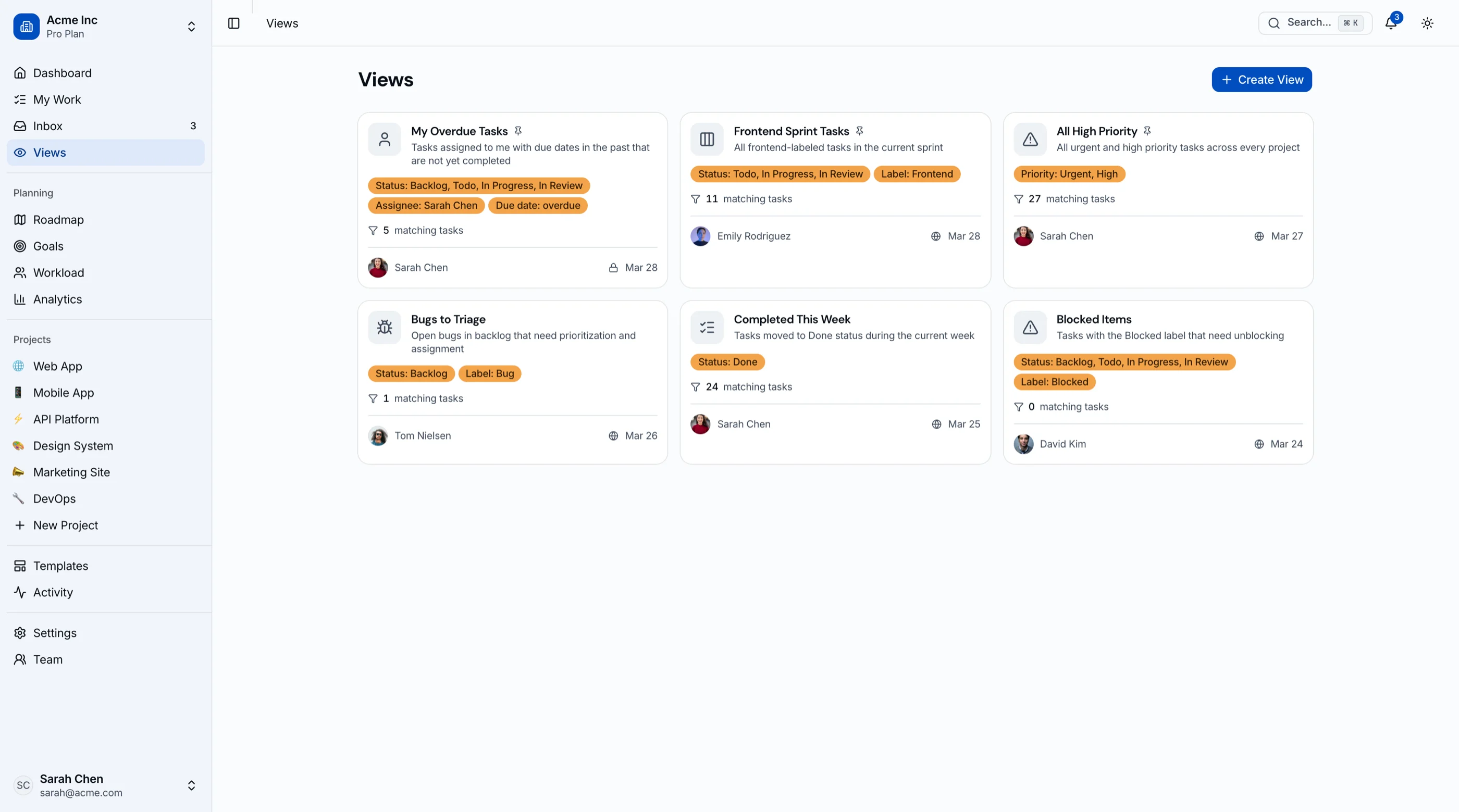
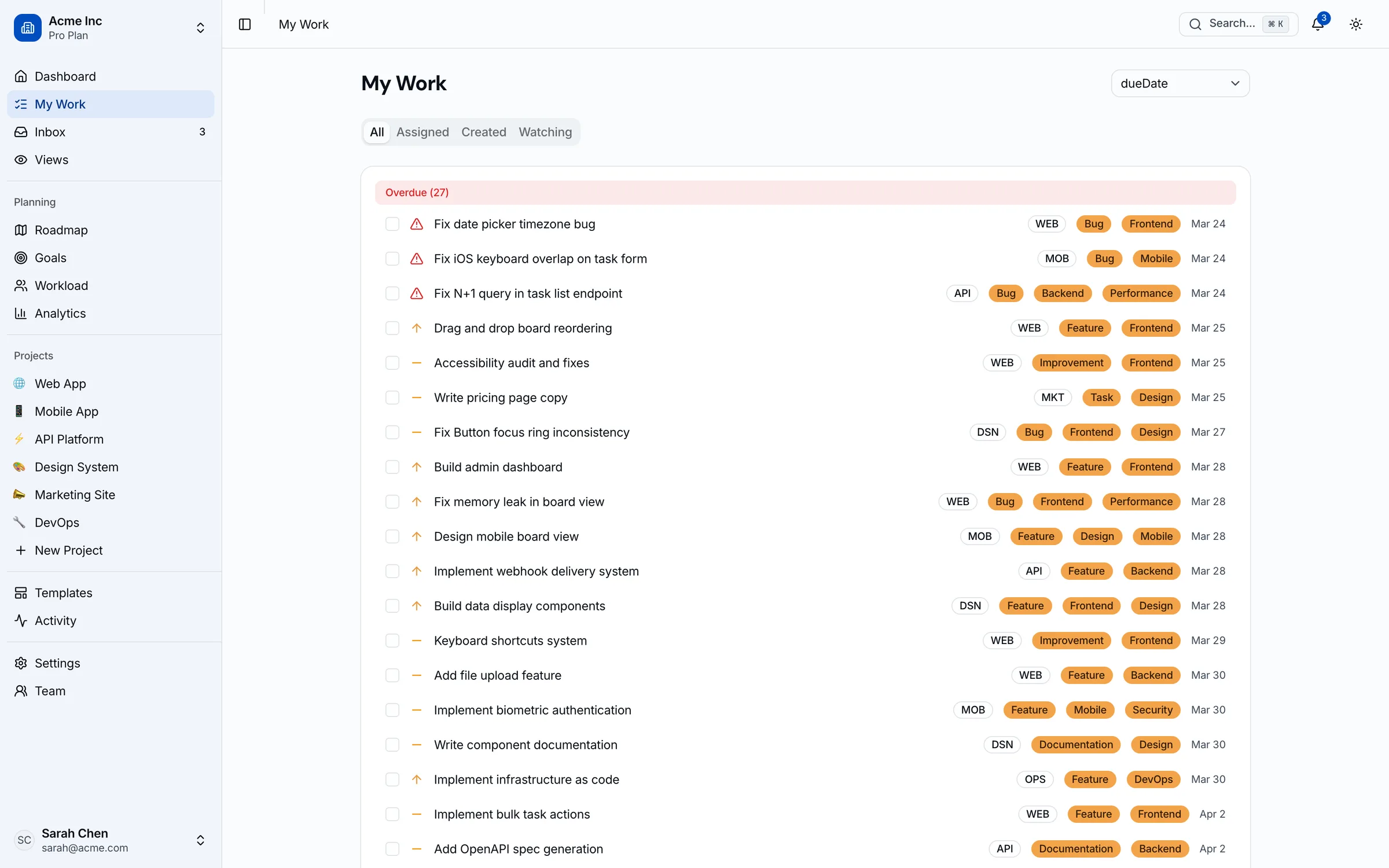
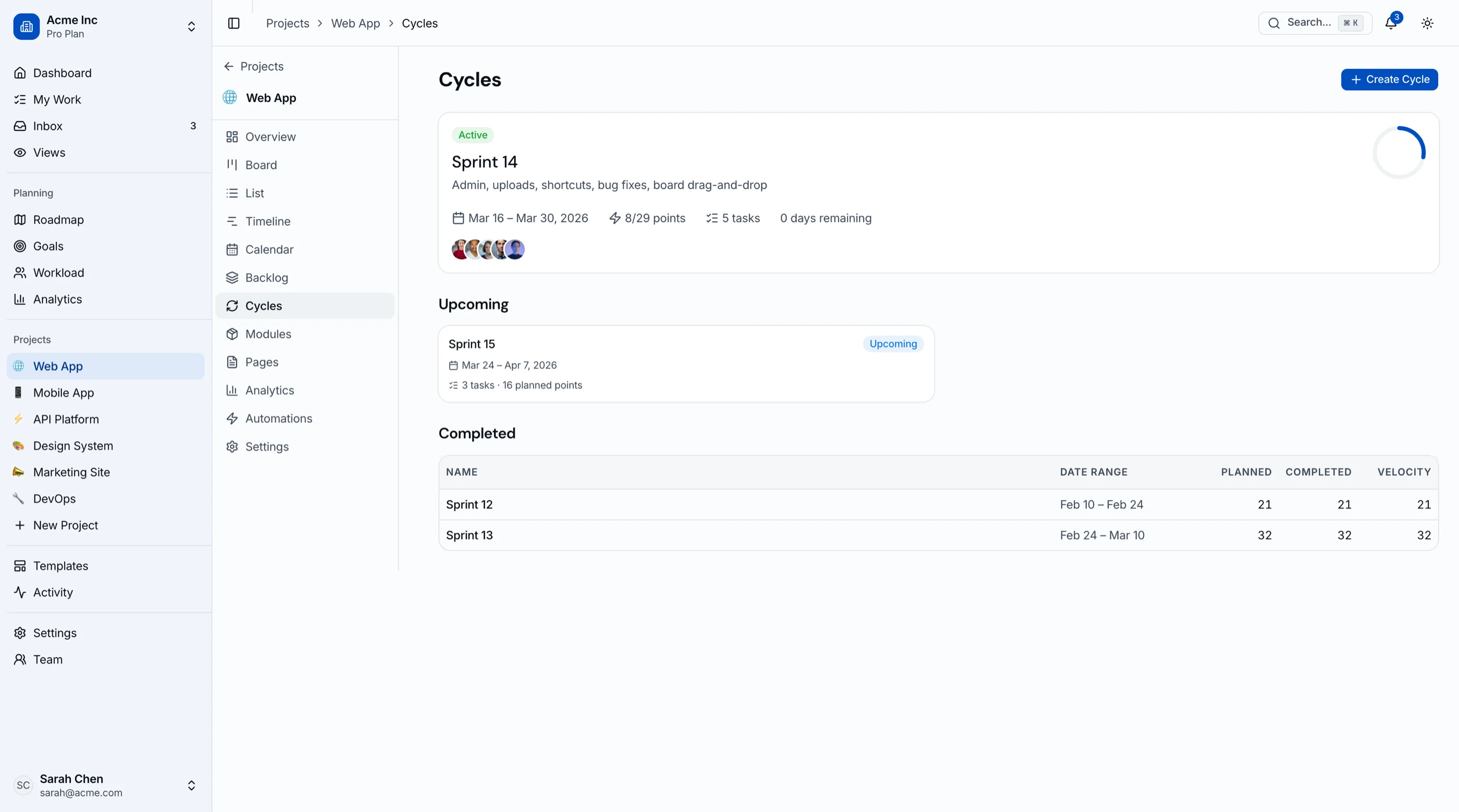
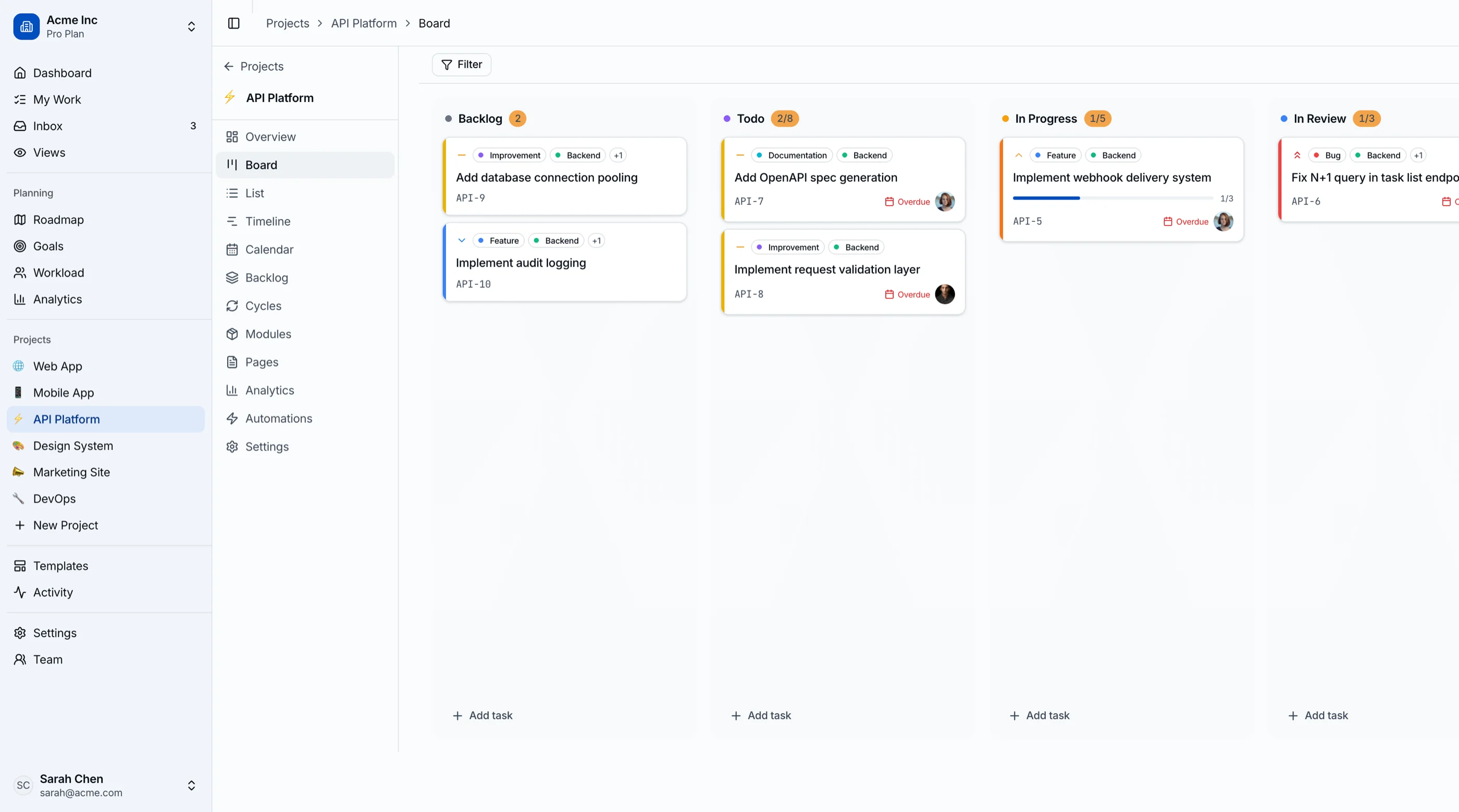
The Kanban Board & Project Management Kit is shipped: 45 screens covering kanban with drag-and-drop, sprint cycles with burndown, roadmap, goals and OKRs, workload view, and project analytics. Next.js + Tailwind + shadcn/ui, WCAG AA. $131 solo, $199 team, $349 agency. Try the live demo.
Get the Kanban PM Kit → or get every kit (18 total) for $749 via All UI Kits →
TL;DR: Quick Picks for 2026
| Need | Top pick | Price |
|---|---|---|
| Boards plus timelines, goals, reporting | Asana | Free tier, $10.99+/user/mo |
| Most structure per dollar | ClickUp | Free tier, $7+/user/mo |
| Engineering team outgrew Trello | Linear | Free tier, $8+/user/mo |
| Boards next to docs and wikis | Notion | Free tier, $10+/seat/mo |
| Open-source, full PM tool | Plane | Free (self-host) |
| Open-source, Trello-shaped | Focalboard | Free (self-host) |
| Already living in GitHub | GitHub Projects | Free with GitHub |
| Board inside your own product | thefrontkit Kanban PM Kit | $131+ one-time |
What Trello Actually Does Well
Trello is still the fastest way to get a shared board in front of a team. Zero training, zero configuration, a generous free tier, and Butler automations that handle more than people expect. Atlassian ownership means it's stable and well-integrated. For personal workflows, small pipelines, and lightweight coordination, Trello remains genuinely hard to beat.
The alternatives exist for the day the board stops being enough.
When to Leave Trello
Three signals:
- You're faking structure with labels and list names. "Sprint 12", "Blocked??", and color-code taxonomies mean the tool ran out of model.
- Someone asks for a report. Velocity, workload, cycle time: Trello can't answer, and power-up duct tape only stretches so far.
- The board should live inside your product. Client-facing boards on Trello mean your product experience runs on someone else's brand.
1. Asana
The natural next step up in structure.
Strengths:
- Boards, plus everything Trello lacks: timelines, workload, goals, portfolios, reporting
- Rules engine for automation beyond Butler's reach
- Handles many teams and many projects without board sprawl
- Approachable enough that the Trello crowd adapts fast
Weaknesses:
- Free tier caps at 10 users with timelines locked
- Per-seat pricing charges viewers like doers
- The tier ladder is engineered (features you want sit one tier up)
Best for: Teams whose coordination outgrew boards and who want one tool for all departments. Its own market is mapped in our Asana alternatives guide.
2. ClickUp
Maximum structure for minimum money.
Strengths:
- Board view plus list, Gantt, calendar, workload, docs, and goals
- The most generous free tier in the category
- $7-$12/user/month when you pay
- Custom fields and automations that make Trello power-ups look quaint
Weaknesses:
- The learning curve Trello never had
- Feature density can overwhelm small teams
- Performance dips on huge workspaces
Best for: Teams that want everything Trello couldn't do, in one tool, and will invest a week configuring it.
3. Linear
The pick when engineering outgrew Trello.
Strengths:
- Fast, keyboard-first, opinionated: sprints (cycles), triage, and roadmaps with zero setup
- Git-native: branch names, PR linking, auto-close
- The board view is there, but with real structure underneath
- Generous free tier
Weaknesses:
- Built for software teams; wrong shape for marketing or ops boards
- Opinionated process means limited customization
- Reporting is lean
Best for: Dev teams that started on Trello and now need velocity, estimates, and release discipline. (Compare its peers in our Jira alternatives guide.)
4. Notion
Boards where the docs already live.
Strengths:
- Kanban views over databases, sitting next to wikis, docs, and notes
- One tool for the board and the context around it
- Relations and rollups give cards real data behavior
- Free for personal use, teams from $10/seat
Weaknesses:
- Board interactions are slower and clunkier than Trello's
- No sprints, workload, or PM reporting
- Big workspaces get sluggish
Best for: Teams already in Notion who want boards near their docs rather than a separate PM tool. (Its own market is in our Notion alternatives guide.)
5. Plane
The open-source upgrade path.
Strengths:
- Free, self-hostable, no per-seat fees
- Boards plus cycles, modules, and roadmaps: structure Trello never had
- Modern UI that doesn't feel like a compromise
- Cloud option available
Weaknesses:
- Self-hosting is your ops burden
- Younger ecosystem, fewer integrations
- Reporting still basic
Best for: Teams that want Trello-and-beyond functionality with full data ownership.
6. Focalboard
The open-source Trello clone.
Strengths:
- Trello's shape (boards, cards, custom properties), open source and self-hosted
- Ships standalone or inside Mattermost
- Templates for common workflows
- Tiny footprint; runs anywhere
Weaknesses:
- Development has slowed as Mattermost refocused
- No automations engine to speak of
- Ecosystem is thin
Best for: Teams that want exactly Trello, but on their own server, and nothing more.
github.com/mattermost/focalboard
7. GitHub Projects
The zero-cost option for code-centric teams.
Strengths:
- Free with GitHub; boards and tables directly over issues and PRs
- Custom fields, views, and Actions-powered automation
- No sync between the board and the work: they're the same objects
- Nothing new to buy or run
Weaknesses:
- No sprints, estimates, or burndown natively
- Awkward for anything that isn't code
- Cross-repo roadmaps take discipline
Best for: Small dev teams whose cards were always just GitHub issues wearing a costume.
8. Build the Board Into Your Product with the Kanban PM Kit
The build path is for boards as a product feature: client portals showing project status, delivery dashboards your customers log into, or a vertical SaaS where kanban is one screen among many. Trello embeds and shared boards put your customer experience on Atlassian's brand and rails.
What this looks like:
- Your backend owns projects, cards, and users
- The Kanban PM Kit provides the frontend: drag-and-drop kanban with keyboard alternatives (WCAG AA matters when clients audit), list and calendar views, timeline, sprints with burndown, workload view, roadmap, and analytics
- 45 screens, Next.js + Tailwind + shadcn/ui, token-driven theming for white-label
- One-time $99-$349
Try the live demo. For the roundup view of board frontends, see Best Kanban Board Templates.
Recommendation by Team Profile
| You | Pick |
|---|---|
| Outgrew boards, want full PM | Asana |
| Want maximum features cheap | ClickUp |
| Engineering team leveling up | Linear |
| Boards next to your docs | Notion |
| Ownership plus structure | Plane |
| Exactly Trello, self-hosted | Focalboard |
| Cards were GitHub issues anyway | GitHub Projects |
| Board inside your product | Build with the Kanban PM Kit |
Pricing at a Glance (15-Person Team, Annual)
| Product | Typical tier | ~Annual cost (15 seats) |
|---|---|---|
| Trello (Premium) | $10/user/mo | $1,800 |
| Asana (Starter) | $10.99/user/mo | $1,978 |
| ClickUp (Unlimited) | $7/user/mo | $1,260 |
| Linear (Basic) | $8/user/mo | $1,440 |
| Notion (Business) | $15/seat/mo | $2,700 |
| Plane (self-hosted) | Free | Hosting only (~$240-600) |
| Focalboard (self-hosted) | Free | Hosting only (~$120-300) |
| GitHub Projects | Free with GitHub | $0 extra |
| Kanban PM Kit (build path) | One-time $131-$349 | $131-$349 once, plus hosting |
Directional numbers. Trello itself is rarely the expensive option; you leave for capability, and the question is whether the upgrade costs money (Asana, ClickUp) or ops time (Plane, Focalboard).
Frequently Asked Questions
What is the best free alternative to Trello?
ClickUp's free tier gives you the most capability. GitHub Projects is free if your work lives in GitHub. For unlimited users at zero license cost, self-host Focalboard (Trello's shape) or Plane (more structure).
What is the best open-source alternative to Trello?
Focalboard if you want a faithful Trello clone on your own server. Plane if leaving Trello was about gaining structure (cycles, modules, roadmaps), not just changing hosts.
Which Trello alternative has sprints and reporting?
Linear (engineering-native), ClickUp (everything-native), and Plane (open source) all ship real sprint mechanics and burndown. Asana handles reporting and workload at the portfolio level. That gap is precisely why teams graduate from Trello.
Can I embed a Trello-style board in my own app?
Not meaningfully with Trello itself: embeds are iframes on Atlassian's brand. Building the board is the real answer, and it's mostly a solved frontend problem: the Kanban PM Kit ships the drag-and-drop board, views, and analytics as Next.js code you wire to your own API.
How hard is it to migrate off Trello?
Easiest migration in the category. Trello exports JSON per board, and Asana, ClickUp, Linear, Plane, and Focalboard all import it directly. Cards, lists, and members map cleanly; Butler automations and power-up data don't. Most teams migrate in an afternoon.
The Honest Take
Trello is still the right first board, and for many small teams the right permanent one. The alternatives are graduation paths: Asana for organizational structure, ClickUp for feature depth, Linear for engineering discipline, Notion for context, Plane and Focalboard for ownership, GitHub Projects for zero-overhead dev tracking.
And if the board you actually need is one your customers see inside your product, that's not a migration, it's a build. One-time cost, your brand, your data.
Want it shipped without hiring a developer?
The build path above assumes you have engineers. If you don't, the team behind thefrontkit does done-for-you launches: we deploy the kit, apply your branding, and wire it to your stack. Fixed quotes, most builds ship in 2-4 weeks, from $1999.